Every AI API call starts with a TCP handshake. Then a TLS negotiation. Then an HTTP request. For a single call, that overhead is invisible — maybe 80ms. Fire 500 concurrent requests without connection pooling and you've just burned 40 seconds of pure handshake latency that your users are waiting on. Connection pooling eliminates that waste by reusing established connections across requests, and it's one of the highest-ROI optimizations you can make in any AI API integration.
This guide walks through the mechanics of HTTP connection pooling for AI APIs, with production-ready Python and Node.js examples using EzAI API as the endpoint. We'll cover pool sizing, keep-alive tuning, and the specific gotchas that hit when you're dealing with long-lived streaming connections to language models.
Why AI APIs Need Connection Pooling
Standard REST APIs return responses in milliseconds. AI APIs are different. A Claude Opus response might take 30 seconds to stream. A batch embedding call might hold a connection for 10 seconds. These long-lived connections create a unique problem: if you're creating a new TCP+TLS connection for every request, your connection setup time can exceed the actual inference time for shorter prompts.
Here's what happens without pooling on a typical production workload:
- DNS lookup: 5-20ms (cached) to 100ms+ (cold)
- TCP handshake: 1 RTT (~20-80ms depending on proximity to EzAI edge)
- TLS 1.3 handshake: 1 RTT (~20-80ms) on resume, 2 RTTs on fresh
- HTTP/2 negotiation: Included in TLS via ALPN, but stream setup adds ~5ms
That's 50-260ms of overhead per request. With a connection pool, subsequent requests on the same connection pay zero for all of that — they just send bytes on an already-open socket. For apps making hundreds of AI calls per minute, this compounds into real seconds of saved latency.
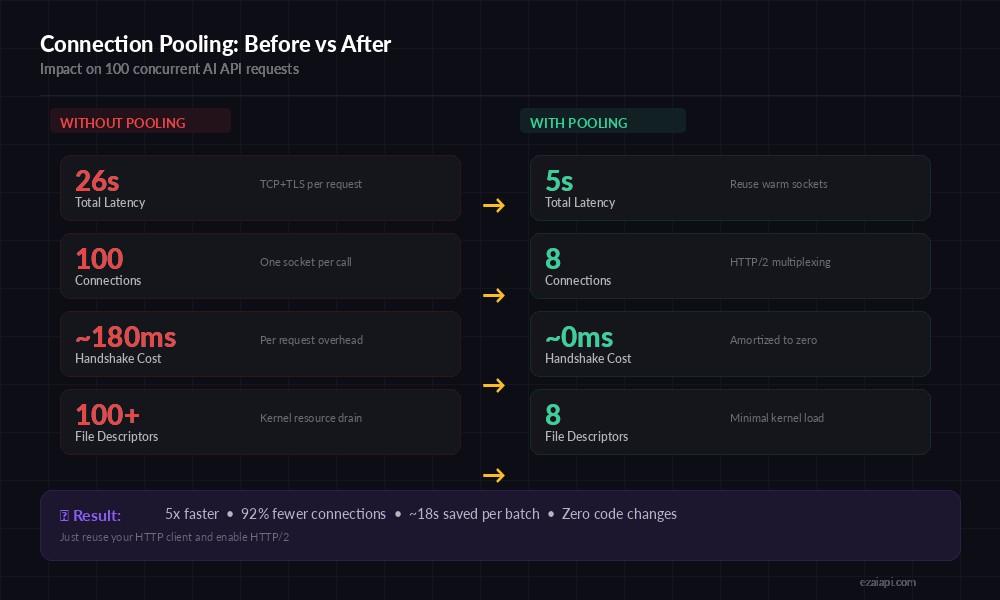
Connection pooling impact on 100 concurrent AI API requests — from 26s to 5s total latency
Python: Connection Pooling with httpx
The httpx library handles connection pooling automatically when you use a persistent AsyncClient. The critical mistake most teams make: creating a new client per request instead of sharing one across the application lifecycle.
import httpx
import asyncio

# ONE client for the entire app — this is the connection pool
client = httpx.AsyncClient(
    base_url="https://api.ezaiapi.com",
    headers={
        "x-api-key": "your-ezai-key",
        "Content-Type": "application/json",
        "anthropic-version": "2023-06-01",
    },
    limits=httpx.Limits(
        max_connections=50,          # total pool size
        max_keepalive_connections=20, # idle connections to keep warm
        keepalive_expiry=120,         # seconds before idle conn is closed
    ),
    timeout=httpx.Timeout(120.0, connect=10.0),
    http2=True,  # HTTP/2 multiplexing — crucial for AI APIs
)

async def ask_claude(prompt: str) -> str:
    resp = await client.post("/v1/messages", json={
        "model": "claude-sonnet-4-20250514",
        "max_tokens": 1024,
        "messages": [{"role": "user", "content": prompt}],
    })
    resp.raise_for_status()
    return resp.json()["content"][0]["text"]

async def main():
    # 20 concurrent requests, all reusing pooled connections
    prompts = [f"Summarize concept {i} in one sentence" for i in range(20)]
    results = await asyncio.gather(*[ask_claude(p) for p in prompts])
    for r in results:
        print(r[:80])

asyncio.run(main())
await client.aclose()  # clean shutdown
The http2=True flag matters. HTTP/2 multiplexes multiple requests over a single TCP connection, which means 20 concurrent AI calls might only need 2-3 actual sockets instead of 20. This dramatically reduces file descriptor usage and connection churn under load.
Node.js: Keep-Alive Agent for AI Calls
Node.js fetch (and undici under the hood) manages connection pools automatically in Node 18+. But the defaults are conservative. For AI API workloads, you want to explicitly configure the pool:
import { Agent } from 'undici';

// Shared pool for all AI API calls
const aiPool = new Agent({
  connect: { timeout: 10_000 },
  keepAliveTimeout: 120_000,      // 2 min idle before close
  keepAliveMaxTimeout: 300_000,   // 5 min max per connection
  connections: 50,               // max concurrent sockets
  pipelining: 1,                 // 1 for HTTP/1.1, safe default
});

async function askClaude(prompt) {
  const res = await fetch('https://api.ezaiapi.com/v1/messages', {
    method: 'POST',
    headers: {
      'x-api-key': process.env.EZAI_API_KEY,
      'content-type': 'application/json',
      'anthropic-version': '2023-06-01',
    },
    body: JSON.stringify({
      model: 'claude-sonnet-4-20250514',
      max_tokens: 1024,
      messages: [{ role: 'user', content: prompt }],
    }),
    dispatcher: aiPool,
  });
  const data = await res.json();
  return data.content[0].text;
}

// Fire 30 requests — all reuse pooled connections
const tasks = Array.from({ length: 30 }, (_, i) =>
  askClaude(`Explain concept ${i} briefly`)
);
const results = await Promise.all(tasks);
console.log(`Completed ${results.length} requests`);
The dispatcher option tells fetch to route through your custom agent instead of the global default. This gives you precise control over pool sizing without affecting other HTTP calls in your application.
Tuning Pool Size: The Math That Matters
Oversized pools waste memory and file descriptors. Undersized pools create queuing. Here's how to calculate the right size for AI workloads:
pool_size = peak_concurrent_requests × avg_response_time / avg_request_interval

Example — chat app with 100 concurrent users:
  peak_concurrent = 100
  avg_response_time = 8s (Claude Sonnet streaming)
  avg_request_interval = 30s (user types, reads, types again)

  pool_size = 100 × 8 / 30 ≈ 27 connections

  → Set max_connections = 30 (round up + 10% headroom)
  → Set max_keepalive = 15 (half the pool stays warm)
The keepalive count should be about 50% of your max pool size. Idle connections consume kernel memory (~10KB each on Linux) but save 50-200ms on the next request. For AI APIs where response latency is already high, that saved handshake time is proportionally more valuable than for fast REST calls.
Streaming Connections: The Hidden Pool Drain
Server-sent events (SSE) for streaming AI responses hold connections open for the entire generation time — sometimes 30+ seconds for long outputs. A streaming connection that's actively receiving tokens cannot be shared with other requests, which means your effective pool size drops to:
# Separate pools for streaming vs non-streaming
streaming_client = httpx.AsyncClient(
    base_url="https://api.ezaiapi.com",
    headers={"x-api-key": "your-ezai-key", "anthropic-version": "2023-06-01"},
    limits=httpx.Limits(
        max_connections=40,          # larger — streams hold longer
        max_keepalive_connections=10,
    ),
    timeout=httpx.Timeout(180.0, connect=10.0),
    http2=True,
)

batch_client = httpx.AsyncClient(
    base_url="https://api.ezaiapi.com",
    headers={"x-api-key": "your-ezai-key", "anthropic-version": "2023-06-01"},
    limits=httpx.Limits(
        max_connections=20,          # smaller — fast turnaround
        max_keepalive_connections=15,
    ),
    timeout=httpx.Timeout(60.0, connect=10.0),
    http2=True,
)

async def stream_response(prompt):
    async with streaming_client.stream("POST", "/v1/messages", json={
        "model": "claude-sonnet-4-20250514",
        "max_tokens": 2048,
        "stream": True,
        "messages": [{"role": "user", "content": prompt}],
    }) as resp:
        async for line in resp.aiter_lines():
            if line.startswith("data: "):
                yield line[6:]
The two-pool pattern — one for streaming, one for batch/sync calls — prevents streaming traffic from starving your classification, embedding, or short-prompt calls. Most production teams discover this the hard way during load testing when their embedding pipeline suddenly times out because 40 chat streams ate the entire pool.
Monitoring Your Connection Pool
A pool you can't observe is a pool you can't tune. Here's a lightweight monitor that logs pool stats alongside your AI API monitoring:
import logging
from dataclasses import dataclass, field
from time import monotonic

logger = logging.getLogger("pool_monitor")

@dataclass
class PoolStats:
    total_requests: int = 0
    reused_connections: int = 0
    new_connections: int = 0
    peak_active: int = 0
    active_now: int = 0
    total_handshake_ms: float = 0.0

    @property
    def reuse_rate(self) -> float:
        if self.total_requests == 0:
            return 0.0
        return self.reused_connections / self.total_requests * 100

    def log_summary(self):
        logger.info(
            "Pool: %d requests | reuse=%.1f%% | peak=%d | "
            "avg_handshake=%.1fms | saved=%.1fs",
            self.total_requests,
            self.reuse_rate,
            self.peak_active,
            self.total_handshake_ms / max(self.new_connections, 1),
            self.reused_connections * 0.08,  # ~80ms saved per reuse
        )
Track three metrics: reuse rate (aim for >85%), peak active connections (should stay below your pool max), and queue wait time (any value above 0 means your pool is undersized). Export these to your existing Prometheus/Datadog setup alongside the AI-specific metrics from EzAI's dashboard.
Common Mistakes and How to Fix Them
1. Creating clients inside request handlers
This is the number one cause of connection pool thrashing. Every httpx.AsyncClient() or new Agent() creates its own isolated pool. If you instantiate one per request, you get zero reuse. Create a single client at application startup and share it across all handlers.
2. Keepalive too short for AI workloads
Default keepalive in most HTTP libraries is 5-15 seconds. AI users often have bursty patterns: send a request, read the response for 30-60 seconds, then send another. By the time the next request fires, the connection is already closed. Set keepalive to at least 120 seconds for AI API pools.
3. Ignoring HTTP/2 multiplexing
HTTP/2 lets you send multiple requests over a single TCP connection. EzAI supports HTTP/2 on all endpoints. Enabling it can reduce your actual socket count by 3-5x while maintaining the same concurrency. Always pass http2=True in httpx or use a Node.js HTTP/2 client for production workloads.
4. No graceful shutdown
Abruptly killing your process leaves connections in TIME_WAIT state on the server. Over time, this can exhaust server-side connection limits. Always call await client.aclose() (Python) or pool.close() (Node.js) during shutdown.
Quick Reference: Pool Config by Workload
Here's a cheat sheet for common AI API workload patterns:
- Single-user CLI tool: max_connections=5, keepalive=30s — low overhead, fast startup
- Backend API (10-50 RPS): max_connections=30, keepalive=120s, HTTP/2 on
- High-throughput batch (100+ RPS): max_connections=80, keepalive=60s, separate streaming pool
- Multi-tenant SaaS: Pool per tenant with max_connections=10 each, global limit of 200
Connection pooling isn't glamorous infrastructure work, but it's the kind of optimization that compounds. Set it up once, tune it with real metrics, and your AI API calls get faster without any changes to your prompts, models, or application logic. Check out our latency reduction guide for more techniques that pair well with pooling, or head to the EzAI docs to see full API reference for the endpoints you'll be pooling against.