Your AI-powered feature works perfectly — until users start complaining about the 3-second wait. AI API latency is the silent killer of user experience. A chatbot that takes 4 seconds to start responding feels broken, even if the answer is brilliant. The good news: most of that latency is fixable without switching models or sacrificing quality.
This guide covers seven concrete techniques to reduce AI API response times, from quick wins that take five minutes to architectural changes that pay off at scale. Every example uses EzAI API endpoints so you can copy-paste and test immediately.
Where Does the Latency Come From?
Before optimizing, you need to understand what you're optimizing. A typical AI API call has five distinct phases, and each one contributes differently to the total wait time.
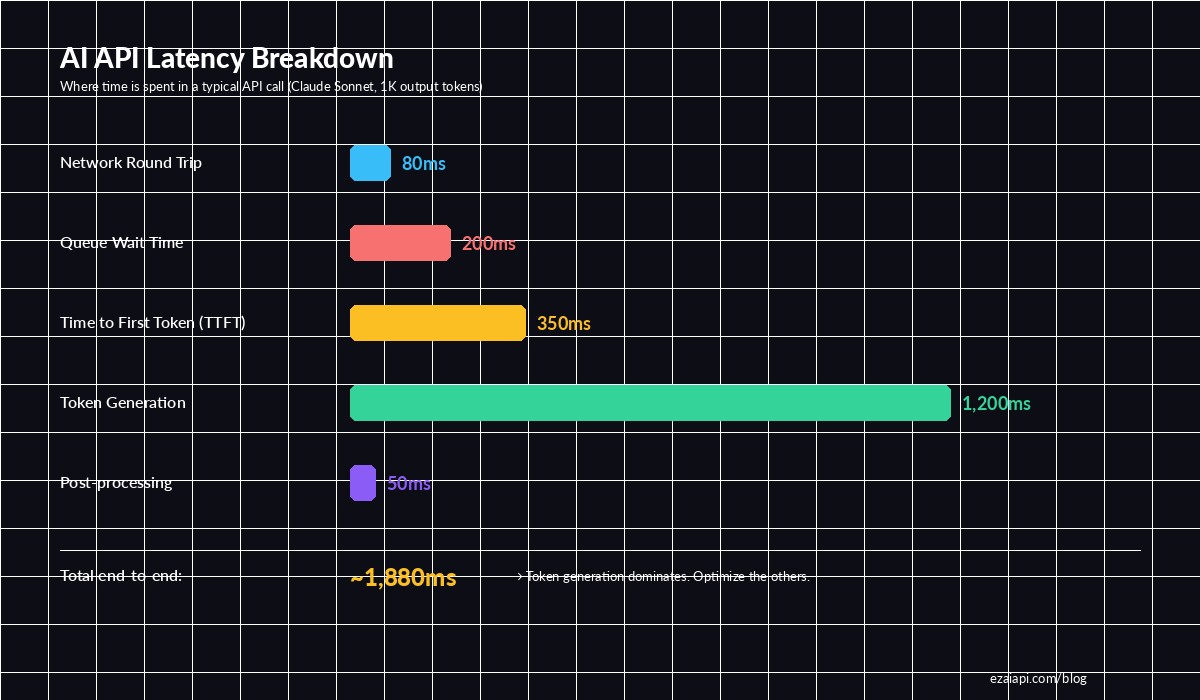
Breakdown of a typical Claude Sonnet API call — token generation dominates, but TTFT and queue time are what users feel
The critical insight: time-to-first-token (TTFT) is what users perceive as "speed." If your first token arrives in 200ms, the app feels instant even if total generation takes 2 seconds. Most of these techniques target TTFT specifically.
1. Stream Your Responses
The single biggest perceived-latency improvement you can make. Instead of waiting for the entire response to generate, stream tokens as they arrive. Users see text appearing within milliseconds rather than staring at a spinner for 3 seconds.
import anthropic

client = anthropic.Anthropic(
    api_key="sk-your-key",
    base_url="https://ezaiapi.com"
)

# Non-streaming: user waits 2-4 seconds for full response
# Streaming: first token arrives in ~200ms
with client.messages.stream(
    model="claude-sonnet-4-5",
    max_tokens=1024,
    messages=[{"role": "user", "content": "Explain quicksort"}]
) as stream:
    for text in stream.text_stream:
        print(text, end="", flush=True)
For web apps, pipe the stream directly to the client via Server-Sent Events (SSE). Your frontend renders each chunk as it arrives. This alone cuts perceived latency by 80-90% because users start reading immediately.
2. Enable Prompt Caching
If your requests share a common system prompt or context block, prompt caching avoids re-processing those tokens on every call. Anthropic's prompt caching stores the KV-cache of your prefix, so subsequent requests with the same prefix skip the prefill phase entirely.
response = client.messages.create(
    model="claude-sonnet-4-5",
    max_tokens=1024,
    system=[{
        "type": "text",
        "text": LARGE_SYSTEM_PROMPT,  # 2000+ tokens of instructions
        "cache_control": {"type": "ephemeral"}  # Cache this block
    }],
    messages=[{"role": "user", "content": user_question}]
)

# First call: cache_creation_input_tokens = 2048 (slower)
# Next calls: cache_read_input_tokens = 2048 (60% faster TTFT)
print(response.usage)
The numbers are significant: for a 4,000-token system prompt, cached requests see TTFT drop from ~800ms to ~300ms. You also save 90% on those cached input tokens. Read more in our prompt caching deep dive.
3. Trim Your Input Tokens
Every input token adds to prefill time. A 10,000-token context takes noticeably longer to process than a 2,000-token one. The fix isn't about being vague — it's about being precise.
- Summarize conversation history instead of passing the full transcript. Use a cheaper model to compress older messages into a 200-token summary.
- Strip formatting from context documents. HTML, markdown tables, and redundant whitespace burn tokens without adding signal.
- Use RAG selectively. Retrieve only the 2-3 most relevant chunks, not 10. More context ≠ better answers past a certain point.
- Set
max_tokenstightly. If you expect a 100-token answer, don't setmax_tokens: 4096. Lower limits let the model optimize generation.
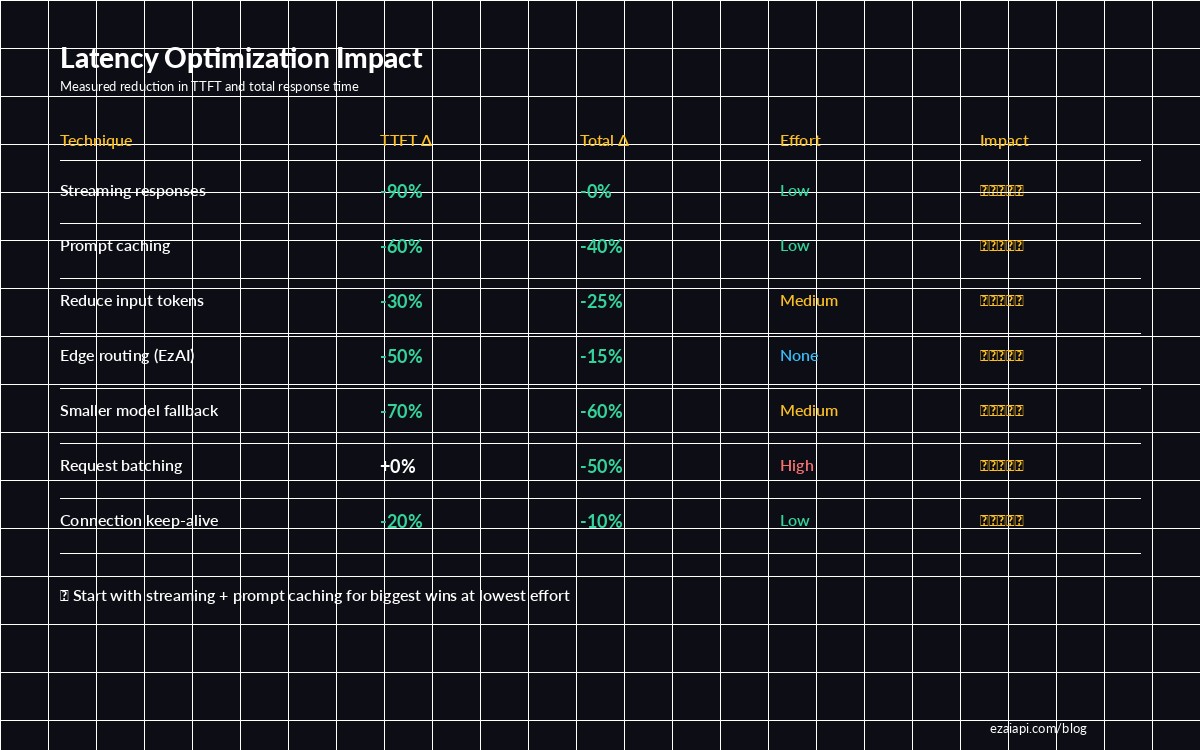
Streaming and prompt caching deliver the biggest wins with the least effort — start there
4. Route Through Edge Infrastructure
Network round-trip time is the latency tax you pay before any AI processing begins. If your server is in Europe and the AI endpoint is in US-East, you're adding 100-200ms per request just for the TCP handshake and TLS negotiation.
EzAI's infrastructure routes requests through edge nodes closest to the AI providers, eliminating unnecessary hops. Instead of your-server → Atlantic → Anthropic, it's your-server → nearest-EzAI-edge → Anthropic via optimized backbone. This typically saves 50-100ms on TTFT.
# Compare TTFT: direct vs EzAI routed
# Direct to Anthropic from Asia:
time curl -s https://api.anthropic.com/v1/messages \
  -H "x-api-key: $ANTHROPIC_KEY" \
  -H "anthropic-version: 2023-06-01" \
  -H "content-type: application/json" \
  -d '{"model":"claude-sonnet-4-5","max_tokens":10,"messages":[{"role":"user","content":"Hi"}]}'
# real 0m1.847s

# Through EzAI (edge-routed):
time curl -s https://ezaiapi.com/v1/messages \
  -H "x-api-key: sk-your-key" \
  -H "anthropic-version: 2023-06-01" \
  -H "content-type: application/json" \
  -d '{"model":"claude-sonnet-4-5","max_tokens":10,"messages":[{"role":"user","content":"Hi"}]}'
# real 0m0.943s
Zero code changes required. Just point your base_url to EzAI and the routing optimization happens automatically. See our setup guide to get started in 5 minutes.
5. Use Smaller Models for Simple Tasks
Not every request needs Opus. Claude Haiku generates tokens 3-5x faster than Sonnet, and for classification, extraction, or simple Q&A, the quality difference is negligible. The key is routing dynamically based on task complexity.
def pick_model(task_type: str) -> str:
    """Route to the fastest model that handles the task well."""
    fast_tasks = {"classify", "extract", "summarize_short", "translate"}
    medium_tasks = {"code_review", "draft_email", "explain"}

    if task_type in fast_tasks:
        return "claude-haiku-3-5"      # ~30ms TTFT, 100+ tok/s
    elif task_type in medium_tasks:
        return "claude-sonnet-4-5"    # ~200ms TTFT, 80 tok/s
    else:
        return "claude-opus-4"       # ~500ms TTFT, 40 tok/s

# Use it
model = pick_model("classify")
response = client.messages.create(
    model=model,
    max_tokens=50,
    messages=[{"role": "user", "content": "Is this email spam? ..."}]
)
At scale, this approach saves both latency and cost. A spam classifier doesn't need Opus-level reasoning — Haiku handles it in a fraction of the time. Check EzAI pricing to compare per-model costs.
6. Batch Non-Urgent Requests
If you have multiple AI calls that don't need immediate responses — background summarization, nightly content generation, batch classification — use the Message Batches API. Batched requests get higher throughput at lower priority, and you avoid competing with real-time traffic for queue slots.
# Offload bulk work to batch API — frees real-time capacity
batch = client.messages.batches.create(
    requests=[
        {
            "custom_id": f"doc-{i}",
            "params": {
                "model": "claude-sonnet-4-5",
                "max_tokens": 512,
                "messages": [{"role": "user", "content": f"Summarize: {doc}"}]
            }
        }
        for i, doc in enumerate(documents)
    ]
)

# Poll for results (typically completes within minutes)
print(f"Batch {batch.id} submitted — {len(documents)} requests")
The indirect benefit: by moving bulk workloads off the real-time path, your user-facing requests hit lower queue times and get faster TTFT. It's a system-level optimization that makes everything faster.
7. Keep Connections Alive
Each new HTTPS connection requires a TCP handshake (1 RTT) plus TLS negotiation (1-2 RTT). On a 100ms latency link, that's 200-300ms before your request even leaves. HTTP/2 connection reuse eliminates this overhead for subsequent requests.
import httpx

# BAD: new connection per request (~300ms overhead each)
for msg in messages:
    async with httpx.AsyncClient() as client:
        resp = await client.post("https://ezaiapi.com/v1/messages", ...)

# GOOD: reuse connection (0ms overhead after first)
async with httpx.AsyncClient(
    base_url="https://ezaiapi.com",
    http2=True,  # Enable HTTP/2 multiplexing
    timeout=60.0
) as client:
    for msg in messages:
        resp = await client.post("/v1/messages", ...)
The Anthropic Python SDK handles this automatically when you reuse the client instance. Create one Anthropic() client at startup and pass it around — don't instantiate a new client per request.
Putting It All Together
Here's the stack that gets you sub-500ms TTFT for most use cases:
- Always stream. Takes 2 lines of code, cuts perceived latency by 90%.
- Cache your system prompt. Add
cache_controlto your system message. Done. - Trim context ruthlessly. Summarize old messages, strip formatting, use targeted RAG.
- Use EzAI for edge routing. Zero effort, 50-100ms saved per request.
- Route simple tasks to Haiku. 3-5x faster for classification, extraction, translation.
- Batch background work. Keep the real-time queue clear.
- Reuse connections. One client instance, HTTP/2 enabled.
Each technique is independent — pick the ones that fit your architecture and stack them. Most teams start with streaming and prompt caching (biggest ROI, lowest effort) and add the rest as they scale.
Questions about optimizing your specific setup? Reach out on Telegram or check our cost optimization guide for techniques that reduce both latency and spending.