Your AI feature works in dev. Requests complete in two seconds, responses look clean, costs are manageable. Then you deploy, and within a week you're staring at a $400 bill, intermittent timeouts, and a Slack channel full of "the AI thing is broken again." The root cause is almost always the same: zero observability into what your AI API calls are actually doing.
This guide covers the practical monitoring stack you need to keep AI API calls under control in production. We'll build structured logging, latency tracking, cost alerts, and error diagnostics — all with Python and the EzAI API.
Why AI APIs Need Different Monitoring
Traditional API monitoring tracks response codes and latency. AI APIs add three dimensions that standard tools don't cover:
- Token-based billing — costs scale with input and output length, not request count. A single runaway prompt can burn more than 10,000 normal requests.
- Non-deterministic outputs — the same input can produce wildly different response lengths and latencies depending on model load, temperature, and extended thinking.
- Cascading failures — when a model is overloaded, you get slow responses, not errors. Your app hangs, users wait, and your monitoring shows green because technically nothing failed.
Standard uptime monitoring will tell you the endpoint is alive. It won't tell you that response quality dropped, latency tripled, or you're burning $8/hour on a prompt that should cost $0.50.
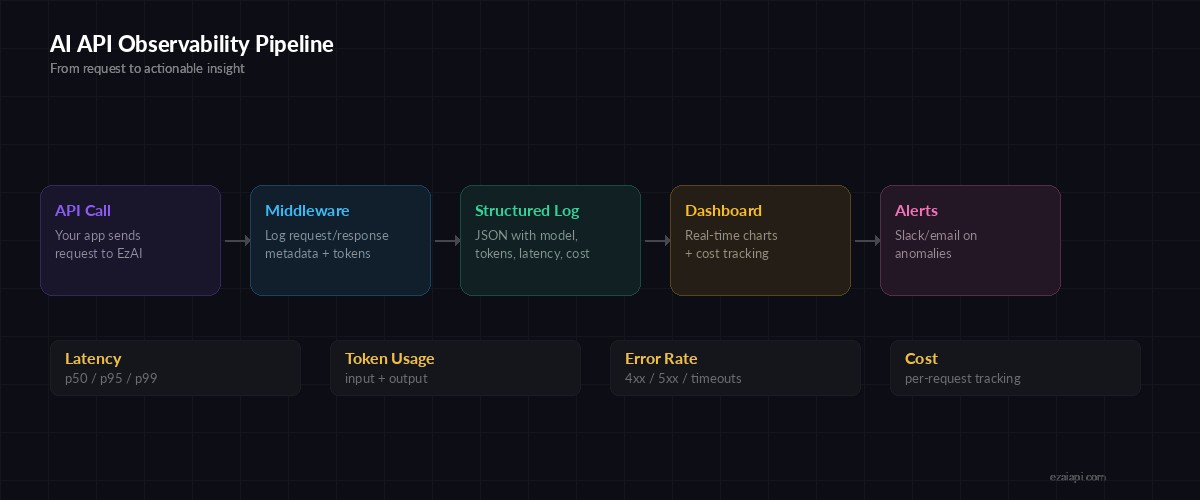
The full observability pipeline — from API call to actionable alerts
Setting Up Structured Request Logging
The foundation of AI API monitoring is a logging wrapper that captures everything you'll need to debug later. Here's a drop-in wrapper around the Anthropic SDK that logs request metadata, token counts, latency, and estimated cost:
import anthropic, time, json, logging

logger = logging.getLogger("ai_monitor")

class MonitoredClient:
    def __init__(self, api_key: str):
        self.client = anthropic.Anthropic(
            api_key=api_key,
            base_url="https://ezaiapi.com"
        )

    def create(self, **kwargs) -> dict:
        start = time.perf_counter()
        error = None
        response = None

        try:
            response = self.client.messages.create(**kwargs)
            return response
        except Exception as e:
            error = str(e)
            raise
        finally:
            latency = time.perf_counter() - start
            log = {
                "model": kwargs.get("model"),
                "latency_ms": round(latency * 1000),
                "input_tokens": getattr(
                    getattr(response, "usage", None),
                    "input_tokens", 0
                ),
                "output_tokens": getattr(
                    getattr(response, "usage", None),
                    "output_tokens", 0
                ),
                "error": error,
                "stop_reason": getattr(
                    response, "stop_reason", None
                ),
            }
            logger.info(json.dumps(log))
Every call through MonitoredClient produces a structured JSON log line. Even if the request throws an exception, the finally block captures the latency and error message. This is the raw data that powers everything else.
Tracking Latency Percentiles
Average latency is misleading for AI APIs. A model might respond in 800ms for short completions and 12 seconds for complex reasoning tasks. You need percentiles. Here's a lightweight tracker that computes p50, p95, and p99 without external dependencies:
import bisect
from collections import defaultdict

class LatencyTracker:
    def __init__(self, window=500):
        self.window = window
        self.samples = defaultdict(list)  # keyed by model

    def record(self, model: str, latency_ms: float):
        buf = self.samples[model]
        bisect.insort(buf, latency_ms)
        if len(buf) > self.window:
            buf.pop(0)

    def percentile(self, model: str, p: float) -> float:
        buf = self.samples.get(model, [])
        if not buf:
            return 0.0
        idx = int(len(buf) * p / 100)
        return buf[min(idx, len(buf) - 1)]

    def report(self, model: str) -> dict:
        return {
            "p50": self.percentile(model, 50),
            "p95": self.percentile(model, 95),
            "p99": self.percentile(model, 99),
            "count": len(self.samples.get(model, [])),
        }

# Usage
tracker = LatencyTracker()
tracker.record("claude-sonnet-4-5", 1240)
tracker.record("claude-sonnet-4-5", 890)
print(tracker.report("claude-sonnet-4-5"))
# {'p50': 890, 'p95': 1240, 'p99': 1240, 'count': 2}
The rolling window keeps memory bounded. In production, you'd feed these percentiles into your metrics system (Prometheus, Datadog, or even a simple SQLite table) and alert when p95 crosses your threshold.
Building a Cost Monitor
Token costs are the silent killer. A prompt that works fine in testing might explode in production when users paste in long documents or the model produces verbose outputs. Here's how to track costs per-request and set hourly budgets:
import time

# Cost per million tokens (EzAI pricing)
COSTS = {
    "claude-sonnet-4-5": {"input": 3.0, "output": 15.0},
    "claude-opus-4-6":   {"input": 15.0, "output": 75.0},
    "gpt-4o":             {"input": 2.5, "output": 10.0},
}

class CostMonitor:
    def __init__(self, hourly_budget: float = 5.0):
        self.hourly_budget = hourly_budget
        self.window_start = time.time()
        self.window_cost = 0.0

    def track(self, model: str, input_tok: int, output_tok: int):
        rates = COSTS.get(model, {"input": 5.0, "output": 15.0})
        cost = (input_tok * rates["input"] +
                output_tok * rates["output"]) / 1_000_000

        # Reset window every hour
        now = time.time()
        if now - self.window_start > 3600:
            self.window_start = now
            self.window_cost = 0.0

        self.window_cost += cost

        if self.window_cost > self.hourly_budget:
            send_alert(
                f"⚠️ AI cost alert: ${self.window_cost:.2f} "
                f"exceeds ${self.hourly_budget}/hr budget"
            )

        return cost
Plug this into the MonitoredClient from earlier: after each response, call cost_monitor.track(model, input_tokens, output_tokens). The alert fires once per window breach — you don't get spammed if the budget is already blown.
EzAI's dashboard shows real-time cost tracking out of the box, but having your own monitor lets you react programmatically — throttle requests, switch to a cheaper model, or kill the feature entirely if costs spike.
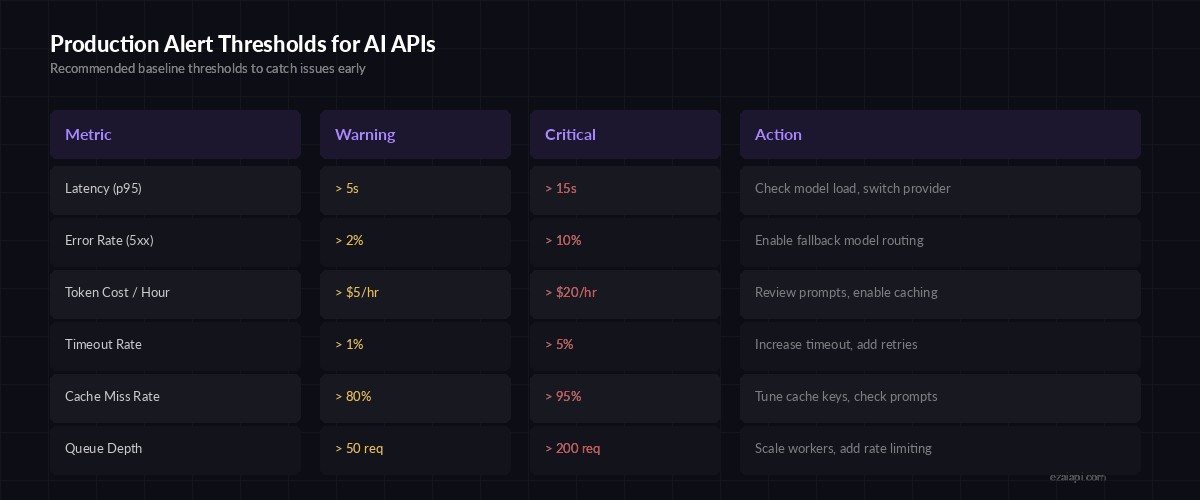
Recommended alert thresholds — tune these based on your traffic patterns
Debugging Failed Requests
AI API errors fall into three buckets, each requiring a different response:
Rate limits (429) — You're sending too many requests. Back off with exponential retry. EzAI handles rate limit management across providers, but your app should still implement client-side backoff:
import httpx, time

def call_with_retry(client, max_retries=3, **kwargs):
    for attempt in range(max_retries):
        try:
            return client.messages.create(**kwargs)
        except anthropic.RateLimitError as e:
            wait = 2 ** attempt  # 1s, 2s, 4s
            if hasattr(e, "response"):
                # Use Retry-After header if available
                wait = int(e.response.headers.get(
                    "retry-after", wait
                ))
            time.sleep(wait)
        except anthropic.APIStatusError as e:
            if e.status_code >= 500:
                time.sleep(2 ** attempt)
                continue
            raise  # 4xx = client error, don't retry
    raise RuntimeError("Max retries exceeded")
Overloaded (529) — The model is at capacity. This is different from rate limiting — your account isn't the problem, the infrastructure is. The best move is multi-model fallback: if Claude is overloaded, route to GPT or Gemini. EzAI supports automatic fallback routing through the x-model-fallback header.
Context length errors (400) — Your input exceeded the model's context window. Log the input token count alongside the error so you can identify which prompts are too long. Truncation logic should live in your application, not in a generic error handler.
Real-Time Monitoring with Webhooks
For teams running production AI features, polling logs isn't fast enough. Set up a lightweight webhook that fires on anomalies. This pairs well with EzAI's dashboard for the visual overview, while your webhook handles automated responses:
import httpx

def send_alert(message: str, webhook_url: str = None):
    """Send alert to Slack, Discord, or any webhook."""
    url = webhook_url or os.environ.get("ALERT_WEBHOOK")
    if not url:
        logger.warning(f"Alert (no webhook): {message}")
        return

    httpx.post(url, json={
        "content": message,  # Discord format
        "text": message,     # Slack format
    }, timeout=5)

# Integrate with the MonitoredClient
def check_anomalies(log: dict):
    if log["latency_ms"] > 15_000:
        send_alert(
            f"🐌 Slow AI response: {log['model']} "
            f"took {log['latency_ms']}ms"
        )
    if log["output_tokens"] > 8000:
        send_alert(
            f"📊 High token output: {log['output_tokens']} "
            f"tokens from {log['model']}"
        )
    if log.get("error"):
        send_alert(f"❌ AI error: {log['error']}")
Call check_anomalies(log) at the end of the MonitoredClient.create() method. Now every slow response, cost spike, or error immediately pings your team instead of sitting in a log file nobody reads.
Putting It All Together
The complete monitoring stack looks like this:
- MonitoredClient wraps every AI call with structured logging
- LatencyTracker computes rolling percentiles per model
- CostMonitor enforces hourly budgets and alerts on overruns
- Webhook alerts push anomalies to Slack/Discord in real-time
- EzAI Dashboard provides the visual overview and historical trends
You don't need to adopt everything at once. Start with MonitoredClient — just getting structured logs into production will save you hours the first time something breaks. Add cost tracking and alerts as your usage grows.
The difference between teams that ship AI features successfully and teams that rip them out after a month almost always comes down to observability. Build the monitoring before you need it, and you'll catch problems while they're still small.
Looking for more on production AI architecture? Read our guides on error handling patterns and reducing API costs. Or get started with EzAI and use the built-in dashboard to monitor your calls from day one.