Traditional translation APIs like Google Translate handle word-for-word conversion well, but they miss context, tone, and domain-specific terminology. LLMs like Claude understand meaning — and that makes them dramatically better for production translation. In this tutorial, you'll build a FastAPI-based translation service powered by Claude through EzAI that handles glossaries, batch requests, and language detection automatically.
Why Use an LLM for Translation?
Statistical translation engines treat every sentence in isolation. An LLM can:
- Preserve tone — formal business email vs. casual Slack message
- Handle domain jargon — "deploy to production" shouldn't translate literally
- Use a glossary — keep your brand names and technical terms consistent
- Translate ambiguous phrases — context from surrounding sentences resolves meaning
The tradeoff is speed and cost. But with streaming, smart model selection, and caching, you can get sub-second translations at a fraction of what dedicated translation APIs charge.
Project Setup
You need Python 3.10+, FastAPI, and the Anthropic SDK. Install everything in one shot:
pip install fastapi uvicorn anthropic pydanticSet your EzAI API key as an environment variable:
export EZAI_API_KEY="sk-your-key-here"The Core Translation Engine
Here's the translator class. It wraps Claude's API with a system prompt tuned for translation, supports glossary injection, and handles language detection when the source language isn't specified:
import os
import anthropic
from typing import Optional

class Translator:
    def __init__(self):
        self.client = anthropic.Anthropic(
            api_key=os.environ["EZAI_API_KEY"],
            base_url="https://ezaiapi.com"
        )

    def translate(
        self,
        text: str,
        target_lang: str,
        source_lang: Optional[str] = None,
        glossary: Optional[dict] = None,
        tone: str = "neutral"
    ) -> dict:
        # Build the system prompt
        system = f"""You are a professional translator.
Translate the user's text into {target_lang}.
Tone: {tone}. Preserve formatting (markdown, HTML, newlines).
Return ONLY the translated text, no explanations."""

        if source_lang:
            system += f"\nSource language: {source_lang}."
        else:
            system += "\nAuto-detect the source language."

        if glossary:
            pairs = "\n".join(
                f"  {k} → {v}" for k, v in glossary.items()
            )
            system += f"\n\nGlossary (use these exact translations):\n{pairs}"

        msg = self.client.messages.create(
            model="claude-sonnet-4-5",
            max_tokens=4096,
            system=system,
            messages=[{"role": "user", "content": text}]
        )

        return {
            "translated_text": msg.content[0].text,
            "model": msg.model,
            "tokens_used": msg.usage.input_tokens + msg.usage.output_tokens
        }
The key design choice: the glossary goes into the system prompt, not the user message. This prevents the model from treating glossary entries as text to translate. Tone control lets callers specify "formal", "casual", or "technical" without rewriting prompts.
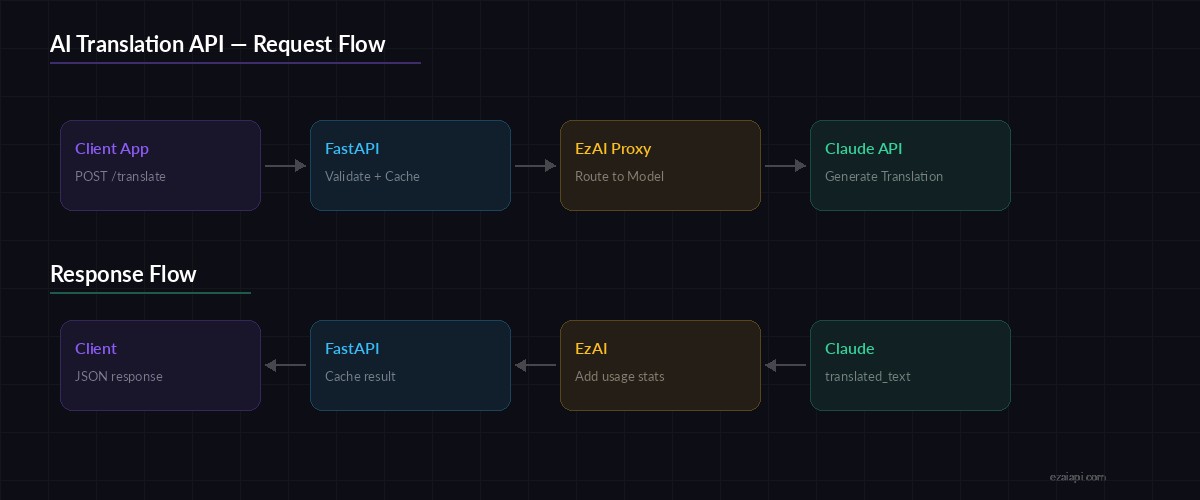
Request flow: Client → FastAPI → Claude via EzAI → Translated response
Building the FastAPI Server
Wrap the translator in a FastAPI app with proper request validation and error handling:
from fastapi import FastAPI, HTTPException
from pydantic import BaseModel, Field
from typing import Optional

app = FastAPI(title="AI Translation API")
translator = Translator()

class TranslateRequest(BaseModel):
    text: str = Field(..., max_length=10000)
    target_lang: str = Field(..., example="Japanese")
    source_lang: Optional[str] = None
    glossary: Optional[dict[str, str]] = None
    tone: str = "neutral"

class BatchRequest(BaseModel):
    items: list[TranslateRequest] = Field(..., max_length=20)

@app.post("/translate")
async def translate(req: TranslateRequest):
    try:
        result = translator.translate(
            text=req.text,
            target_lang=req.target_lang,
            source_lang=req.source_lang,
            glossary=req.glossary,
            tone=req.tone
        )
        return result
    except anthropic.APIError as e:
        raise HTTPException(status_code=502, detail=str(e))

@app.post("/translate/batch")
async def translate_batch(req: BatchRequest):
    results = []
    for item in req.items:
        result = translator.translate(
            text=item.text,
            target_lang=item.target_lang,
            source_lang=item.source_lang,
            glossary=item.glossary,
            tone=item.tone
        )
        results.append(result)
    return {"translations": results}
Run the server with uvicorn main:app --host 0.0.0.0 --port 8000 and you've got a working translation API.
Testing with curl
Let's test a basic translation with glossary support:
curl -X POST http://localhost:8000/translate \
  -H "content-type: application/json" \
  -d '{
    "text": "We deployed the new feature to staging. QA passed all tests. Ready to ship to production by EOD.",
    "target_lang": "Japanese",
    "tone": "formal",
    "glossary": {
      "staging": "ステージング環境",
      "production": "本番環境",
      "QA": "品質保証チーム"
    }
  }'
The glossary ensures "staging" and "production" use your preferred Japanese terms instead of generic translations. Without it, Claude might translate "production" as 生産 (manufacturing) instead of 本番環境 (production environment).
Adding a Translation Cache
Identical strings come up constantly — UI labels, error messages, repeated phrases. A simple in-memory cache cuts redundant API calls:
import hashlib
from functools import lru_cache

class CachedTranslator(Translator):
    def __init__(self, cache_size=2048):
        super().__init__()
        self._cache = {}
        self._max = cache_size

    def _cache_key(self, text, target, source, glossary, tone):
        raw = f"{text}|{target}|{source}|{glossary}|{tone}"
        return hashlib.sha256(raw.encode()).hexdigest()[:16]

    def translate(self, text, target_lang, source_lang=None,
                 glossary=None, tone="neutral"):
        key = self._cache_key(
            text, target_lang, source_lang, glossary, tone
        )
        if key in self._cache:
            return {**self._cache[key], "cached": True}

        result = super().translate(
            text, target_lang, source_lang, glossary, tone
        )
        if len(self._cache) >= self._max:
            # Evict oldest entry
            self._cache.pop(next(iter(self._cache)))
        self._cache[key] = result
        return {**result, "cached": False}
For production, swap this with Redis. But for prototyping, an in-memory dict with a 2048-entry cap works well and adds zero latency on cache hits.
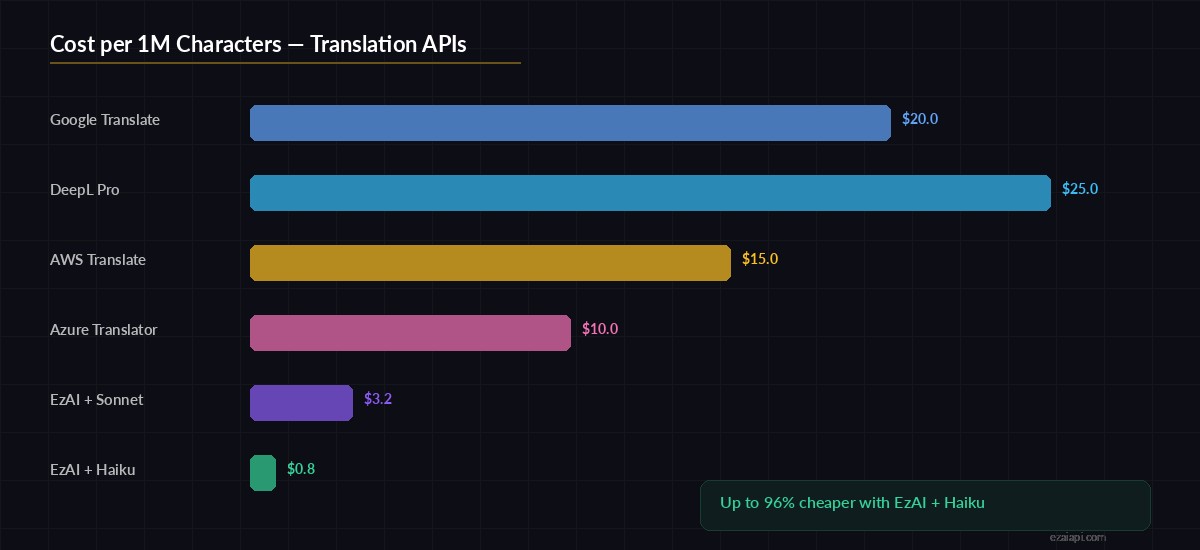
Cost per 1M characters: EzAI + Claude vs. traditional translation APIs
Model Selection for Translation
Not every translation needs Claude Opus. Here's how to pick the right model:
- Short UI strings — Use
claude-haiku-3-5. Fast, cheap, accurate enough for buttons and labels - Business documents — Use
claude-sonnet-4-5. Good balance of quality and cost for emails and reports - Legal / medical content — Use
claude-opus-4. Maximum accuracy where mistakes have consequences
With EzAI, you switch models by changing one string — no config changes, no separate API keys. See the pricing page for per-model costs.
Error Handling and Retries
Production APIs need to handle rate limits and transient failures gracefully. EzAI returns standard HTTP error codes, so you can use exponential backoff like any other API. Check our rate limit guide for the full pattern.
Key things to handle:
- 429 Too Many Requests — back off and retry with exponential delay
- Input too long — split text at paragraph boundaries, translate chunks, rejoin
- Timeout — set a 30s timeout; if exceeded, fall back to a faster model
What's Next?
You now have a working translation API that handles glossaries, batch requests, and caching. From here you can:
- Add streaming for real-time translation of long documents
- Build multi-model fallback to auto-switch between Claude, GPT, and Gemini
- Integrate with your CI/CD pipeline to auto-translate documentation on every push
- Add webhook support to translate incoming customer messages automatically
The full source code is ~120 lines of Python. Clone it, point it at your EzAI key, and you've got a translation service that beats Google Translate on context-heavy content.
Ready to build? Get your EzAI API key — takes 30 seconds, comes with 15 free credits.