Every application starts with a database schema, and getting it right early saves weeks of refactoring later. The typical workflow — open pgAdmin, stare at an ER diagram, argue about naming conventions for 45 minutes — doesn't scale. What if you could describe your app in plain English and get back production-ready DDL with proper indexes, constraints, and foreign keys?
That's exactly what we're building: a Python tool that takes natural language requirements, sends them to Claude via EzAI API, and outputs complete database schemas ready for psql or your ORM of choice.
Why AI for Schema Design?
Manual schema design has three recurring pain points. First, naming inconsistencies — one developer uses user_id, another uses userId, and someone inevitably creates a column called data. Second, missing indexes on columns you'll obviously query by. Third, relationship gaps where you forget a junction table or set the wrong cascade behavior.
Claude excels at this because it's seen millions of database schemas across every domain. It knows that an e-commerce app needs a separate order_items table (not a JSON column on orders), that email columns should be UNIQUE, and that deleted_at is better than a hard delete for most SaaS apps.
Project Setup
You need Python 3.9+ and the Anthropic SDK. Install the dependencies:
pip install anthropic pydanticSet your EzAI API key as an environment variable:
export ANTHROPIC_API_KEY="sk-your-ezai-key"The Schema Designer Class
The core idea is straightforward: define a system prompt that enforces PostgreSQL best practices, send the user's requirements, and parse the structured output. We use structured JSON output to get clean, parseable results every time.
import json
import anthropic
from pydantic import BaseModel

class SchemaDesigner:
    def __init__(self):
        self.client = anthropic.Anthropic(
            base_url="https://ezaiapi.com"
        )
        self.system_prompt = """You are a senior database architect.
Given app requirements in plain English, output a JSON object with:
- "tables": array of table definitions
- "indexes": array of CREATE INDEX statements
- "notes": array of design decision explanations

Each table has: "name", "columns" (array of {name, type, constraints}),
"primary_key", "foreign_keys" (array of {column, references_table,
references_column, on_delete}).

Rules:
- Use snake_case for all names
- Always include id (SERIAL/BIGSERIAL), created_at, updated_at
- Add soft delete (deleted_at) for user-facing entities
- Use TIMESTAMPTZ, never TIMESTAMP
- Add indexes on foreign keys and commonly queried columns
- Use DECIMAL for money, never FLOAT
- Add CHECK constraints where appropriate
- Include junction tables for many-to-many relationships
Output ONLY valid JSON. No markdown, no explanation outside the JSON."""

    def design(self, requirements: str, dialect: str = "postgresql") -> dict:
        msg = self.client.messages.create(
            model="claude-sonnet-4-5",
            max_tokens=4096,
            system=self.system_prompt,
            messages=[{
                "role": "user",
                "content": f"Design a {dialect} schema for: {requirements}"
            }]
        )
        return json.loads(msg.content[0].text)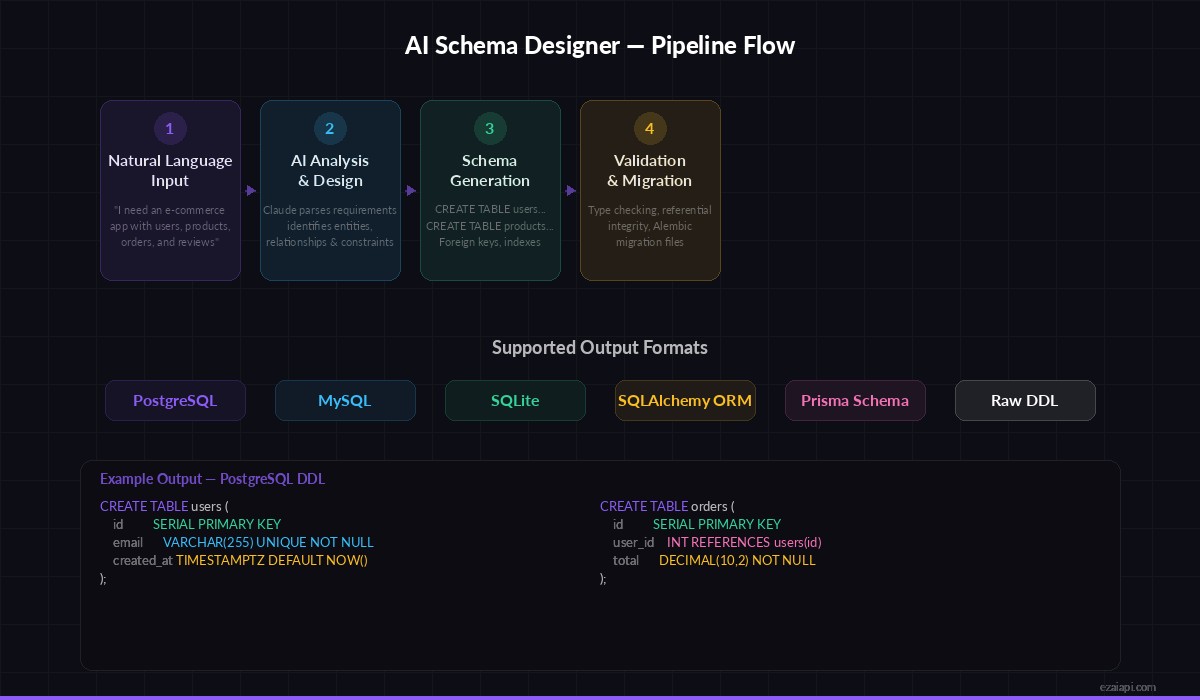
The four-stage pipeline: input → AI analysis → schema generation → validation
Converting JSON to DDL
The raw JSON from Claude is structured but not executable. We need a converter that turns it into actual SQL statements:
def to_ddl(schema: dict) -> str:
    """Convert the AI-generated schema JSON to executable DDL."""
    statements = []

    for table in schema["tables"]:
        cols = []
        for col in table["columns"]:
            line = f"    {col['name']} {col['type']}"
            if col.get("constraints"):
                line += f" {col['constraints']}"
            cols.append(line)

        # Add foreign key constraints
        for fk in table.get("foreign_keys", []):
            ref = f"    FOREIGN KEY ({fk['column']}) "
            ref += f"REFERENCES {fk['references_table']}({fk['references_column']})"
            if fk.get("on_delete"):
                ref += f" ON DELETE {fk['on_delete']}"
            cols.append(ref)

        sql = f"CREATE TABLE {table['name']} (\n"
        sql += ",\n".join(cols)
        sql += "\n);"
        statements.append(sql)

    # Add indexes
    for idx in schema.get("indexes", []):
        statements.append(idx)

    return "\n\n".join(statements)
Running It End-to-End
Here's the full workflow — describe your app, get back SQL you can paste directly into psql:
designer = SchemaDesigner()

schema = designer.design("""
A project management app where:
- Users belong to organizations
- Organizations have multiple projects
- Projects contain tasks with assignees and due dates
- Tasks can have comments and file attachments
- Users can watch tasks for notifications
""")

ddl = to_ddl(schema)
print(ddl)

# Save to file
with open("schema.sql", "w") as f:
    f.write(ddl)

# Print design notes
for note in schema.get("notes", []):
    print(f"💡 {note}")
Claude will generate a complete schema with tables like organizations, users, org_members (junction table), projects, tasks, task_comments, task_attachments, and task_watchers. Each table gets proper timestamps, soft deletes, and foreign keys with appropriate cascade rules.
Adding Schema Validation
AI output isn't always perfect. Add a validation layer that catches common issues before you run the DDL against your database:
def validate_schema(schema: dict) -> list[str]:
    """Return a list of warnings for the generated schema."""
    warnings = []
    table_names = {t["name"] for t in schema["tables"]}

    for table in schema["tables"]:
        col_names = [c["name"] for c in table["columns"]]

        # Check for timestamps
        if "created_at" not in col_names:
            warnings.append(
                f"⚠️  {table['name']}: missing created_at column"
            )

        # Check foreign key references exist
        for fk in table.get("foreign_keys", []):
            if fk["references_table"] not in table_names:
                warnings.append(
                    f"❌ {table['name']}.{fk['column']} references "
                    f"non-existent table {fk['references_table']}"
                )

        # Check for FLOAT on money columns
        for col in table["columns"]:
            if "FLOAT" in col["type"].upper() and \
               any(w in col["name"] for w in ["price", "cost", "amount", "total"]):
                warnings.append(
                    f"⚠️  {table['name']}.{col['name']}: use DECIMAL for money, not FLOAT"
                )

    return warnings
Generating SQLAlchemy Models
DDL is great for direct database work, but most Python apps use an ORM. Here's how to generate SQLAlchemy models from the same schema:
def to_sqlalchemy(schema: dict) -> str:
    """Generate SQLAlchemy 2.0 model code from schema JSON."""
    designer = SchemaDesigner()

    msg = designer.client.messages.create(
        model="claude-sonnet-4-5",
        max_tokens=4096,
        messages=[{
            "role": "user",
            "content": f"""Convert this database schema JSON to SQLAlchemy 2.0 models
using mapped_column and DeclarativeBase. Include relationships,
type annotations, and __repr__ methods.

Schema: {json.dumps(schema, indent=2)}

Output ONLY the Python code, no markdown."""
        }]
    )
    return msg.content[0].text

# Usage
models_code = to_sqlalchemy(schema)
with open("models.py", "w") as f:
    f.write(models_code)
This gives you a complete models.py with typed columns, relationship definitions, and proper imports — ready to drop into a FastAPI project.
Iterating on the Schema
Real schema design is iterative. You start with a rough idea, see the output, then refine. Add a method that takes the existing schema and a modification request:
def refine(self, current_schema: dict, changes: str) -> dict:
    """Modify an existing schema based on new requirements."""
    msg = self.client.messages.create(
        model="claude-sonnet-4-5",
        max_tokens=4096,
        system=self.system_prompt,
        messages=[
            {"role": "user", "content": "Here is my current schema:"},
            {"role": "assistant", "content": json.dumps(current_schema)},
            {"role": "user", "content": f"Modify the schema: {changes}. Return the complete updated schema JSON."}
        ]
    )
    return json.loads(msg.content[0].text)

# Example: add multi-tenancy
updated = designer.refine(schema, """
Add row-level multi-tenancy:
- Every table gets a tenant_id column
- Add a tenants table with name, slug, plan
- All queries should scope by tenant_id
""")
This conversational approach mirrors how you'd work with a senior DBA — present the current state, describe what you need, get back the full updated schema.
Cost and Performance
A typical schema design request uses about 500 input tokens and 1,500-3,000 output tokens. With Claude Sonnet 4.5 through EzAI, that's roughly $0.01-0.03 per design iteration — significantly cheaper than the hour you'd spend doing it manually.
For larger schemas (20+ tables), consider splitting the requirements into domain groups (auth, billing, content) and designing them separately. This keeps each request focused and reduces the chance of hallucinated relationships between unrelated entities.
What's Next?
You now have a tool that turns plain English into production database schemas. From here, you could:
- Add migration file generation with Alembic or Flyway
- Build a CLI wrapper for quick schema iteration from the terminal
- Integrate with your CI pipeline to validate schema changes against existing data
- Add support for multiple dialects (MySQL, SQLite) with a single flag
The full source code fits in a single file under 200 lines. The AI handles the hard part — knowing which column types to use, when to add indexes, and how to structure relationships — while your code handles the boring parts: parsing, formatting, and file output.