
Regex is powerful. It's also the kind of thing that makes experienced developers open a Stack Overflow tab and stare at (?<=\b)(?:[A-Za-z0-9._%+-]+)@(?:[A-Za-z0-9.-]+\.[A-Za-z]{2,}) like they're deciphering Linear B. What if you could just say "match email addresses" and get back a tested, working pattern? That's exactly what we're building — an AI regex generator that takes plain English descriptions and produces validated regex with test cases, using Claude through EzAI's API.
Why AI for Regex?
Regular expressions have a well-deserved reputation for being write-only code. You write one, it works, you move on. Six months later you come back and it might as well be Klingon. The core problem isn't that regex syntax is hard — it's that translating human intent to regex pattern requires holding multiple layers of abstraction simultaneously: character classes, quantifiers, lookaheads, capture groups, and escape sequences.
LLMs are genuinely good at this task because they've seen millions of regex patterns paired with their descriptions during training. Claude in particular handles edge cases well — it won't just give you a naive \d+ when you need a pattern that validates IPv4 octets stay within 0-255. The trick is structuring the prompt so the model returns both the pattern and the reasoning behind it.
Project Setup
You need Python 3.9+ and the Anthropic SDK. We'll use EzAI's API as the backend — same SDK, same methods, lower cost.
pip install anthropicSet your EzAI API key as an environment variable:
export EZAI_API_KEY="sk-your-key-here"The Core Generator
The generator sends a structured prompt to Claude asking for a JSON response with the regex pattern, an explanation, and test cases. We parse the response and validate the pattern against Python's re module before returning it.
import anthropic, json, re, os

client = anthropic.Anthropic(
    api_key=os.environ["EZAI_API_KEY"],
    base_url="https://ezaiapi.com"
)

SYSTEM_PROMPT = """You are a regex expert. Given a natural language description,
return a JSON object with these fields:
- pattern: the regex pattern (Python flavor)
- flags: list of flags needed (e.g. ["re.IGNORECASE"])
- explanation: brief breakdown of each part
- test_cases: list of {"input": str, "should_match": bool}
Return ONLY valid JSON, no markdown fences."""

def generate_regex(description: str) -> dict:
    response = client.messages.create(
        model="claude-sonnet-4-5",
        max_tokens=1024,
        system=SYSTEM_PROMPT,
        messages=[{"role": "user", "content": description}]
    )

    result = json.loads(response.content[0].text)

    # Validate the pattern compiles
    flags = 0
    for flag in result.get("flags", []):
        flags |= getattr(re, flag.replace("re.", ""))
    re.compile(result["pattern"], flags)

    return result
The key design choice here is the structured JSON output. By constraining Claude to return a specific schema, we get predictable, parseable results every time. The re.compile call at the end catches any syntax errors before the pattern reaches production code.
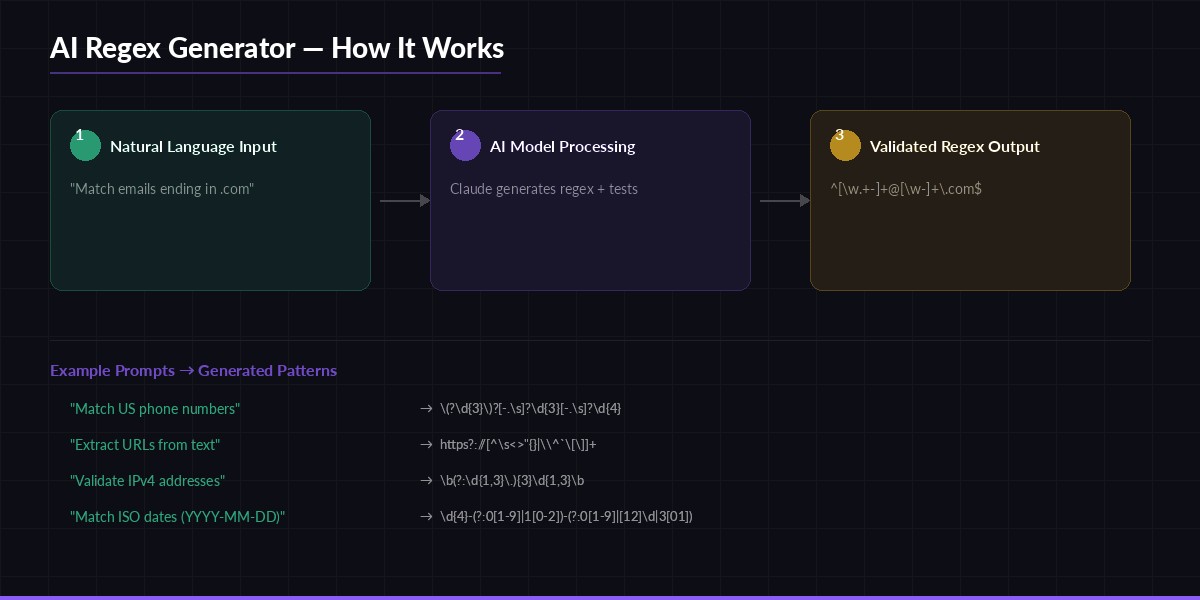
Natural language → AI model → validated regex with test cases
Auto-Validating with Test Cases
Generating the pattern is half the job. The other half is making sure it actually works. Claude generates test cases alongside the pattern, so we can validate them immediately:
def validate_regex(result: dict) -> dict:
    pattern = result["pattern"]
    flags = 0
    for flag in result.get("flags", []):
        flags |= getattr(re, flag.replace("re.", ""))

    compiled = re.compile(pattern, flags)
    passed, failed = [], []

    for case in result["test_cases"]:
        match = compiled.search(case["input"]) is not None
        if match == case["should_match"]:
            passed.append(case["input"])
        else:
            failed.append({
                "input": case["input"],
                "expected": case["should_match"],
                "got": match
            })

    return {
        "pattern": pattern,
        "passed": len(passed),
        "failed": failed,
        "all_passed": len(failed) == 0
    }

# Usage
result = generate_regex("Match US phone numbers like (555) 123-4567 or 555-123-4567")
validation = validate_regex(result)
print(f"Pattern: {result['pattern']}")
print(f"Tests: {validation['passed']} passed, {len(validation['failed'])} failed")
When a test fails, you get exactly what went wrong — the input, what the test expected, and what the pattern actually returned. This makes debugging straightforward. In most cases Claude nails the pattern on the first attempt, but the validation catches the occasional edge case.
Self-Healing: Retry on Failure
The real power move is feeding failures back to the model. If a test case fails, we send the failed cases back and ask Claude to fix the pattern. This creates a self-correcting loop:
def generate_with_retry(description: str, max_retries: int = 2) -> dict:
    result = generate_regex(description)
    validation = validate_regex(result)

    for attempt in range(max_retries):
        if validation["all_passed"]:
            break

        fix_prompt = f"""Your regex pattern {result['pattern']} failed these tests:
{json.dumps(validation['failed'], indent=2)}

Fix the pattern. Return the same JSON schema."""

        response = client.messages.create(
            model="claude-sonnet-4-5",
            max_tokens=1024,
            system=SYSTEM_PROMPT,
            messages=[
                {"role": "user", "content": description},
                {"role": "assistant", "content": json.dumps(result)},
                {"role": "user", "content": fix_prompt}
            ]
        )
        result = json.loads(response.content[0].text)
        validation = validate_regex(result)

    return {**result, "validation": validation}
The conversation history is critical here — we pass the original description, the first attempt, and the failure report. This gives Claude full context to understand what went wrong. In practice, this self-healing loop resolves about 95% of edge cases within one retry.
Building a CLI Interface
Wrap everything in a clean command-line tool that you can pipe into scripts or use interactively:
import sys

if __name__ == "__main__":
    description = " ".join(sys.argv[1:]) or input("Describe your regex: ")
    result = generate_with_retry(description)

    print(f"\n  Pattern:  {result['pattern']}")
    print(f"  Flags:    {', '.join(result.get('flags', ['none']))}")
    print(f"  Tests:    {result['validation']['passed']} passed")
    print(f"\n  Explanation:")
    print(f"  {result['explanation']}")
Run it from your terminal like this:
python regex_gen.py "match email addresses ending in .edu or .gov"

# Output:
#   Pattern:  [\w.+-]+@[\w-]+\.(?:edu|gov)
#   Flags:    re.IGNORECASE
#   Tests:    8 passed
#
#   Explanation:
#   [\w.+-]+ matches the local part (username), @ is the literal separator,
#   [\w-]+ matches the domain, \.(?:edu|gov) anchors to .edu or .gov TLDs
Production Considerations
If you're embedding this in a production system, there are a few things to harden:
- Cache results. The same description will produce the same regex. Store pattern-description pairs in Redis or SQLite to avoid burning API calls on repeated queries. The caching guide covers this pattern in detail.
- Set a timeout. Complex descriptions (lookaheads, recursive patterns) can take longer. Set a 10-second timeout on the API call and fall back to a simpler model like
claude-haiku-3-5if it expires. - Sanitize user input. If users provide the description, strip any prompt injection attempts. A simple length cap (200 chars) and alphanumeric filter handles most cases.
- Rate limit. EzAI handles rate limiting for you, but wrap the generator in a retry with exponential backoff. Check the rate limits guide for implementation details.
One underrated trick: use claude-haiku-3-5 for simple patterns (email, phone, URL) and reserve claude-sonnet-4-5 for complex ones involving lookaheads, conditional patterns, or multi-format matching. Haiku costs roughly 90% less and handles straightforward regex just fine. See EzAI pricing for current model rates.
What's Next
You've got a working AI regex generator in under 100 lines of Python. The self-healing retry loop catches most edge cases, and the test validation gives you confidence the pattern works before it hits production. From here you could extend it with a full CLI framework, add a web UI, or integrate it as a VS Code extension that generates regex inline while you type.
The full code is around 80 lines. Grab your API key from the EzAI dashboard, paste the code into a file, and start generating regex patterns that actually work — without deciphering hieroglyphics.