Your inbox is a mess. Dozens of unread emails, half of them irrelevant, and buried somewhere in the pile is a client message that needed a reply two hours ago. Sound familiar? Let's fix that with a Python email assistant that uses Claude API to classify emails by priority, extract action items, and draft smart replies — all automatically.
By the end of this tutorial, you'll have a working script that connects to your inbox via IMAP, runs each email through Claude for classification, and generates context-aware draft replies. Total cost per email: roughly 0.2¢ through EzAI API.
How the Email Pipeline Works
The assistant runs as a simple 4-step pipeline: fetch unread emails, classify them with AI, generate draft replies for anything that needs a response, and present the results. No frameworks, no over-engineering — just Python and the Anthropic SDK.
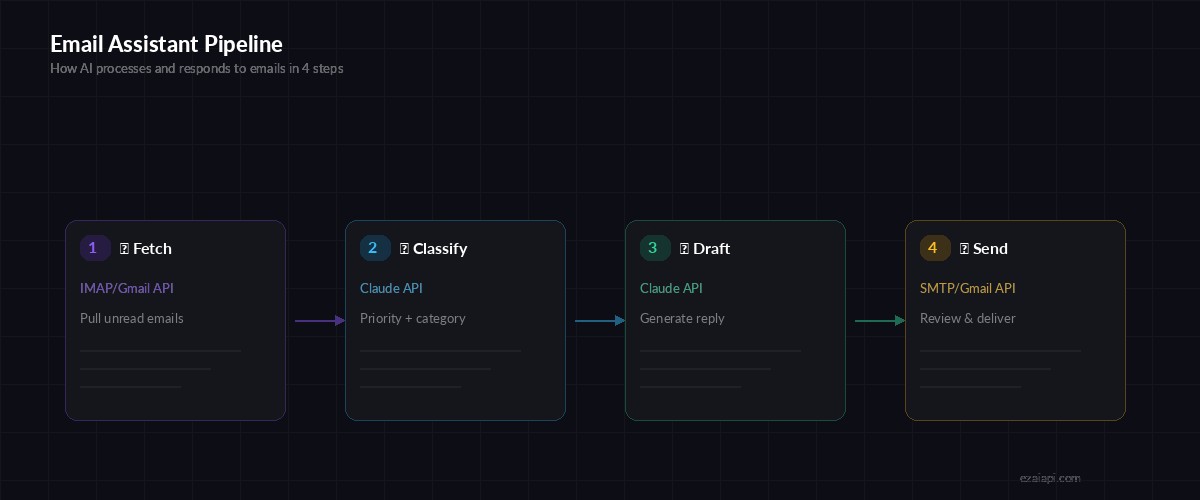
4-step pipeline: fetch emails via IMAP, classify with Claude, draft replies, then review and send
We'll use claude-sonnet-4-5 for classification (fast, cheap) and optionally claude-opus-4 for drafting complex replies where tone matters. This kind of model routing keeps costs low without sacrificing quality.
Setup and Dependencies
Install the Anthropic SDK and set your EzAI API key:
pip install anthropic
export EZAI_API_KEY="sk-your-key"
export EMAIL_USER="[email protected]"
export EMAIL_PASS="your-app-password"
For Gmail, you'll need an App Password — regular passwords won't work with IMAP. Go to Google Account → Security → 2-Step Verification → App Passwords.
Step 1: Fetch Unread Emails
First, connect to IMAP and pull unread messages. We grab the subject, sender, date, and body text:
import imaplib, email, os
from email.header import decode_header

def fetch_unread(max_emails=20):
    imap = imaplib.IMAP4_SSL("imap.gmail.com")
    imap.login(os.environ["EMAIL_USER"], os.environ["EMAIL_PASS"])
    imap.select("INBOX")

    _, msg_ids = imap.search(None, "UNSEEN")
    ids = msg_ids[0].split()[-max_emails:]

    emails = []
    for mid in ids:
        _, data = imap.fetch(mid, "(RFC822)")
        msg = email.message_from_bytes(data[0][1])

        subject = decode_header(msg["Subject"])[0][0]
        if isinstance(subject, bytes):
            subject = subject.decode()

        body = ""
        if msg.is_multipart():
            for part in msg.walk():
                if part.get_content_type() == "text/plain":
                    body = part.get_payload(decode=True).decode()
                    break
        else:
            body = msg.get_payload(decode=True).decode()

        emails.append({
            "id": mid,
            "from": msg["From"],
            "subject": subject,
            "date": msg["Date"],
            "body": body[:2000]  # truncate to save tokens
        })

    imap.logout()
    return emails
We truncate the body to 2000 characters. Most emails convey their point in the first few paragraphs, and longer bodies burn tokens for little gain. If you need full-body analysis for legal or support emails, bump this limit.
Step 2: Classify with AI
Now the interesting part. We send each email to Claude with a structured prompt that returns JSON classification:
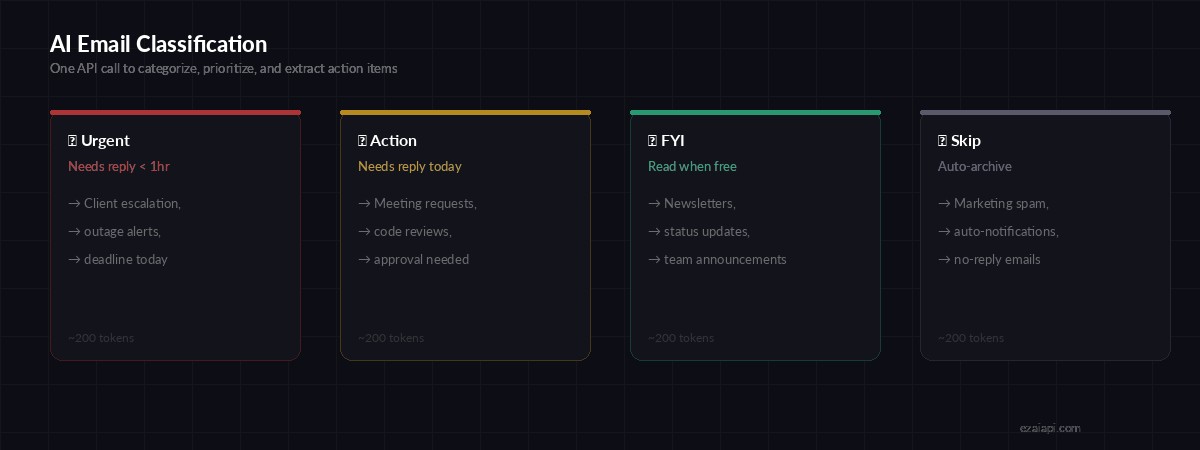
Four priority levels — Claude classifies each email and extracts action items in a single API call
import anthropic, json

client = anthropic.Anthropic(
    api_key=os.environ["EZAI_API_KEY"],
    base_url="https://ezaiapi.com"
)

def classify_email(email_data):
    prompt = f"""Classify this email. Return ONLY valid JSON.

From: {email_data['from']}
Subject: {email_data['subject']}
Body: {email_data['body'][:1500]}

Return JSON:
{{
  "priority": "urgent|action|fyi|skip",
  "category": "client|team|billing|marketing|notification|personal",
  "needs_reply": true/false,
  "action_items": ["item1", "item2"],
  "summary": "One sentence summary"
}}"""

    response = client.messages.create(
        model="claude-sonnet-4-5",
        max_tokens=300,
        messages=[{"role": "user", "content": prompt}]
    )

    text = response.content[0].text
    # Extract JSON from response (handles markdown code blocks)
    if "```" in text:
        text = text.split("```")[1].strip("json\n")
    return json.loads(text)
Using claude-sonnet-4-5 here is deliberate. Classification is a pattern-matching task — it doesn't need the reasoning power of Opus. Each call uses roughly 200 input tokens and 80 output tokens, costing well under a cent through EzAI. For more on this approach, see our guide on reducing AI API costs.
Step 3: Generate Smart Replies
For emails that need a response, we generate a context-aware draft. The system prompt sets the tone and the email content provides context:
def draft_reply(email_data, classification):
    # Use Opus for urgent/client emails, Sonnet for everything else
    model = "claude-opus-4" if classification["priority"] == "urgent" else "claude-sonnet-4-5"

    response = client.messages.create(
        model=model,
        max_tokens=500,
        system="You are drafting email replies for a software developer. "
               "Be professional but not stiff. Keep replies concise — "
               "3-5 sentences max unless the topic requires detail. "
               "Address specific points raised in the original email.",
        messages=[{
            "role": "user",
            "content": f"""Draft a reply to this email.

From: {email_data['from']}
Subject: {email_data['subject']}
Body: {email_data['body']}

Context: This was classified as {classification['priority']} priority.
Action items identified: {', '.join(classification['action_items'])}

Write ONLY the reply body — no subject line, no greeting format suggestions."""
        }]
    )
    return response.content[0].text
Notice the model routing: urgent emails from clients get claude-opus-4 for more nuanced, carefully worded replies. Routine responses use Sonnet to keep costs down. This is the same pattern we covered in our model routing guide.
Step 4: Putting It All Together
The main script ties everything together — fetch, classify, draft, and present a prioritized summary:
def run_assistant():
    emails = fetch_unread(max_emails=15)
    print(f"📥 Found {len(emails)} unread emails\n")

    priority_order = {"urgent": 0, "action": 1, "fyi": 2, "skip": 3}
    results = []

    for em in emails:
        print(f"🧠 Classifying: {em['subject'][:60]}...")
        try:
            classification = classify_email(em)
            draft = None
            if classification.get("needs_reply"):
                print(f"  ✍️  Drafting reply...")
                draft = draft_reply(em, classification)
            results.append({"email": em, "class": classification, "draft": draft})
        except Exception as e:
            print(f"  ⚠️  Error: {e}")

    # Sort by priority
    results.sort(key=lambda r: priority_order.get(r["class"]["priority"], 9))

    # Display results
    icons = {"urgent": "🔴", "action": "🟡", "fyi": "🟢", "skip": "⚪"}
    for r in results:
        c = r["class"]
        icon = icons.get(c["priority"], "❓")
        print(f"\n{icon} [{c['priority'].upper()}] {r['email']['subject']}")
        print(f"   From: {r['email']['from']}")
        print(f"   Summary: {c['summary']}")
        if c["action_items"]:
            print(f"   Actions: {', '.join(c['action_items'])}")
        if r["draft"]:
            print(f"   📝 Draft reply:\n   {r['draft'][:200]}...")

if __name__ == "__main__":
    run_assistant()
Running It as a Cron Job
To check your inbox automatically every 30 minutes, add a cron entry:
# Run every 30 minutes during work hours
*/30 8-18 * * 1-5 cd /path/to/project && python3 email_assistant.py >> email_log.txt 2>&1
For a more robust setup, pipe the output to a Slack webhook or your AI Slack bot so you get prioritized email summaries delivered straight to your team channel.
Cost Breakdown
Here's what this costs through EzAI for a typical inbox of 20 emails per run:
- Classification — 20 emails × ~280 tokens each = 5,600 tokens → ~$0.02
- Reply drafts — ~8 replies × ~800 tokens each = 6,400 tokens → ~$0.03
- Total per run: roughly $0.05 to process your entire inbox
- Monthly (hourly during work hours): ~$2-4 total
Compare that to paying a human VA $500/month to triage your email, and the math speaks for itself. Check our pricing page for current per-model rates.
What's Next?
This is a solid starting point. Here are some upgrades worth considering:
- Thread awareness — fetch previous messages in a thread to give Claude conversation context for better replies
- Auto-send for low-risk replies — let the assistant send "fyi" acknowledgments automatically while holding "urgent" drafts for your review
- Slack integration — pipe the daily summary to your Slack channel using our Slack bot tutorial
- Multi-model fallback — add automatic failover so the assistant works even during provider outages
The full source code for this tutorial is under 150 lines of Python. No frameworks, no magic — just IMAP and Claude doing what they do best. Get your API key from the EzAI dashboard and start building.