
Every app that accepts user input eventually needs content moderation. Comment sections, product reviews, chat rooms, support tickets — left unmoderated, they attract spam, hate speech, and content that drives users away. Traditional keyword filters catch maybe 30% of violations and flag innocent messages constantly. AI content moderation solves both problems: it understands context, catches subtle policy violations, and produces far fewer false positives.
In this guide, you'll build a production-ready content moderation API using Claude via EzAI and FastAPI. The final system classifies text into three tiers — safe, warn, or block — with category labels and confidence scores, all behind a single POST endpoint that responds in under 500ms.
Why Claude for Content Moderation?
Rule-based systems crumble against real-world text. Users misspell slurs on purpose, embed toxic messages inside otherwise normal sentences, and use sarcasm that keyword matchers can't parse. Claude handles all of this because it reads like a human does — understanding intent, not just patterns.
Compared to dedicated moderation APIs from Google or OpenAI, running your own moderation layer with Claude gives you full control over what counts as a violation. Your community guidelines are different from Reddit's or Discord's. With a Claude-powered system, your moderation policy is just a prompt you can update in seconds, no retraining required.
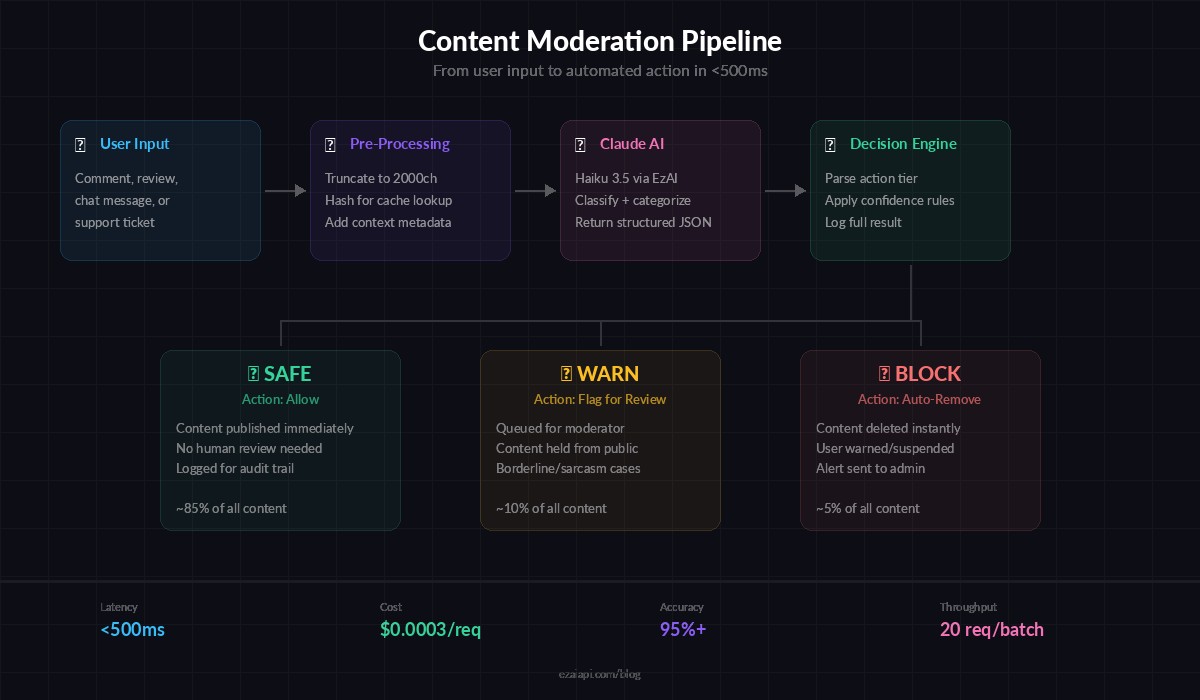
Content moderation pipeline — from user input through Claude classification to action
Project Setup
You need Python 3.10+, an EzAI API key (grab one free at ezaiapi.com/dashboard), and three packages:
pip install anthropic fastapi uvicornSet your environment variables:
export EZAI_API_KEY="sk-your-key-here"
export EZAI_BASE_URL="https://ezaiapi.com"
The Moderation Prompt
The prompt is the heart of the system. It defines your moderation policy and forces Claude to return structured JSON every time. Here's a production-tested version:
MODERATION_SYSTEM = """You are a content moderation classifier. Analyze the provided text and return a JSON object with these fields:

- "action": one of "safe", "warn", "block"
- "categories": list of violated categories (empty if safe)
- "confidence": float 0.0-1.0
- "reason": one-sentence explanation

Categories to check:
- hate_speech: slurs, dehumanization, calls for violence against groups
- harassment: personal attacks, threats, doxxing, intimidation
- sexual: explicit sexual content, unsolicited sexual messages
- spam: promotional content, repeated messages, phishing links
- self_harm: promotion or encouragement of self-harm
- violence: graphic violence, gore, credible threats

Rules:
- "safe" = no violations detected
- "warn" = borderline content, mild violations, sarcasm that could offend
- "block" = clear policy violation, must be removed

Return ONLY valid JSON. No markdown, no explanation outside the JSON."""
This prompt works because it gives Claude a fixed output schema, concrete category definitions, and a clear three-tier decision framework. The categories cover the six most common moderation needs — adjust them for your specific community.
Building the FastAPI Server
The API exposes a single POST /moderate endpoint. It sends the user text to Claude, parses the JSON response, and returns the moderation verdict. Using claude-haiku-3.5 keeps latency under 400ms while still catching nuanced violations.
import os, json
from fastapi import FastAPI, HTTPException
from pydantic import BaseModel
import anthropic

app = FastAPI(title="AI Content Moderator")

client = anthropic.Anthropic(
    api_key=os.environ["EZAI_API_KEY"],
    base_url=os.environ.get("EZAI_BASE_URL", "https://ezaiapi.com"),
)

class ModerateRequest(BaseModel):
    text: str
    context: str | None = None  # e.g., "product_review", "chat_message"

class ModerateResponse(BaseModel):
    action: str
    categories: list[str]
    confidence: float
    reason: str

@app.post("/moderate", response_model=ModerateResponse)
async def moderate(req: ModerateRequest):
    user_msg = req.text
    if req.context:
        user_msg = f"[Context: {req.context}]\n{req.text}"

    response = client.messages.create(
        model="claude-haiku-3.5",
        max_tokens=256,
        system=MODERATION_SYSTEM,
        messages=[{"role": "user", "content": user_msg}],
    )

    try:
        result = json.loads(response.content[0].text)
        return ModerateResponse(**result)
    except (json.JSONDecodeError, KeyError) as e:
        raise HTTPException(status_code=502, detail=f"Model returned invalid JSON: {e}")
Run it with uvicorn main:app --port 8000 and test immediately:
curl -X POST http://localhost:8000/moderate \
  -H "content-type: application/json" \
  -d '{"text": "Great product, fast shipping!", "context": "product_review"}'
Expected response:
{
  "action": "safe",
  "categories": [],
  "confidence": 0.98,
  "reason": "Positive product review with no policy violations."
}
Batch Moderation for High Throughput
If you're moderating a backlog of comments or processing a queue, sending one request at a time wastes time. Here's an async batch endpoint that moderates up to 20 texts in parallel using asyncio.gather:
import asyncio

async_client = anthropic.AsyncAnthropic(
    api_key=os.environ["EZAI_API_KEY"],
    base_url=os.environ.get("EZAI_BASE_URL", "https://ezaiapi.com"),
)

async def moderate_single(text: str) -> dict:
    resp = await async_client.messages.create(
        model="claude-haiku-3.5",
        max_tokens=256,
        system=MODERATION_SYSTEM,
        messages=[{"role": "user", "content": text}],
    )
    return json.loads(resp.content[0].text)

@app.post("/moderate/batch")
async def moderate_batch(texts: list[str]):
    if len(texts) > 20:
        raise HTTPException(400, "Max 20 texts per batch")
    results = await asyncio.gather(
        *[moderate_single(t) for t in texts],
        return_exceptions=True,
    )
    return [
        r if isinstance(r, dict) else {"error": str(r)}
        for r in results
    ]
Twenty texts through Haiku in parallel completes in roughly the same latency as a single request — around 400ms. That's the advantage of concurrent API calls with EzAI's infrastructure handling the load.
Adding Webhook Integration
Most production setups don't call the moderation API synchronously. Instead, your app fires a webhook when new content arrives, the moderator classifies it, and posts results back. Here's a webhook receiver that processes content and notifies your app:
import httpx
from fastapi import BackgroundTasks

async def process_and_callback(content_id: str, text: str, callback_url: str):
    result = await moderate_single(text)
    async with httpx.AsyncClient() as http:
        await http.post(callback_url, json={
            "content_id": content_id,
            "moderation": result,
        })

@app.post("/moderate/webhook")
async def moderate_webhook(
    content_id: str,
    text: str,
    callback_url: str,
    bg: BackgroundTasks,
):
    bg.add_task(process_and_callback, content_id, text, callback_url)
    return {"status": "queued", "content_id": content_id}
The endpoint returns immediately with a queued status while moderation runs in the background. Your main app never blocks waiting for AI classification.
Cost Breakdown
Running content moderation through Haiku via EzAI is surprisingly cheap. A typical moderation request uses about 350 input tokens (system prompt + user text) and 60 output tokens. At EzAI's Haiku pricing, that works out to roughly $0.0003 per moderation — or about 3,000 moderations per dollar.
Compare that to hiring human moderators ($15-25/hour, reviewing maybe 200 items/hour) or dedicated moderation APIs ($1-5 per 1,000 items). The AI approach is 10-50x cheaper and runs 24/7 without fatigue or inconsistency. Check the full EzAI pricing page for current rates across all models.
Production Hardening Tips
- Add a local cache. Hash incoming text and cache results for 5 minutes. Duplicate comments (common in spam waves) get instant responses without burning API calls. See our guide on caching AI API responses for implementation details.
- Set up fallback models. If Haiku is slow or unavailable, fall back to a lighter model. EzAI's multi-model fallback guide covers this pattern end to end.
- Log everything. Store the raw moderation results alongside the content. When you tune your prompt or adjust thresholds, you can replay historical data to measure the impact before deploying.
- Rate limit the endpoint. Add
slowapior a reverse proxy rate limiter to prevent abuse of your moderation API itself. - Handle edge cases. Empty strings, extremely long texts (truncate to 2000 chars), and non-text content (URLs, emoji-only messages) all need explicit handling before they hit Claude.
Wrapping Up
You now have a content moderation system that understands context, handles sarcasm, and classifies text in under half a second. The entire thing fits in a single Python file, costs fractions of a cent per request through EzAI, and your moderation policy lives in a prompt you can update without redeploying. Swap claude-haiku-3.5 for claude-sonnet-4-5 when you need higher accuracy on edge cases, or drop down to a free model for initial filtering before escalating to a paid tier. The API shape stays the same either way.