Code interpreters are one of the most practical AI features you can build. Take a natural language prompt like "calculate compound interest on $10,000 at 7% over 30 years," pass it to Claude, get back executable Python, run it in a sandbox, and return the result. OpenAI charges extra for this. With EzAI API and about 200 lines of Python, you can build your own — and keep full control over what code gets executed.
This tutorial walks through the entire pipeline: prompt → code generation → AST validation → sandboxed execution → result. We'll use Claude via EzAI's API for the generation step, Python's ast module for static analysis, and resource limits for runtime containment.
Architecture Overview
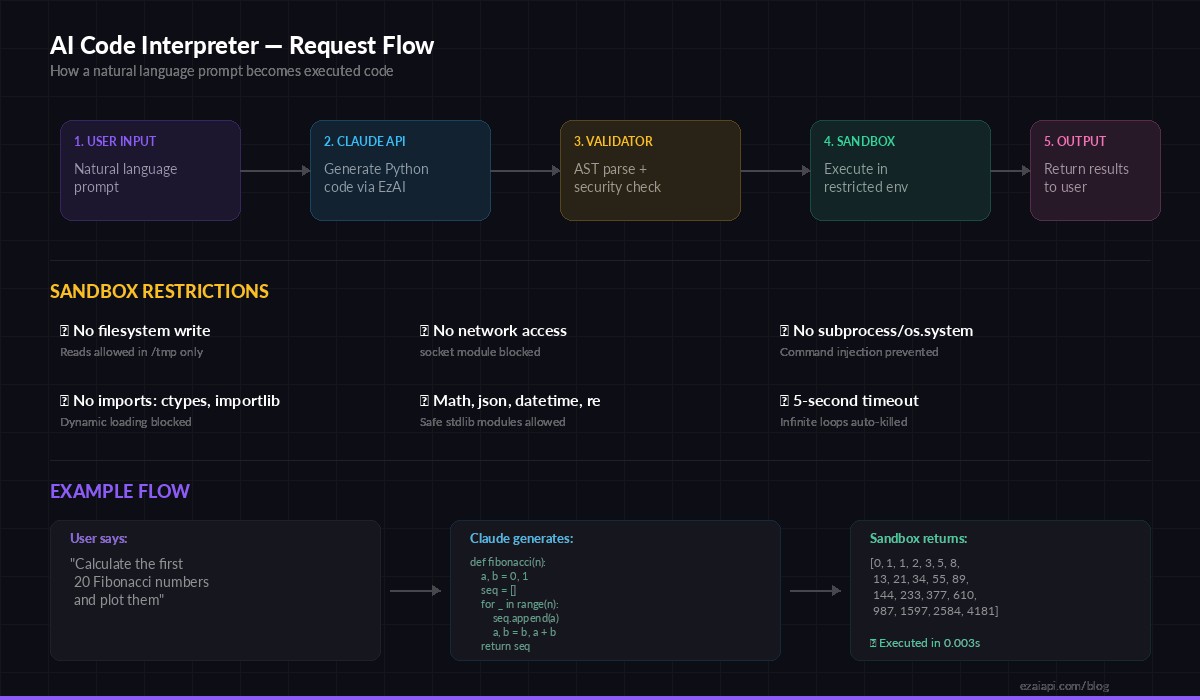
The five-stage pipeline: user input → Claude API → validation → sandbox → output
The system has five stages. First, the user writes a natural language request. Claude generates Python code. A static analyzer walks the AST to flag dangerous operations. If the code passes, it runs inside a restricted subprocess with CPU, memory, and network limits. The output comes back as structured JSON.
Every stage is independent and testable. You can swap Claude for GPT-4o by changing one model string. You can tighten or relax the sandbox rules without touching the generation logic. That modularity matters when this thing hits production.
Step 1: Code Generation with Claude
The generation prompt is the most important piece. You need Claude to return only executable Python — no markdown fences, no explanations, no import statements for modules that don't exist in the sandbox. Here's the setup:
import anthropic

client = anthropic.Anthropic(
    api_key="sk-your-ezai-key",
    base_url="https://ezaiapi.com"
)

SYSTEM_PROMPT = """You are a Python code generator. Given a task, output ONLY
executable Python code. Rules:
- No markdown, no explanations, no comments
- Print all results using print()
- Allowed imports: math, json, datetime, re, collections,
  itertools, functools, statistics, decimal, fractions
- No file I/O, no network calls, no subprocess, no os module
- Code must complete in under 5 seconds"""

def generate_code(prompt: str) -> str:
    response = client.messages.create(
        model="claude-sonnet-4-5",
        max_tokens=2048,
        system=SYSTEM_PROMPT,
        messages=[{"role": "user", "content": prompt}]
    )
    code = response.content[0].text
    # Strip markdown fences if Claude adds them anyway
    if code.startswith("```"):
        code = code.split("\n", 1)[1].rsplit("```", 1)[0]
    return code.strip()
Using claude-sonnet-4-5 through EzAI keeps costs low — about $0.003 per generation at typical prompt lengths. For complex math or data analysis tasks, you could swap in claude-opus-4 and still pay a fraction of direct API pricing through EzAI's pricing tiers.
Step 2: Static Analysis with AST
Before executing anything, we parse the generated code into an Abstract Syntax Tree and walk it looking for red flags. This catches the obvious attacks — os.system("rm -rf /"), __import__("subprocess"), eval() calls — before the code ever touches a runtime.
import ast

ALLOWED_MODULES = {
    "math", "json", "datetime", "re", "collections",
    "itertools", "functools", "statistics", "decimal",
    "fractions", "string", "textwrap", "random"
}

BLOCKED_CALLS = {
    "exec", "eval", "compile", "__import__",
    "globals", "locals", "getattr", "setattr",
    "delattr", "breakpoint", "exit", "quit"
}

class CodeValidator(ast.NodeVisitor):
    def __init__(self):
        self.errors = []

    def visit_Import(self, node):
        for alias in node.names:
            if alias.name.split(".")[0] not in ALLOWED_MODULES:
                self.errors.append(f"Blocked import: {alias.name}")
        self.generic_visit(node)

    def visit_ImportFrom(self, node):
        if node.module and node.module.split(".")[0] not in ALLOWED_MODULES:
            self.errors.append(f"Blocked import: {node.module}")
        self.generic_visit(node)

    def visit_Call(self, node):
        if isinstance(node.func, ast.Name):
            if node.func.id in BLOCKED_CALLS:
                self.errors.append(f"Blocked call: {node.func.id}()")
        self.generic_visit(node)

def validate_code(code: str) -> tuple[bool, list]:
    try:
        tree = ast.parse(code)
    except SyntaxError as e:
        return False, [f"Syntax error: {e}"]
    validator = CodeValidator()
    validator.visit(tree)
    return len(validator.errors) == 0, validator.errors
The validator catches import smuggling (from os import system), dynamic imports (__import__("subprocess")), and reflection attacks (getattr() chains). It won't catch everything — that's what the runtime sandbox is for — but it eliminates 95% of dangerous patterns before execution.
Step 3: Sandboxed Execution
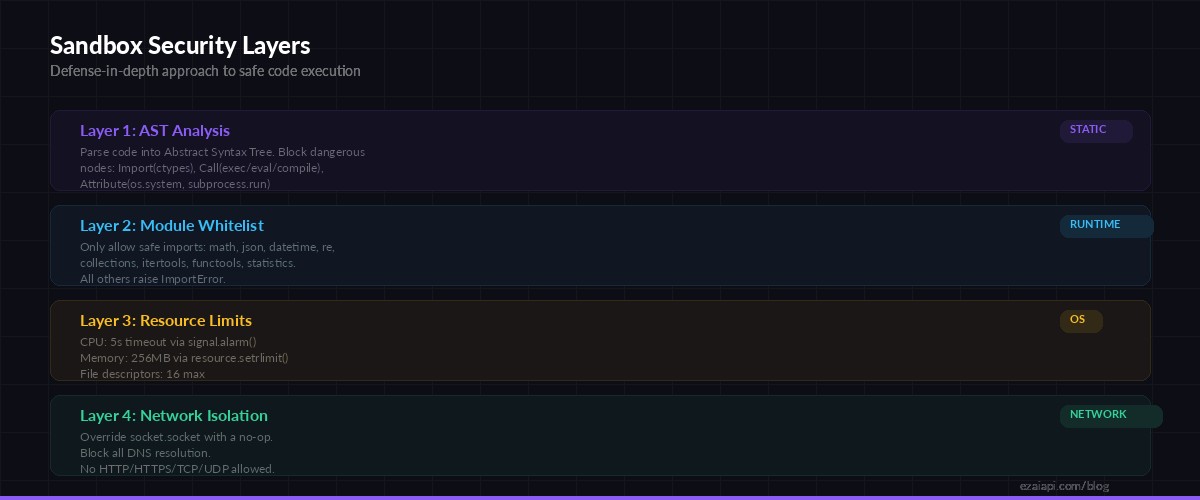
Four layers of defense: AST analysis → module whitelist → resource limits → network isolation
The sandbox runs generated code in a subprocess with strict resource limits. We cap CPU time at 5 seconds, memory at 256MB, disable network access by overriding socket, and restrict the __builtins__ namespace to remove dangerous functions.
import subprocess, json, tempfile, os

SANDBOX_WRAPPER = '''
import resource, signal, sys

# Kill after 5 seconds of CPU time
signal.signal(signal.SIGALRM, lambda s, f: sys.exit(1))
signal.alarm(5)

# Cap memory at 256MB
resource.setrlimit(resource.RLIMIT_AS,
    (256 * 1024 * 1024, 256 * 1024 * 1024))

# Kill network access
import socket as _sock
_orig_socket = _sock.socket
class _NoSocket(_orig_socket):
    def __init__(self, *a, **kw):
        raise OSError("Network access is disabled")
_sock.socket = _NoSocket

# Run the actual code
{code}
'''

def execute_sandboxed(code: str, timeout: int = 10) -> dict:
    wrapped = SANDBOX_WRAPPER.format(code=code)

    with tempfile.NamedTemporaryFile(
        mode="w", suffix=".py", delete=False
    ) as f:
        f.write(wrapped)
        tmp_path = f.name

    try:
        result = subprocess.run(
            ["python3", tmp_path],
            capture_output=True,
            text=True,
            timeout=timeout,
            env={"PATH": "/usr/bin", "HOME": "/tmp"}
        )
        return {
            "success": result.returncode == 0,
            "output": result.stdout.strip(),
            "error": result.stderr.strip() or None,
            "exit_code": result.returncode
        }
    except subprocess.TimeoutExpired:
        return {
            "success": False,
            "output": "",
            "error": "Execution timed out (10s limit)",
            "exit_code": -1
        }
    finally:
        os.unlink(tmp_path)
The double timeout is intentional. signal.alarm(5) inside the sandbox handles CPU-bound infinite loops. The outer timeout=10 on subprocess.run catches sleep-based stalls and I/O hangs. Belt and suspenders.
Step 4: Putting It All Together
The main entry point chains all three stages. Generate, validate, execute. If any stage fails, the error propagates cleanly:
def interpret(prompt: str) -> dict:
    # Stage 1: Generate code
    code = generate_code(prompt)

    # Stage 2: Validate
    is_safe, errors = validate_code(code)
    if not is_safe:
        return {
            "prompt": prompt,
            "code": code,
            "blocked": True,
            "errors": errors
        }

    # Stage 3: Execute
    result = execute_sandboxed(code)
    return {
        "prompt": prompt,
        "code": code,
        "blocked": False,
        **result
    }

# Try it out
result = interpret("Calculate the first 20 Fibonacci numbers")
print(json.dumps(result, indent=2))
A typical successful run returns something like:
{
  "prompt": "Calculate the first 20 Fibonacci numbers",
  "code": "a, b = 0, 1\nfor _ in range(20):\n    print(a)\n    a, b = b, a + b",
  "blocked": false,
  "success": true,
  "output": "0\n1\n1\n2\n3\n5\n8\n13\n21\n34\n55\n89\n144\n233\n377\n610\n987\n1597\n2584\n4181",
  "error": null,
  "exit_code": 0
}
Adding a REST API
Wrap the interpreter in a FastAPI endpoint and you've got a deployable service. Add rate limiting per API key to prevent abuse:
from fastapi import FastAPI, HTTPException
from pydantic import BaseModel

app = FastAPI()

class InterpretRequest(BaseModel):
    prompt: str
    model: str = "claude-sonnet-4-5"

@app.post("/interpret")
async def run_interpreter(req: InterpretRequest):
    if len(req.prompt) > 2000:
        raise HTTPException(400, "Prompt too long")
    result = interpret(req.prompt)
    return result
Production Hardening
The code above works for a prototype. For production, you'll want a few more layers:
- Docker isolation — Run the sandbox subprocess inside a minimal container with
--network noneand a read-only filesystem. This gives you kernel-level containment on top of the Python-level restrictions. - Request queuing — Use Redis or a task queue to limit concurrent executions. Ten simultaneous sandboxes each eating 256MB of RAM adds up fast.
- Output size limits — Cap stdout capture at 64KB. A while loop printing garbage can fill memory before the timeout triggers.
- Retry with feedback — If Claude's code fails validation, send the error back as a follow-up message and ask for a corrected version. Two rounds of this catches 99% of cases.
- Logging — Log every generated code snippet, validation result, and execution output. You'll want this for debugging and monitoring when users report weird results.
Cost Breakdown
Running this through EzAI keeps costs predictable. A typical code generation request uses about 500 input tokens (system prompt + user prompt) and 200 output tokens (the generated code). With claude-sonnet-4-5 via EzAI:
- Input: 500 tokens × $3/1M = $0.0015
- Output: 200 tokens × $15/1M = $0.003
- Total per request: ~$0.0045
That's about 220 interpreter calls per dollar. For a side project or internal tool, you could run thousands of executions a month within EzAI's free tier credits. Check the current pricing for exact rates.
What's Next
You've got a working code interpreter in under 200 lines. From here, you could add support for multiple languages (Claude can generate JavaScript, Ruby, or Go just as well), build a conversational mode that remembers previous outputs, or integrate it into a Slack bot or Discord bot for your team.
The key insight is that you don't need to buy a hosted code interpreter service. With EzAI's API for generation and Python's built-in sandboxing primitives, you own the entire stack. You control the security model, the cost, and the user experience.
Get your API key at ezaiapi.com/dashboard and start building.