Your team has five services calling Claude and GPT. Each one manages its own API key, retry logic, and error handling. Costs are scattered across dashboards. One rogue loop burns through $200 in tokens before anyone notices. Sound familiar? An AI API gateway solves all of this — a single entry point that handles authentication, rate limiting, caching, and routing before any request hits an AI provider.
In this tutorial, you'll build a lightweight gateway in Node.js that sits between your apps and EzAI's unified API. By the end, every AI request from your stack will flow through a single service with proper controls.
Why Build a Gateway?
Calling AI APIs directly from application code works fine for prototypes. In production, you hit problems fast:
- Key sprawl — API keys hardcoded or scattered across .env files in 10 repos
- No spend controls — a misconfigured batch job can drain your balance in minutes
- Duplicate caching logic — every service reinvents response caching independently
- Blind spots — no unified view of which service is spending what
A gateway centralizes all of this. Your apps send requests to your gateway using internal tokens. The gateway validates, rate-limits, caches, and forwards to EzAI. One key, one dashboard, one place to set guardrails.
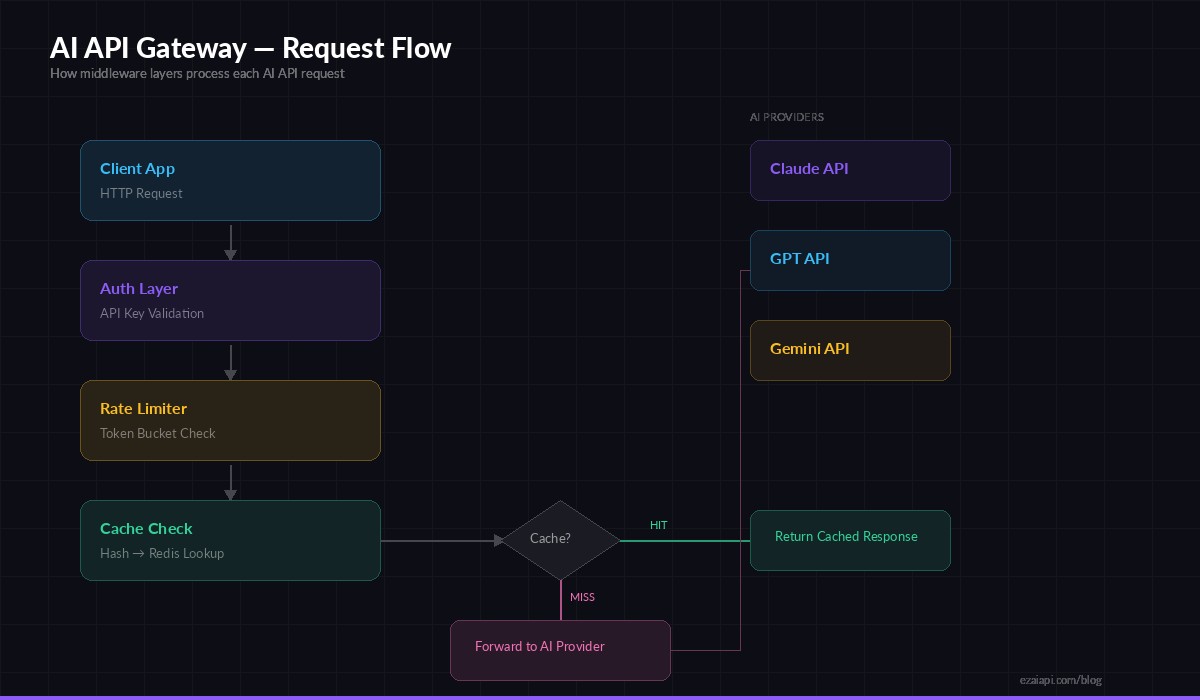
Gateway request flow — auth → rate limit → cache → forward to AI provider
Project Setup
Initialize the project and install dependencies. We're using Express for routing, ioredis for caching and rate limit state, and node-fetch for upstream calls.
mkdir ai-gateway && cd ai-gateway
npm init -y
npm i express ioredis node-fetch@3 crypto-js dotenv
Create a .env file with your EzAI key and Redis connection:
EZAI_API_KEY=sk-your-ezai-key
EZAI_BASE_URL=https://ezaiapi.com
REDIS_URL=redis://localhost:6379
PORT=4000
Authentication Middleware
Internal services authenticate against your gateway with their own tokens. This decouples your team's access from the upstream EzAI key — you can revoke a single service's access without rotating the master key.
// middleware/auth.js
const VALID_KEYS = new Map([
  ['gw-svc-frontend-abc123', { name: 'frontend', rateLimit: 100 }],
  ['gw-svc-backend-def456',  { name: 'backend',  rateLimit: 500 }],
  ['gw-svc-worker-ghi789',  { name: 'worker',   rateLimit: 50  }],
]);

export function authMiddleware(req, res, next) {
  const key = req.headers['x-gateway-key'];
  if (!key) return res.status(401).json({ error: 'Missing x-gateway-key header' });

  const client = VALID_KEYS.get(key);
  if (!client) return res.status(403).json({ error: 'Invalid API key' });

  req.client = client; // attach client metadata for downstream use
  next();
}
In production, you'd store keys in Redis or a database with hashed values. The hardcoded map works for this tutorial.
Token Bucket Rate Limiter
AI API calls are expensive. A token bucket rate limiter lets clients burst briefly but enforces a sustained ceiling. Each client gets a bucket that refills at a fixed rate — spend all your tokens on a burst, then wait for the bucket to refill.
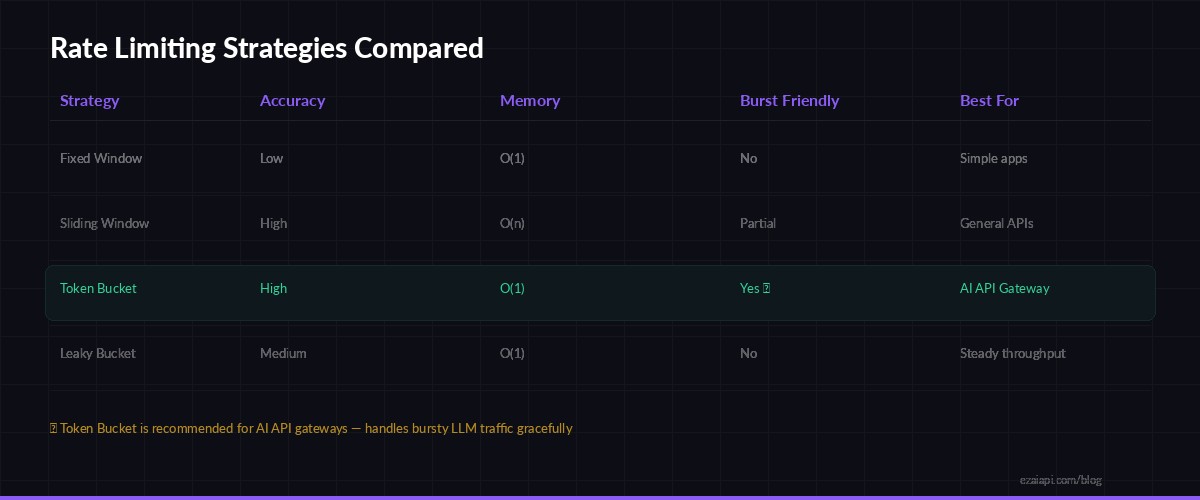
Token Bucket handles bursty LLM traffic better than fixed or sliding window approaches
// middleware/rateLimit.js
import Redis from 'ioredis';
const redis = new Redis(process.env.REDIS_URL);

export async function rateLimitMiddleware(req, res, next) {
  const { name, rateLimit: maxTokens } = req.client;
  const key = `rl:${name}`;
  const now = Date.now();
  const refillRate = maxTokens / 3600000; // tokens per ms (1 hour window)

  let bucket = await redis.hgetall(key);

  if (!bucket.tokens) {
    // First request — initialize full bucket
    await redis.hmset(key, { tokens: maxTokens, lastRefill: now });
    await redis.expire(key, 7200);
    return next();
  }

  // Refill tokens based on elapsed time
  const elapsed = now - Number(bucket.lastRefill);
  const refilled = Math.min(
    Number(bucket.tokens) + elapsed * refillRate,
    maxTokens
  );

  if (refilled < 1) {
    const retryMs = Math.ceil((1 - refilled) / refillRate);
    res.set('Retry-After', Math.ceil(retryMs / 1000));
    return res.status(429).json({
      error: 'Rate limit exceeded',
      retryAfterMs: retryMs
    });
  }

  await redis.hmset(key, { tokens: refilled - 1, lastRefill: now });
  next();
}
The Retry-After header tells clients exactly when to retry, so they don't hammer the gateway with blind retries. The bucket state lives in Redis, so it persists across gateway restarts and works with multiple gateway instances behind a load balancer.
Response Caching
Identical prompts happen more often than you'd think — especially in production apps with templated queries. Caching saves both latency and money. We hash the request body and store the response in Redis with a TTL.
// middleware/cache.js
import Redis from 'ioredis';
import { createHash } from 'crypto';
const redis = new Redis(process.env.REDIS_URL);
const CACHE_TTL = 3600; // 1 hour

function hashBody(body) {
  return createHash('sha256').update(JSON.stringify(body)).digest('hex');
}

export async function cacheMiddleware(req, res, next) {
  if (req.body?.stream) return next(); // skip streaming requests

  const cacheKey = `cache:${hashBody(req.body)}`;
  const cached = await redis.get(cacheKey);

  if (cached) {
    res.set('X-Cache', 'HIT');
    return res.json(JSON.parse(cached));
  }

  // Store original json method to intercept response
  const originalJson = res.json.bind(res);
  res.json = async (data) => {
    await redis.setex(cacheKey, CACHE_TTL, JSON.stringify(data));
    res.set('X-Cache', 'MISS');
    return originalJson(data);
  };
  next();
}
Streaming requests bypass the cache — you can't meaningfully cache SSE chunks. For non-streaming calls, the X-Cache header lets clients see whether they got a cached response.
Proxy Route to EzAI
The final piece: forward validated, rate-limited requests to EzAI's API and return the response. This is where your gateway swaps internal tokens for the real EzAI API key.
// server.js
import express from 'express';
import 'dotenv/config';
import { authMiddleware } from './middleware/auth.js';
import { rateLimitMiddleware } from './middleware/rateLimit.js';
import { cacheMiddleware } from './middleware/cache.js';

const app = express();
app.use(express.json({ limit: '1mb' }));

app.post('/v1/messages',
  authMiddleware,
  rateLimitMiddleware,
  cacheMiddleware,
  async (req, res) => {
    const start = Date.now();
    try {
      const upstream = await fetch(
        `${process.env.EZAI_BASE_URL}/v1/messages`,
        {
          method: 'POST',
          headers: {
            'x-api-key': process.env.EZAI_API_KEY,
            'anthropic-version': '2023-06-01',
            'content-type': 'application/json',
          },
          body: JSON.stringify(req.body),
        }
      );

      const data = await upstream.json();
      const latency = Date.now() - start;

      console.log(
        `[${req.client.name}] ${req.body.model} → ${upstream.status} (${latency}ms)`
      );

      res.status(upstream.status).json(data);
    } catch (err) {
      console.error(`Gateway error: ${err.message}`);
      res.status(502).json({ error: 'Upstream request failed' });
    }
  }
);

app.listen(process.env.PORT, () =>
  console.log(`AI Gateway running on :${process.env.PORT}`)
);
Every request gets logged with the client name, model, status, and latency. Pipe these logs to any aggregation tool for real-time visibility into your AI spend.
Testing the Gateway
Start the gateway and make a test call. Your internal services use the x-gateway-key header instead of the real API key:
curl http://localhost:4000/v1/messages \
  -H "x-gateway-key: gw-svc-frontend-abc123" \
  -H "content-type: application/json" \
  -d '{
    "model": "claude-sonnet-4-5",
    "max_tokens": 256,
    "messages": [{"role": "user", "content": "Ping!"}]
  }'
Run the same request twice — the second call returns instantly with X-Cache: HIT. Try an invalid key and you'll get a clean 403. Exceed the rate limit and the gateway returns 429 with a Retry-After header your clients can respect.
Going Further
This foundation handles the critical 80%. Here's what to add for a fully production-ready gateway:
- Per-model cost tracking — parse
usage.input_tokensandusage.output_tokensfrom responses, multiply by EzAI's pricing, and store per-client cost totals in Redis - Spend alerts — set a daily budget per client, reject requests when exceeded, and fire a webhook to Slack
- Streaming support — pipe
ReadableStreamfrom the upstream response directly to the client for SSE streaming - Model allowlists — restrict which clients can use expensive models like Claude Opus vs cheaper ones like Haiku
- Request logging to a database — store every request for audit and debugging
The composable middleware pattern makes each feature a single file. Drop in a new middleware, add it to the chain, and deploy. No refactoring needed.
If you don't want to build the infrastructure from scratch, EzAI already provides many of these features out of the box — unified API keys, real-time cost dashboards, multi-model routing, and usage analytics. You can layer your own gateway on top for internal auth and custom rate limits, or use EzAI directly and skip the plumbing entirely.