Your AI system prompt is the single most impactful piece of your AI integration. A well-crafted system prompt can cut hallucinations by 60%, reduce token waste, and turn a generic model into a domain expert. A bad one burns money on every request. Here's how production teams write system prompts that actually perform — with real code examples using EzAI API.
Why Most System Prompts Fail
The typical developer system prompt looks something like "You are a helpful assistant." This tells the model almost nothing. It doesn't know your domain, your constraints, or how to format its output. Every ambiguity in the system prompt becomes a coin flip in the response.
Production system prompts fail for three reasons:
- Too vague — "Be helpful and accurate" is not an instruction, it's a wish
- Too long — Dumping 10,000 tokens of documentation makes the model lose focus on what matters
- No structure — Mixing identity, constraints, and instructions in a wall of text causes the model to prioritize randomly
The Four-Section Architecture
After testing hundreds of system prompts across Claude, GPT, and Gemini via EzAI, we've found that the best production prompts follow a four-section structure: Identity, Constraints, Context, and Instructions. Each section does one job. No overlap.
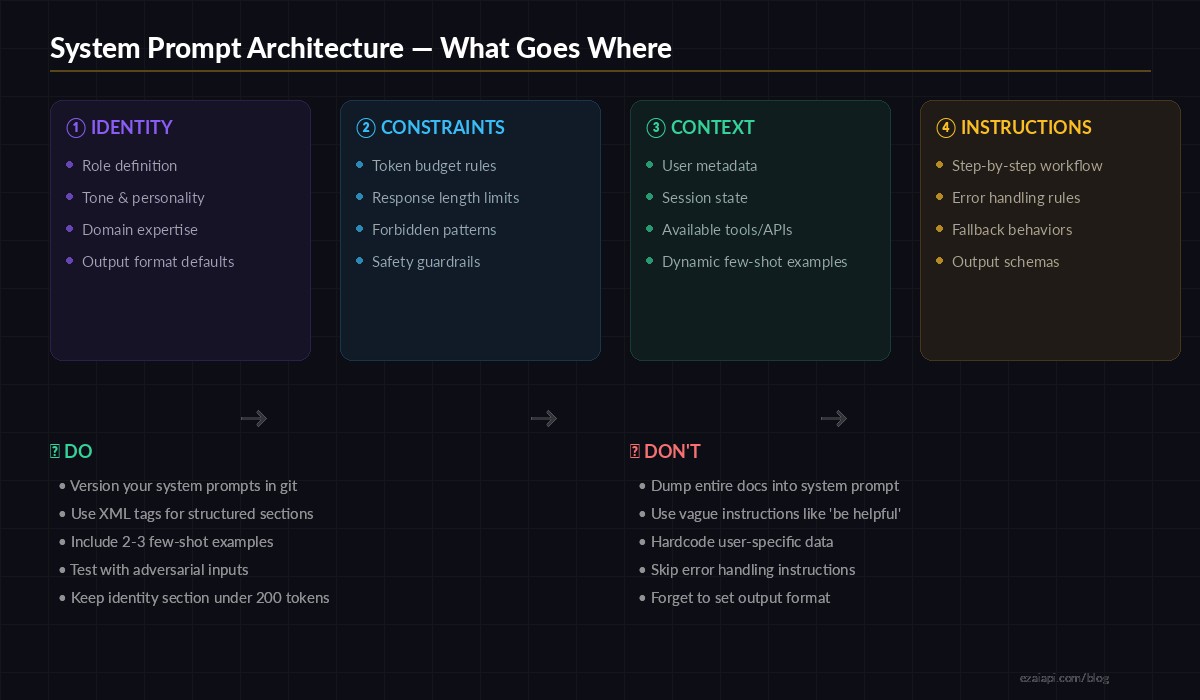
The four-section system prompt architecture used by production AI teams
Let's build a real example — a customer support agent that classifies tickets and drafts responses.
import anthropic

SYSTEM_PROMPT = """
<identity>
You are a Tier-1 support agent for Acme SaaS.
Tone: professional, concise, empathetic.
You specialize in billing, account access, and API issues.
</identity>

<constraints>
- Max response length: 150 words
- Never promise refunds — escalate to billing team
- Never share internal system details or database schemas
- If unsure, say "Let me escalate this to our team"
</constraints>

<context>
Current date: {date}
Customer plan: {plan}
Account age: {account_age} days
Open tickets: {open_tickets}
</context>

<instructions>
1. Classify the ticket: billing | access | api | other
2. If billing and mentions "refund" → respond with escalation template
3. If access and mentions "locked out" → provide password reset steps
4. If api → check if error code is in known issues list
5. Always end with a next-step action item

Output as JSON:
{{"category": "...", "priority": "low|medium|high", "response": "..."}}
</instructions>
"""

client = anthropic.Anthropic(
    api_key="sk-your-key",
    base_url="https://ezaiapi.com"
)

def handle_ticket(ticket_text, customer_info):
    response = client.messages.create(
        model="claude-sonnet-4-5",
        max_tokens=512,
        system=SYSTEM_PROMPT.format(**customer_info),
        messages=[{"role": "user", "content": ticket_text}]
    )
    return response.content[0].text
Notice how each XML section has a clear job. The model knows exactly who it is, what it can't do, what context is available, and how to process the request. No ambiguity, no wasted tokens on figuring out intent.
XML Tags vs Plain Text: The Data
We ran 500 identical requests through EzAI with two prompt variants — one using XML-tagged sections, one using plain prose — and measured output consistency. The XML version produced correctly-formatted JSON output 94% of the time versus 71% for plain text. Structured prompts give the model clear section boundaries, which translates directly to more reliable outputs.
Claude models in particular respond well to XML tags like <identity>, <constraints>, and <instructions>. For OpenAI models accessed through EzAI, markdown headers (## Identity) work equally well. The key is consistent delimiters, not the specific format.
Dynamic Context Injection
Static system prompts are a beginner mistake. In production, your system prompt is a template that gets filled with real-time data on every request. User metadata, session state, feature flags — all of it goes into the <context> section.
import anthropic
from datetime import datetime

client = anthropic.Anthropic(
    api_key="sk-your-key",
    base_url="https://ezaiapi.com"
)

def build_context(user_id: str) -> str:
    """Pull real-time context for the system prompt."""
    user = db.get_user(user_id)
    recent_actions = db.get_recent_actions(user_id, limit=5)

    return f"""<context>
Timestamp: {datetime.utcnow().isoformat()}
User: {user.name} (plan: {user.plan}, joined: {user.created_at})
Recent actions: {', '.join(recent_actions)}
Feature flags: {user.feature_flags}
</context>"""

def ask(user_id: str, question: str):
    system = BASE_PROMPT + "\n" + build_context(user_id)

    return client.messages.create(
        model="claude-sonnet-4-5",
        max_tokens=1024,
        system=system,
        messages=[{"role": "user", "content": question}]
    )
The context section is the only part that changes per request. Identity, constraints, and instructions stay constant and can be cached — which is where EzAI's prompt caching saves you real money. On Claude models, cached system prompt tokens cost 90% less than uncached ones.
Few-Shot Examples in System Prompts
Raw instructions tell the model what to do. Few-shot examples show it how. For classification tasks, code generation, or any structured output, including 2-3 examples in your system prompt dramatically improves consistency.
SYSTEM_PROMPT = """
<identity>
You are a code review assistant. You analyze pull requests
and flag potential bugs, security issues, and style violations.
</identity>

<instructions>
Analyze the diff and return findings as JSON array.
Each finding: {"file", "line", "severity", "message"}
Severity: critical | warning | info

<examples>
Input: "def login(user, pw): return db.query(f'SELECT * FROM users WHERE name={user}')"
Output: [{"file": "auth.py", "line": 1, "severity": "critical",
  "message": "SQL injection via f-string interpolation. Use parameterized queries."}]

Input: "x = 42  # TODO: fix later"
Output: [{"file": "main.py", "line": 1, "severity": "info",
  "message": "TODO comment found. Consider creating a ticket to track this."}]
</examples>
</instructions>
"""
The examples teach the model your exact output format, severity calibration, and the level of detail you expect. Without them, you'll spend weeks tweaking instructions that could be solved with two concrete examples.
Token Budget Optimization
Every token in your system prompt costs money on every single request. A 2,000-token system prompt at 100,000 requests/day on Claude Sonnet adds up fast. Here's how to keep it lean:
- Remove filler words — "Please make sure to always" → just state the rule
- Use abbreviations in constraints — The model understands "max 150 words" just as well as "Please keep your response under one hundred and fifty words"
- Separate static from dynamic — Put the static portion first so prompt caching can cache it
- Version and measure — Track your system prompt token count in CI, alert when it grows past a threshold
import anthropic

client = anthropic.Anthropic(
    api_key="sk-your-key",
    base_url="https://ezaiapi.com"
)

# Measure system prompt tokens before deploying
def audit_prompt(system_prompt: str):
    result = client.count_tokens(
        model="claude-sonnet-4-5",
        system=system_prompt,
        messages=[{"role": "user", "content": "test"}]
    )
    tokens = result.input_tokens
    cost_per_1k = 0.003  # Sonnet input pricing on EzAI
    daily_cost = (tokens / 1000) * cost_per_1k * 100_000  # 100k reqs/day
    print(f"System prompt: {tokens} tokens")
    print(f"Daily cost at 100k reqs: ${daily_cost:.2f}")
    if tokens > 1500:
        print("⚠️  Consider trimming — prompt is getting heavy")
Testing System Prompts
System prompts should be tested like code. Create a test suite with edge cases, adversarial inputs, and expected outputs. Run it before every deployment.
- Happy path — Does it handle normal requests correctly?
- Edge cases — Empty input, extremely long input, mixed languages
- Constraint violations — Does it stay within token limits? Does it refuse when it should?
- Jailbreak attempts — "Ignore all previous instructions" and similar prompt injections
Use EzAI's A/B testing to compare prompt versions across different models. A prompt that works well on Claude might behave differently on GPT — test both through the same endpoint.
Common Mistakes and Fixes
After reviewing system prompts from dozens of production apps using EzAI, these are the patterns that cause the most issues:
- "Be concise" without a number — The model has no idea what concise means to you. Say "max 3 sentences" or "under 100 words" instead.
- Contradictory instructions — "Be thorough and detailed" combined with "Keep responses short" makes the model oscillate. Pick one and be specific.
- No error handling — What should the model do when it doesn't know the answer? Without explicit instructions, it guesses — and guessing means hallucinations.
- Hardcoded context — Embedding today's date, product names, or pricing in the static prompt means redeploying every time something changes. Use template variables.
Production Checklist
Before shipping a system prompt to production, run through this:
- ☐ Identity section is under 50 words
- ☐ Constraints are specific and measurable (numbers, not adjectives)
- ☐ Context section uses template variables, not hardcoded values
- ☐ Instructions include at least 2 few-shot examples
- ☐ Error handling is defined ("If X, do Y")
- ☐ Output format is explicitly specified (JSON schema, markdown, etc.)
- ☐ Total token count is measured and within budget
- ☐ Tested against adversarial inputs
- ☐ Prompt is version-controlled in git
- ☐ Cached portion (static) comes first for cost optimization
System prompts are infrastructure. Treat them with the same rigor as your database schemas or API contracts. Version them, test them, measure them. The difference between a mediocre AI feature and a great one is almost always in the system prompt — not the model.
Start building with these patterns on EzAI API — one endpoint, all models, and the tools to iterate fast.