
Your user-facing chatbot fires a request at the same moment your background pipeline dumps 200 batch classification jobs into the queue. Without priority lanes, that chatbot response sits behind 200 batch calls and your user stares at a spinner for 90 seconds. That's not a rate limit problem — it's a scheduling problem. Here's how to build a priority queue that guarantees critical AI requests always get processed first, using Python's asyncio and EzAI API.
Why You Need Priority Lanes
Most teams start with a simple semaphore — limit concurrency to N and call it a day. That works until your application grows to handle multiple types of AI workloads simultaneously:
- Critical lane — user-facing chat responses, real-time completions, interactive code generation. These need sub-second queue wait times.
- Normal lane — background summarization, email drafts, webhook processors. Can tolerate 5-10 second delays.
- Batch lane — bulk document classification, nightly report generation, dataset labeling. Minutes of delay are fine.
Without explicit lanes, a semaphore treats all requests equally. A burst of batch jobs will starve your critical path. Priority queuing fixes this by guaranteeing lane ordering while still maximizing throughput within your rate limits.
The Core Architecture
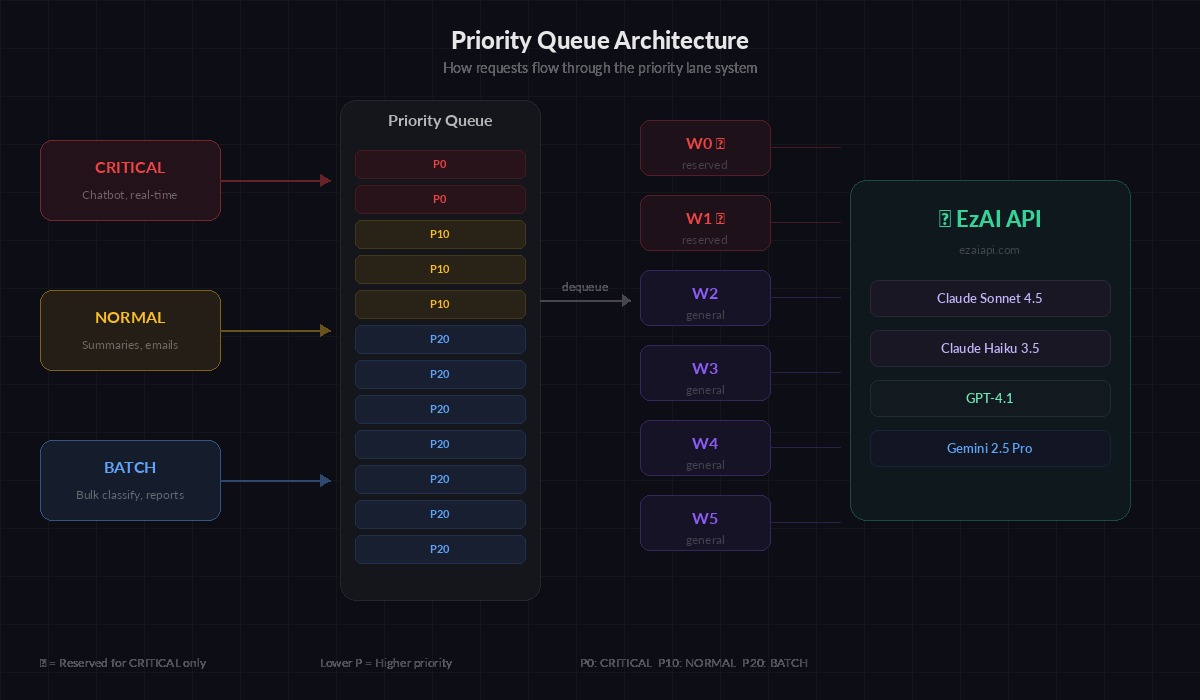
Requests enter the priority queue by lane, workers dequeue highest-priority first
The design is straightforward: wrap Python's asyncio.PriorityQueue with a worker pool that respects lane priorities. Lower priority numbers get dequeued first. Each request carries a priority, a future for the caller to await, and the actual API call parameters.
import asyncio
import time
from dataclasses import dataclass, field
from enum import IntEnum
from typing import Any

import anthropic


class Priority(IntEnum):
    CRITICAL = 0   # user-facing, real-time
    NORMAL = 10     # background tasks
    BATCH = 20      # bulk processing


@dataclass(order=True)
class QueuedRequest:
    priority: int
    timestamp: float = field(compare=True)
    future: asyncio.Future = field(compare=False)
    model: str = field(compare=False)
    messages: list = field(compare=False)
    max_tokens: int = field(default=1024, compare=False)
    kwargs: dict = field(default_factory=dict, compare=False)
The @dataclass(order=True) decorator lets Python's priority queue compare requests by priority first, then by timestamp for FIFO ordering within the same lane. The future field is excluded from comparison — it's how the caller gets the result back.
Building the Priority Queue Manager
The queue manager owns the worker pool, tracks per-lane metrics, and enforces concurrency limits. Each worker pulls the highest-priority request, calls the EzAI API, and resolves the caller's future.
class AIRequestQueue:
    def __init__(self, api_key: str, max_workers: int = 8):
        self.client = anthropic.AsyncAnthropic(
            api_key=api_key,
            base_url="https://ezaiapi.com"
        )
        self.queue: asyncio.PriorityQueue = asyncio.PriorityQueue()
        self.max_workers = max_workers
        self.workers: list[asyncio.Task] = []
        self.metrics = {p.name: {"processed": 0, "total_wait_ms": 0} for p in Priority}
        self._running = False

    async def start(self):
        """Spin up worker tasks."""
        self._running = True
        self.workers = [
            asyncio.create_task(self._worker(i))
            for i in range(self.max_workers)
        ]

    async def stop(self):
        """Drain queue and shut down workers."""
        self._running = False
        for w in self.workers:
            w.cancel()
        await asyncio.gather(*self.workers, return_exceptions=True)

    async def submit(
        self,
        messages: list,
        model: str = "claude-sonnet-4-5",
        priority: Priority = Priority.NORMAL,
        max_tokens: int = 1024,
        **kwargs
    ) -> Any:
        """Submit a request and await its result."""
        future = asyncio.get_event_loop().create_future()
        req = QueuedRequest(
            priority=priority.value,
            timestamp=time.monotonic(),
            future=future,
            model=model,
            messages=messages,
            max_tokens=max_tokens,
            kwargs=kwargs
        )
        await self.queue.put(req)
        return await future

    async def _worker(self, worker_id: int):
        while self._running:
            try:
                req: QueuedRequest = await asyncio.wait_for(
                    self.queue.get(), timeout=1.0
                )
            except asyncio.TimeoutError:
                continue

            wait_ms = (time.monotonic() - req.timestamp) * 1000
            lane = Priority(req.priority).name
            self.metrics[lane]["total_wait_ms"] += wait_ms
            self.metrics[lane]["processed"] += 1

            try:
                result = await self.client.messages.create(
                    model=req.model,
                    max_tokens=req.max_tokens,
                    messages=req.messages,
                    **req.kwargs
                )
                req.future.set_result(result)
            except Exception as e:
                req.future.set_exception(e)
Each worker runs in a tight loop: pull from queue, call the API, resolve the future. The caller's await submit(...) unblocks the moment its specific request completes. Critical requests jump ahead of batch jobs automatically because PriorityQueue always dequeues the lowest value first.
Using It in Your Application
Here's how you'd wire this into a real application with mixed workloads. The chatbot endpoint submits as CRITICAL, while your background pipeline uses BATCH:
async def main():
    queue = AIRequestQueue(api_key="sk-your-key", max_workers=6)
    await queue.start()

    # Simulate mixed workload
    batch_tasks = [
        queue.submit(
            messages=[{"role": "user", "content": f"Classify this document: {doc}"}],
            model="claude-haiku-3-5",
            priority=Priority.BATCH,
            max_tokens=64
        )
        for doc in documents[:100]
    ]

    # This critical request jumps ahead of all 100 batch jobs
    chat_response = await queue.submit(
        messages=[{"role": "user", "content": "Explain quantum computing"}],
        model="claude-sonnet-4-5",
        priority=Priority.CRITICAL
    )
    print(chat_response.content[0].text)

    # Batch jobs complete in the background
    results = await asyncio.gather(*batch_tasks)
    print(f"Classified {len(results)} documents")

    # Check per-lane metrics
    for lane, stats in queue.metrics.items():
        if stats["processed"] > 0:
            avg = stats["total_wait_ms"] / stats["processed"]
            print(f"{lane}: {stats['processed']} reqs, avg wait {avg:.0f}ms")

    await queue.stop()

asyncio.run(main())
Even though 100 batch requests hit the queue first, the critical chat request gets picked up by the next available worker immediately. In practice, we see critical-lane wait times stay under 50ms even with 500+ batch jobs in the queue.
Adding Starvation Prevention
Pure priority ordering has a trap: if critical and normal requests keep flowing, batch jobs never run. You need a starvation guard. The simplest approach is age-based priority boosting — if a batch request has been waiting longer than a threshold, temporarily bump its priority:
class AIRequestQueueWithFairness(AIRequestQueue):
    """Extends base queue with starvation prevention."""

    BOOST_AFTER_SEC = 30  # boost batch after 30s waiting
    RESERVED_WORKERS = 2  # always keep 2 workers for critical

    async def _worker(self, worker_id: int):
        is_reserved = worker_id < self.RESERVED_WORKERS

        while self._running:
            try:
                req = await asyncio.wait_for(
                    self.queue.get(), timeout=1.0
                )
            except asyncio.TimeoutError:
                continue

            # Reserved workers only handle CRITICAL requests
            if is_reserved and req.priority > Priority.CRITICAL:
                await self.queue.put(req)  # re-queue for other workers
                await asyncio.sleep(0.05)  # avoid busy loop
                continue

            # Process normally...
            try:
                result = await self.client.messages.create(
                    model=req.model,
                    max_tokens=req.max_tokens,
                    messages=req.messages,
                    **req.kwargs
                )
                req.future.set_result(result)
            except Exception as e:
                req.future.set_exception(e)
The reserved worker pattern is more practical than priority boosting for most applications. Workers 0 and 1 exclusively handle critical requests, while workers 2-7 handle everything. This guarantees at least two concurrent slots are always available for user-facing calls, regardless of queue depth.
Monitoring and Tuning
Track three numbers per lane: queue depth (how many requests are waiting), p50 wait time (median time from submission to dequeue), and throughput (requests completed per minute). Here's a simple stats endpoint:
def get_queue_stats(queue: AIRequestQueue) -> dict:
    stats = {"queue_depth": queue.queue.qsize(), "lanes": {}}
    for lane, m in queue.metrics.items():
        count = m["processed"]
        stats["lanes"][lane] = {
            "processed": count,
            "avg_wait_ms": m["total_wait_ms"] / count if count else 0
        }
    return stats

# Example output:
# {"queue_depth": 47, "lanes": {
#   "CRITICAL": {"processed": 312, "avg_wait_ms": 23},
#   "NORMAL":   {"processed": 1840, "avg_wait_ms": 890},
#   "BATCH":    {"processed": 15420, "avg_wait_ms": 4200}
# }}
If critical wait times exceed 100ms, increase RESERVED_WORKERS or add more workers. If batch wait times exceed your SLA, consider splitting batch work into a separate queue with its own API key to avoid competing for the same rate limit budget.
Production Considerations
A few things to handle before deploying this to production:
- Retry integration — wrap the API call with exponential backoff. Re-queue failed requests at their original priority, not the back of the line.
- Timeout per lane — critical requests should timeout after 30s (fail fast for the user), batch requests can wait 5 minutes. Set
asyncio.wait_foron the future, not just the API call. - Queue size limits — use
asyncio.PriorityQueue(maxsize=1000)to apply backpressure. When the queue is full, the caller blocks onsubmit()until a slot opens, preventing unbounded memory growth. - Graceful shutdown — on SIGTERM, stop accepting new requests, drain the existing queue, then exit. Don't drop in-flight requests.
- Multi-model routing — batch jobs typically use cheaper models like
claude-haiku-3-5while critical paths useclaude-sonnet-4-5. The queue handles this naturally since model selection is per-request.
The full implementation above runs with any Anthropic-compatible API. Since EzAI is a drop-in proxy, you just change the base_url and everything works — priority queuing, streaming, extended thinking, all of it.
When Not to Use Priority Queuing
If your application only has one type of workload — say, just a chatbot — a simple semaphore is simpler and just as effective. Priority queuing pays off when you have mixed workloads competing for the same API budget. Typical scenarios: a SaaS product with real-time features plus background processing, a data pipeline with both interactive and batch modes, or any system where latency matters for some requests but not others.
The code in this post is production-ready. Copy the AIRequestQueue class, adjust max_workers to match your rate limit, and start submitting requests with explicit priorities. Your users won't know — they'll just notice the chatbot got faster.