Every production codebase that touches an AI API eventually hits the same wall: prompts scattered across files, duplicated logic in every handler, and zero ability to A/B test or version anything. The fix isn't a framework — it's a pattern. This guide walks through building reusable prompt templates in Python and TypeScript that you can version, test, and swap without redeploying your app.
Why Raw Strings Break at Scale
Most AI integrations start the same way. You concatenate a string, ship it to the API, and move on. Three months later, the same prompt exists in fourteen places with slightly different wording, and nobody knows which version performs better.
The core problems with raw prompt strings:
- No type safety — missing a variable silently produces garbage output
- No versioning — you can't roll back a prompt change without a full redeploy
- No testability — you can't unit test prompt construction separate from API calls
- Injection risk — user input injected directly into prompts opens the door to prompt injection
- Duplication — shared logic (output format, tone, guardrails) gets copy-pasted everywhere
The solution is straightforward: treat prompts like code. Give them types, versions, and tests.
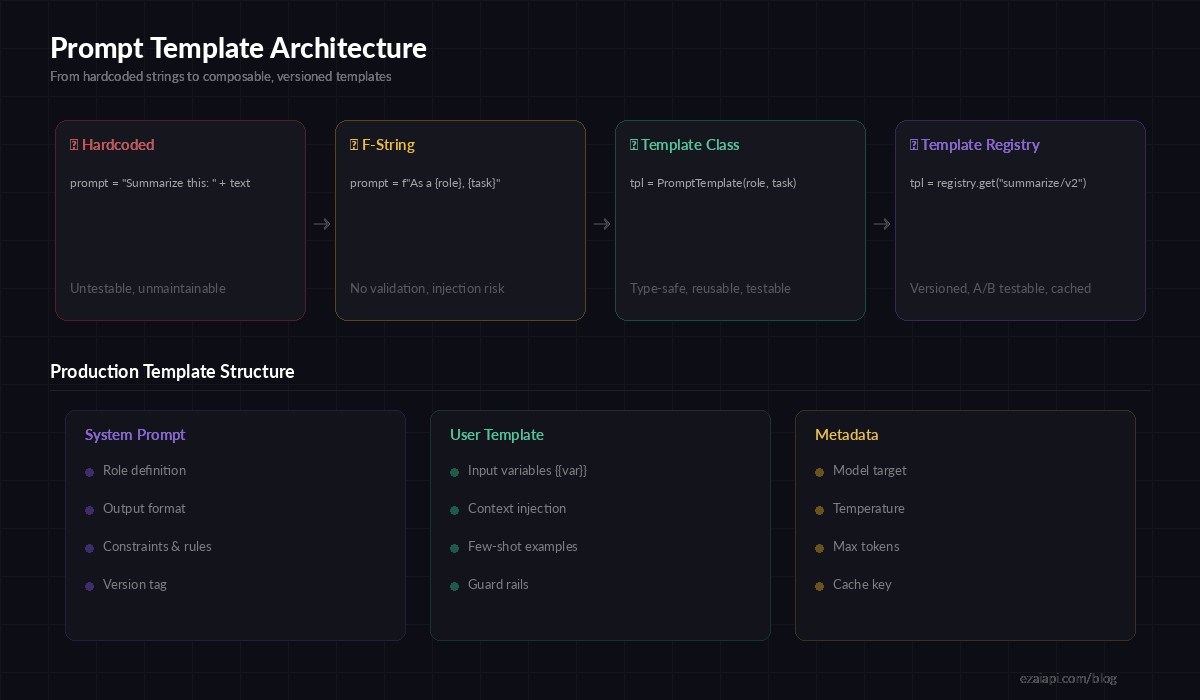
Evolution of prompt management — from raw strings to versioned template registries
Building a Prompt Template Class in Python
Start with a minimal template class that validates variables at construction time. This catches missing or extra variables before the prompt ever reaches the API.
import re
from dataclasses import dataclass, field

@dataclass
class PromptTemplate:
    name: str
    system: str
    user: str
    model: str = "claude-sonnet-4-20250514"
    temperature: float = 0.3
    max_tokens: int = 2048
    version: str = "1.0"

    def _extract_vars(self, template: str) -> set:
        return set(re.findall(r"\{\{(\w+)\}\}", template))

    def render(self, **kwargs) -> dict:
        # Validate all variables are provided
        required = self._extract_vars(self.system) | self._extract_vars(self.user)
        provided = set(kwargs.keys())

        missing = required - provided
        if missing:
            raise ValueError(f"Missing variables: {missing}")

        # Replace {{var}} with values, escaping user input
        def replace(template):
            for key, val in kwargs.items():
                template = template.replace(f"{{{{{key}}}}}", str(val))
            return template

        return {
            "model": self.model,
            "max_tokens": self.max_tokens,
            "temperature": self.temperature,
            "system": replace(self.system),
            "messages": [{"role": "user", "content": replace(self.user)}],
        }
This gives you three things for free: variable validation catches typos at construction time, the render() output is exactly what the Anthropic API expects, and each template carries its own model and sampling config.
Defining Templates as Data
With the class in place, define your templates as standalone objects. Keep them in a dedicated file — prompts.py or prompts/ directory — separate from business logic.
SUMMARIZE = PromptTemplate(
    name="summarize/v2",
    version="2.0",
    model="claude-sonnet-4-20250514",
    temperature=0.2,
    max_tokens=1024,
    system="""You are a technical writer. Summarize the given text in {{style}} style.
Output exactly {{count}} bullet points. Each bullet must be one sentence.
Do not add introductions or conclusions.""",
    user="Summarize this:\n\n{{text}}",
)

CODE_REVIEW = PromptTemplate(
    name="code-review/v1",
    version="1.0",
    model="claude-sonnet-4-20250514",
    temperature=0.1,
    max_tokens=4096,
    system="""You are a senior {{language}} developer reviewing code.
Focus on: bugs, security issues, performance, readability.
Rate severity as Critical/High/Medium/Low.
Output as JSON array: [{"issue": "...", "severity": "...", "line": N, "fix": "..."}]""",
    user="Review this {{language}} code:\n\n```{{language}}\n{{code}}\n```",
)
Each template is self-documenting. A new engineer can read SUMMARIZE and immediately understand what it does, which model it targets, and what variables it expects — without reading the calling code.
Calling EzAI with Templates
Wire the template into your API client with a thin wrapper. This keeps the calling code minimal and the template logic centralized.
import anthropic

client = anthropic.Anthropic(
    api_key="sk-your-key",
    base_url="https://ezaiapi.com",
)

def run_template(template: PromptTemplate, **kwargs) -> str:
    params = template.render(**kwargs)
    system = params.pop("system")
    temperature = params.pop("temperature")

    response = client.messages.create(
        system=system,
        temperature=temperature,
        **params,
    )
    return response.content[0].text

# Usage — clean, readable, type-safe
summary = run_template(
    SUMMARIZE,
    text=article_body,
    style="concise",
    count="5",
)

review = run_template(
    CODE_REVIEW,
    language="python",
    code=pr_diff,
)
Notice what's missing: no string concatenation, no duplicated model config, no f-strings with user input. The template handles all of it.
TypeScript Version
The same pattern works in TypeScript. Here's a version with TypeScript generics for compile-time variable checking.
import Anthropic from "@anthropic-ai/sdk";

interface TemplateConfig {
  name: string;
  system: string;
  user: string;
  model?: string;
  temperature?: number;
  maxTokens?: number;
}

function renderTemplate(
  tpl: TemplateConfig,
  vars: Record<string, string>
) {
  const fill = (s: string) =>
    s.replace(/\{\{(\w+)\}\}/g, (_, k) => {
      if (!(k in vars)) throw new Error(`Missing: ${k}`);
      return vars[k];
    });

  return {
    model: tpl.model ?? "claude-sonnet-4-20250514",
    max_tokens: tpl.maxTokens ?? 2048,
    system: fill(tpl.system),
    messages: [{ role: "user" as const, content: fill(tpl.user) }],
  };
}

const client = new Anthropic({
  apiKey: "sk-your-key",
  baseURL: "https://ezaiapi.com",
});

// Usage
const params = renderTemplate(SUMMARIZE_TPL, {
  text: articleBody,
  style: "concise",
  count: "5",
});
const msg = await client.messages.create(params);
Building a Template Registry
Once you have more than a handful of templates, a registry lets you load them by name and version at runtime. This is what unlocks A/B testing — you can route 10% of traffic to summarize/v3 while the rest stays on summarize/v2 without touching any application code.
import json, random
from pathlib import Path

class TemplateRegistry:
    def __init__(self, directory: str = "./prompts"):
        self._templates: dict[str, PromptTemplate] = {}
        self._ab_tests: dict[str, list] = {}
        self._load_dir(directory)

    def _load_dir(self, directory: str):
        for path in Path(directory).glob("*.json"):
            data = json.loads(path.read_text())
            tpl = PromptTemplate(**data)
            self._templates[tpl.name] = tpl

    def get(self, name: str) -> PromptTemplate:
        # Check for A/B test first
        if name in self._ab_tests:
            variants = self._ab_tests[name]
            return random.choices(
                [v["template"] for v in variants],
                weights=[v["weight"] for v in variants],
            )[0]
        return self._templates[name]

    def ab_test(self, name: str, variants: list[tuple]):
        """Register A/B test: [("summarize/v2", 0.9), ("summarize/v3", 0.1)]"""
        self._ab_tests[name] = [
            {"template": self._templates[n], "weight": w}
            for n, w in variants
        ]

# Initialize once at app start
registry = TemplateRegistry("./prompts")
registry.ab_test("summarize", [("summarize/v2", 0.9), ("summarize/v3", 0.1)])
Now your product team can tweak prompts by editing JSON files and adjusting traffic splits. No deploys. No code changes. The engineering team ships the plumbing once and the prompt iteration happens at the data layer.
Testing Templates
Templates are pure functions — given the same variables, they produce the same output. That makes them trivially testable. Write unit tests for the template construction, not for the AI response.
import pytest

def test_summarize_renders_correctly():
    result = SUMMARIZE.render(text="Hello world", style="concise", count="3")
    assert "concise" in result["system"]
    assert "Hello world" in result["messages"][0]["content"]
    assert result["model"] == "claude-sonnet-4-20250514"

def test_missing_variable_raises():
    with pytest.raises(ValueError, match="Missing variables"):
        SUMMARIZE.render(text="Hello")  # missing style, count

def test_code_review_uses_low_temperature():
    result = CODE_REVIEW.render(language="python", code="x = 1")
    assert result["temperature"] == 0.1
These tests run in milliseconds with zero API calls. They catch the bugs that actually bite you in production: wrong model, missing variables, incorrect temperature for deterministic tasks.
Production Checklist
Before shipping prompt templates to production, run through this list:
- Separate prompts from code — store templates in
/promptsor a database, not inline - Version every template — use
name/v1,name/v2naming so rollbacks are trivial - Log which template version was used — attach
template_nameandtemplate_versionto your request logs - Validate at boot — load all templates when the app starts and fail fast if any are malformed
- Sanitize user input — never trust
{{text}}from users; strip or escape prompt-injection patterns - Set model per template — use cheaper models for simple tasks, expensive ones for complex reasoning
- Monitor cost per template — track token usage by template name in your EzAI dashboard
Where to Go Next
Prompt templates are the foundation. Once you've got them, the next steps are adding prompt caching to avoid redundant API calls, building A/B testing infrastructure on top of the registry pattern, and integrating structured output so the AI always returns parseable JSON.
The pattern scales from a solo developer with three templates to a team with hundreds. Start small, version everything, and let the templates evolve with your product.