Embeddings turn text into dense numeric vectors that capture meaning. Two sentences about the same concept land close together in vector space, even when they share zero words. This is the foundation behind semantic search, recommendation systems, duplicate detection, and RAG pipelines — and you can generate them through EzAI's OpenAI-compatible /v1/embeddings endpoint in a single API call.
This guide walks through generating embeddings, computing similarity, chunking documents, and building a nearest-neighbor search index. All code hits ezaiapi.com directly — no provider-specific SDK required.
What Are Embeddings and Why They Matter
A text embedding is a fixed-length array of floats (typically 1536 or 3072 dimensions) that represents the semantic content of a string. Unlike keyword matching, embeddings understand that "how to fix a memory leak" and "debugging OOM errors in production" are related — because the model learned those associations from billions of tokens.
Practical use cases break down into three buckets:
- Semantic search — find documents by meaning, not keywords
- RAG (retrieval-augmented generation) — feed relevant context to an LLM before it answers
- Clustering and classification — group similar items, detect duplicates, build recommendation engines
EzAI proxies OpenAI's embedding models through the standard /v1/embeddings endpoint. You get the same vectors at a lower cost, and your existing OpenAI-compatible code works without changes. Check the pricing page for current embedding model rates.
Generate Embeddings with Python
The simplest way to generate embeddings: send a POST request with your text and model name. Here's a complete Python example using httpx:
import httpx

EZAI_KEY = "your-ezai-api-key"
BASE_URL = "https://api.ezaiapi.com/v1"

def get_embedding(text: str, model: str = "text-embedding-3-small") -> list[float]:
    resp = httpx.post(
        f"{BASE_URL}/embeddings",
        headers={"Authorization": f"Bearer {EZAI_KEY}"},
        json={"input": text, "model": model},
        timeout=30,
    )
    resp.raise_for_status()
    return resp.json()["data"][0]["embedding"]

# Generate a single embedding
vec = get_embedding("How to deploy a FastAPI app on Kubernetes")
print(f"Dimensions: {len(vec)}")  # 1536 for text-embedding-3-small
The response follows the standard OpenAI format — an array of objects with embedding and index fields. You can also pass a list of strings to input to embed multiple texts in one request, which cuts round-trip overhead significantly.
Batch Embeddings for Performance
When you have hundreds or thousands of documents, batching is critical. The API accepts up to 2048 inputs per request. Here's how to process a corpus efficiently:
import httpx
from itertools import batched  # Python 3.12+

def embed_batch(texts: list[str], batch_size: int = 256) -> list[list[float]]:
    """Embed a list of texts in batches through EzAI."""
    all_embeddings = []
    client = httpx.Client(timeout=60)

    for chunk in batched(texts, batch_size):
        resp = client.post(
            "https://api.ezaiapi.com/v1/embeddings",
            headers={"Authorization": f"Bearer {EZAI_KEY}"},
            json={"input": list(chunk), "model": "text-embedding-3-small"},
        )
        resp.raise_for_status()
        vecs = [d["embedding"] for d in resp.json()["data"]]
        all_embeddings.extend(vecs)

    return all_embeddings

# Embed 1000 docs in 4 round-trips instead of 1000
docs = ["doc text..."] * 1000
vectors = embed_batch(docs)
print(f"Embedded {len(vectors)} documents")
Batching 256 texts per request means 1000 documents only takes 4 API calls. If you're embedding an entire codebase or knowledge base, this saves minutes of wall-clock time and avoids rate limit issues.
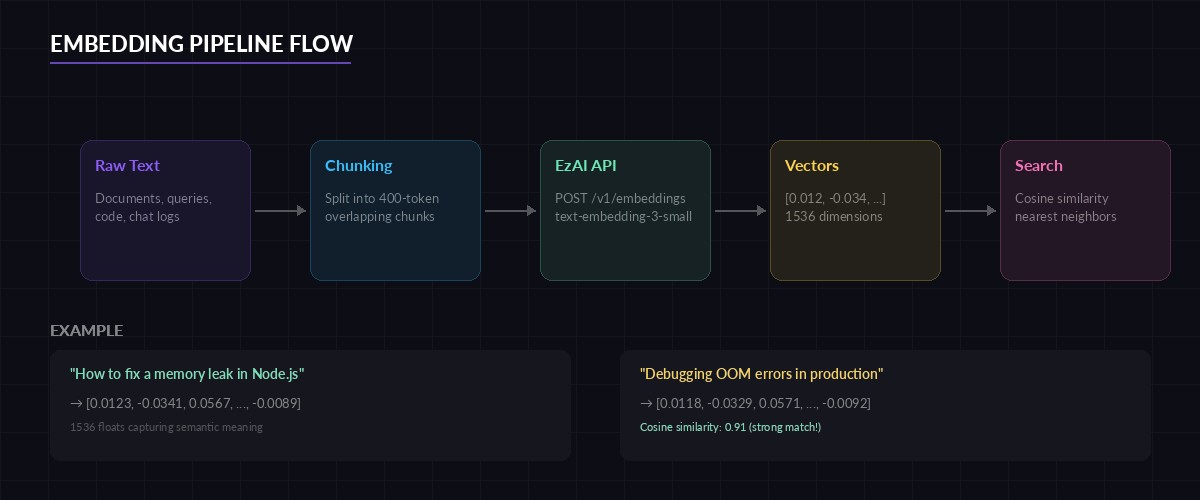
End-to-end embedding pipeline — from raw text through vector storage to nearest-neighbor retrieval
Cosine Similarity: Finding Related Content
Once you have vectors, finding related content means computing the cosine similarity between them. Cosine similarity ranges from -1 (opposite) to 1 (identical). In practice, embedding vectors are normalized, so anything above 0.8 is a strong match:
import numpy as np

def cosine_sim(a: list[float], b: list[float]) -> float:
    a, b = np.array(a), np.array(b)
    return float(np.dot(a, b) / (np.linalg.norm(a) * np.linalg.norm(b)))

# Compare two queries
v1 = get_embedding("kubernetes pod crash loop")
v2 = get_embedding("container restarting repeatedly in k8s")
v3 = get_embedding("best pizza recipe for beginners")

print(f"k8s vs k8s rephrased: {cosine_sim(v1, v2):.4f}")  # ~0.91
print(f"k8s vs pizza:        {cosine_sim(v1, v3):.4f}")  # ~0.12
The two Kubernetes queries score above 0.9 despite sharing almost no words. The pizza query scores near zero. That's the power of semantic understanding — and why embeddings beat TF-IDF for search.
Build a Nearest-Neighbor Search Index
For small datasets (under 100k vectors), a NumPy brute-force search is fine. For anything larger, use an approximate nearest-neighbor (ANN) library. Here's both approaches:
import numpy as np

class VectorIndex:
    """Simple brute-force vector search. Good for <100k docs."""

    def __init__(self):
        self.texts: list[str] = []
        self.vectors: list[np.ndarray] = []

    def add(self, text: str, vector: list[float]):
        self.texts.append(text)
        self.vectors.append(np.array(vector))

    def search(self, query_vec: list[float], top_k: int = 5):
        q = np.array(query_vec)
        matrix = np.stack(self.vectors)
        # Cosine similarity via dot product (vectors are normalized)
        scores = matrix @ q / (
            np.linalg.norm(matrix, axis=1) * np.linalg.norm(q)
        )
        top_idx = np.argsort(scores)[-top_k:][::-1]
        return [(self.texts[i], float(scores[i])) for i in top_idx]

# Usage
index = VectorIndex()
docs = [
    "Setting up CI/CD with GitHub Actions",
    "Debugging memory leaks in Node.js apps",
    "PostgreSQL query optimization techniques",
    "Deploying containers to AWS ECS",
    "React performance tuning with memo and useMemo",
]
vectors = embed_batch(docs)

for doc, vec in zip(docs, vectors):
    index.add(doc, vec)

# Search
query = get_embedding("how to speed up database queries")
results = index.search(query, top_k=3)
for text, score in results:
    print(f"{score:.3f}  {text}")
This returns "PostgreSQL query optimization techniques" first, even though the query uses completely different words. For production workloads with millions of vectors, swap the brute-force index for FAISS or a managed vector database like Pinecone or Qdrant.
Chunking Documents for Better Retrieval
Long documents need to be split into chunks before embedding. Embedding an entire 10-page document into a single vector loses specificity — the vector becomes an average of everything. Chunk at 200-500 tokens with 50-token overlap for best results:
def chunk_text(text: str, max_tokens: int = 400, overlap: int = 50) -> list[str]:
    """Split text into overlapping chunks by word count (rough token proxy)."""
    words = text.split()
    chunks = []
    start = 0
    while start < len(words):
        end = start + max_tokens
        chunk = " ".join(words[start:end])
        chunks.append(chunk)
        start += max_tokens - overlap
    return chunks

# Chunk a long document, then embed each piece
long_doc = open("architecture.md").read()
chunks = chunk_text(long_doc)
chunk_vectors = embed_batch(chunks)

# Store chunks with metadata for retrieval
for i, (chunk, vec) in enumerate(zip(chunks, chunk_vectors)):
    index.add(f"[chunk {i}] {chunk[:80]}...", vec)
The 50-token overlap ensures context isn't lost at chunk boundaries. When a user queries "how does the auth middleware work," the search finds the specific chunk covering that section, not a vague whole-document embedding.
Node.js: Embeddings with fetch
The same workflow in Node.js — zero dependencies beyond the built-in fetch:
const EZAI_KEY = process.env.EZAI_API_KEY;

async function getEmbedding(text) {
  const res = await fetch("https://api.ezaiapi.com/v1/embeddings", {
    method: "POST",
    headers: {
      "Authorization": `Bearer ${EZAI_KEY}`,
      "Content-Type": "application/json",
    },
    body: JSON.stringify({
      input: text,
      model: "text-embedding-3-small",
    }),
  });
  const data = await res.json();
  return data.data[0].embedding;
}

// Cosine similarity
function cosineSim(a, b) {
  let dot = 0, normA = 0, normB = 0;
  for (let i = 0; i < a.length; i++) {
    dot += a[i] * b[i];
    normA += a[i] ** 2;
    normB += b[i] ** 2;
  }
  return dot / (Math.sqrt(normA) * Math.sqrt(normB));
}

// Compare two queries
const v1 = await getEmbedding("fix slow API response time");
const v2 = await getEmbedding("reduce latency in REST endpoints");
console.log(`Similarity: ${cosineSim(v1, v2).toFixed(4)}`); // ~0.89
Choosing the Right Embedding Model
EzAI supports multiple embedding models through the same endpoint. Your choice depends on the tradeoff between cost, speed, and quality:
- text-embedding-3-small (1536 dims) — Best value. Fast, cheap, good enough for 90% of use cases. Use this unless you have a specific reason not to.
- text-embedding-3-large (3072 dims) — Higher dimensional, slightly better accuracy on benchmarks. Worth it for large-scale retrieval where a 2-3% precision gain matters.
- text-embedding-ada-002 (1536 dims) — Legacy model. Still works, but
3-smalloutperforms it at lower cost. Migrate away if you're still using it.
For most teams building RAG pipelines or semantic search, text-embedding-3-small is the right default. The cost difference between small and large adds up fast when you're embedding millions of chunks. Check the API docs for the complete model list and dimension options.
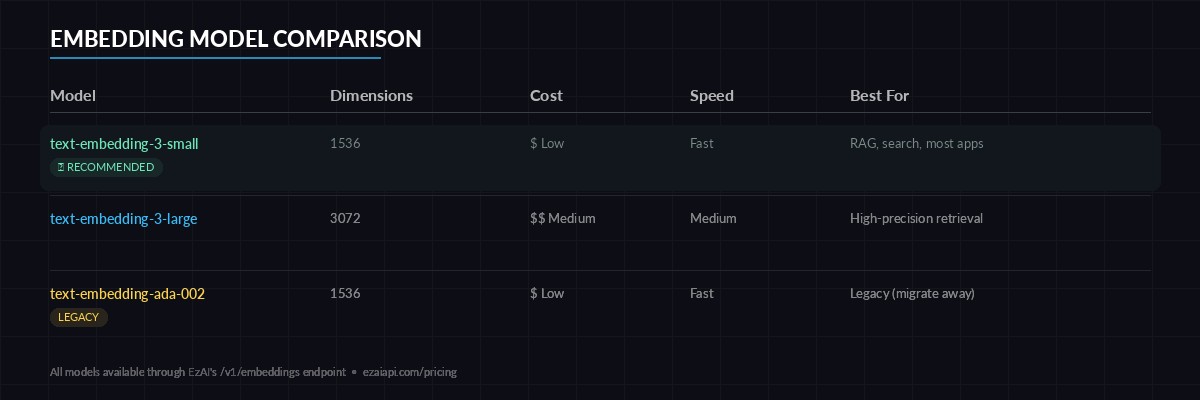
Embedding model comparison — dimensions, relative cost, and recommended use cases
Production Tips
A few things that'll save you headaches when shipping embeddings to production:
- Cache aggressively. Embedding the same text twice is wasted money. Hash your input and check a cache (Redis, SQLite, even a dict) before making an API call.
- Normalize on storage. If you pre-normalize vectors to unit length, cosine similarity becomes a simple dot product — which is 2-3x faster to compute.
- Version your embeddings. When you switch models (e.g., ada-002 to 3-small), old vectors are incompatible. Re-embed everything or keep model info in your metadata.
- Chunk size matters more than model choice. A 400-token chunk with
3-smallalmost always beats a 2000-token chunk with3-largefor retrieval precision. - Use cost reduction strategies — batch requests, cache results, and avoid re-embedding unchanged documents.
Embeddings are the glue between unstructured text and structured retrieval. With EzAI's /v1/embeddings endpoint, you get OpenAI-compatible vectors at a fraction of the direct cost — no SDK changes, no new authentication flow, just swap your base URL and go. Pair embeddings with a RAG chatbot or semantic search to put them to real use.
Sign up at ezaiapi.com and start embedding. Your first 15 credits are free.