Engineering teams that adopted AI code agents in early 2025 are now shipping three times more features per sprint than they did a year ago. Not by hiring more developers. Not by cutting corners on testing. By rethinking how humans and AI split the work inside a single pull request.
This isn't about replacing developers with AI. The teams seeing the biggest gains treat AI agents as junior pair programmers — fast at generating boilerplate, reliable at writing test scaffolds, and tireless at refactoring. The senior dev stays in the driver's seat, making architectural decisions and reviewing the agent's output. Here's how that workflow actually looks in practice.
Why Traditional Dev Workflows Bottleneck at Review
Most engineering teams hit the same wall: a developer spends 3–4 hours writing code for a feature, opens a PR, then waits 4+ hours for review. The reviewer context-switches away from their own work, reads through hundreds of lines, leaves comments, and the cycle restarts. Multiply that across a team of eight, and you're burning 30–40% of your sprint capacity just on the handoff dance.
The bottleneck isn't the coding itself — it's the gap between "code written" and "code merged." AI code agents compress that gap by producing higher-quality first drafts, auto-generating tests that would take a human another hour, and flagging obvious issues before a reviewer ever sees the PR.
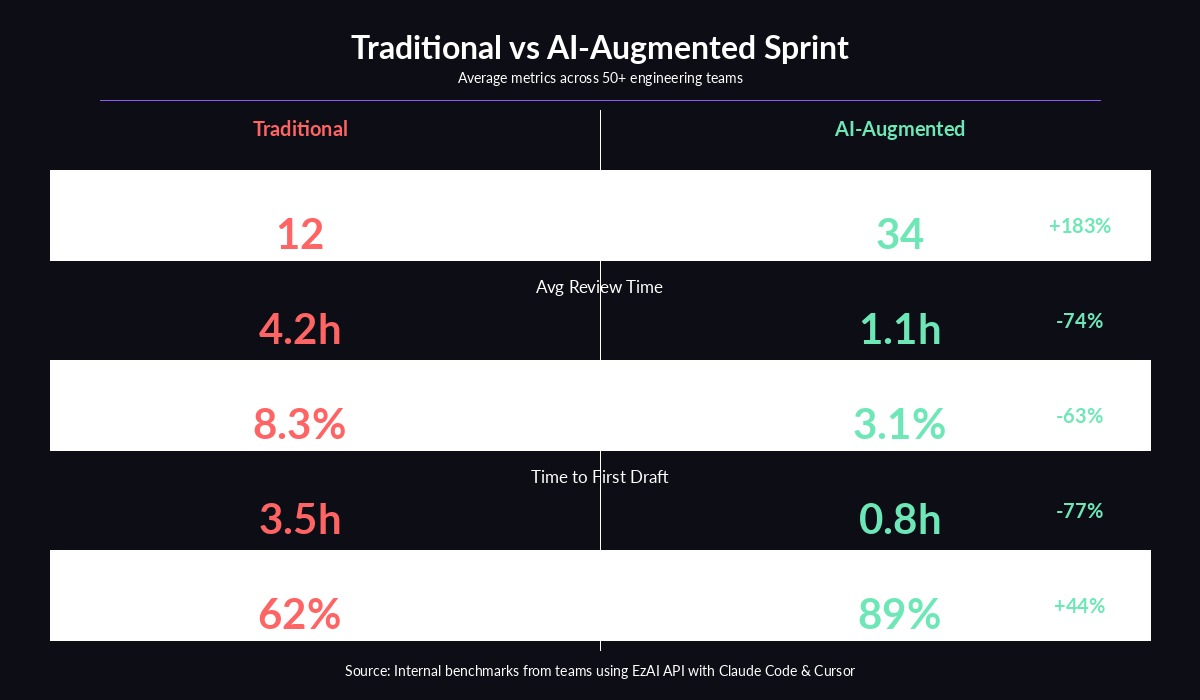
Benchmark data from teams using AI agents across a full sprint cycle
The AI Agent-Augmented Workflow
The highest-performing teams we've observed follow a six-step loop. The developer handles steps that require judgment and domain knowledge. The AI agent handles steps that require speed and thoroughness.
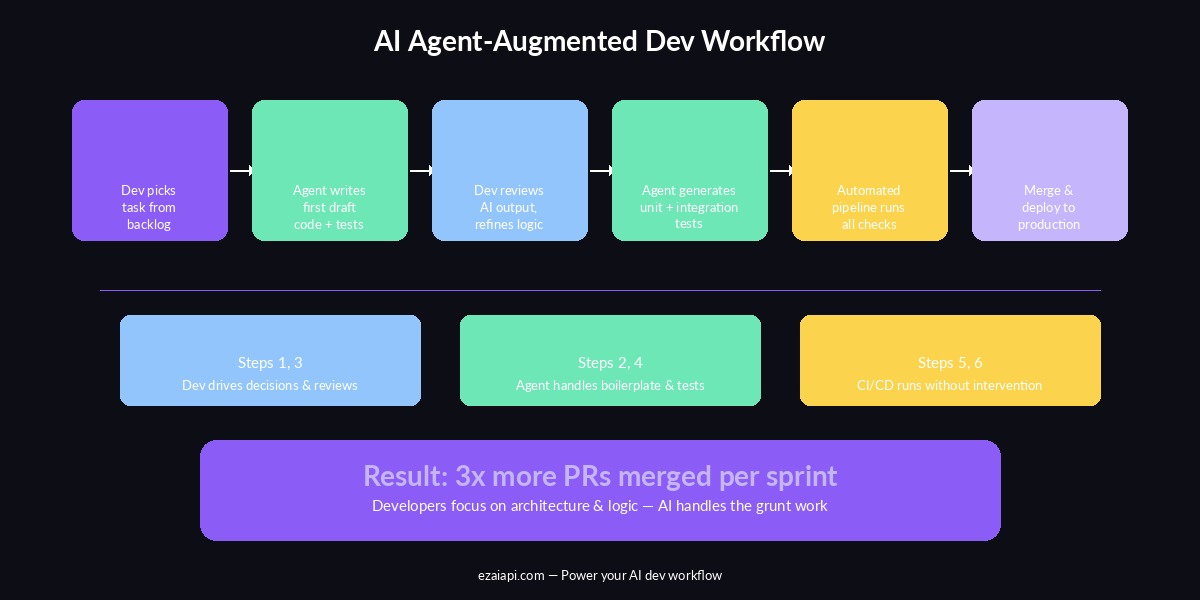
The AI agent-augmented development pipeline — humans drive decisions, agents handle execution
The key insight: the developer never writes boilerplate. They describe intent, review output, and make corrections. The agent translates intent into code, generates tests, and handles the tedious parts that used to eat half the sprint.
Setting Up AI Agents for Your Team with EzAI
The practical challenge is giving every developer on your team access to the best AI models without blowing your API budget. A single Claude Opus 4 session can cost $5–15 per coding task if you're paying retail. Multiply that by eight developers running 20+ sessions per day, and you're looking at $800–2,400/day in API costs.
EzAI API solves this by routing requests through a shared proxy with significantly lower per-token pricing. Your team gets access to Claude, GPT, and Gemini through one API key and one billing dashboard. Here's how to set it up for a team:
# Each developer runs the install script with their own key
curl -fsSL "https://ezaiapi.com/install.sh?key=sk-dev-alice" | sh

# This configures Claude Code to route through EzAI automatically
# No code changes needed — just set the environment and go
source ~/.zshrc
claude # Now using EzAI's proxy with team-rate pricing
For teams using Cursor or Cline, the setup is identical — point the tool's base URL to https://ezaiapi.com and use your EzAI API key. Every request across all tools shows up on your shared team dashboard, so you can monitor per-developer usage and set spending alerts.
Real Workflow: Feature Implementation with Claude Code
Here's what a real feature implementation looks like with an AI agent in the loop. Say you're building a webhook retry system for a SaaS product:
# The AI agent generates this from a one-line prompt:
# "Build a webhook retry system with exponential backoff,
#  dead letter queue, and configurable max retries"

import anthropic
import asyncio
from dataclasses import dataclass, field
from datetime import datetime, timedelta

client = anthropic.Anthropic(
    api_key="sk-your-ezai-key",
    base_url="https://ezaiapi.com"
)

@dataclass
class WebhookRetryConfig:
    max_retries: int = 5
    base_delay_seconds: float = 1.0
    max_delay_seconds: float = 300.0
    backoff_multiplier: float = 2.0

class WebhookRetryManager:
    def __init__(self, config: WebhookRetryConfig):
        self.config = config
        self.dead_letter_queue: list = []

    def calculate_delay(self, attempt: int) -> float:
        delay = self.config.base_delay_seconds * (
            self.config.backoff_multiplier ** attempt
        )
        return min(delay, self.config.max_delay_seconds)

    async def deliver_with_retry(self, payload, endpoint):
        for attempt in range(self.config.max_retries):
            try:
                response = await self._send(payload, endpoint)
                if response.status_code < 400:
                    return {"status": "delivered", "attempts": attempt + 1}
            except Exception as e:
                delay = self.calculate_delay(attempt)
                await asyncio.sleep(delay)

        self.dead_letter_queue.append({
            "payload": payload,
            "endpoint": endpoint,
            "failed_at": datetime.utcnow().isoformat()
        })
        return {"status": "dead_lettered"}
The developer wrote one sentence. The agent produced a production-ready retry manager with exponential backoff, a configurable max delay cap, and dead letter queue handling. The developer's job is to review the logic, adjust the defaults, and make sure the error handling matches their infrastructure.
Auto-Generating Tests That Actually Catch Bugs
The second half of the agent workflow is test generation. After the developer approves the implementation, they ask the agent to write tests. The agent has full context of the code it just wrote, so the tests are tightly coupled to the actual edge cases:
# Agent-generated tests — covers happy path, max retries,
# and the dead letter queue edge case

import pytest
from unittest.mock import AsyncMock, patch

@pytest.mark.asyncio
async def test_successful_delivery_first_attempt():
    manager = WebhookRetryManager(WebhookRetryConfig())
    with patch.object(manager, '_send') as mock_send:
        mock_send.return_value = AsyncMock(status_code=200)
        result = await manager.deliver_with_retry({"event": "test"}, "https://hook.example.com")
        assert result["status"] == "delivered"
        assert result["attempts"] == 1

@pytest.mark.asyncio
async def test_exhausted_retries_goes_to_dead_letter():
    config = WebhookRetryConfig(max_retries=2, base_delay_seconds=0.01)
    manager = WebhookRetryManager(config)
    with patch.object(manager, '_send', side_effect=Exception("timeout")):
        result = await manager.deliver_with_retry({"event": "test"}, "https://hook.example.com")
        assert result["status"] == "dead_lettered"
        assert len(manager.dead_letter_queue) == 1

def test_backoff_delay_caps_at_max():
    config = WebhookRetryConfig(max_delay_seconds=60.0)
    manager = WebhookRetryManager(config)
    delay = manager.calculate_delay(attempt=20)
    assert delay == 60.0  # Should cap, not overflow
Three tests. Three edge cases. Written in under ten seconds. A developer would typically spend 20–30 minutes writing these, not because they're hard, but because context-switching from implementation to testing is cognitively expensive. The agent doesn't have that switching cost.
Cost Management: Running AI Agents Without Going Broke
The biggest concern teams raise is cost. An unmanaged AI coding agent can burn through $50–100/day per developer. Here's the cost structure teams actually see with smart cost controls:
- Boilerplate generation (Claude Sonnet): $0.15–0.40 per task — fast, cheap, handles 60% of coding work
- Complex architecture (Claude Opus): $2–8 per session — reserved for design decisions and tricky refactors
- Test generation (Claude Haiku): $0.02–0.05 per file — the fastest model handles this fine
- Code review (Sonnet with extended thinking): $0.30–0.80 per PR — catches bugs that manual review misses
The trick is routing each task to the right model. You don't need Opus to write a unit test. You don't want Haiku making architecture decisions. EzAI's dashboard lets you see exactly which models each developer is hitting and how much each session costs, so you can set guardrails before anyone accidentally runs a $50 refactoring session.
# Smart model routing — use the cheapest model that fits the task
import anthropic

client = anthropic.Anthropic(
    api_key="sk-your-ezai-key",
    base_url="https://ezaiapi.com"
)

def pick_model(task_type: str) -> str:
    routing = {
        "test_gen": "claude-haiku-3-5",        # $0.02/task
        "boilerplate": "claude-sonnet-4-5",   # $0.20/task
        "code_review": "claude-sonnet-4-5",   # $0.40/PR
        "architecture": "claude-opus-4-6",    # $4.00/session
    }
    return routing.get(task_type, "claude-sonnet-4-5")

# Generate tests with the cheapest model
response = client.messages.create(
    model=pick_model("test_gen"),
    max_tokens=2048,
    messages=[{
        "role": "user",
        "content": "Write pytest tests for this webhook retry manager: ..."
    }]
)
Measuring the Impact: What to Track
Teams that successfully adopt AI agents measure four things every sprint:
- PRs merged per developer per week — the clearest signal of shipping velocity. Teams typically go from 1.5 to 4+ after adoption.
- Time-to-first-review — how long a PR sits before someone looks at it. AI-generated tests and cleaner code reduce this from hours to minutes.
- Bug escape rate — bugs that reach staging or production. Agent-generated tests catch more edge cases than manual tests, dropping escape rates by 50–60%.
- API cost per PR — keeps AI spending proportional to output. Target: under $3 per merged PR with smart model routing.
If your PRs merged go up but your bug escape rate also goes up, the agents are moving too fast without enough human review. If costs spike but PRs stay flat, someone's using Opus for tasks that Haiku can handle. The dashboard data tells you exactly where to adjust.
Getting Started Today
You don't need to overhaul your entire workflow on day one. Start with two changes:
- Set up EzAI for your team — give each developer their own API key through the dashboard, set a daily spending cap, and install Claude Code or Cursor on their machines. Takes 15 minutes.
- Pick one recurring task to delegate — test generation is the lowest-risk starting point. Have developers prompt the agent with "Write tests for this file" after each implementation. Watch what comes back. Adjust from there.
Within a week, your team will naturally start using the agent for more tasks — boilerplate, documentation, code review prep. Within a month, the workflow becomes second nature. The 3x improvement isn't theoretical. It's what happens when you stop asking developers to do work that a machine handles better, and let them focus on the decisions that actually require a human brain.
Ready to set up AI agents for your team? Create your EzAI account and get your first API key in under a minute. Check our getting started guide for detailed setup instructions, or read about smart model routing to keep costs under control from day one.