
Your AI-powered app handles 500 requests per minute. Then Claude goes down for 90 seconds. Without a circuit breaker, those 500 requests stack up — threads block, memory spikes, timeouts cascade through your entire stack. Users see a blank screen. Your monitoring lights up red across every service, not just the one calling the AI model.
Circuit breakers prevent this exact scenario. Borrowed from electrical engineering, the pattern is simple: track failures, and when they exceed a threshold, stop making calls entirely for a cooldown period. Return a fallback response or a fast error instead of waiting 30 seconds for a timeout you already know is coming.
How Circuit Breakers Work
A circuit breaker has three states:
- Closed — Normal operation. Requests pass through. The breaker tracks consecutive failures.
- Open — Too many failures. All requests are rejected immediately without hitting the API. A timer starts.
- Half-Open — Timer expired. One probe request is allowed through. If it succeeds, the breaker closes. If it fails, it reopens.
The key insight: failing fast is better than failing slow. A 5ms rejection beats a 30-second timeout every time.
Building a Circuit Breaker in Python
Here's a production-grade circuit breaker you can drop into any Python codebase. No external dependencies — just time and threading:
import time, threading
from enum import Enum

class State(Enum):
    CLOSED = "closed"
    OPEN = "open"
    HALF_OPEN = "half_open"

class CircuitBreaker:
    def __init__(self, failure_threshold=5,
                 reset_timeout=60, half_open_max=1):
        self.failure_threshold = failure_threshold
        self.reset_timeout = reset_timeout
        self.half_open_max = half_open_max
        self.failures = 0
        self.state = State.CLOSED
        self.opened_at = 0
        self.lock = threading.Lock()

    def call(self, func, *args, **kwargs):
        with self.lock:
            if self.state == State.OPEN:
                if time.time() - self.opened_at > self.reset_timeout:
                    self.state = State.HALF_OPEN
                else:
                    raise CircuitOpenError(
                        f"Circuit open, retry in "
                        f"{self.reset_timeout - int(time.time() - self.opened_at)}s"
                    )
        try:
            result = func(*args, **kwargs)
            self._on_success()
            return result
        except Exception as e:
            self._on_failure()
            raise

    def _on_success(self):
        with self.lock:
            self.failures = 0
            self.state = State.CLOSED

    def _on_failure(self):
        with self.lock:
            self.failures += 1
            if self.failures >= self.failure_threshold:
                self.state = State.OPEN
                self.opened_at = time.time()

class CircuitOpenError(Exception):
    pass
Wire it into your AI client like this:
import anthropic

client = anthropic.Anthropic(
    api_key="sk-your-key",
    base_url="https://ezaiapi.com"
)

breaker = CircuitBreaker(failure_threshold=3, reset_timeout=30)

def ask_claude(prompt: str) -> str:
    def _call():
        return client.messages.create(
            model="claude-sonnet-4-5",
            max_tokens=1024,
            messages=[{"role": "user", "content": prompt}]
        )
    try:
        response = breaker.call(_call)
        return response.content[0].text
    except CircuitOpenError:
        return "Service temporarily unavailable. Please try again shortly."
    except anthropic.APIStatusError as e:
        if e.status_code == 429:
            return "Rate limited — backing off."
        raise
Three consecutive failures and the breaker opens. For the next 30 seconds, every call returns the fallback string instantly — zero network round-trips, zero wasted threads.
Circuit Breaker States Explained
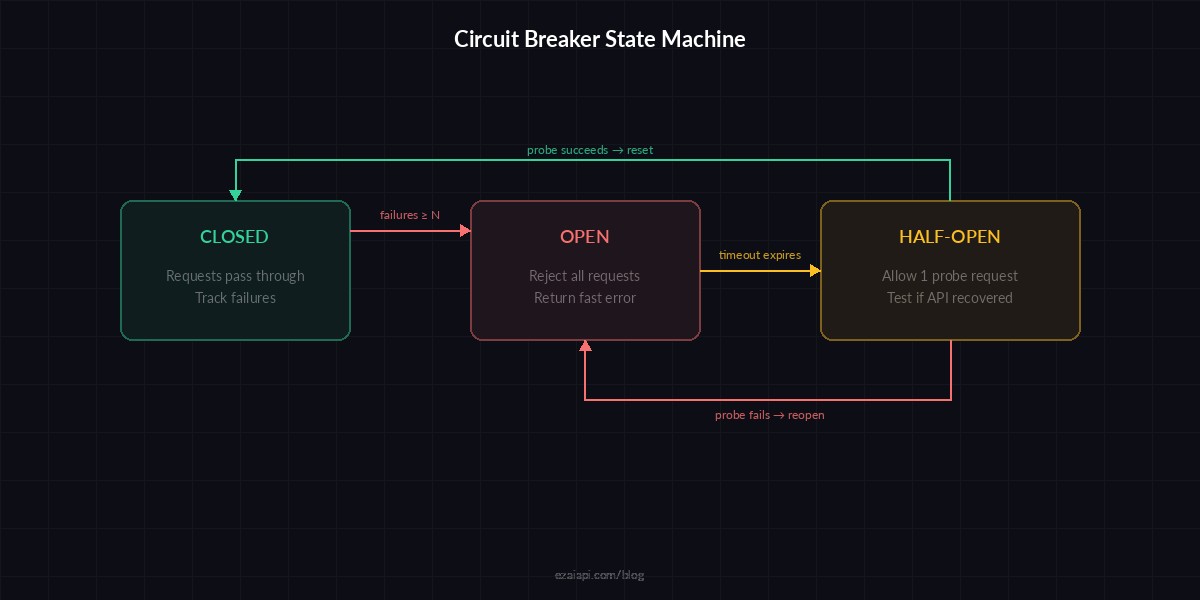
Circuit breaker state machine — failures trip the breaker open, timer allows a probe, success resets
The half-open state is where the magic happens. Instead of slamming the recovering API with your full traffic volume, you send a single probe request. If that probe succeeds, traffic resumes normally. If it fails, the breaker reopens and waits another cooldown cycle. This prevents the "thundering herd" problem where a recovering service gets immediately overwhelmed again.
Node.js Implementation
Same pattern in TypeScript for Node.js backends. This version uses async/await and includes an event emitter for monitoring:
import Anthropic from "@anthropic-ai/sdk";

class CircuitBreaker {
  private failures = 0;
  private state: "closed" | "open" | "half_open" = "closed";
  private openedAt = 0;

  constructor(
    private threshold = 5,
    private resetMs = 60_000
  ) {}

  async exec<T>(fn: () => Promise<T>): Promise<T> {
    if (this.state === "open") {
      if (Date.now() - this.openedAt > this.resetMs) {
        this.state = "half_open";
      } else {
        throw new Error("Circuit open");
      }
    }
    try {
      const result = await fn();
      this.failures = 0;
      this.state = "closed";
      return result;
    } catch (err) {
      this.failures++;
      if (this.failures >= this.threshold) {
        this.state = "open";
        this.openedAt = Date.now();
      }
      throw err;
    }
  }
}

const client = new Anthropic({
  apiKey: "sk-your-key",
  baseURL: "https://ezaiapi.com",
});

const breaker = new CircuitBreaker(3, 30_000);

async function askClaude(prompt: string) {
  return breaker.exec(() =>
    client.messages.create({
      model: "claude-sonnet-4-5",
      max_tokens: 1024,
      messages: [{ role: "user", content: prompt }],
    })
  );
}
Choosing the Right Thresholds
The two numbers that matter most: failure threshold and reset timeout. Get them wrong and your circuit breaker either never trips (useless) or trips on a single hiccup (overreactive).
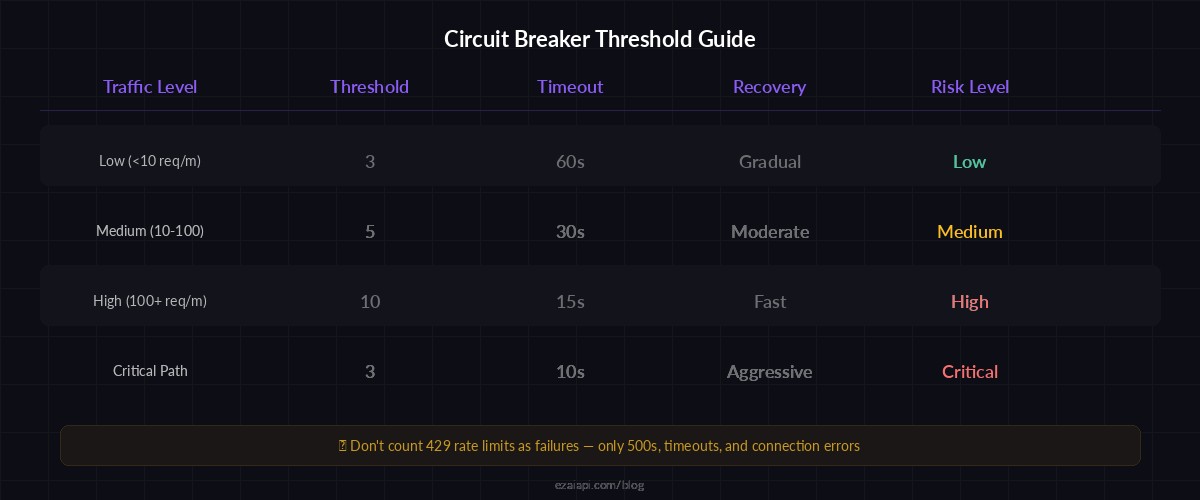
Recommended thresholds by use case — tune based on your traffic volume and latency tolerance
For AI API calls specifically, these starting points work well:
- Low-traffic apps (under 10 req/min) — threshold: 3, timeout: 60s. You can afford to wait longer.
- Medium-traffic apps (10–100 req/min) — threshold: 5, timeout: 30s. Fast enough to detect real outages, not jumpy.
- High-traffic apps (100+ req/min) — threshold: 10, timeout: 15s. At this volume, you'll hit the threshold fast anyway. Shorter timeouts mean faster recovery.
One non-obvious tip: don't count 429 (rate limit) responses as failures. Rate limits are expected behavior, not outages. Count only 500s, timeouts, and connection errors. Otherwise your breaker will trip every time you spike above your rate limit, which defeats the purpose.
Combining Circuit Breakers with Model Fallback
Circuit breakers get really powerful when paired with multi-model fallback. If Claude's circuit trips, route to GPT. If GPT trips too, fall back to a cached response or a smaller model:
models = [
    ("claude-sonnet-4-5", CircuitBreaker(threshold=3, reset_timeout=30)),
    ("gpt-4o", CircuitBreaker(threshold=3, reset_timeout=30)),
    ("gemini-2.5-flash", CircuitBreaker(threshold=5, reset_timeout=60)),
]

def ask_with_fallback(prompt: str) -> str:
    for model, breaker in models:
        try:
            response = breaker.call(
                lambda m=model: client.messages.create(
                    model=m, max_tokens=1024,
                    messages=[{"role": "user", "content": prompt}]
                )
            )
            return response.content[0].text
        except (CircuitOpenError, Exception):
            continue  # Try next model
    return "All models unavailable. Please try again later."
With EzAI, this works out of the box because all models share the same endpoint format. The same client instance handles Claude, GPT, and Gemini — just change the model string. Check the pricing page for available models and rates.
Monitoring Your Circuit Breakers
A circuit breaker you can't observe is a circuit breaker you can't trust. At minimum, log every state transition:
import logging

logger = logging.getLogger("circuit_breaker")

def _on_failure(self):
    with self.lock:
        self.failures += 1
        if self.failures >= self.failure_threshold:
            self.state = State.OPEN
            self.opened_at = time.time()
            logger.warning(
                "Circuit OPENED — %d consecutive failures, "
                "cooling down for %ds",
                self.failures, self.reset_timeout
            )
For production dashboards, expose metrics via OpenTelemetry: breaker state (as a gauge), trip count (as a counter), and time-in-open (as a histogram). These three metrics tell you everything: how often your breakers trip, which models are flaky, and how long outages last.
Common Pitfalls
After running circuit breakers on AI APIs across dozens of production deployments, these are the mistakes that bite hardest:
- Sharing one breaker across all models. Claude going down shouldn't disable your GPT calls. Use one breaker per model or per endpoint.
- Setting the threshold to 1. A single timeout isn't an outage — it's Tuesday. Start at 3 minimum.
- Forgetting about streaming. If you use SSE streaming, a stream that drops mid-response is a failure. Don't just check the initial connection.
- No fallback behavior. Opening the circuit without a fallback means your users see a raw error. Always have a graceful degradation path — even if it's just a cached response.
Wrapping Up
Circuit breakers are one of those patterns that feel like overkill until the first time they save you. Add them early. The Python implementation above is ~40 lines, the Node.js version is shorter, and they'll prevent the kind of cascading failure that turns a 90-second model hiccup into a 20-minute full-stack outage.
Start with the code above, tune the thresholds based on your traffic, and check the EzAI docs for model-specific timeout recommendations. If you're running multiple models, pair circuit breakers with automatic fallback for near-zero downtime.