Last quarter we lost 40,000 AI API calls. Not because the requests failed — they all came back with errors that should have been recoverable. We lost them because the worker swallowed the exception, logged a line nobody read, and moved on. The user got an empty response, support got the ticket, and we got the bill for tokens we burned re-running everything from scratch.
If you're calling an AI API from a queue worker — RAG pipelines, batch summarisation, agent loops, async chat — you need a dead letter queue. This post is the pattern we landed on after that incident, with working Python + Redis code you can lift into production today.
What a DLQ actually is (and isn't)
A dead letter queue is a second queue that holds messages your main worker couldn't process after exhausting its retries. It's not a retry buffer. It's not a log. It's a quarantine zone where failed work waits for either a human or an automated triage process to decide what to do with it.
The mental model: your main queue is the highway, your retry policy is the shoulder, and the DLQ is the impound lot. Once a request lands in the impound lot, the worker stops touching it and moves on to the next one. Nothing else gets blocked.
Without a DLQ, you have three bad options:
- Infinite retries — one poison message can pin a worker forever, and you'll be paying for tokens on every attempt.
- Drop on the floor — fast, but you've now silently lost a paid request. The user may never know it failed.
- Crash the worker — your scheduler restarts it, the message comes back, and you're in a crash loop.
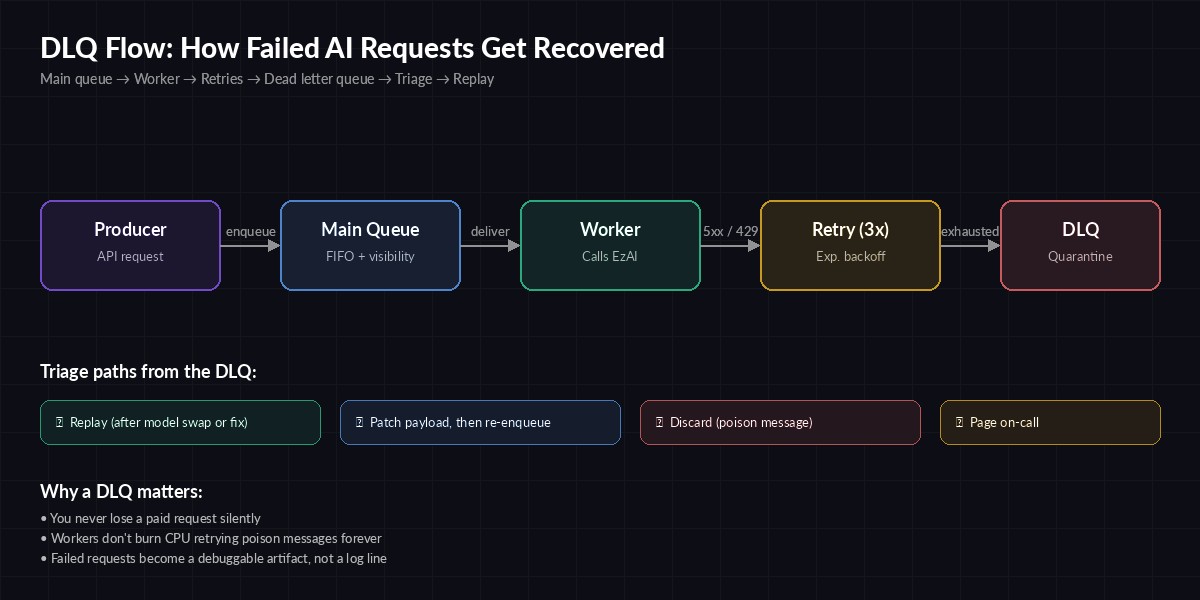
A request that fails its retry budget moves to the DLQ instead of blocking the main queue
Classify before you DLQ
Not every failure deserves the same treatment. The biggest mistake teams make is dumping every non-200 into one bucket. A 429 is recoverable. A 400 with max_tokens too high isn't — retrying it 100 times burns nothing but your time. Classify first, then route.
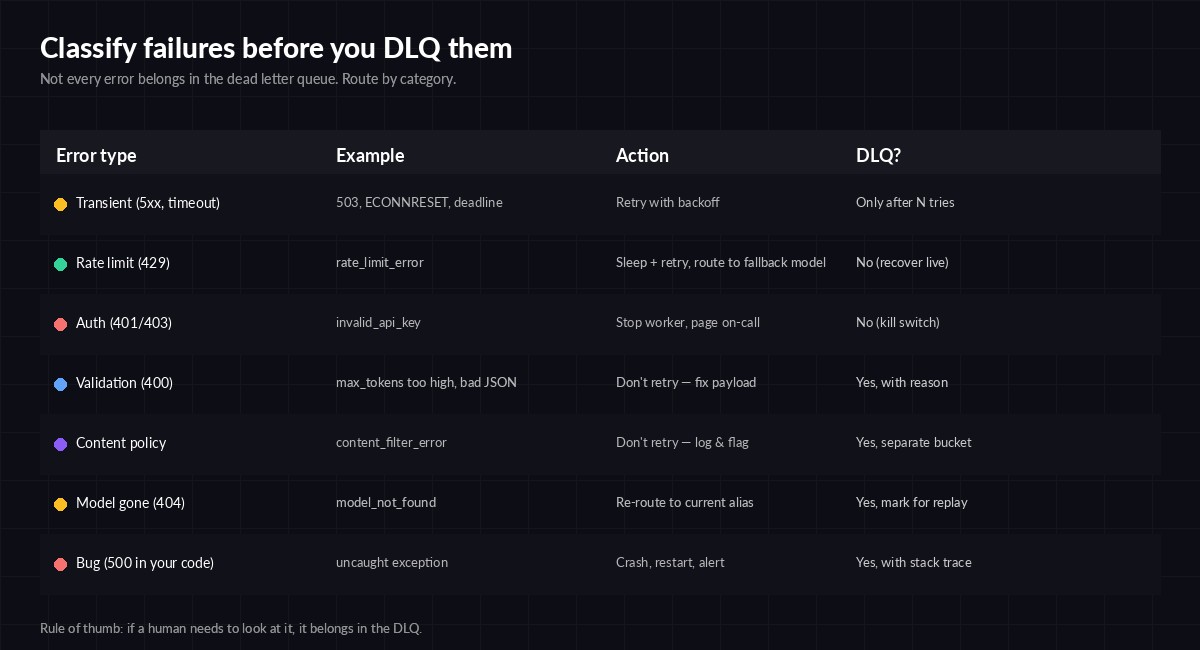
Decide DLQ eligibility per error class — not per message
Here's a Python classifier we use in front of the EzAI client. It returns one of four actions: retry, fallback, dlq, or discard.
from dataclasses import dataclass
from typing import Literal
import httpx

Action = Literal["retry", "fallback", "dlq", "discard"]

def classify(exc: Exception) -> tuple[Action, str]:
    if isinstance(exc, httpx.TimeoutException):
        return "retry", "timeout"
    if isinstance(exc, httpx.HTTPStatusError):
        s = exc.response.status_code
        body = exc.response.text[:200]
        if s == 429: return "retry", "rate_limit"
        if s == 503: return "retry", "upstream_busy"
        if s == 404: return "dlq", f"model_gone:{body}"
        if s == 400: return "dlq", f"bad_request:{body}"
        if s in (401, 403): return "discard", "auth"  # page on-call separately
        if s >= 500: return "fallback", f"upstream_5xx:{s}"
    return "dlq", f"unknown:{type(exc).__name__}"
Note that 401/403 returns discard, not dlq. If your API key is bad, every message in the DLQ will fail too — you don't want to flood it. Page on-call instead and stop the worker. For a deeper look at the recoverable cases, see our error handling guide and retry strategies post.
A working Redis DLQ in ~60 lines
You don't need Kafka or SQS to do this well. A Redis list with a sorted-set retry counter does the job for most teams. Here's the worker:
import json, time, uuid, redis, anthropic
from classify import classify

r = redis.Redis(decode_responses=True)
client = anthropic.Anthropic(
    api_key="sk-your-key",
    base_url="https://ezaiapi.com",
)

MAIN, DLQ, ATTEMPTS = "q:main", "q:dlq", "q:attempts"
MAX_ATTEMPTS = 5

def push_dlq(msg, reason):
    record = {**msg, "dlq_reason": reason, "dlq_at": time.time()}
    r.lpush(DLQ, json.dumps(record))
    r.zrem(ATTEMPTS, msg["id"])

def work():
    while True:
        _, raw = r.brpop(MAIN, timeout=5) or (None, None)
        if not raw: continue
        msg = json.loads(raw)
        attempts = int(r.zscore(ATTEMPTS, msg["id"]) or 0)

        try:
            resp = client.messages.create(
                model=msg["model"],
                max_tokens=msg["max_tokens"],
                messages=msg["messages"],
            )
            r.set(f"result:{msg['id']}", resp.content[0].text, ex=86400)
            r.zrem(ATTEMPTS, msg["id"])
        except Exception as exc:
            action, reason = classify(exc)
            if action == "discard":
                print(f"FATAL {reason} — stopping worker"); return
            if action == "dlq":
                push_dlq(msg, reason); continue
            attempts += 1
            if attempts >= MAX_ATTEMPTS:
                push_dlq(msg, f"max_attempts:{reason}"); continue
            r.zadd(ATTEMPTS, {msg["id"]: attempts})
            # exponential backoff with jitter
            time.sleep(min(30, 2 ** attempts) + uuid.uuid4().int % 3)
            r.lpush(MAIN, raw)

if __name__ == "__main__": work()
Three things to notice. First, attempts live in a separate sorted set keyed by message id — restarting the worker doesn't reset them. Second, the DLQ record carries a dlq_reason string so you can group failures later. Third, we backoff inside the worker rather than using a delayed queue — fine for low-volume pipelines, swap for brpoplpush + a scheduler if you're processing more than ~100 msg/sec.
Reprocessing without making it worse
A DLQ is only useful if you actually drain it. Most teams build the queue, never build the replay tool, and end up with a Redis list that's silently grown to 200k messages. Build the replay at the same time as the queue.
import json, redis, argparse
r = redis.Redis(decode_responses=True)

def replay(reason_prefix: str, limit: int = 100, dry_run: bool = True):
    moved = kept = 0
    for _ in range(limit):
        raw = r.rpop("q:dlq")
        if not raw: break
        msg = json.loads(raw)
        if msg["dlq_reason"].startswith(reason_prefix):
            if not dry_run: r.lpush("q:main", raw)
            moved += 1
        else:
            r.lpush("q:dlq", raw); kept += 1
    print(f"replayed={moved} kept={kept} dry={dry_run}")

if __name__ == "__main__":
    p = argparse.ArgumentParser()
    p.add_argument("--reason", required=True)  # e.g. "model_gone"
    p.add_argument("--limit", type=int, default=100)
    p.add_argument("--apply", action="store_true")
    a = p.parse_args()
    replay(a.reason, a.limit, dry_run=not a.apply)
Always run with --apply off first to see what would move. The two replay scenarios you'll hit most:
- Model alias rotation — provider deprecated
claude-3-5-sonnet. Patch the message, thenreplay --reason model_gone --apply. Pin your aliases so this is rare; see model version pinning. - Upstream incident recovery — provider had a 30-minute 503 storm and your retry budget ran out. Once they recover, drain
upstream_5xxback to main.
What to monitor
The DLQ itself is a metric. Three alerts cover 95% of incidents:
- DLQ depth — alert if
LLEN q:dlq > 100for 5 minutes. Anything growing is a story you don't yet know. - Reason cardinality — count messages grouped by
dlq_reason. A spike in one reason means a single root cause; a flat distribution usually means infra trouble. - Age of oldest message — if your oldest DLQ message is older than 24h, nobody is draining it. Page someone.
For deeper observability, wire the DLQ writes into your tracing. We covered the setup in OpenTelemetry for AI APIs — adding a dlq.reason attribute to the failing span makes Grafana queries trivial.
Three things people get wrong
Putting prompts the user typed straight into the DLQ. If your DLQ contains user-generated content, treat it like a database — encrypt at rest, set retention, redact PII before logging. The DLQ is debugging gold and a privacy liability in the same data structure.
Replaying without checking for staleness. A 6-hour-old summarisation request whose source document has since changed will produce a wrong answer. Either embed a content hash in the message and verify before replay, or skip replay for time-sensitive work.
One DLQ for everything. Critical user-facing requests should not share a DLQ with background batch jobs. Two queues, two alert thresholds, two on-call rotations. The AWS DLQ design notes are a solid reference even if you're not on SQS.
Wrap-up
A DLQ isn't glamorous, but it's the difference between "we lost 40k requests and didn't know" and "we lost 40k requests, here they are, replay them after lunch." Build it on day one of your AI pipeline, alongside the retry policy. The whole pattern fits in a single afternoon: classifier, worker, replay tool, three alerts.
If you're routing AI calls through EzAI, the standard error shapes return clean status codes you can classify with the snippet above — no scraping error message strings. Pair it with our multi-model fallback guide and you've got a pipeline that degrades gracefully and never silently drops paid work.