Your team has been running OpenAI in production for months. The code works, the prompts are tuned, and your billing is… painful. Then Claude Opus 4 drops and benchmarks everything into the ground. Gemini 2.5 Pro ships with a 1M-token context window. Suddenly, being locked to a single provider feels like running a race in cement shoes.
This guide walks you through migrating a production codebase from direct OpenAI API calls to a multi-model architecture via EzAI — without rewriting your application logic, without downtime, and without losing your mind.
Why Teams Get Stuck on One Provider
Most teams don't choose vendor lock-in. It happens gradually. You start with one openai.ChatCompletion.create() call in a prototype. Six months later, that call is in 47 files across 12 microservices, and the api.openai.com base URL is hardcoded in environment configs that nobody wants to touch.
The real cost isn't just the API bill — it's opportunity cost. When Anthropic releases a model that's 30% better at coding tasks, you can't try it without refactoring your entire inference layer. When OpenAI has an outage (and they do, roughly every few weeks), your app goes down with it. No fallback, no plan B.
EzAI solves this by sitting between your code and every major provider. One endpoint, one API key, every model. Here's exactly how to make the switch.
The Migration Path: Four Steps
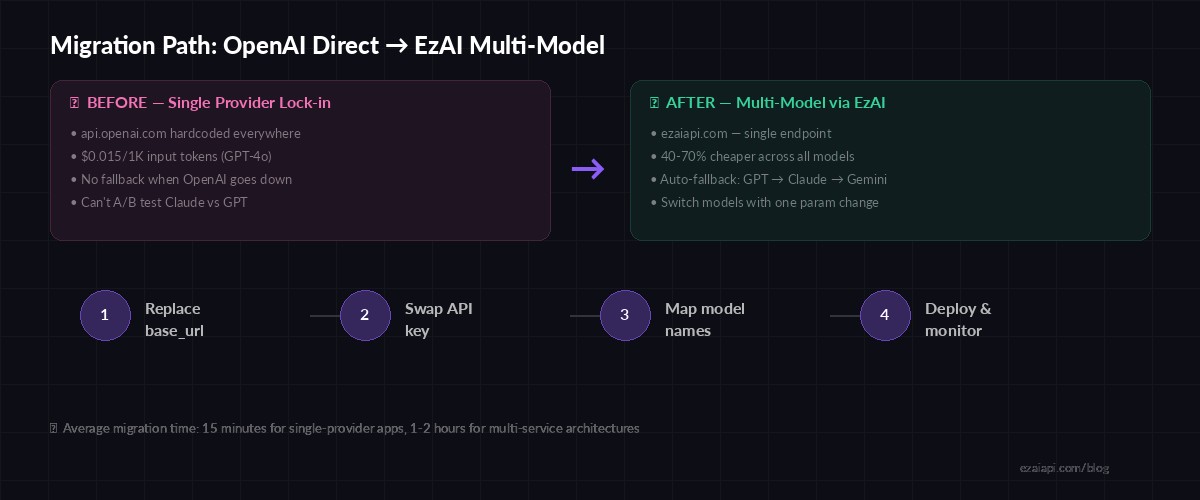
Four-step migration path — most teams complete this in under an hour
Step 1: Replace Your Base URL
If you're using the OpenAI Python SDK, the change is a single line. EzAI supports the OpenAI-compatible endpoint format, so your existing code structure stays identical:
from openai import OpenAI

client = OpenAI(
    api_key="sk-openai-...",
    # base_url defaults to api.openai.com
)

response = client.chat.completions.create(
    model="gpt-4o",
    messages=[{"role": "user", "content": "Summarize this PR"}]
)from openai import OpenAI
client = OpenAI(
api_key="sk-ezai-...",
base_url="https://ezaiapi.com/openai/v1",
)
response = client.chat.completions.create(
model="gpt-4o", # same model name — EzAI routes it
messages=[{"role": "user", "content": "Summarize this PR"}]
)Two lines changed. Same SDK, same response format, same error handling. Your tests still pass because the contract is identical.
Step 2: Swap Your API Key
Generate an EzAI API key from your dashboard and drop it into your environment config. Best practice: use an environment variable so you can rotate keys without redeploying:
# .env
OPENAI_API_KEY=sk-ezai-your-key-here
OPENAI_BASE_URL=https://ezaiapi.com/openai/v1
If you're using the Anthropic SDK directly (for Claude models), the setup is even simpler — EzAI's native endpoint is Anthropic-compatible:
import anthropic

client = anthropic.Anthropic(
    api_key="sk-ezai-your-key",
    base_url="https://ezaiapi.com",
)

msg = client.messages.create(
    model="claude-sonnet-4-5",
    max_tokens=2048,
    messages=[{"role": "user", "content": "Review this diff for bugs"}]
)
Step 3: Map Model Names and Start Experimenting
Here's where multi-model gets interesting. With EzAI, you can swap model strings and instantly route to a different provider. No SDK changes, no new client library — just a different string:
# Route tasks to the best model for the job
MODEL_MAP = {
    "code_review":    "claude-opus-4",       # Best at code reasoning
    "summarization":  "gemini-3-flash-preview",    # Fast + cheap for summaries
    "creative":       "gpt-4o",              # Strong creative writing
    "long_context":   "gemini-2.5-pro",      # 1M token window
    "fast_chat":      "claude-sonnet-4-5",   # Good balance of speed/quality
}

def ai_call(task_type, prompt):
    return client.chat.completions.create(
        model=MODEL_MAP[task_type],
        messages=[{"role": "user", "content": prompt}]
    )
This is the pattern that saves production teams real money. Instead of sending everything through GPT-4o at $10/1M output tokens, you route simple summarization through Gemini Flash at a fraction of the cost and reserve the expensive models for tasks that actually need them.
Real-World Cost Impact
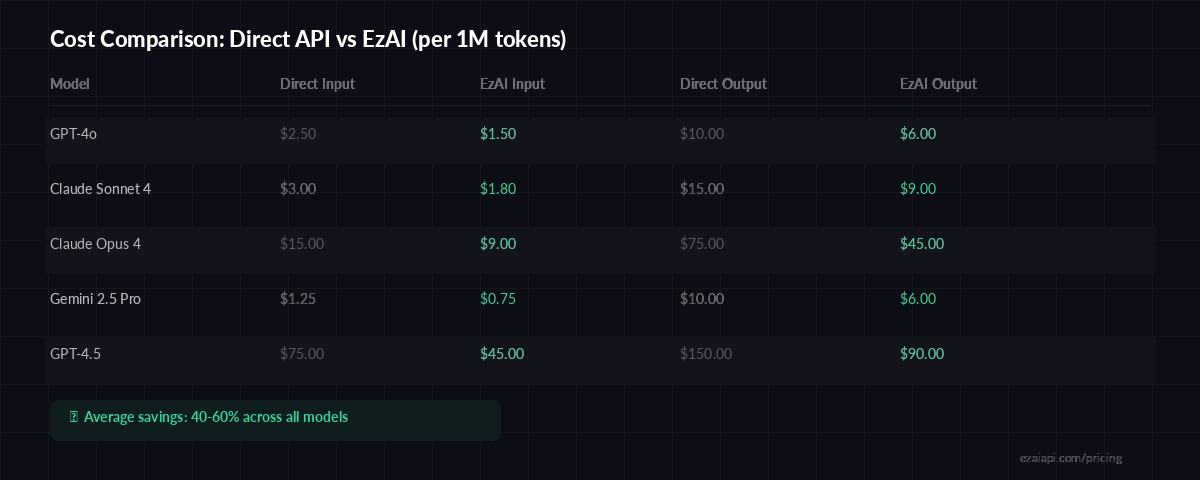
EzAI pricing across popular models — 40-60% savings on average
A mid-size SaaS team we worked with was spending $4,200/month on OpenAI API calls — mostly GPT-4o for customer support summarization, code generation, and internal tooling. After migrating to EzAI and routing tasks to appropriate models:
- Support summaries moved to Gemini 2.5 Flash — 80% cheaper, same quality
- Code generation moved to Claude Sonnet 4.5 — better output, 40% cheaper
- Complex reasoning stayed on GPT-4o via EzAI — still 40% cheaper
- Monthly bill dropped to $1,600 — a 62% reduction with zero quality regression
Adding Fallback Resilience
Single-provider architectures have a single point of failure. With EzAI, you can build automatic fallback chains that route around outages in seconds. Here's a production-ready pattern:
import openai, time

FALLBACK_CHAIN = ["gpt-4o", "claude-sonnet-4-5", "gemini-2.5-pro"]

client = openai.OpenAI(
    api_key="sk-ezai-...",
    base_url="https://ezaiapi.com/openai/v1",
)

def resilient_completion(messages, max_retries=3):
    for model in FALLBACK_CHAIN:
        for attempt in range(max_retries):
            try:
                return client.chat.completions.create(
                    model=model,
                    messages=messages,
                    timeout=30,
                )
            except openai.APIStatusError as e:
                if e.status_code == 429:
                    time.sleep(2 ** attempt)
                    continue
                break  # try next model
            except openai.APIConnectionError:
                break  # provider down, try next
    raise RuntimeError("All models in fallback chain failed")
This pattern gives you provider-level resilience with zero infrastructure overhead. If GPT-4o returns a 503, you're on Claude within milliseconds. If Claude is rate-limited, Gemini picks up the slack. Your users never notice.
Step 4: Deploy and Monitor
Once you've updated the base URL and API key, deploy normally. EzAI's real-time dashboard shows every request as it flows through — model used, token count, latency, and cost. You'll be able to verify that requests are routing correctly before you even finish your coffee.
Things to watch in the first 24 hours after migration:
- Latency — EzAI adds ~20-50ms of routing overhead. For most applications, this is invisible.
- Token counts — should match your previous usage patterns exactly
- Error rates — should be flat or lower (EzAI handles upstream retries)
- Cost per request — the dashboard breaks this down per model, per call
Migration Checklist
Here's the condensed version for your team's Jira ticket or Notion doc:
- Sign up at ezaiapi.com and generate an API key
- Replace
OPENAI_BASE_URLwithhttps://ezaiapi.com/openai/v1 - Replace
OPENAI_API_KEYwith your EzAI key - Run your existing test suite — everything should pass unchanged
- Deploy to staging, verify on the EzAI dashboard
- Gradually route traffic: 10% → 50% → 100%
- Start experimenting with model routing and fallback chains
The whole migration is typically a 15-minute PR for single-service apps. For larger architectures with multiple services, budget 1-2 hours to update environment configs and run integration tests. Either way, you'll ship Claude, GPT, and Gemini through a single unified API before your next standup.
Check out our multi-model fallback guide for more advanced routing patterns, or read how to cut your AI costs by 50-80% with EzAI's pricing structure.