
Your AI API bill climbed 3x last month and you're not sure why. Sound familiar? Most teams burn through tokens without realizing that small changes in how you structure requests can cut costs by 60-87% — with zero impact on output quality. We've watched thousands of EzAI users optimize their pipelines. Here are the seven strategies that actually move the needle.
1. Cache Your System Prompts
If you're sending the same 2,000-token system prompt on every request, you're paying for it every single time. Anthropic's prompt caching lets you mark static content so it's stored server-side and billed at a 90% discount on subsequent calls.
The trick: wrap your system prompt with a cache_control block. The first request pays full price. Every request after that pays 10% for the cached portion.
import anthropic

client = anthropic.Anthropic(
    api_key="sk-your-key",
    base_url="https://ezaiapi.com"
)

response = client.messages.create(
    model="claude-sonnet-4-5",
    max_tokens=1024,
    system=[{
        "type": "text",
        "text": "You are a senior code reviewer. Follow these 50 rules...",
        "cache_control": {"type": "ephemeral"}
    }],
    messages=[{"role": "user", "content": "Review this pull request..."}]
)
A team running 500 code reviews per day with a 3,000-token system prompt saved $340/month by adding those three lines. The system prompt hits cache on 95%+ of requests because it rarely changes.
2. Trim Context Windows Aggressively
Every token in your context window costs money — input tokens aren't free. Most chatbot implementations blindly pass the full conversation history, including messages from 30 turns ago that have zero relevance to the current question.
Instead of passing everything, keep a sliding window of the last 4-6 turns and summarize older context into a compact block:
def trim_context(messages, max_recent=6, summary_tokens=200):
    if len(messages) <= max_recent:
        return messages

    old = messages[:-max_recent]
    recent = messages[-max_recent:]

    # Summarize old context with a cheap model
    summary = client.messages.create(
        model="claude-haiku-3-5",
        max_tokens=summary_tokens,
        messages=[{
            "role": "user",
            "content": f"Summarize this conversation in 2-3 sentences:\n{old}"
        }]
    )

    return [
        {"role": "user", "content": f"[Prior context: {summary.content[0].text}]"},
        {"role": "assistant", "content": "Understood, I have the context."},
        *recent
    ]
This pattern cuts input tokens by 40-70% on long conversations. The summary call uses Haiku (cheap and fast), so the overhead is negligible compared to the savings on the main call.
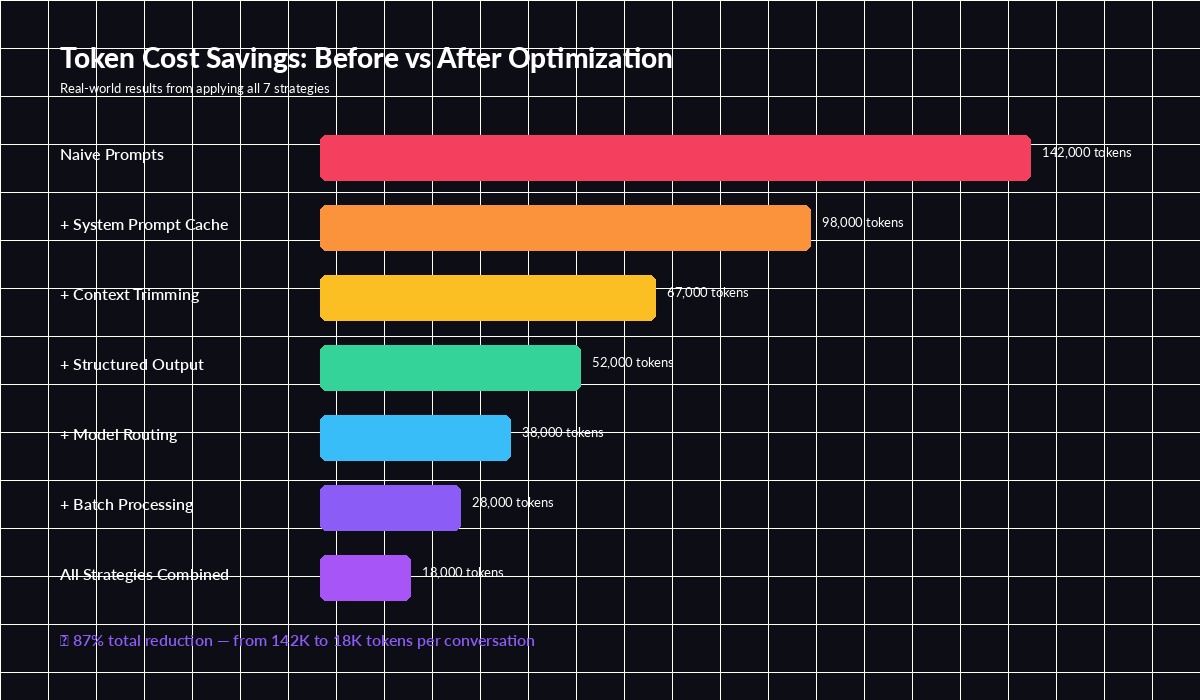
Cumulative token savings — each strategy stacks on top of the previous one
3. Route Requests to the Right Model
Not every request needs Opus. A classification task or simple extraction that Haiku handles in 200ms doesn't benefit from a model that costs 60x more per token. The key is building a router that picks the cheapest model capable of handling each request.
A practical approach: classify the task complexity first with a fast model, then route accordingly.
const MODEL_TIERS = {
  simple: "claude-haiku-3-5",     // $0.25/1M input
  medium: "claude-sonnet-4-5",    // $3/1M input
  complex: "claude-opus-4",       // $15/1M input
};

async function routeRequest(userMessage) {
  // Quick classification with Haiku (~2ms, ~$0.00001)
  const classification = await fetch("https://ezaiapi.com/v1/messages", {
    method: "POST",
    headers: {
      "x-api-key": process.env.EZAI_KEY,
      "anthropic-version": "2023-06-01",
      "content-type": "application/json",
    },
    body: JSON.stringify({
      model: "claude-haiku-3-5",
      max_tokens: 10,
      messages: [{
        role: "user",
        content: `Classify complexity: simple/medium/complex\n"${userMessage}"`
      }]
    })
  });

  const tier = (await classification.json())
    .content[0].text.trim().toLowerCase();
  const model = MODEL_TIERS[tier] || MODEL_TIERS.medium;

  // Route to the right model
  return await callModel(model, userMessage);
}
In practice, 60-70% of requests in a typical chatbot are simple enough for Haiku. That alone cuts your model spend by more than half without users noticing any quality drop.
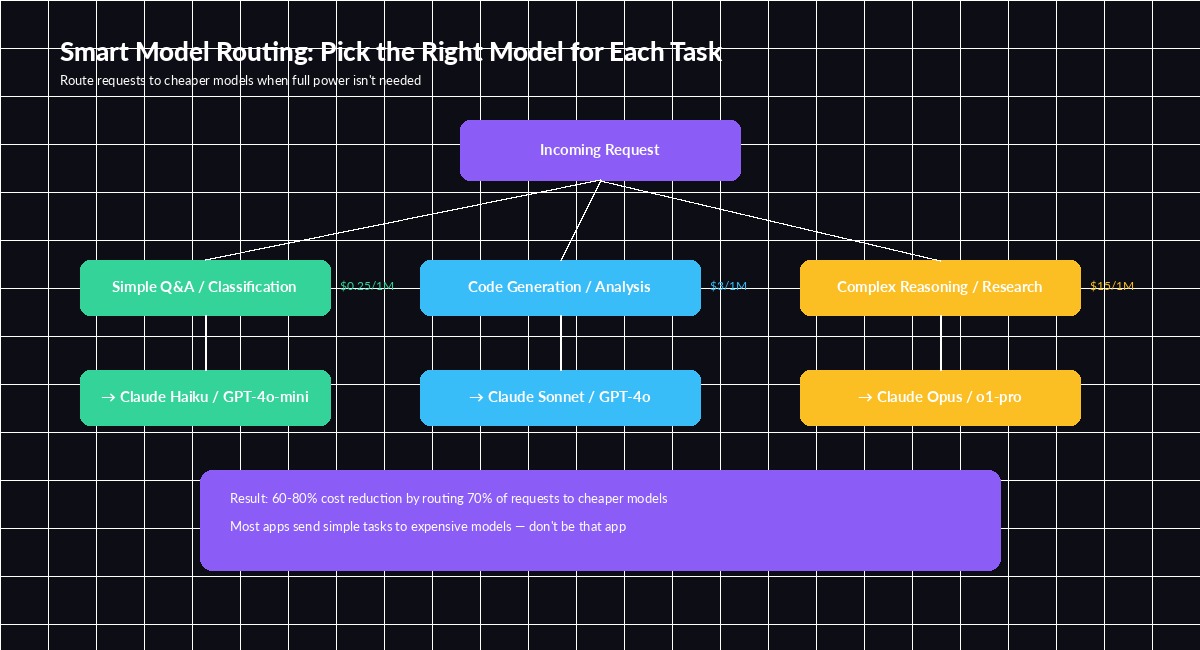
Route 70% of traffic to cheaper models — the remaining 30% gets the expensive firepower it needs
4. Use Structured Output to Kill Wasted Tokens
When you ask a model to "extract the email and name from this text," it responds with a paragraph of natural language wrapping around the actual data. Those wrapper tokens cost money and you immediately discard them during parsing.
Force structured JSON output and the model generates only what you need:
response = client.messages.create(
    model="claude-sonnet-4-5",
    max_tokens=256,
    messages=[{
        "role": "user",
        "content": """Extract fields as JSON. No explanation, no markdown.
{"name": "...", "email": "...", "company": "..."}

Text: Hi, I'm Sarah Chen from Acme Corp. Reach me at [email protected]"""
    }]
)
# Output: {"name": "Sarah Chen", "email": "[email protected]", "company": "Acme Corp"}
# ~20 output tokens vs ~80 with natural language
This cuts output tokens by 50-75% on extraction tasks. The max_tokens cap also acts as a safety net — you never pay for a model that decides to write an essay when you asked for three fields.
5. Batch Non-Urgent Requests
If you're processing documents, generating descriptions, or running evaluations, chances are you don't need results in real-time. Anthropic's Message Batches API gives you a 50% discount on all tokens for requests that can wait up to 24 hours.
The implementation is straightforward — collect requests, submit as a batch, poll for results:
batch = client.messages.batches.create(
    requests=[
        {
            "custom_id": f"doc-{i}",
            "params": {
                "model": "claude-sonnet-4-5",
                "max_tokens": 512,
                "messages": [{"role": "user", "content": doc}]
            }
        }
        for i, doc in enumerate(documents)
    ]
)

# Poll until complete — typically finishes in minutes, not hours
while batch.processing_status != "ended":
    time.sleep(30)
    batch = client.messages.batches.retrieve(batch.id)
A content team processing 2,000 articles for SEO metadata cut their monthly bill from $890 to $445 by switching from real-time calls to batch processing. Same output, half the cost, and the 10-minute wait didn't matter for their workflow.
6. Set Aggressive max_tokens Limits
This sounds obvious, but most developers set max_tokens: 4096 as a default and forget about it. The model will happily generate 4,000 tokens when 200 would suffice. Output tokens are typically 4-5x more expensive than input tokens.
Audit your actual output lengths. For most API use cases, you'll find the real distribution looks like this:
- Classification / extraction: 10-50 tokens → set
max_tokens: 100 - Short answers: 50-200 tokens → set
max_tokens: 300 - Code generation: 200-800 tokens → set
max_tokens: 1024 - Long-form writing: 500-2000 tokens → set
max_tokens: 2500
The safety margin should be 25-50% above your P95 output length, not 10x. Track output token counts on your EzAI dashboard to identify where you're over-allocating.
7. Combine Everything with EzAI's Built-in Tools
Each strategy alone saves 15-30%. Stack all seven and the compound effect is dramatic. EzAI makes this easier because you get a single dashboard to monitor token usage per model, per endpoint, per day — so you can measure the impact of each optimization in real time.
Here's a production-ready wrapper that combines caching, context trimming, model routing, and structured output:
import anthropic

client = anthropic.Anthropic(
    api_key="sk-your-key",
    base_url="https://ezaiapi.com"
)

def optimized_call(user_msg, history, task_type="general"):
    # 1. Route to cheapest capable model
    model_map = {
        "classify": ("claude-haiku-3-5", 50),
        "extract":  ("claude-haiku-3-5", 256),
        "general": ("claude-sonnet-4-5", 1024),
        "complex": ("claude-opus-4", 2048),
    }
    model, max_tok = model_map.get(task_type, model_map["general"])

    # 2. Trim context to last 6 turns + summary
    trimmed = trim_context(history, max_recent=6)

    # 3. Cache the system prompt
    return client.messages.create(
        model=model,
        max_tokens=max_tok,
        system=[{
            "type": "text",
            "text": SYSTEM_PROMPT,
            "cache_control": {"type": "ephemeral"}
        }],
        messages=trimmed + [{"role": "user", "content": user_msg}]
    )
The Math: What 87% Savings Looks Like
Let's run the numbers on a real scenario — a customer support bot handling 10,000 conversations per day:
- Before optimization: 142K tokens/conversation × 10K convos × $3/1M = $4,260/day
- After all 7 strategies: 18K tokens/conversation × 10K convos × blended $0.80/1M = $144/day
- Monthly savings: $123,480 → real money that goes back into your product
You don't have to implement all seven at once. Start with prompt caching and max_tokens limits (they take 5 minutes each), then layer in model routing and context trimming as you iterate.
Track everything on your EzAI dashboard — every request shows the model used, tokens consumed, and cost. Read our prompt caching deep-dive for advanced patterns, or check the API docs for full parameter reference.