You're building a SaaS product and want to offer AI features to your customers. Each customer needs their own usage limits, cost tracking, and model access — without you managing separate API keys for every provider. This is the multi-tenant AI problem, and EzAI API handles the hard parts so you can focus on your product.
This guide walks through a production-ready Python implementation: tenant isolation, per-user rate limiting, cost attribution, and smart model routing. Every code example hits ezaiapi.com directly.
The Multi-Tenant Architecture
In a multi-tenant AI setup, your application sits between end users and AI models. Each tenant (customer, team, or organization) gets isolated access with their own budgets and limits. EzAI acts as the unified gateway — one API key, one endpoint, all models.
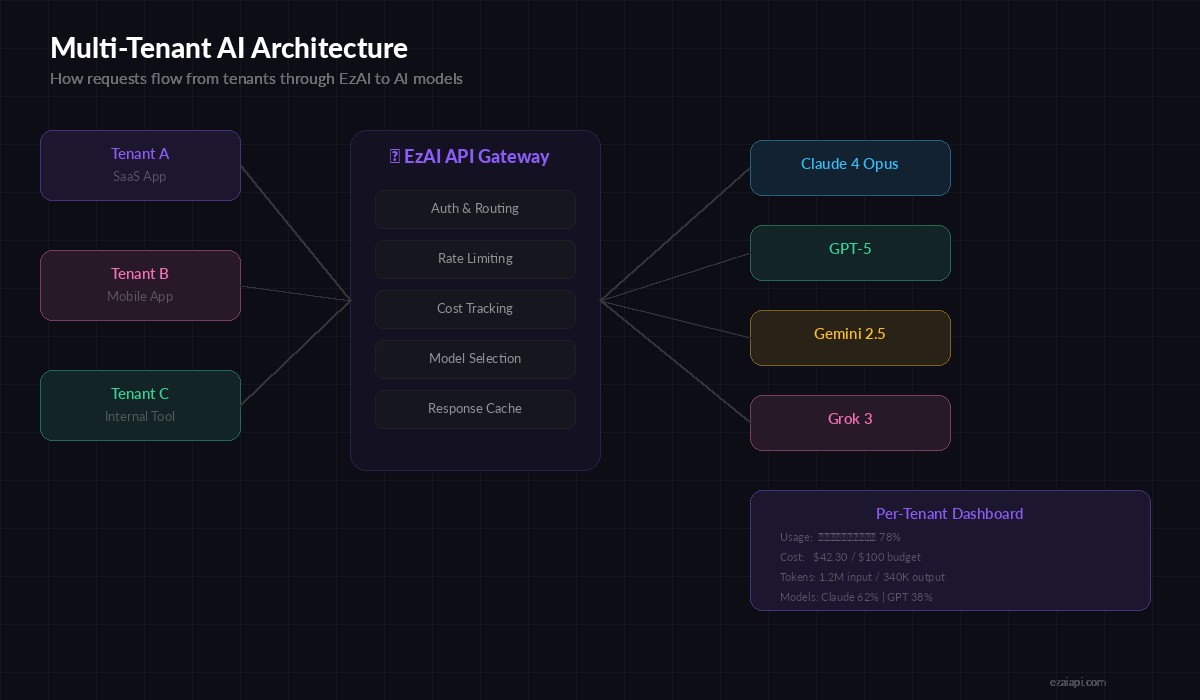
Request flow: Tenant apps → your backend → EzAI API → Claude, GPT, Gemini
The key insight: you don't need separate API keys per tenant. Your backend authenticates tenants, applies their limits, then proxies through EzAI with metadata headers for tracking. This cuts your infrastructure from "N provider accounts" to "one EzAI key + a tenant table."
Tenant Configuration and Isolation
Start with a tenant config that defines each customer's AI access. This lives in your database, but here's the data model:
from dataclasses import dataclass, field
from typing import Optional
import httpx, time, asyncio

EZAI_BASE = "https://api.ezaiapi.com"
EZAI_KEY = "sk-your-ezai-key"

@dataclass
class TenantConfig:
    tenant_id: str
    name: str
    allowed_models: list[str] = field(default_factory=lambda: [
        "claude-sonnet-4-20250514",
    ])
    default_model: str = "claude-sonnet-4-20250514"
    max_requests_per_minute: int = 60
    max_tokens_per_day: int = 500_000
    monthly_budget_usd: float = 100.0
    current_spend_usd: float = 0.0

# Example tenants
tenants = {
    "acme-corp": TenantConfig(
        tenant_id="acme-corp", name="Acme Corporation",
        allowed_models=["claude-sonnet-4-20250514", "claude-opus-4-20250514"],
        max_requests_per_minute=120,
        monthly_budget_usd=500.0
    ),
    "startup-xyz": TenantConfig(
        tenant_id="startup-xyz", name="Startup XYZ",
        max_requests_per_minute=30,
        monthly_budget_usd=50.0
    ),
}
Each tenant gets explicit boundaries: which models they can access, how fast they can call, and how much they can spend. The allowed_models list prevents a free-tier tenant from accidentally burning through Opus-tier credits.
Per-Tenant Rate Limiting
Rate limiting in multi-tenant apps is non-negotiable. One noisy tenant shouldn't degrade service for everyone else. Here's a sliding-window rate limiter that tracks per-tenant request counts:
from collections import defaultdict

class TenantRateLimiter:
    def __init__(self):
        self.windows: dict[str, list[float]] = defaultdict(list)

    def check(self, tenant_id: str, max_rpm: int) -> bool:
        now = time.time()
        window = self.windows[tenant_id]
        # Drop entries older than 60 seconds
        self.windows[tenant_id] = [
            ts for ts in window if now - ts < 60
        ]
        if len(self.windows[tenant_id]) >= max_rpm:
            return False
        self.windows[tenant_id].append(now)
        return True

    def retry_after(self, tenant_id: str) -> float:
        if not self.windows[tenant_id]:
            return 0
        oldest = min(self.windows[tenant_id])
        return max(0, 60 - (time.time() - oldest))

rate_limiter = TenantRateLimiter()
In production, swap the in-memory dict for Redis sorted sets. The pattern stays identical — ZADD timestamps, ZRANGEBYSCORE to count the window, ZREMRANGEBYSCORE to prune. This scales horizontally across multiple backend instances.
Cost Attribution and Budget Enforcement
Every AI request costs money. In a multi-tenant app, you need to know exactly which tenant spent what. EzAI returns token counts in every response, so you can compute costs in real time:
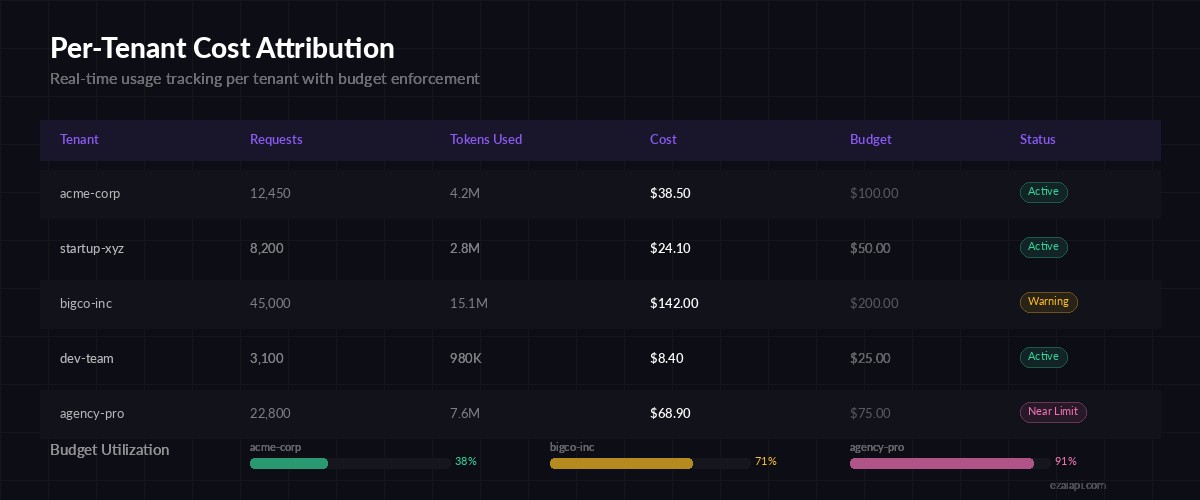
Track every dollar per tenant — budget enforcement prevents surprise bills
# Pricing per 1M tokens (input/output)
MODEL_PRICING = {
    "claude-sonnet-4-20250514": (3.0, 15.0),
    "claude-opus-4-20250514": (15.0, 75.0),
    "gpt-4o": (2.5, 10.0),
}

def calculate_cost(model: str, input_tokens: int, output_tokens: int) -> float:
    inp_price, out_price = MODEL_PRICING.get(model, (3.0, 15.0))
    return (input_tokens * inp_price + output_tokens * out_price) / 1_000_000

def check_budget(tenant: TenantConfig) -> bool:
    return tenant.current_spend_usd < tenant.monthly_budget_usd

def record_usage(tenant: TenantConfig, model: str, usage: dict):
    cost = calculate_cost(
        model,
        usage.get("input_tokens", 0),
        usage.get("output_tokens", 0)
    )
    tenant.current_spend_usd += cost
    return {
        "tenant_id": tenant.tenant_id,
        "model": model,
        "input_tokens": usage.get("input_tokens", 0),
        "output_tokens": usage.get("output_tokens", 0),
        "cost_usd": round(cost, 6),
        "total_spend": round(tenant.current_spend_usd, 2),
        "budget_remaining": round(tenant.monthly_budget_usd - tenant.current_spend_usd, 2),
    }
The budget check runs before the API call, not after. If a tenant hits 95% of their budget, you can downgrade them to a cheaper model automatically instead of hard-blocking. More on that in the routing section.
The Unified Request Handler
Here's where it all comes together. The request handler validates the tenant, checks rate limits and budget, selects the model, calls EzAI, and records usage — all in one clean flow:
async def handle_tenant_request(
    tenant_id: str,
    messages: list[dict],
    model: Optional[str] = None,
    max_tokens: int = 1024
) -> dict:
    # 1. Resolve tenant
    tenant = tenants.get(tenant_id)
    if not tenant:
        raise ValueError(f"Unknown tenant: {tenant_id}")

    # 2. Rate limit check
    if not rate_limiter.check(tenant_id, tenant.max_requests_per_minute):
        retry = rate_limiter.retry_after(tenant_id)
        return {
            "error": "rate_limited",
            "retry_after": round(retry, 1),
            "message": f"Rate limit exceeded. Retry in {retry:.0f}s"
        }

    # 3. Budget check (auto-downgrade if near limit)
    selected_model = model or tenant.default_model
    if not check_budget(tenant):
        return {"error": "budget_exceeded", "spend": tenant.current_spend_usd}

    budget_pct = tenant.current_spend_usd / tenant.monthly_budget_usd
    if budget_pct > 0.9 and "opus" in selected_model:
        selected_model = "claude-sonnet-4-20250514"  # auto-downgrade

    # 4. Validate model access
    if selected_model not in tenant.allowed_models:
        return {"error": "model_not_allowed", "allowed": tenant.allowed_models}

    # 5. Call EzAI
    async with httpx.AsyncClient(timeout=60) as client:
        resp = await client.post(
            f"{EZAI_BASE}/v1/messages",
            headers={
                "x-api-key": EZAI_KEY,
                "anthropic-version": "2023-06-01",
                "content-type": "application/json",
            },
            json={
                "model": selected_model,
                "max_tokens": max_tokens,
                "messages": messages,
            }
        )
        data = resp.json()

    # 6. Record usage
    if "usage" in data:
        usage_log = record_usage(tenant, selected_model, data["usage"])

    return {
        "content": data.get("content", []),
        "model": selected_model,
        "tenant": tenant_id,
        "usage": usage_log if "usage" in data else None,
    }
The auto-downgrade at 90% budget is a pattern worth stealing. Instead of hard-cutting a customer's AI access, you gracefully reduce cost by routing to a cheaper model. Their features keep working; you send a notification that they're near their limit.
Smart Model Routing per Tenant Tier
Different tenants have different needs. A free-tier user gets Sonnet for quick tasks. An enterprise customer gets Opus for complex reasoning. You can encode this logic cleanly:
TIER_ROUTING = {
    "free": {
        "simple": "claude-sonnet-4-20250514",
        "complex": "claude-sonnet-4-20250514",
    },
    "pro": {
        "simple": "claude-sonnet-4-20250514",
        "complex": "claude-opus-4-20250514",
    },
    "enterprise": {
        "simple": "claude-sonnet-4-20250514",
        "complex": "claude-opus-4-20250514",
    },
}

def classify_complexity(messages: list[dict]) -> str:
    """Classify request complexity by token count heuristic."""
    total_chars = sum(len(m.get("content", "")) for m in messages)
    return "complex" if total_chars > 2000 else "simple"

def route_model(tier: str, messages: list[dict]) -> str:
    complexity = classify_complexity(messages)
    return TIER_ROUTING.get(tier, TIER_ROUTING["free"])[complexity]

# Usage in handler:
# model = route_model("pro", messages)  →  auto-selects Opus for complex tasks
The complexity classifier here is deliberately simple — character count as a proxy. In production, you might inspect the system prompt for keywords like "analyze," "compare," or "generate code" to route more accurately. The routing table itself is the real value: it decouples business logic from API calls.
Putting It Into Production
To ship this in a real FastAPI or Flask app, wrap the handler as an endpoint:
- Authentication: Validate tenant API keys in middleware before hitting the handler
- Rate limiter storage: Move from in-memory dicts to Redis sorted sets for horizontal scaling
- Cost persistence: Write usage logs to PostgreSQL with tenant_id, model, tokens, and cost columns
- Alerts: Fire webhooks at 80%, 90%, and 100% budget thresholds
- Streaming: Use EzAI's streaming endpoint with SSE for real-time responses
The EzAI dashboard already tracks your aggregate usage. The per-tenant layer you build on top gives your customers the same visibility into their own slice.
What You Get
With this architecture, each new tenant is a database row — not a new API key, not a new billing account, not a new integration. Your tenants get isolated rate limits, budget controls, and smart model routing. You get a single EzAI bill and a clean audit trail.
Grab an API key from ezaiapi.com, paste the code above into your project, and start shipping multi-tenant AI features. If you're handling rate limits or cost optimization at scale, those guides cover the deeper patterns.