Your pager fires at 3 AM. The database connection pool is exhausted, requests are piling up, and customers are seeing 500 errors. Two hours later you've patched the leak, restarted the service, and crawled back to bed. Now comes the part nobody enjoys: writing the postmortem.
Incident postmortems are critical for engineering teams — they capture what went wrong, why, and what to do about it. But writing one from scattered logs, Slack threads, and PagerDuty alerts is tedious. In this tutorial, you'll build a Python CLI tool that ingests raw incident data and produces a structured postmortem report using Claude via EzAI API. The entire thing runs in about 30 seconds and costs less than a penny per report.
How the Pipeline Works
The generator follows a five-stage pipeline: collect raw data, send it through Claude for root cause analysis, score the impact, generate a structured report, and optionally push it to Slack or email. Each stage is a single function, and Claude handles the heavy lifting — pattern recognition across log lines, timeline reconstruction, and natural-language summarization.
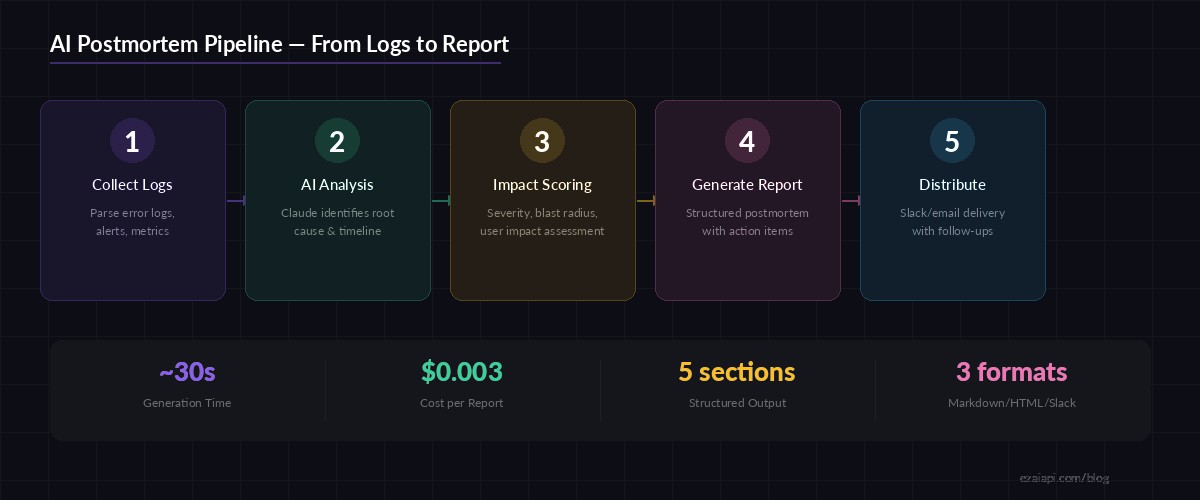
Five-stage pipeline: logs in, structured postmortem out — powered by Claude via EzAI
Setup and Dependencies
You need an EzAI API key and Python 3.10+. Install the Anthropic SDK — it works with EzAI out of the box since EzAI is a drop-in replacement for the Anthropic API.
pip install anthropic python-dateutilSet your API key as an environment variable:
export EZAI_API_KEY="your-key-here"Building the Core Generator
The generator takes a directory of log files (plain text, JSON lines, or structured alerting output) and feeds them to Claude with a carefully crafted system prompt. Claude returns a JSON object with distinct sections: summary, timeline, root cause, impact assessment, and action items.
import anthropic
import json
import os
from pathlib import Path

client = anthropic.Anthropic(
    api_key=os.environ["EZAI_API_KEY"],
    base_url="https://ezaiapi.com",
)

SYSTEM_PROMPT = """You are a senior SRE writing an incident postmortem.
Analyze the provided logs and produce a JSON object with these keys:

- "title": concise incident title (max 80 chars)
- "severity": "SEV1" | "SEV2" | "SEV3" | "SEV4"
- "summary": 2-3 sentence executive summary
- "timeline": array of {"time": "ISO8601", "event": "description"}
- "root_cause": detailed root cause analysis (3-5 sentences)
- "impact": {"users_affected": int|null, "duration_minutes": int,
             "revenue_impact": string, "services": [string]}
- "action_items": [{"priority": "P0"|"P1"|"P2", "owner": string,
                     "task": string, "due": string}]
- "lessons_learned": array of strings
- "detection": how the issue was detected, time-to-detect

Be specific. Reference exact timestamps, error codes, and metrics
from the logs. Do not invent data not present in the input."""


def collect_logs(log_dir: str) -> str:
    """Read all log files from a directory, sorted by name."""
    log_dir = Path(log_dir)
    chunks = []
    for f in sorted(log_dir.glob("*")):
        if f.is_file() and f.suffix in (".log", ".txt", ".json", ".jsonl"):
            content = f.read_text(errors="replace")[:50000]
            chunks.append(f"=== {f.name} ===\n{content}")
    return "\n\n".join(chunks)


def generate_postmortem(log_dir: str, model: str = "claude-sonnet-4-5") -> dict:
    """Analyze logs and generate a structured postmortem."""
    raw_logs = collect_logs(log_dir)
    if not raw_logs:
        raise ValueError(f"No log files found in {log_dir}")

    message = client.messages.create(
        model=model,
        max_tokens=4096,
        system=SYSTEM_PROMPT,
        messages=[{
            "role": "user",
            "content": f"Analyze this incident data:\n\n{raw_logs}"
        }],
    )

    # Parse the JSON response
    text = message.content[0].text
    # Strip markdown code fences if present
    if text.startswith("```"):
        text = text.split("\n", 1)[1].rsplit("```", 1)[0]

    return json.loads(text)
Two things to note here. First, the base_url points to ezaiapi.com — that's the only change from a direct Anthropic setup. Second, we cap each log file at 50,000 characters. Claude Sonnet's 200K context window can handle far more, but keeping the input focused reduces cost and improves accuracy.
Rendering the Report
Raw JSON isn't what you'd paste into a Notion doc. Let's add a renderer that produces clean Markdown suitable for Confluence, GitHub Issues, or Slack.
def render_markdown(pm: dict) -> str:
    """Convert postmortem JSON to formatted Markdown."""
    lines = [
        f"# {pm['title']}",
        f"**Severity:** {pm['severity']}  ",
        f"**Duration:** {pm['impact']['duration_minutes']} minutes  ",
        f"**Services:** {', '.join(pm['impact']['services'])}\n",
        f"## Summary\n{pm['summary']}\n",
        "## Timeline",
    ]
    for entry in pm["timeline"]:
        lines.append(f"- **{entry['time']}** — {entry['event']}")

    lines.append(f"\n## Root Cause\n{pm['root_cause']}\n")
    lines.append(f"## Detection\n{pm['detection']}\n")

    lines.append("## Action Items")
    lines.append("| Priority | Owner | Task | Due |")
    lines.append("|----------|-------|------|-----|")
    for item in pm["action_items"]:
        lines.append(
            f"| {item['priority']} | {item['owner']} "
            f"| {item['task']} | {item['due']} |"
        )

    lines.append("\n## Lessons Learned")
    for lesson in pm["lessons_learned"]:
        lines.append(f"- {lesson}")

    return "\n".join(lines)
Adding the CLI Interface
Wrap it in a CLI with argparse so your on-call engineers can run postmortem ./incident-logs/ right from the terminal. We support multiple output formats and model selection for teams that want to balance speed vs. depth.
import argparse
import sys

def main():
    parser = argparse.ArgumentParser(
        description="Generate incident postmortems from log files"
    )
    parser.add_argument("log_dir", help="Directory containing incident logs")
    parser.add_argument(
        "--model", default="claude-sonnet-4-5",
        help="Model to use (default: claude-sonnet-4-5)"
    )
    parser.add_argument(
        "--format", choices=["markdown", "json"],
        default="markdown", help="Output format"
    )
    parser.add_argument("--output", "-o", help="Write to file instead of stdout")

    args = parser.parse_args()

    print("Analyzing incident logs...", file=sys.stderr)
    pm = generate_postmortem(args.log_dir, model=args.model)

    if args.format == "json":
        output = json.dumps(pm, indent=2)
    else:
        output = render_markdown(pm)

    if args.output:
        Path(args.output).write_text(output)
        print(f"Postmortem saved to {args.output}", file=sys.stderr)
    else:
        print(output)


if __name__ == "__main__":
    main()
Now your engineers can run:
# Quick postmortem from last night's incident
python postmortem.py ./incidents/2026-04-03-db-pool/ -o postmortem.md

# Use Opus for complex multi-service outages
python postmortem.py ./incidents/2026-04-03-db-pool/ --model claude-opus-4 -o postmortem.md

# JSON output for integration with ticketing systems
python postmortem.py ./incidents/2026-04-03-db-pool/ --format json | jq '.action_items'
Extending with Streaming for Long Incidents
Major outages produce massive log files. For incidents with 100K+ lines, you'll want streaming responses so the team gets real-time feedback instead of staring at a spinner. EzAI supports SSE streaming through the same SDK:
def generate_streaming(log_dir: str, model: str = "claude-sonnet-4-5"):
    """Stream the postmortem generation for real-time feedback."""
    raw_logs = collect_logs(log_dir)

    with client.messages.stream(
        model=model,
        max_tokens=4096,
        system=SYSTEM_PROMPT,
        messages=[{
            "role": "user",
            "content": f"Analyze this incident data:\n\n{raw_logs}"
        }],
    ) as stream:
        full_text = ""
        for text in stream.text_stream:
            full_text += text
            print(text, end="", flush=True)

    return json.loads(full_text)
Cost Breakdown
Postmortem generation is surprisingly cheap. A typical incident with 5-10 log files (~30K tokens input) runs through Sonnet for about $0.003 per report. Even if your team runs 50 postmortems a month, that's $0.15 total. With EzAI's discounted pricing, it's even less.
For complex multi-service outages where you need Claude Opus's deeper reasoning, the cost bumps to roughly $0.05 per report — still cheaper than the 2 hours an engineer would spend writing it manually.
Production Tips
- Chunk large log files — If a single log exceeds 100K characters, split it by time window before sending. Claude performs better on focused chunks than on massive undifferentiated blobs.
- Add retry logic — Wrap the API call with exponential backoff. Check our retry strategies guide for a production-ready implementation.
- Cache results — Hash the input logs and cache the JSON output. Same incident data should return the same postmortem without burning another API call.
- Validate JSON output — Claude occasionally produces slightly malformed JSON on very long responses. Add a
try/exceptaroundjson.loads()with a repair fallback. - Hook into your incident workflow — Trigger the generator from PagerDuty webhooks or Slack commands so postmortems start generating the moment an incident resolves.
What's Next
You now have a working postmortem generator that turns scattered logs into structured, actionable reports. Extend it further by adding Jira ticket creation from action items, Slack delivery with your AI Slack bot, or a web UI that lets engineers annotate and edit before publishing.
The full source code is about 120 lines of Python. Get your EzAI API key and start generating postmortems — your on-call team will thank you.