Meetings generate a lot of talk and not enough documentation. Someone says "I'll take notes," then forgets half the action items by lunch. The transcript sits in a Google Doc that nobody reads. Sound familiar?
In this tutorial, you'll build a Python tool that takes a raw meeting transcript — whether from Zoom, Google Meet, or a pasted text dump — and produces a structured summary with action items, key decisions, and follow-ups. The entire thing runs on Claude's API through EzAI, which means you get access to the best summarization models at a fraction of the direct cost.
How the Pipeline Works
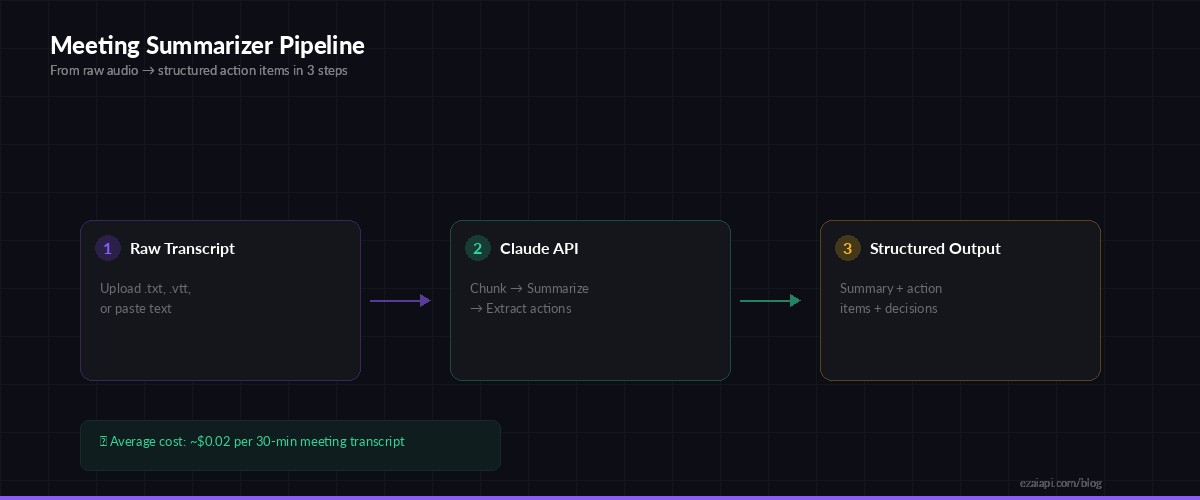
Three-step pipeline: ingest transcript, process with Claude, output structured results
The summarizer works in three phases. First, it ingests raw text — this can be a .txt file, a .vtt subtitle file from Zoom, or text pasted directly via stdin. Second, it chunks long transcripts (anything over 50K characters) and sends them to Claude with a carefully crafted prompt that asks for specific output sections. Third, it parses Claude's response into a clean JSON structure you can pipe into Slack, Notion, or your project management tool.
Prerequisites
You need Python 3.9+ and an EzAI API key. If you don't have one yet, sign up here — every account gets 15 free credits to start.
pip install anthropicThe Core Summarizer
Here's the complete summarizer class. It handles transcript chunking, prompt construction, and structured output parsing in under 100 lines:
import json
import anthropic

client = anthropic.Anthropic(
    api_key="sk-your-ezai-key",
    base_url="https://ezaiapi.com"
)

SUMMARIZE_PROMPT = """Analyze this meeting transcript and return a JSON object with:
{
  "title": "Brief meeting title (max 10 words)",
  "summary": "3-5 sentence overview of what was discussed",
  "decisions": ["List of decisions that were made"],
  "action_items": [
    {
      "task": "What needs to be done",
      "owner": "Person responsible (or 'Unassigned')",
      "due": "Deadline if mentioned (or 'Not specified')",
      "priority": "high/medium/low"
    }
  ],
  "follow_ups": ["Topics that need further discussion"],
  "participants": ["Names mentioned in the transcript"]
}

Return ONLY valid JSON. No markdown, no explanation."""

def summarize_meeting(transcript: str, model: str = "claude-sonnet-4-20250514") -> dict:
    # Chunk long transcripts (Claude handles 200K tokens,
    # but shorter inputs = faster + cheaper responses)
    max_chars = 80000
    if len(transcript) > max_chars:
        transcript = transcript[:max_chars]
        transcript += "\n\n[Transcript truncated at 80K chars]"

    response = client.messages.create(
        model=model,
        max_tokens=2048,
        messages=[{
            "role": "user",
            "content": f"{SUMMARIZE_PROMPT}\n\n---\n\n{transcript}"
        }]
    )

    raw = response.content[0].text
    return json.loads(raw)
That's the foundation. Call summarize_meeting() with any transcript string and you get back a clean Python dictionary with every section pre-parsed. The model choice matters here — claude-sonnet-4-20250514 hits the sweet spot between quality and cost for summarization tasks. A typical 30-minute meeting transcript runs about $0.01-0.03 through EzAI.
Adding VTT File Support
Zoom and Google Meet export transcripts as .vtt (WebVTT) files. These contain timestamps and speaker labels mixed with the actual text. Here's a parser that strips the formatting noise and gives Claude clean input:
import re

def parse_vtt(filepath: str) -> str:
    """Strip VTT timestamps and metadata, keep speaker + text."""
    with open(filepath) as f:
        content = f.read()

    # Remove WEBVTT header and timestamp lines
    lines = content.split("\n")
    cleaned = []
    for line in lines:
        if re.match(r"^\d{2}:\d{2}:\d{2}", line):
            continue
        if line.strip() in ("", "WEBVTT", "NOTE"):
            continue
        if re.match(r"^\d+$", line.strip()):
            continue
        cleaned.append(line.strip())

    return "\n".join(cleaned)

# Usage
transcript = parse_vtt("weekly-standup-2026-03-19.vtt")
result = summarize_meeting(transcript)
print(json.dumps(result, indent=2))
What Claude Extracts
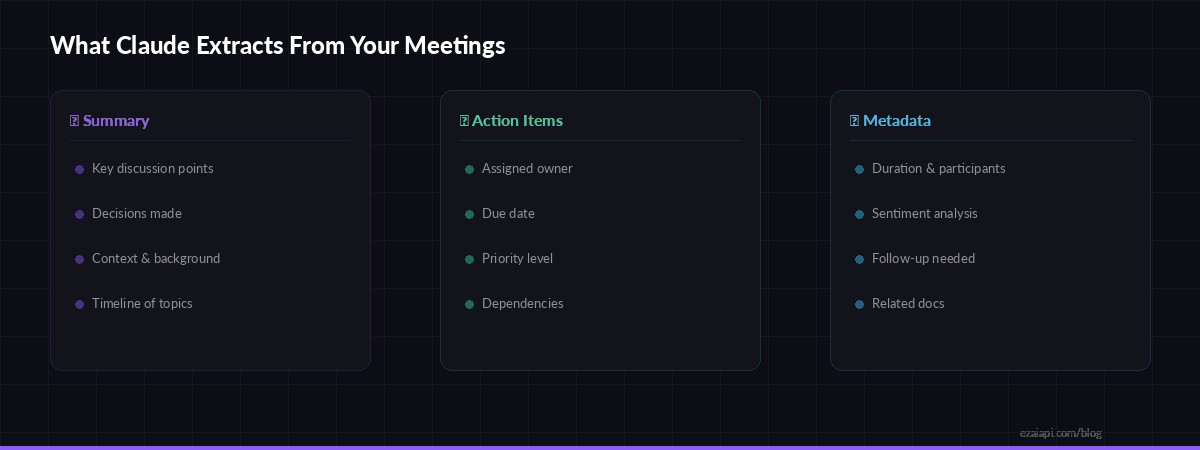
Three categories of structured data extracted from every meeting transcript
The JSON prompt forces Claude to produce consistent output every time. Here's what a real summary looks like from a 45-minute engineering standup:
{
  "title": "Q1 Sprint Review — Auth Service Migration",
  "summary": "Team reviewed progress on the auth service migration to Rust. Backend is 80% complete but the token refresh flow has a race condition under load. Frontend integration tests are blocked until the staging deploy lands. Decision to push the release to March 28 instead of March 21.",
  "decisions": [
    "Push release date from March 21 to March 28",
    "Use feature flags instead of a hard cutover"
  ],
  "action_items": [
    {
      "task": "Fix token refresh race condition in auth-rs",
      "owner": "Marcus",
      "due": "March 24",
      "priority": "high"
    },
    {
      "task": "Deploy auth-rs to staging",
      "owner": "Linh",
      "due": "March 22",
      "priority": "high"
    }
  ],
  "follow_ups": ["Load testing results after race condition fix"],
  "participants": ["Marcus", "Linh", "Sarah", "Dev"]
}
Every field is machine-readable. You can pipe this into Jira, Linear, Asana — anything with an API. The action items come with owners and due dates already extracted, which saves the usual "who's doing what again?" Slack thread after every meeting.
Posting Results to Slack
The most useful thing you can do with the output is push it directly to the team channel. Here's how to format it as a Slack message via webhook:
import httpx

def post_to_slack(summary: dict, webhook_url: str):
    actions = "\n".join(
        f"• *{a['task']}* → {a['owner']} (due: {a['due']})"
        for a in summary["action_items"]
    )
    decisions = "\n".join(
        f"• {d}" for d in summary["decisions"]
    )

    text = f"""📋 *{summary['title']}*

{summary['summary']}

*Decisions:*
{decisions}

*Action Items:*
{actions}"""

    httpx.post(webhook_url, json={"text": text})

# After summarizing
result = summarize_meeting(transcript)
post_to_slack(result, "https://hooks.slack.com/services/T.../B.../...")
Running It as a CLI Tool
Wrap everything into a script you can call from the terminal. Accepts a file path or reads from stdin — perfect for piping output from other tools:
#!/usr/bin/env python3
# meeting_summary.py
import sys, json

if len(sys.argv) > 1:
    filepath = sys.argv[1]
    if filepath.endswith(".vtt"):
        transcript = parse_vtt(filepath)
    else:
        with open(filepath) as f:
            transcript = f.read()
else:
    transcript = sys.stdin.read()

result = summarize_meeting(transcript)
print(json.dumps(result, indent=2))# Summarize a Zoom transcript
python3 meeting_summary.py standup-2026-03-19.vtt
# Pipe from clipboard (macOS)
pbpaste | python3 meeting_summary.py
# Save to file
python3 meeting_summary.py standup.vtt > summary.jsonCost Breakdown
Here's what this costs in practice through EzAI, based on real transcript lengths:
- 15-minute standup (~3K words) — ~$0.008 with Sonnet
- 30-minute planning session (~7K words) — ~$0.02 with Sonnet
- 60-minute all-hands (~15K words) — ~$0.04 with Sonnet
- Same calls with Haiku — roughly 10x cheaper, still accurate for straightforward meetings
A team running 20 meetings per week burns maybe $2-4/month on summarization. Compare that to paying someone $50/hour to write notes manually, or the cost of lost action items when nobody takes notes at all.
Going Further
Once you have the core pipeline working, there are natural extensions:
- Batch processing: Run all your team's transcripts through a batch pipeline at the end of each week for a digest
- Whisper integration: Record meetings with Whisper to go straight from audio to summary without a separate transcription service
- Action item tracking: Store summaries in a database and build a dashboard that shows overdue items across all meetings
- Model routing: Use smart model routing — Haiku for quick standups, Sonnet for complex planning sessions
The structured JSON output makes all of this composable. Each meeting summary is a data point you can query, aggregate, and act on — not a wall of text that disappears into your chat history.