Claude's vision capabilities let you send images directly to the API and get structured analysis back — OCR, object detection, classification, and natural language descriptions. Combined with a lightweight Python web server, you can build a production-ready image analysis API in under 150 lines of code. This tutorial walks through every step using EzAI as the API gateway.
What You'll Build
By the end of this tutorial, you'll have a FastAPI service that accepts image uploads via HTTP and returns structured JSON analysis. The service supports three modes:
- Describe — detailed natural language description of the image
- OCR — extract all visible text from screenshots, documents, or photos
- Classify — categorize images with confidence scores and tags
Every request routes through EzAI's API, so you get access to the latest Claude models at reduced cost with zero config changes.
Prerequisites
You'll need Python 3.10+, an EzAI API key (grab one from the dashboard — you get 15 free credits), and these dependencies:
pip install fastapi uvicorn anthropic python-multipartProject Structure
The entire project is two files — analyzer.py for the core logic and server.py for the HTTP layer. No frameworks, no abstractions, just clean Python that does what it says.
Core Analyzer: Talking to Claude Vision
The analyzer module handles image encoding and API calls. Claude accepts images as base64-encoded data in the message content array, alongside text prompts. Here's the complete module:
import base64, json
from anthropic import Anthropic

client = Anthropic(
    api_key="sk-your-ezai-key",
    base_url="https://ezaiapi.com",
)

PROMPTS = {
    "describe": "Describe this image in detail. Include objects, colors, "
                "composition, text, and any notable features.",
    "ocr": "Extract ALL visible text from this image. Return it as "
           "plain text, preserving layout where possible. If no "
           "text is found, return {\"text\": \"\", \"confidence\": 0}.",
    "classify": "Classify this image. Return valid JSON with: "
               "{\"category\": \"...\", \"tags\": [...], "
               "\"confidence\": 0.0-1.0}. Categories: photo, "
               "screenshot, diagram, document, meme, art, chart.",
}

def analyze(image_bytes: bytes, media_type: str, mode: str) -> dict:
    """Send image to Claude Vision via EzAI and return analysis."""
    b64 = base64.b64encode(image_bytes).decode()
    prompt = PROMPTS.get(mode, PROMPTS["describe"])

    message = client.messages.create(
        model="claude-sonnet-4-5",
        max_tokens=1024,
        messages=[{
            "role": "user",
            "content": [
                {
                    "type": "image",
                    "source": {
                        "type": "base64",
                        "media_type": media_type,
                        "data": b64,
                    },
                },
                {"type": "text", "text": prompt},
            ],
        }],
    )

    text = message.content[0].text
    try:
        return {"result": json.loads(text), "mode": mode}
    except json.JSONDecodeError:
        return {"result": text, "mode": mode}
The key detail: Claude's messages API accepts an array of content blocks. By combining an image block (base64-encoded) with a text block (your prompt), you get multimodal analysis in a single request. The response format is identical to text-only calls — same SDK, same error handling.
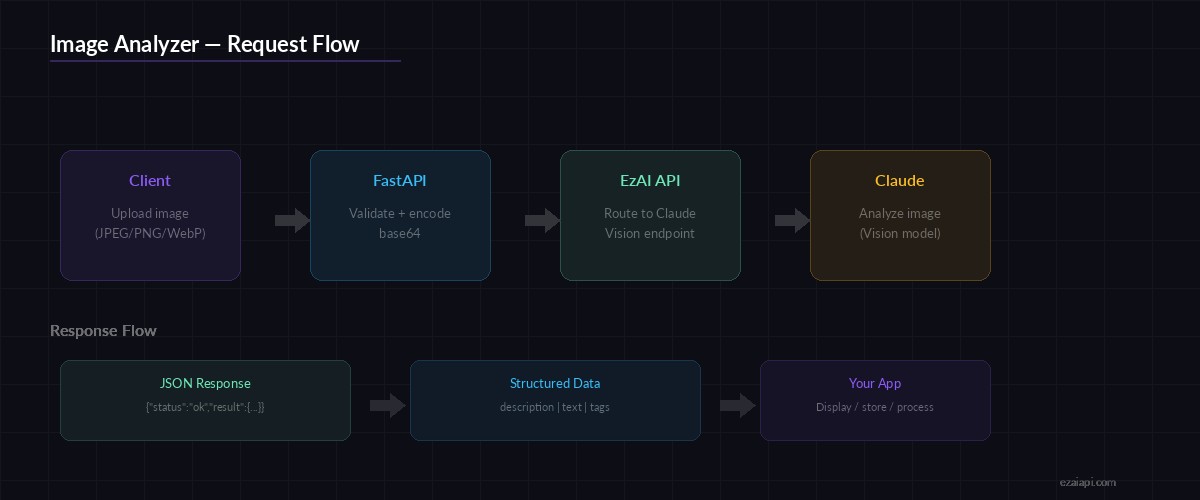
Request flow: Upload → Base64 encode → Claude Vision via EzAI → Structured JSON response
HTTP Server: FastAPI Endpoint
The server wraps the analyzer in a single POST endpoint. It handles file upload validation, MIME type detection, and response formatting:
from fastapi import FastAPI, UploadFile, File, Query, HTTPException
from analyzer import analyze

app = FastAPI(title="AI Image Analyzer")
ALLOWED = {"image/jpeg", "image/png", "image/gif", "image/webp"}
MAX_SIZE = 10 * 1024 * 1024  # 10 MB

@app.post("/analyze")
async def analyze_image(
    file: UploadFile = File(...),
    mode: str = Query("describe", enum=["describe", "ocr", "classify"]),
):
    if file.content_type not in ALLOWED:
        raise HTTPException(415, f"Unsupported type: {file.content_type}")

    data = await file.read()
    if len(data) > MAX_SIZE:
        raise HTTPException(413, "Image exceeds 10 MB limit")

    result = analyze(data, file.content_type, mode)
    return {"status": "ok", **result}

if __name__ == "__main__":
    import uvicorn
    uvicorn.run(app, host="0.0.0.0", port=8000)
Run it with python server.py and you've got a live API at http://localhost:8000. The /analyze endpoint takes a multipart file upload and a mode query parameter.
Testing with curl
Upload a screenshot and extract all text from it:
# OCR mode — extract text from a screenshot
curl -X POST "http://localhost:8000/analyze?mode=ocr" \
  -F "[email protected]"

# Classify an image
curl -X POST "http://localhost:8000/analyze?mode=classify" \
  -F "[email protected]"

# Describe (default mode)
curl -X POST "http://localhost:8000/analyze" \
  -F "[email protected]"
The classify endpoint returns structured JSON you can feed directly into downstream pipelines:
{
  "status": "ok",
  "mode": "classify",
  "result": {
    "category": "screenshot",
    "tags": ["code-editor", "dark-theme", "python", "terminal"],
    "confidence": 0.94
  }
}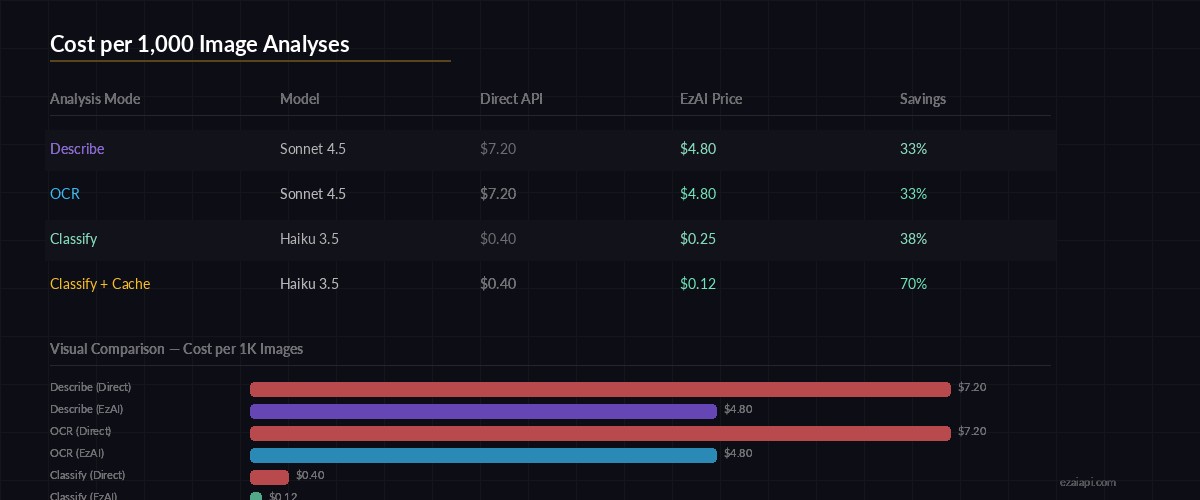
Cost per 1,000 image analyses — EzAI pricing vs direct API
Optimizing for Production
The basic setup works, but production deployments need a few tweaks. Here are three changes that make a real difference:
1. Resize Before Sending
Claude processes images up to 1568px on the longest side. Sending a 4000×3000 photo wastes tokens on downscaling that the API does internally anyway. Resize client-side to cut latency and cost:
from PIL import Image
import io

def optimize_image(data: bytes, max_side: int = 1568) -> bytes:
    img = Image.open(io.BytesIO(data))
    if max(img.size) > max_side:
        img.thumbnail((max_side, max_side))
    buf = io.BytesIO()
    img.save(buf, format="JPEG", quality=85)
    return buf.getvalue()
2. Pick the Right Model
Not every image analysis task needs Sonnet. For basic classification, claude-haiku-3-5 runs 10× cheaper and responds in under 500ms. Use Sonnet for OCR on complex documents where accuracy matters, and Haiku for high-volume classification:
MODEL_MAP = {
    "describe": "claude-sonnet-4-5",   # detailed analysis
    "ocr":      "claude-sonnet-4-5",   # accuracy-critical
    "classify": "claude-haiku-3-5",    # fast + cheap
}

message = client.messages.create(
    model=MODEL_MAP[mode],
    # ...rest of the call
)
3. Add Request Caching
If users upload the same image twice, don't call the API again. Hash the image bytes and cache results. Check our full caching guide for implementation details — the technique works identically with vision requests.
Cost Breakdown
Image tokens in Claude's API depend on resolution. A typical 1200×800 image costs around 1,600 input tokens. Through EzAI, here's what you're looking at per 1,000 analyses:
- Sonnet (describe/OCR) — ~$4.80 per 1K images via EzAI (vs $7.20 direct)
- Haiku (classify) — ~$0.25 per 1K images via EzAI (vs $0.40 direct)
- With caching + resize — cut those numbers by 30-50%
At Haiku pricing, you can classify 60,000 images for about $15. That's cheaper than most dedicated computer vision APIs, and you get the flexibility of natural language prompts.
What's Next
You've got a working image analysis API. Here are some directions to take it:
- Add batch processing for bulk uploads with async workers
- Combine OCR with classification — extract text AND categorize in one call
- Pipe results into a RAG chatbot for searchable image libraries
- Set up model fallback so your service stays up even if one model is overloaded
The code from this tutorial is production-ready — add authentication, rate limiting, and check the Anthropic vision docs for supported image formats and size limits.