Database migrations are the scariest part of shipping. One bad ALTER TABLE on a 200-million-row table and your app is down for hours. Traditional migration tools generate SQL from schema diffs, but they don't understand intent — they can't tell you that renaming a column will break 47 queries, or that adding an index on a hot table needs CONCURRENTLY. Claude can. This tutorial builds a migration tool that reads your current schema, takes your desired changes in plain English, and generates production-safe SQL with rollback scripts.
What We're Building
A Python CLI that does three things:
- Schema introspection — reads your PostgreSQL schema and sends it to Claude as structured context
- Migration generation — turns plain-English requests into versioned SQL files with up/down scripts
- Safety validation — checks for locking issues, data loss risks, and missing indexes before you run anything
The whole thing talks to Claude through EzAI's API, so you get access to the latest models without managing separate provider keys.
Project Setup
You need Python 3.10+, a PostgreSQL database, and an EzAI API key. Install the dependencies:
pip install anthropic psycopg2-binary clickCreate the project structure:
mkdir -p ai-migrate/migrations
cd ai-migrate
touch migrate.py
Reading the Schema
The first step is pulling your database schema into a format Claude can reason about. PostgreSQL's information_schema gives us everything — tables, columns, constraints, indexes, and foreign keys. Here's the introspection module:
import psycopg2
import json

def introspect_schema(dsn: str) -> dict:
    """Pull full schema from PostgreSQL into a dict."""
    conn = psycopg2.connect(dsn)
    cur = conn.cursor()

    # Get all tables and columns
    cur.execute("""
        SELECT table_name, column_name, data_type,
               is_nullable, column_default
        FROM information_schema.columns
        WHERE table_schema = 'public'
        ORDER BY table_name, ordinal_position
    """)

    tables = {}
    for table, col, dtype, nullable, default in cur.fetchall():
        if table not in tables:
            tables[table] = {"columns": [], "indexes": [], "fkeys": []}
        tables[table]["columns"].append({
            "name": col, "type": dtype,
            "nullable": nullable == "YES",
            "default": default
        })

    # Get indexes
    cur.execute("""
        SELECT tablename, indexname, indexdef
        FROM pg_indexes WHERE schemaname = 'public'
    """)
    for table, name, definition in cur.fetchall():
        if table in tables:
            tables[table]["indexes"].append({
                "name": name, "definition": definition
            })

    # Get foreign keys
    cur.execute("""
        SELECT tc.table_name, kcu.column_name,
               ccu.table_name AS ref_table,
               ccu.column_name AS ref_column
        FROM information_schema.table_constraints tc
        JOIN information_schema.key_column_usage kcu
          ON tc.constraint_name = kcu.constraint_name
        JOIN information_schema.constraint_column_usage ccu
          ON tc.constraint_name = ccu.constraint_name
        WHERE tc.constraint_type = 'FOREIGN KEY'
    """)
    for table, col, ref_table, ref_col in cur.fetchall():
        if table in tables:
            tables[table]["fkeys"].append({
                "column": col, "references": f"{ref_table}.{ref_col}"
            })

    conn.close()
    return tables
This returns a clean dictionary with every table's columns, types, indexes, and foreign key relationships. Claude needs this context to generate correct SQL — you can't ask it to add a column if it doesn't know what columns already exist.
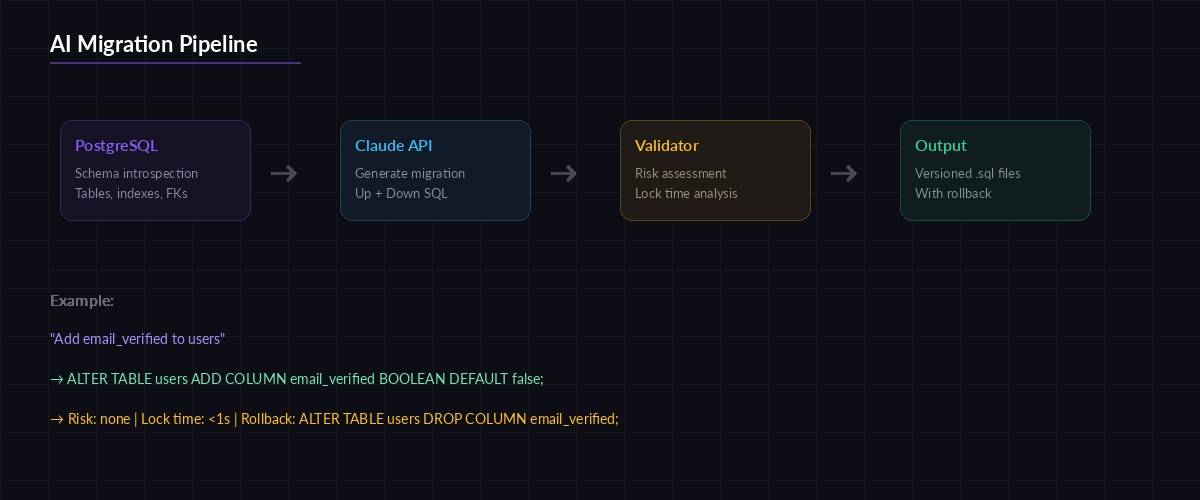
How the AI migration pipeline works — schema introspection feeds Claude, which outputs versioned up/down SQL
Generating Migrations with Claude
Here's the core function. It takes your schema and a plain-English description of what you want to change, then asks Claude to produce the migration SQL:
import anthropic
import json
from datetime import datetime

client = anthropic.Anthropic(
    api_key="sk-your-ezai-key",
    base_url="https://ezaiapi.com"
)

SYSTEM_PROMPT = """You are a PostgreSQL migration expert. Given a database
schema and a requested change, generate:

1. An UP migration (apply the change)
2. A DOWN migration (revert the change)
3. A risk assessment

Rules:
- Use CREATE INDEX CONCURRENTLY for indexes on tables with data
- Never use ALTER TABLE ... ADD COLUMN ... NOT NULL without a DEFAULT
- Wrap destructive operations in transactions
- Flag any operation that locks the table for writes
- Output valid PostgreSQL SQL only

Return JSON with keys: up_sql, down_sql, risks (array of strings),
estimated_lock_time (string like "none", "<1s", "minutes")."""

def generate_migration(schema: dict, request: str) -> dict:
    message = client.messages.create(
        model="claude-sonnet-4-5",
        max_tokens=4096,
        system=SYSTEM_PROMPT,
        messages=[{
            "role": "user",
            "content": f"""Current schema:
{json.dumps(schema, indent=2)}

Requested change: {request}"""
        }]
    )

    # Parse the JSON response
    text = message.content[0].text
    # Strip markdown code fences if present
    if "```json" in text:
        text = text.split("```json")[1].split("```")[0]
    elif "```" in text:
        text = text.split("```")[1].split("```")[0]

    return json.loads(text)
The system prompt is doing the heavy lifting. It encodes years of DBA knowledge: never add a NOT NULL column without a default, always use CONCURRENTLY for hot-table indexes, flag locking operations. Claude follows these rules and adds its own reasoning about the specific schema it's looking at.
Building the CLI
Wrap everything in a Click CLI so your team can use it from the terminal:
import click
import os

@click.group()
def cli():
    """AI-powered database migration tool."""
    pass

@cli.command()
@click.option("--dsn", envvar="DATABASE_URL", required=True)
@click.argument("description")
def create(dsn, description):
    """Generate a migration from a plain-English description."""
    click.echo("🔍 Reading schema...")
    schema = introspect_schema(dsn)
    click.echo(f"   Found {len(schema)} tables")

    click.echo("🧠 Generating migration with Claude...")
    result = generate_migration(schema, description)

    # Create versioned migration files
    ts = datetime.now().strftime("%Y%m%d_%H%M%S")
    slug = description[:40].lower().replace(" ", "_")
    base = f"migrations/{ts}_{slug}"

    with open(f"{base}.up.sql", "w") as f:
        f.write(result["up_sql"])
    with open(f"{base}.down.sql", "w") as f:
        f.write(result["down_sql"])

    # Show risk assessment
    click.echo(f"\n✅ Migration created: {base}")
    click.echo(f"   Lock time: {result['estimated_lock_time']}")

    if result["risks"]:
        click.echo("\n⚠️  Risks:")
        for risk in result["risks"]:
            click.echo(f"   • {risk}")

@cli.command()
@click.option("--dsn", envvar="DATABASE_URL", required=True)
def validate(dsn):
    """Validate pending migrations against the current schema."""
    schema = introspect_schema(dsn)
    pending = sorted(
        [f for f in os.listdir("migrations")
         if f.endswith(".up.sql")]
    )

    for migration in pending:
        sql = open(f"migrations/{migration}").read()
        click.echo(f"Validating {migration}...")

        result = client.messages.create(
            model="claude-sonnet-4-5",
            max_tokens=2048,
            messages=[{
                "role": "user",
                "content": f"""Review this PostgreSQL migration against the schema.
Flag: syntax errors, missing indexes for new FKs, locking risks,
data loss potential. Be specific.

Schema: {json.dumps(schema)}
SQL: {sql}"""
            }]
        )
        click.echo(result.content[0].text)

if __name__ == "__main__":
    cli()
Now your workflow looks like this:
# Generate a migration
python migrate.py create "add email_verified boolean to users table"

# Validate before applying
python migrate.py validate

# Apply with psql
psql $DATABASE_URL -f migrations/20260318_142000_add_email_verified.up.sql
Safety Validation Layer
The validate command is where this tool earns its keep. Claude doesn't just check syntax — it cross-references the migration against your actual schema. It'll catch things like:
- Missing FK indexes — adding a foreign key without an index on the referencing column kills JOIN performance
- Table locks —
ALTER TABLEon large tables acquires anACCESS EXCLUSIVElock that blocks all reads and writes - Data loss — dropping a column or changing types without a data migration step
- Naming conflicts — creating a column or index that already exists
Traditional linters check SQL syntax. Claude checks consequences. That's the difference between "this SQL is valid" and "this SQL will lock your users table for 3 minutes during peak traffic."
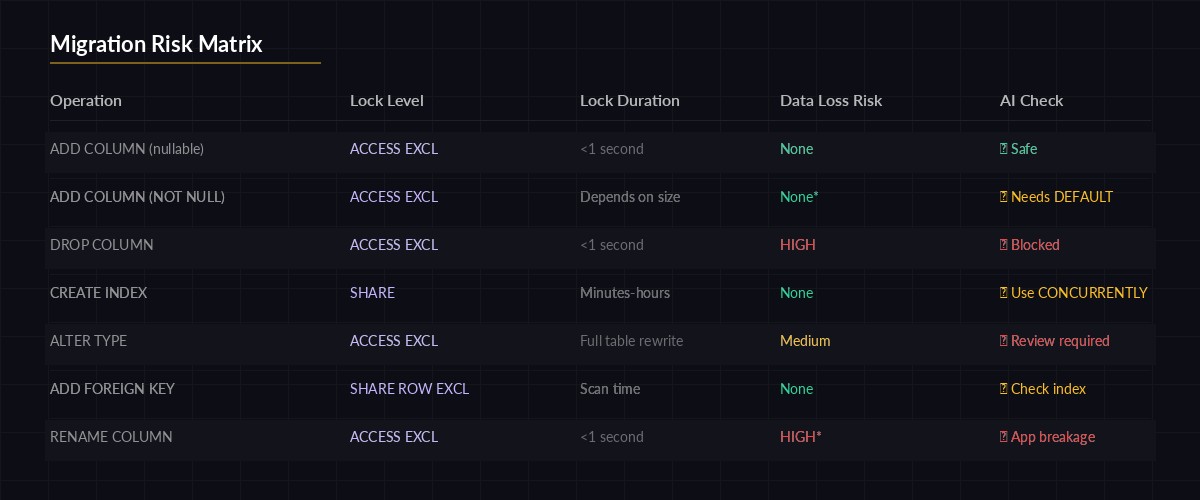
Risk matrix — Claude categorizes each migration by lock severity and data loss potential
Handling Large Schemas
If your database has hundreds of tables, dumping the entire schema into the prompt burns tokens. Filter to only the relevant tables:
def filter_relevant_tables(schema: dict, request: str) -> dict:
    """Use Claude to pick which tables are relevant."""
    table_names = list(schema.keys())

    resp = client.messages.create(
        model="claude-haiku-3-5",  # Cheap model for filtering
        max_tokens=256,
        messages=[{
            "role": "user",
            "content": f"""Which tables are relevant to this migration?
Tables: {table_names}
Request: {request}
Return JSON array of table names only."""
        }]
    )

    relevant = json.loads(resp.content[0].text)
    return {t: schema[t] for t in relevant if t in schema}
This two-stage approach uses Haiku (fast, cheap) to pick the tables, then Sonnet (smarter) to generate the actual SQL. On a 200-table database, this cuts token usage by 80% without sacrificing accuracy. You can set both models up through your EzAI dashboard — one key covers Haiku, Sonnet, and Opus.
Production Tips
A few things I've learned running this in production:
- Version your prompts. Store the system prompt in a file alongside your migrations. When you improve it, you want to know which prompt generated which migration.
- Always review the SQL. Claude is good, but it's not a DBA with 20 years of experience. Treat generated migrations as a strong first draft, not the final word.
- Use extended thinking for complex migrations involving multiple tables. It catches more edge cases when given time to reason through dependency chains.
- Track token costs. Schema introspection + generation + validation runs about 10-15K tokens per migration with Sonnet. At EzAI's current rates, that's under $0.10 per migration — cheaper than a DBA review and faster than writing SQL by hand.
What's Next
This tutorial gets you a working migration tool in about 100 lines of Python. From here, you could add:
- A
migrate applycommand that runs pending migrations in order - Integration with CI/CD to auto-validate migrations on pull requests
- Support for MySQL and SQLite schema introspection
- A
--dry-runflag that explains what the migration would do without generating files
The full source is on GitHub. Star it, fork it, break it — then let Claude fix it.