You inherit a 50,000-line codebase with zero documentation. The previous dev left three months ago. Grep gives you filenames but no understanding. What if you could just ask the codebase how it works?
That's what we're building today: a Python CLI that indexes a project's source files and uses Claude API to answer natural-language questions about the code. Point it at any repo, ask "where does authentication happen?" or "what does the payment flow look like?", and get accurate answers with file references.
The entire tool is under 120 lines of Python. It uses the Anthropic SDK with EzAI API as the backend — same API format, fraction of the cost.
How It Works
The approach is straightforward: collect source files from a directory, pack them into a structured context string with filenames and line numbers, then send that context plus the user's question to Claude. The model reads the code and answers based on what it actually sees — no embeddings, no vector databases, no infrastructure overhead.
For codebases under ~100K tokens (roughly 300-400 files of typical source code), this brute-force approach works surprisingly well. Claude's 200K context window handles it without breaking a sweat, and you avoid the retrieval accuracy problems that plague RAG-based code search.
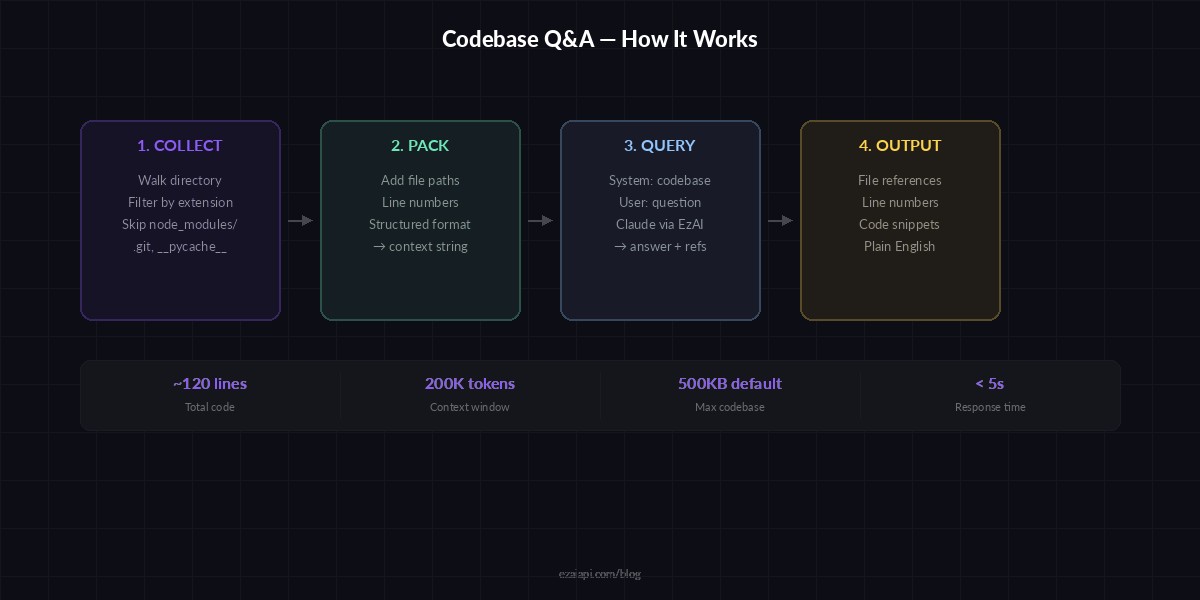
Architecture: source files → context packing → Claude API via EzAI → structured answer
Prerequisites
You'll need Python 3.9+ and an EzAI API key. If you don't have one yet, sign up at ezaiapi.com/dashboard — you'll get 15 free credits immediately.
pip install anthropicSet your EzAI API key as an environment variable:
export EZAI_API_KEY="sk-your-key-here"Step 1: Collect Source Files
First, we need a function that walks through a directory and collects source files. We'll filter by extension and skip common junk directories like node_modules, .git, and __pycache__.
import os
from pathlib import Path

SKIP_DIRS = {".git", "node_modules", "__pycache__", "venv",
             ".venv", "dist", "build", ".next"}

CODE_EXTS = {".py", ".js", ".ts", ".tsx", ".jsx", ".go",
             ".rs", ".java", ".rb", ".cpp", ".c", ".h"}

def collect_files(root: str, max_bytes: int = 500_000) -> list[dict]:
    """Walk directory, return list of {path, content} dicts."""
    files = []
    total = 0
    for dirpath, dirnames, filenames in os.walk(root):
        dirnames[:] = [d for d in dirnames if d not in SKIP_DIRS]
        for fname in sorted(filenames):
            if Path(fname).suffix not in CODE_EXTS:
                continue
            fpath = os.path.join(dirpath, fname)
            rel = os.path.relpath(fpath, root)
            try:
                content = open(fpath, "r", errors="ignore").read()
            except OSError:
                continue
            if total + len(content) > max_bytes:
                break
            files.append({"path": rel, "content": content})
            total += len(content)
    return files
The max_bytes parameter caps total source code at 500KB by default. That's roughly 125K tokens — safely within Claude's context window while leaving room for the system prompt and response.
Step 2: Pack Files Into Context
Claude needs to see the code in a structured format. We'll add file paths as headers and line numbers for easy reference:
def pack_context(files: list[dict]) -> str:
    """Format files into a numbered, labeled context block."""
    parts = []
    for f in files:
        lines = f["content"].splitlines()
        numbered = "\n".join(
            f"{i+1:4d} | {line}" for i, line in enumerate(lines)
        )
        parts.append(f"### FILE: {f['path']}\n{numbered}")
    return "\n\n".join(parts)
Line numbers are critical. When Claude references "the auth check on line 47 of middleware/auth.py", you can jump straight there in your editor.
Step 3: Query Claude via EzAI
Now the core function. We send the packed codebase as the system context and the user's question as the message:
import anthropic

client = anthropic.Anthropic(
    api_key=os.environ["EZAI_API_KEY"],
    base_url="https://ezaiapi.com",
)

SYSTEM = """You are a senior software engineer analyzing a codebase.
Answer the user's question based ONLY on the source code provided below.
Always cite specific file paths and line numbers. If you're unsure, say so.

CODEBASE:
{context}"""

def ask_codebase(context: str, question: str, model: str = "claude-sonnet-4-5") -> str:
    response = client.messages.create(
        model=model,
        max_tokens=2048,
        system=SYSTEM.format(context=context),
        messages=[{"role": "user", "content": question}],
    )
    return response.content[0].text
Notice we're using base_url="https://ezaiapi.com" — that's all it takes to route through EzAI. The Anthropic SDK handles everything else identically. You can swap between claude-sonnet-4-5 for speed or claude-opus-4-6 for deeper analysis without changing anything else.
Step 4: Build the CLI
Let's wire it all together into a usable command-line tool:
import sys

def main():
    if len(sys.argv) < 3:
        print("Usage: python codeqa.py <directory> <question>")
        sys.exit(1)

    directory = sys.argv[1]
    question = " ".join(sys.argv[2:])

    print(f"📂 Scanning {directory}...")
    files = collect_files(directory)
    print(f"📄 Found {len(files)} source files")

    if not files:
        print("No source files found. Check the directory path.")
        sys.exit(1)

    context = pack_context(files)
    print(f"🧠 Sending {len(context):,} chars to Claude...\n")

    answer = ask_codebase(context, question)
    print(answer)

if __name__ == "__main__":
    main()
Run it like this:
python codeqa.py ./my-project "How does the user authentication flow work?"

# 📂 Scanning ./my-project...
# 📄 Found 47 source files
# 🧠 Sending 89,412 chars to Claude...
#
# Authentication is handled in `middleware/auth.py` (lines 12-58).
# The flow works as follows:
# 1. Requests hit the `verify_token()` middleware (line 15)...
Practical Tips for Better Results
Use specific questions. "How does auth work?" beats "tell me about this code." Claude gives better answers when the question is focused. "What happens when a user's JWT expires in the payment flow?" will get you surgical precision.
Pick the right model for the job. For quick lookups and "where is X defined?" questions, claude-sonnet-4-5 is fast and cheap. For architectural analysis or tracing complex bug paths across multiple files, upgrade to claude-opus-4-6 — its deeper reasoning is worth the extra tokens. You can check EzAI's pricing page for the per-token costs of each model.
Filter aggressively. Don't feed test fixtures, generated code, or vendored dependencies into the context. They burn tokens and confuse the model. Add patterns like test_*, *.min.js, and vendor/ to your skip list.
Cache the context. If you're asking multiple questions about the same repo, pack the context once and reuse it. You can extend the CLI into an interactive REPL that keeps the context in memory between questions — caching strategies covered here.
Scaling Beyond the Context Window
What about codebases that exceed 200K tokens? Two practical approaches:
Directory-level chunking. Instead of feeding the entire repo, let the user specify a subdirectory. Most questions are scoped to a specific module anyway. "How does billing work?" probably only needs src/billing/, not the entire monorepo.
Two-pass retrieval. First pass: send just the file tree (paths only, no content) and ask Claude which files are relevant to the question. Second pass: load only those files and ask the actual question. This cuts context usage by 80-90% on large repos while maintaining accuracy.
For production-grade codebase search across massive repositories, consider pairing this approach with a RAG pipeline that uses embeddings for initial retrieval and Claude for final synthesis.
What You Can Build From Here
This 120-line script is a foundation. Here's where it gets interesting:
- PR review bot — feed the diff plus surrounding files and ask Claude to review for bugs. We covered this in our GitHub PR bot tutorial.
- Onboarding assistant — new team members ask questions about the codebase instead of pinging senior devs on Slack.
- Architecture docs generator — ask "describe the overall architecture of this project" and pipe the output into your wiki.
- Bug tracer — paste an error message and ask "where does this error originate and what conditions trigger it?"
The pattern is always the same: collect relevant code, pack it into context, ask a focused question. Claude does the hard part — understanding the code relationships, tracing execution paths, and explaining it in plain English.
The full source code from this tutorial is available on GitHub. To get started with EzAI API, follow the 5-minute setup guide.