Every developer knows the pain: you inherit a codebase with zero documentation, or your own project has grown so fast that the docs are six months stale. Writing documentation by hand is tedious, error-prone, and the first thing to slip when deadlines hit. What if you could point an AI at your source files and get structured, accurate docs back in seconds?
In this tutorial, you'll build a Python tool that walks your project directory, extracts functions and classes, sends them to Claude via EzAI API, and outputs clean Markdown documentation — complete with parameter descriptions, return types, usage examples, and module overviews. The whole thing runs from the command line, costs about $0.02 per file, and handles repos with hundreds of modules.
How the Pipeline Works
The documentation generator follows a three-stage pipeline. First, it scans your project and extracts Python source files, filtering out virtualenvs, __pycache__, and other noise. Second, it uses Python's built-in ast module to parse each file into a structured tree of functions, classes, and their signatures — no regex hacking required. Third, it sends each parsed module to Claude with a carefully tuned prompt that produces consistent Markdown output.
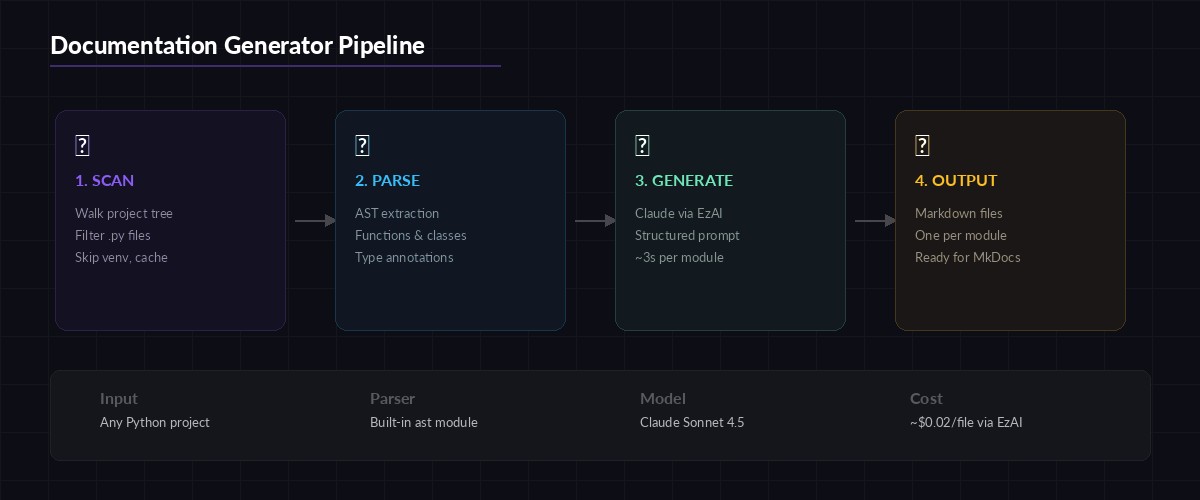
Three-stage pipeline: file scanning, AST parsing, and AI-powered doc generation
The ast approach gives Claude structured context instead of raw text. Instead of dumping an entire file and asking "document this," you tell Claude exactly what each function's parameters are, what decorators it uses, and where it sits in the class hierarchy. This produces dramatically better output than naive file-level prompts.
Setting Up the Project
You need Python 3.10+ and an EzAI API key. If you don't have one yet, grab it at ezaiapi.com/dashboard — the free tier gives you enough credits to document a mid-sized project.
mkdir ai-docs-gen && cd ai-docs-gen
pip install anthropic
export ANTHROPIC_API_KEY="sk-your-ezai-key"
That's the entire dependency list. The ast module ships with Python, and anthropic is the only external package.
Extracting Code Structure with AST
The first component parses Python files and extracts a structured representation of every function and class. This is the foundation — good extraction means good docs.
import ast, os, json

def extract_module_info(filepath: str) -> dict:
    """Parse a Python file and return structured info about its contents."""
    with open(filepath) as f:
        source = f.read()
    tree = ast.parse(source)

    module_doc = ast.get_docstring(tree) or ""
    functions, classes = [], []

    for node in ast.iter_child_nodes(tree):
        if isinstance(node, ast.FunctionDef):
            functions.append(extract_function(node, source))
        elif isinstance(node, ast.ClassDef):
            classes.append(extract_class(node, source))

    return {
        "filepath": filepath,
        "module_docstring": module_doc,
        "functions": functions,
        "classes": classes
    }

def extract_function(node: ast.FunctionDef, source: str) -> dict:
    args = []
    for arg in node.args.args:
        annotation = ast.unparse(arg.annotation) if arg.annotation else "Any"
        args.append({"name": arg.arg, "type": annotation})

    return_type = ast.unparse(node.returns) if node.returns else "None"
    body_lines = source.split("\n")[node.lineno - 1 : node.end_lineno]

    return {
        "name": node.name,
        "args": args,
        "return_type": return_type,
        "docstring": ast.get_docstring(node) or "",
        "decorators": [ast.unparse(d) for d in node.decorator_list],
        "source": "\n".join(body_lines)
    }
The extract_class function follows the same pattern but also iterates over methods within the class body. The key insight is using ast.unparse() to convert annotation nodes back into readable strings — this gives Claude type information without needing to infer it from usage patterns.
Generating Documentation with Claude
Here's the core: sending parsed module data to Claude and getting back structured Markdown. The prompt engineering matters a lot. You want Claude to write docs that are specific to your code, not generic boilerplate.
import anthropic

client = anthropic.Anthropic(
    base_url="https://ezaiapi.com",
    # Uses ANTHROPIC_API_KEY env var automatically
)

DOCS_PROMPT = """You are a technical writer generating API documentation.
Given the following Python module structure, produce clean Markdown docs.

Rules:
- Write a one-paragraph module overview
- Document every public function and class (skip _private ones)
- Include: description, parameters table, return type, one usage example
- Use Google-style docstring format in examples
- Be specific about what the code does — don't just restate the function name
- If a function has no type annotations, infer types from the source code

Module: {filepath}
Module docstring: {module_docstring}

Functions:
{functions_json}

Classes:
{classes_json}

Output ONLY the Markdown documentation. No preamble."""

def generate_docs(module_info: dict) -> str:
    prompt = DOCS_PROMPT.format(
        filepath=module_info["filepath"],
        module_docstring=module_info["module_docstring"],
        functions_json=json.dumps(module_info["functions"], indent=2),
        classes_json=json.dumps(module_info["classes"], indent=2)
    )

    response = client.messages.create(
        model="claude-sonnet-4-5",
        max_tokens=4096,
        messages=[{"role": "user", "content": prompt}]
    )
    return response.content[0].text
Sonnet 4.5 is the sweet spot here — fast enough for batch processing, smart enough to infer behavior from source code. Processing a 200-line module takes about 3 seconds and costs roughly $0.01 through EzAI. For a 50-file project, that's under $1 total.
Walking the Project Tree
The scanner component discovers all Python files while skipping directories that shouldn't be documented. This is where practical decisions matter — you don't want docs for your migrations folder or test fixtures.
SKIP_DIRS = {"venv", ".venv", "node_modules", "__pycache__",
             ".git", ".tox", "dist", "build", ".eggs"}

def scan_project(root: str) -> list[str]:
    """Find all documentable Python files in a project."""
    files = []
    for dirpath, dirnames, filenames in os.walk(root):
        # Prune skippable directories in-place
        dirnames[:] = [d for d in dirnames if d not in SKIP_DIRS]

        for fname in sorted(filenames):
            if fname.endswith(".py") and not fname.startswith("test_"):
                files.append(os.path.join(dirpath, fname))
    return files

# Main pipeline
def generate_project_docs(project_path: str, output_dir: str):
    os.makedirs(output_dir, exist_ok=True)
    files = scan_project(project_path)
    print(f"Found {len(files)} Python files to document")

    for filepath in files:
        print(f"  Documenting: {filepath}")
        module_info = extract_module_info(filepath)

        # Skip empty modules (just __init__.py with no content)
        if not module_info["functions"] and not module_info["classes"]:
            continue

        markdown = generate_docs(module_info)
        rel_path = os.path.relpath(filepath, project_path)
        out_name = rel_path.replace(os.sep, "_").replace(".py", ".md")

        with open(os.path.join(output_dir, out_name), "w") as f:
            f.write(markdown)

    print(f"\n✅ Docs written to {output_dir}/")
Handling Large Files and Token Limits
Claude's context window is generous, but a 2,000-line module can still blow past your token budget. The fix is chunking: split large modules into logical groups and document them separately, then stitch the output together.
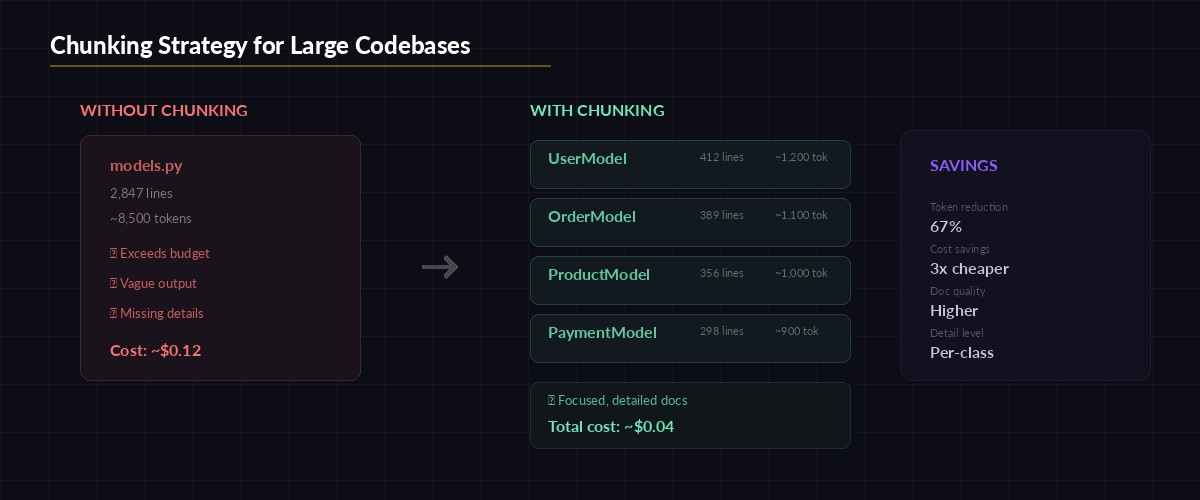
Chunking strategy: split by class boundaries, merge docs after generation
MAX_SOURCE_CHARS = 12000  # ~3000 tokens, safe for Sonnet

def chunk_module(module_info: dict) -> list[dict]:
    """Split a large module into documentable chunks."""
    all_items = module_info["functions"] + module_info["classes"]
    chunks, current, current_size = [], [], 0

    for item in all_items:
        item_size = len(item.get("source", ""))
        if current_size + item_size > MAX_SOURCE_CHARS and current:
            chunks.append(current)
            current, current_size = [], 0
        current.append(item)
        current_size += item_size

    if current:
        chunks.append(current)
    return chunks
With chunking in place, a 3,000-line Django model file splits into 4-5 chunks, each generating focused documentation. The output gets concatenated with a module header, and the total cost stays under $0.05 for even the largest files.
Running It From the CLI
Wrap everything in a clean CLI entry point so you can run it against any project:
python docs_gen.py ./my-project ./docs-output

# Output:
# Found 47 Python files to document
#   Documenting: ./my-project/api/views.py
#   Documenting: ./my-project/api/serializers.py
#   Documenting: ./my-project/core/models.py
#   ...
# ✅ Docs written to docs-output/
Each run produces one Markdown file per module, named after the file path. A models.py inside api/ becomes api_models.md. You can feed these directly into MkDocs, Docusaurus, or any static site generator.
Cost Breakdown
Here's what real-world runs look like through EzAI API:
- Small project (10 files): ~$0.15, finishes in 30 seconds
- Medium project (50 files): ~$0.60, finishes in 2.5 minutes
- Large project (200 files): ~$2.00, finishes in 10 minutes
Compare that to paying a technical writer $50-100/hour to document the same code manually. Even running this weekly on CI as part of your deploy pipeline costs almost nothing. Check your real-time spending on the EzAI dashboard as it runs.
Going Further
This tutorial covers the core pipeline, but you can extend it in several directions:
- Add a CI/CD step — Run
docs_gen.pyon every PR to keep docs in sync with code changes. Commit the output to adocs/folder automatically. - Generate docstrings in-place — Instead of separate Markdown, write docstrings back into the source files. Use
astto find functions missing docstrings and patch them. - Cross-reference modules — Pass multiple related modules in a single prompt so Claude can describe how they interact. Useful for documenting service layers that call each other.
- Add streaming output — Show docs as they generate instead of waiting for the full response. Makes the tool feel snappy on large projects.
The source code from this tutorial works out of the box with any Python project. Point it at your codebase, run it once, and you'll never start documentation from a blank page again. If you need to process other languages, swap the ast parser for tree-sitter — the rest of the pipeline stays identical.