Most AI chat demos stop at console.log. Real users expect tokens appearing word-by-word, a pulsing cursor, and graceful error handling. This tutorial builds exactly that — a React chat component that streams responses from Claude via Server-Sent Events through EzAI's API. You'll have a working UI in under 30 minutes.
Architecture Overview
The stack is deliberately minimal: a React frontend sends user messages to a thin Node.js proxy, which opens a streaming connection to EzAI's /v1/messages endpoint. The proxy pipes SSE events directly to the browser. No WebSockets, no polling, no complex state machines.
Why a proxy instead of calling EzAI directly from the browser? Two reasons: your API key stays on the server, and you can add rate limiting, auth, and logging in one place. The browser never touches your sk- key.
Setting Up the Backend Proxy
Start with a bare Express server that accepts a POST with the conversation history and streams back EzAI's response:
// server.js
import express from 'express';

const app = express();
app.use(express.json());

const EZAI_KEY = process.env.EZAI_API_KEY;
const EZAI_URL = 'https://ezaiapi.com/v1/messages';

app.post('/api/chat', async (req, res) => {
  res.setHeader('Content-Type', 'text/event-stream');
  res.setHeader('Cache-Control', 'no-cache');
  res.setHeader('Connection', 'keep-alive');

  const upstream = await fetch(EZAI_URL, {
    method: 'POST',
    headers: {
      'x-api-key': EZAI_KEY,
      'anthropic-version': '2023-06-01',
      'content-type': 'application/json',
    },
    body: JSON.stringify({
      model: 'claude-sonnet-4-5',
      max_tokens: 4096,
      stream: true,
      messages: req.body.messages,
    }),
  });

  // Pipe the SSE stream straight through
  const reader = upstream.body.getReader();
  const decoder = new TextDecoder();

  while (true) {
    const { done, value } = await reader.read();
    if (done) break;
    res.write(decoder.decode(value, { stream: true }));
  }

  res.end();
});

app.listen(3001, () =>
  console.log('Proxy running on :3001')
);
That's 35 lines. The proxy reads chunks from EzAI and writes them to the browser as they arrive. No buffering, no transformation. Latency from first token to first pixel is typically under 400ms.
Building the React Chat Component
The frontend needs three pieces: a message list, an input box, and a streaming parser. Here's the core hook that handles the SSE connection:
// useStreamChat.js
import { useState, useCallback, useRef } from 'react';

export function useStreamChat() {
  const [messages, setMessages] = useState([]);
  const [isStreaming, setIsStreaming] = useState(false);
  const abortRef = useRef(null);

  const send = useCallback(async (text) => {
    const userMsg = { role: 'user', content: text };
    const assistantMsg = { role: 'assistant', content: '' };

    setMessages(prev => [...prev, userMsg, assistantMsg]);
    setIsStreaming(true);

    abortRef.current = new AbortController();

    const res = await fetch('/api/chat', {
      method: 'POST',
      headers: { 'Content-Type': 'application/json' },
      body: JSON.stringify({
        messages: [...messages, userMsg],
      }),
      signal: abortRef.current.signal,
    });

    const reader = res.body.getReader();
    const decoder = new TextDecoder();
    let buffer = '';

    while (true) {
      const { done, value } = await reader.read();
      if (done) break;

      buffer += decoder.decode(value, { stream: true });
      const lines = buffer.split('\n');
      buffer = lines.pop() || '';

      for (const line of lines) {
        if (!line.startsWith('data: ')) continue;
        const json = line.slice(6);
        if (json === '[DONE]') continue;

        const event = JSON.parse(json);
        if (event.type === 'content_block_delta') {
          const chunk = event.delta?.text || '';
          setMessages(prev => {
            const updated = [...prev];
            const last = updated[updated.length - 1];
            updated[updated.length - 1] = {
              ...last,
              content: last.content + chunk,
            };
            return updated;
          });
        }
      }
    }

    setIsStreaming(false);
  }, [messages]);

  const stop = useCallback(() => {
    abortRef.current?.abort();
    setIsStreaming(false);
  }, []);

  return { messages, isStreaming, send, stop };
}
The key detail is parsing Anthropic's SSE format. Each content_block_delta event carries a text chunk in event.delta.text. We append it to the last message in state, and React re-renders the bubble with the new content. The user sees tokens streaming in real time.
The Chat UI Component
Wire the hook into a minimal chat layout with auto-scroll and a typing indicator:
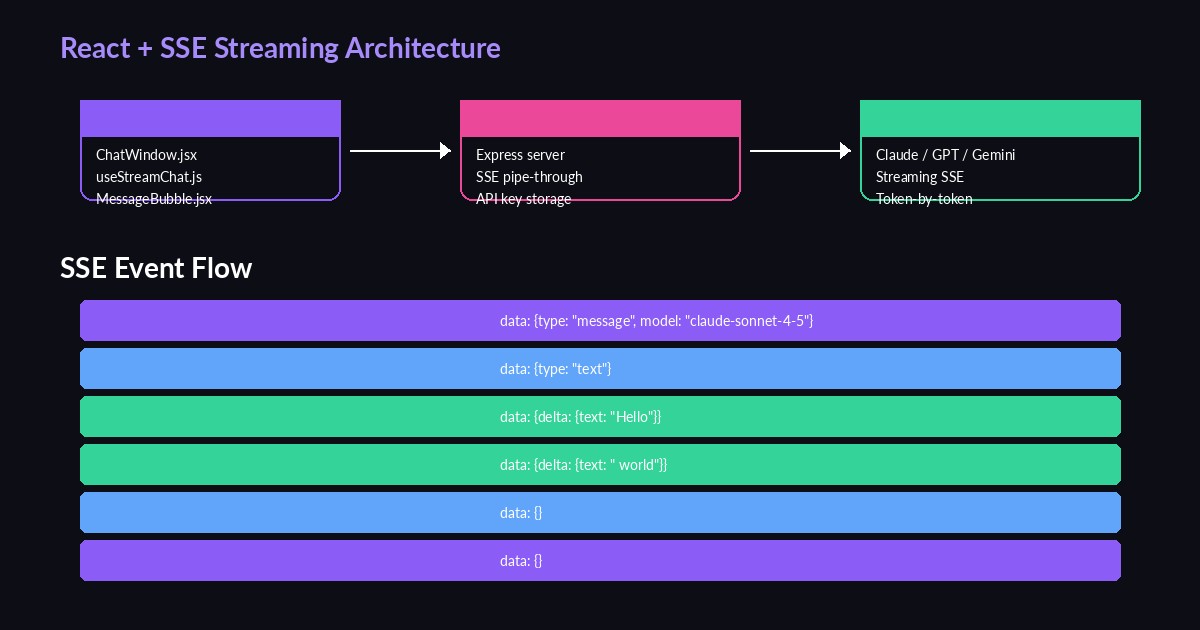
Component hierarchy: App → ChatWindow → MessageBubble + InputBar
// ChatWindow.jsx
import { useRef, useEffect, useState } from 'react';
import { useStreamChat } from './useStreamChat';

export default function ChatWindow() {
  const { messages, isStreaming, send, stop } = useStreamChat();
  const [input, setInput] = useState('');
  const bottomRef = useRef(null);

  useEffect(() => {
    bottomRef.current?.scrollIntoView({ behavior: 'smooth' });
  }, [messages]);

  const handleSubmit = (e) => {
    e.preventDefault();
    if (!input.trim() || isStreaming) return;
    send(input.trim());
    setInput('');
  };

  return (
    <div className="flex flex-col h-screen max-w-2xl mx-auto">
      <div className="flex-1 overflow-y-auto p-4 space-y-4">
        {messages.map((msg, i) => (
          <div key={i} className={
            msg.role === 'user'
              ? 'ml-auto bg-violet-600 rounded-2xl px-4 py-2 max-w-[80%]'
              : 'bg-zinc-800 rounded-2xl px-4 py-2 max-w-[80%]'
          }>
            {msg.content || (isStreaming && '▍')}
          </div>
        ))}
        <div ref={bottomRef} />
      </div>

      <form onSubmit={handleSubmit} className="p-4 border-t border-zinc-800">
        <div className="flex gap-2">
          <input
            value={input}
            onChange={e => setInput(e.target.value)}
            placeholder="Type a message..."
            className="flex-1 bg-zinc-900 rounded-xl px-4 py-3 outline-none"
          />
          {isStreaming ? (
            <button type="button" onClick={stop}
              className="px-4 py-3 bg-red-600 rounded-xl">Stop</button>
          ) : (
            <button type="submit"
              className="px-4 py-3 bg-violet-600 rounded-xl">Send</button>
          )}
        </div>
      </form>
    </div>
  );
}
The ▍ block cursor shows up while the assistant message is still empty — that brief moment after you send but before the first token arrives. Once text starts flowing, it disappears naturally because msg.content becomes truthy.
Handling Edge Cases
Production chat UIs break on three things: network drops, user cancellation, and malformed SSE chunks. Here's how to handle all three in the streaming hook:
// Add to the streaming loop in useStreamChat
try {
  const event = JSON.parse(json);

  if (event.type === 'error') {
    // EzAI returns structured errors — surface them
    setMessages(prev => {
      const updated = [...prev];
      updated[updated.length - 1].content =
        `⚠️ ${event.error?.message || 'Stream interrupted'}`;
      return updated;
    });
    break;
  }

  if (event.type === 'message_stop') break;

} catch (e) {
  // Malformed chunk — skip and continue
  console.warn('SSE parse error:', json);
}
The AbortController in the hook handles cancellation cleanly. When the user clicks "Stop", we abort the fetch, which terminates the SSE stream on both sides. No orphaned connections, no wasted tokens.
Adding Markdown Rendering
Claude's responses include code blocks, lists, and headers. Rendering raw markdown as plain text looks terrible. Drop in react-markdown with remark-gfm for GitHub-flavored markdown support:
npm install react-markdown remark-gfm react-syntax-highlighterimport ReactMarkdown from 'react-markdown';
import remarkGfm from 'remark-gfm';
import { Prism as SyntaxHighlighter } from 'react-syntax-highlighter';
import { oneDark } from 'react-syntax-highlighter/dist/esm/styles/prism';
function MessageBubble({ content, role }) {
if (role === 'user') return <div className="...">{content}</div>;
return (
<ReactMarkdown
remarkPlugins={[remarkGfm]}
components={{
code({ inline, className, children }) {
const lang = className?.replace('language-', '');
if (inline) return <code className="bg-zinc-800 px-1 rounded">{children}</code>;
return (
<SyntaxHighlighter style={oneDark} language={lang}>
{String(children).replace(/\n$/, '')}
</SyntaxHighlighter>
);
}
}}
>
{content}
</ReactMarkdown>
);
}One gotcha: react-markdown re-parses the entire string on every render. During streaming, that's every 20-50ms. For short responses it's fine. For 2000+ token responses, wrap the markdown component in React.memo and debounce renders to every 100ms using requestAnimationFrame.
Switching Models on the Fly
EzAI gives you access to 20+ models through the same endpoint. Adding a model picker takes one state variable and a dropdown:
// Pass model to the proxy
const MODELS = [
  { id: 'claude-sonnet-4-5', label: 'Claude Sonnet 4.5' },
  { id: 'claude-opus-4', label: 'Claude Opus 4' },
  { id: 'gpt-4o', label: 'GPT-4o' },
  { id: 'gemini-2.5-pro', label: 'Gemini 2.5 Pro' },
];

// In the fetch body:
body: JSON.stringify({
  messages: [...messages, userMsg],
  model: selectedModel, // from state
}),
On the server side, just forward req.body.model into the EzAI request. The SSE format is identical across all models — your parser works without changes. Check the API docs for the full model list and pricing.
Performance Tips
- Debounce scroll-to-bottom — use
requestAnimationFrameinstead of scrolling on every state update. During fast streaming, you'll get 30+ updates per second. - Virtualize long conversations — after 50+ messages, use
react-windowto only render visible bubbles. DOM node count drops from thousands to ~20. - Cache conversation state — store
messagesinlocalStorageso users don't lose context on refresh. Rehydrate on mount. - Use prompt caching — EzAI supports cache_control breakpoints. Long system prompts get cached on the first request, cutting input token costs by 90% on subsequent turns.
Wrapping Up
You've built a streaming AI chat UI with ~150 lines of React and ~35 lines of Node.js. The proxy keeps your API key safe, the SSE parser handles real-time token delivery, and the component architecture scales to production use. Grab an API key from your EzAI dashboard and start building. The full SSE production guide covers retry logic, backpressure, and connection pooling if you need to go deeper.