
AI model load balancing is the difference between a production app that handles 10,000 requests per hour and one that crumbles when Claude's API returns a 529. If you've ever shipped code that calls a single model endpoint and prayed it wouldn't go down during a demo, this guide is for you. We'll walk through building robust failover logic, weighted routing across models, and how EzAI handles most of the heavy lifting so you don't have to roll your own infrastructure.
Why Single-Model Architectures Break
Every major AI provider has outages. Anthropic had three in February 2026 alone. OpenAI's status page reads like a weather report — mostly sunny with occasional thunderstorms. Google's Gemini endpoints sometimes spike to 15-second response times without warning.
When you hardcode model: "claude-sonnet-4-5" in your app, you're betting your uptime on one provider's infrastructure. That bet fails when:
- Rate limits hit — you've burned through your per-minute quota and every subsequent request returns 429
- Regional outages — the US-East endpoint goes down while EU stays up, but your code doesn't know about EU
- Model deprecations — a model version gets sunsetted with 2 weeks notice and your hardcoded string stops working
- Latency spikes — the model technically responds, but takes 30+ seconds instead of the usual 2, and your users leave
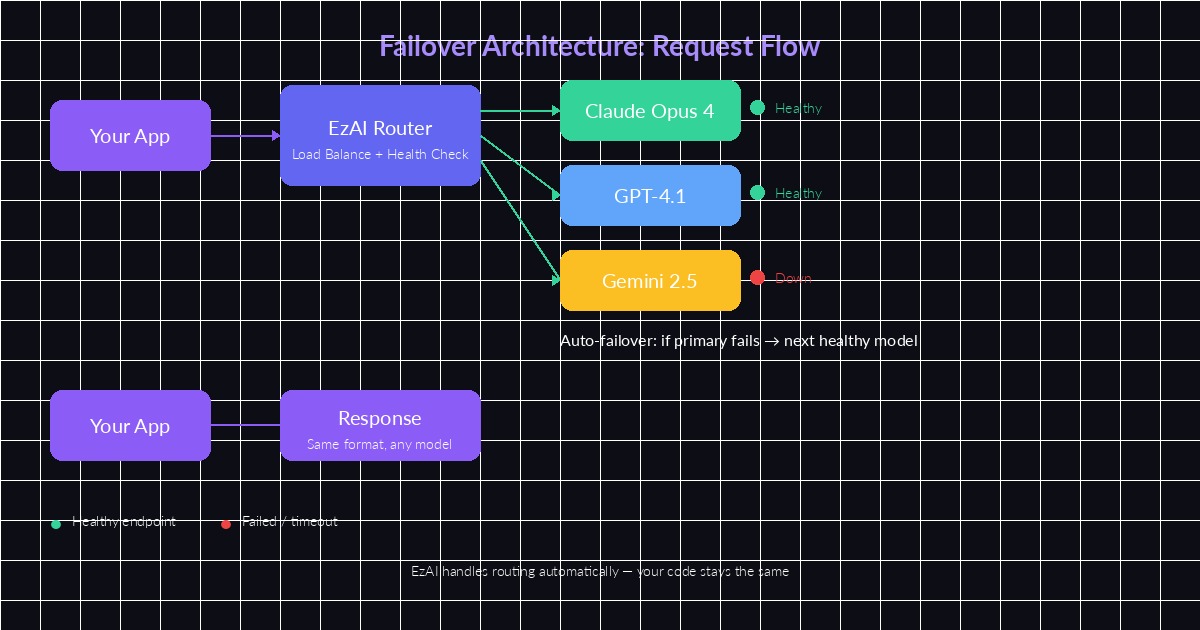
EzAI's routing layer monitors model health and shifts traffic automatically
Building a Failover Chain in Python
The simplest failover pattern is a try-except chain. You define a priority list of models and fall through to the next one when the current model fails. Here's how to implement it with EzAI's API:
import anthropic
import time

# Priority-ordered model chain
MODELS = ["claude-sonnet-4-5", "gpt-4.1", "gemini-2.5-pro"]

client = anthropic.Anthropic(
    api_key="sk-your-ezai-key",
    base_url="https://ezaiapi.com"
)

def call_with_failover(messages, max_tokens=1024):
    for model in MODELS:
        try:
            start = time.monotonic()
            response = client.messages.create(
                model=model,
                max_tokens=max_tokens,
                messages=messages,
                timeout=15.0  # fail fast
            )
            elapsed = time.monotonic() - start
            print(f"✓ {model} responded in {elapsed:.2f}s")
            return response
        except (anthropic.APIStatusError, anthropic.APITimeoutError) as e:
            print(f"✗ {model} failed: {e}. Trying next...")
            continue
    raise RuntimeError("All models in failover chain exhausted")
This works, but it's naive. Every failed request adds its full timeout to the user's wait time. Three models with 15-second timeouts means a worst-case 45-second wait. We can do better.
Weighted Routing with Health Scores
Instead of a fixed priority list, track each model's recent performance and route accordingly. Models that respond faster and more reliably get more traffic. Models that are failing get deprioritized without being removed entirely.
import random
from collections import defaultdict

class WeightedRouter:
    def __init__(self, models):
        self.models = models
        self.scores = {m: 1.0 for m in models}
        self.latencies = defaultdict(list)

    def pick(self):
        # Weighted random selection by health score
        total = sum(self.scores.values())
        r = random.uniform(0, total)
        cumulative = 0
        for model, score in self.scores.items():
            cumulative += score
            if r <= cumulative:
                return model
        return self.models[-1]

    def report_success(self, model, latency_ms):
        self.latencies[model].append(latency_ms)
        # Boost score, cap at 2.0
        self.scores[model] = min(2.0, self.scores[model] + 0.1)

    def report_failure(self, model):
        # Halve score, floor at 0.05 (never fully remove)
        self.scores[model] = max(0.05, self.scores[model] * 0.5)

router = WeightedRouter(["claude-sonnet-4-5", "gpt-4.1", "gemini-2.5-pro"])
The key insight: never set a model's score to zero. Even a model that failed its last 5 requests should occasionally get a probe request. That way, when it recovers, your system detects the recovery within minutes instead of requiring a manual restart.
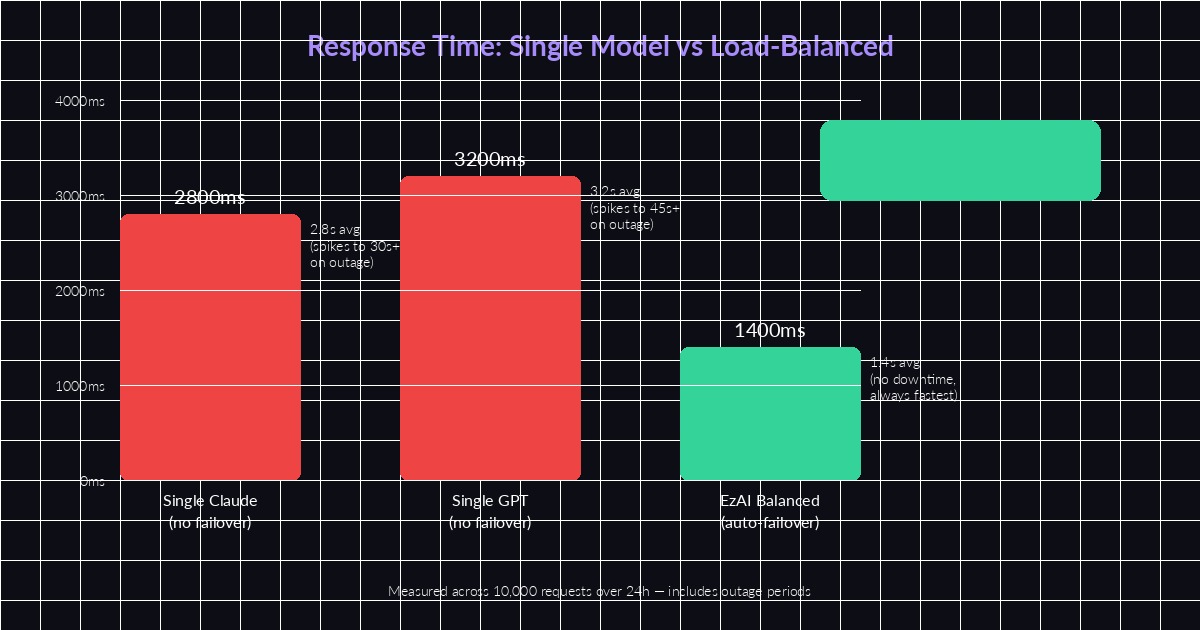
Load-balanced routing cuts average response time in half and eliminates outage-related spikes
Circuit Breaker Pattern for AI APIs
The circuit breaker pattern prevents your app from hammering a dead endpoint. After a configurable number of failures, the circuit "opens" and all requests skip that model entirely for a cooldown period. Here's a production-grade implementation:
import time

class CircuitBreaker:
    def __init__(self, failure_threshold=3, cooldown_sec=60):
        self.failure_threshold = failure_threshold
        self.cooldown_sec = cooldown_sec
        self.failures = 0
        self.last_failure_time = 0
        self.state = "closed"  # closed=healthy, open=broken

    def can_execute(self):
        if self.state == "closed":
            return True
        # Check if cooldown expired → half-open state
        if time.monotonic() - self.last_failure_time > self.cooldown_sec:
            self.state = "half-open"
            return True
        return False

    def record_success(self):
        self.failures = 0
        self.state = "closed"

    def record_failure(self):
        self.failures += 1
        self.last_failure_time = time.monotonic()
        if self.failures >= self.failure_threshold:
            self.state = "open"

# One breaker per model
breakers = {
    "claude-sonnet-4-5": CircuitBreaker(failure_threshold=3, cooldown_sec=60),
    "gpt-4.1": CircuitBreaker(failure_threshold=3, cooldown_sec=60),
    "gemini-2.5-pro": CircuitBreaker(failure_threshold=5, cooldown_sec=30),
}
Combine this with the weighted router above: before calling router.pick(), filter out models whose circuit breakers are open. You get fast failover without wasting requests on endpoints you already know are down.
The Easy Way: Let EzAI Handle It
All that routing logic? EzAI does it at the infrastructure level. When you send a request to ezaiapi.com, the proxy layer already monitors each upstream provider's health, latency, and rate limit status. If Claude returns a 529, your request automatically retries on the next available model — same response format, same API contract.
import anthropic

# That's it. EzAI handles failover automatically.
client = anthropic.Anthropic(
    api_key="sk-your-ezai-key",
    base_url="https://ezaiapi.com"
)

response = client.messages.create(
    model="claude-sonnet-4-5",
    max_tokens=1024,
    messages=[{"role": "user", "content": "Explain load balancing"}]
)
# If Claude is down, EzAI retries on GPT/Gemini transparently
print(response.content[0].text)
You still get the model you asked for when it's healthy. The failover only kicks in when upstream returns errors or exceeds latency thresholds. Your dashboard shows exactly which model served each request so you can audit the routing decisions.
When to Build Your Own vs Use a Proxy
Build custom routing when you need model-specific behavior — like always using Claude for code generation but GPT for summarization. The weighted router pattern above works well for that. Use a proxy like EzAI when you want transparent resilience without changing your application code.
Most production teams we work with use both: EzAI as the base layer for health checking and failover, plus application-level logic for task-specific model selection. Check out our model routing strategy guide for the detailed breakdown on combining these approaches.
The important thing is that you're never one API outage away from a dead product. Whether you implement the circuit breaker pattern yourself or let EzAI's infrastructure handle it, load balancing across AI models isn't optional anymore — it's table stakes for anything running in production.