Image generation APIs have exploded in capability over the past year. DALL-E 3 produces photorealistic compositions from natural language. Flux delivers stunning artistic renders at breakneck speed. The problem? Each provider has its own endpoint, authentication scheme, and billing dashboard. Managing three separate API keys to access three image models is overhead you don't need.
EzAI's OpenAI-compatible image endpoint routes your generation requests to DALL-E 3, Flux, and SDXL through a single base URL. Same API key you already use for Claude and GPT. Same dashboard for tracking costs. This tutorial walks through the entire flow — from your first cURL call to a production-ready Python service that generates images with automatic fallback between models.
Available Image Models on EzAI
EzAI proxies the OpenAI /v1/images/generations endpoint. You can target any supported model by setting the model parameter:
- dall-e-3 — OpenAI's flagship. Best at following complex prompts with text rendering. Supports 1024×1024, 1024×1792, 1792×1024.
- flux-1.1-pro — Black Forest Labs' production model. Fast generation (~3s), exceptional photorealism, strong at faces and hands.
- sdxl-turbo — Stability AI's distilled model. Cheapest option, solid for batch jobs where speed matters more than fine detail.
Pricing is pay-per-image. Check your EzAI dashboard for current per-generation costs — typically 40-60% lower than direct API pricing.
Your First Image: cURL
Let's generate an image right now. If you have an EzAI API key (grab one from the dashboard if you don't), paste this into your terminal:
curl -s https://ezaiapi.com/v1/images/generations \
  -H "Authorization: Bearer sk-your-key" \
  -H "Content-Type: application/json" \
  -d '{
    "model": "dall-e-3",
    "prompt": "A cyberpunk Tokyo alley at night, neon signs reflecting on wet pavement, cinematic lighting",
    "size": "1024x1024",
    "quality": "hd",
    "n": 1
  }' | jq '.data[0].url'
The response follows the standard OpenAI images format — a JSON object with a data array containing URLs or base64-encoded images. Any library or tool that speaks OpenAI's image API will work unchanged.
Python: Generate and Download Images
The official openai Python package works directly. Point base_url at EzAI and you're set:
from openai import OpenAI
import httpx, pathlib

client = OpenAI(
    api_key="sk-your-key",
    base_url="https://ezaiapi.com/v1",
)

# Generate with DALL-E 3
response = client.images.generate(
    model="dall-e-3",
    prompt="Isometric 3D render of a cozy developer workspace with three monitors, plants, and warm lighting",
    size="1024x1024",
    quality="hd",
    n=1,
)

# Download the image
url = response.data[0].url
img_bytes = httpx.get(url).content
pathlib.Path("workspace.png").write_bytes(img_bytes)
print(f"Saved workspace.png ({len(img_bytes)} bytes)")
Swap model to "flux-1.1-pro" or "sdxl-turbo" and everything else stays identical. No SDK changes, no new dependencies.
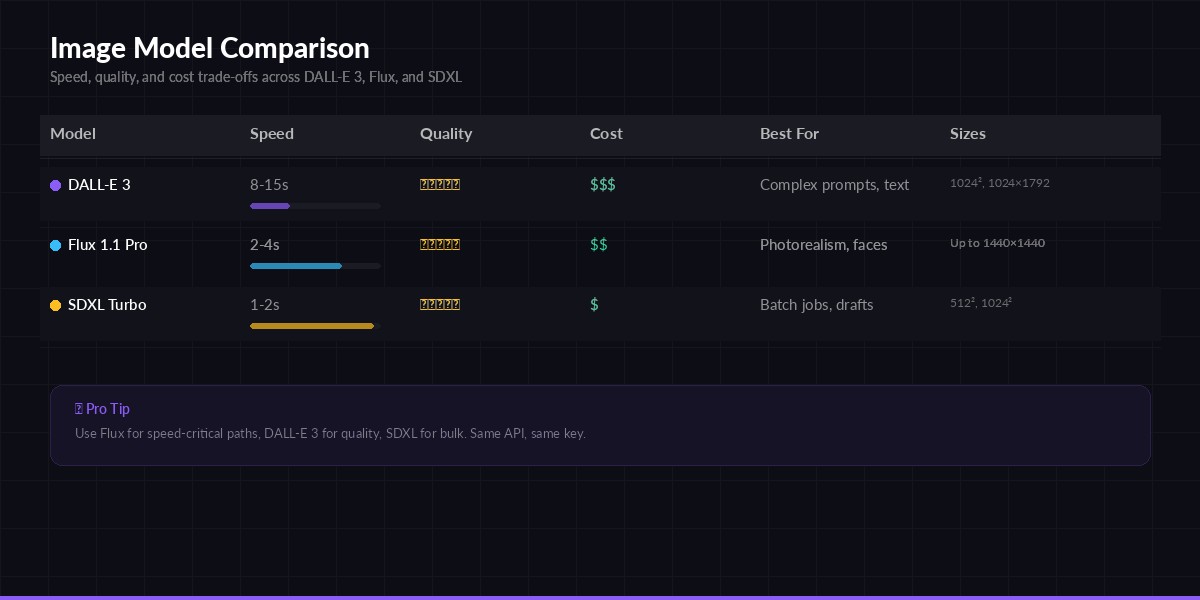
Model comparison — speed, quality, and cost trade-offs for each image generation model
Node.js: Server-Side Generation
Building an image generation feature into a Node.js backend? Here's a clean Express handler that accepts a prompt and returns the generated image URL:
import OpenAI from "openai";
import express from "express";

const client = new OpenAI({
  apiKey: process.env.EZAI_API_KEY,
  baseURL: "https://ezaiapi.com/v1",
});

const app = express();
app.use(express.json());

app.post("/api/generate-image", async (req, res) => {
  const { prompt, model = "dall-e-3", size = "1024x1024" } = req.body;

  try {
    const result = await client.images.generate({
      model,
      prompt,
      size,
      n: 1,
      response_format: "url",
    });

    res.json({
      url: result.data[0].url,
      revised_prompt: result.data[0].revised_prompt,
    });
  } catch (err) {
    res.status(500).json({ error: err.message });
  }
});

app.listen(3000);
Note the revised_prompt field — DALL-E 3 sometimes rewrites your prompt for better results. EzAI passes this through so you can log exactly what the model actually rendered.
Production Pattern: Model Fallback
In production, you don't want a single model failure to break your image pipeline. Here's a fallback chain that tries Flux first (fastest), falls back to DALL-E 3, and finally drops to SDXL as a last resort:
import logging
from openai import OpenAI, APIError

logger = logging.getLogger(__name__)

client = OpenAI(
    api_key="sk-your-key",
    base_url="https://ezaiapi.com/v1",
)

FALLBACK_CHAIN = ["flux-1.1-pro", "dall-e-3", "sdxl-turbo"]

def generate_image(prompt: str, size: str = "1024x1024") -> str:
    """Generate image with automatic model fallback. Returns URL."""
    for model in FALLBACK_CHAIN:
        try:
            resp = client.images.generate(
                model=model,
                prompt=prompt,
                size=size,
                n=1,
            )
            logger.info(f"Generated with {model}")
            return resp.data[0].url
        except APIError as e:
            logger.warning(f"{model} failed: {e}. Trying next...")
            continue
    raise RuntimeError("All image models failed")

# Usage
url = generate_image("A minimalist logo for a developer tools startup, flat design, white background")
print(url)
This pattern costs you exactly zero extra when things work — you only pay for the model that succeeds. The fallback adds maybe 200ms of overhead per retry, which is negligible compared to the 3-15 second generation time.
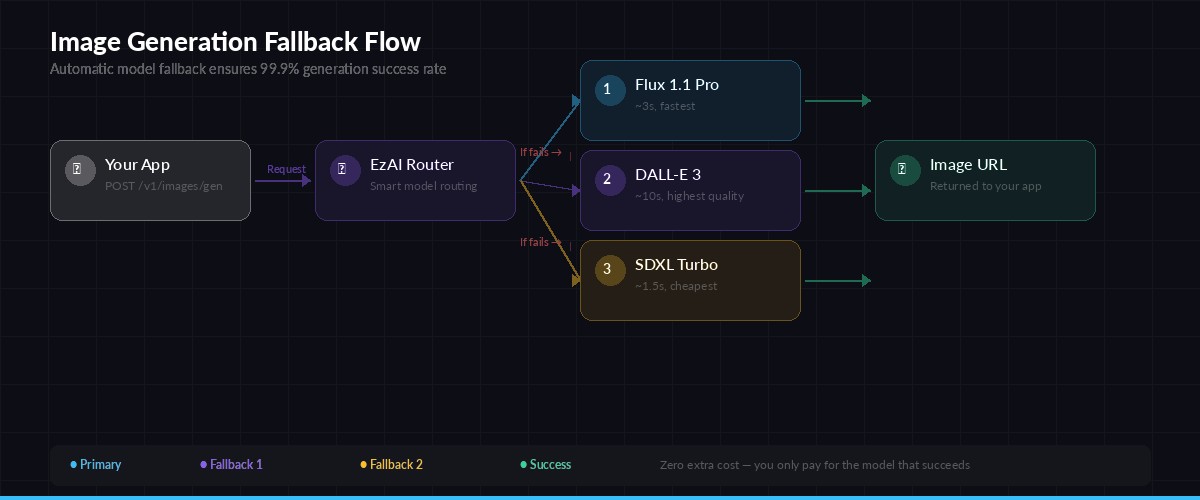
Request flow — EzAI routes your image generation through the fallback chain automatically
Prompt Engineering for Image APIs
Text-to-image prompts work differently from LLM prompts. A few rules that consistently produce better results:
- Be spatially specific. "A red mug on the left side of a wooden desk" beats "a desk with a mug." Tell the model where things are.
- Specify the camera. "Shot from below, wide-angle lens, 35mm" gives you a cinematic look. "Top-down flat lay" gives you product photography.
- Name the style explicitly. "Watercolor illustration" or "3D isometric render" or "35mm film photograph, Kodak Portra 400" — the more specific, the more coherent the output.
- Negative description works. "Clean background, no text, no watermarks" helps avoid common artifacts.
DALL-E 3 benefits from natural language descriptions. Flux responds better to comma-separated tag lists (closer to Stable Diffusion's prompt format). Experiment with both styles and check the revised_prompt field to understand how the model interpreted your input.
Cost Optimization
Image generation burns credits faster than text completion. A single DALL-E 3 HD image costs roughly 10× what a typical Claude Haiku request costs. Here's how to keep spending under control:
- Use SDXL for drafts. Generate quick previews with
sdxl-turbo, then switch to DALL-E 3 or Flux only for the final version the user actually sees. - Cache aggressively. Hash the prompt + model + size combination and store results. Same prompt should never hit the API twice.
- Batch with b64_json. When generating multiple images for offline processing, request
response_format: "b64_json"to skip the URL hosting step and reduce latency. - Right-size your output. Don't generate 1792×1024 if the image renders at 400px wide on screen. Match the generation size to the display size.
Track everything on your EzAI dashboard. Each image generation shows up as a line item with the model, size, and exact cost — making it dead simple to spot which prompts or models are eating your budget.
Combining Vision + Generation
One powerful pattern: use Claude's vision capabilities to analyze an existing image, then feed that analysis into an image generation prompt. This is how you build "style transfer" or "image remix" features without training custom models:
import anthropic, base64
from openai import OpenAI

# Step 1: Analyze the source image with Claude
claude = anthropic.Anthropic(
    api_key="sk-your-key",
    base_url="https://ezaiapi.com",
)

img_data = base64.b64encode(open("source.jpg", "rb").read()).decode()

analysis = claude.messages.create(
    model="claude-sonnet-4-5",
    max_tokens=500,
    messages=[{
        "role": "user",
        "content": [
            {"type": "image", "source": {"type": "base64", "media_type": "image/jpeg", "data": img_data}},
            {"type": "text", "text": "Describe this image in detail for an image generation prompt. Focus on composition, colors, lighting, and style."}
        ]
    }]
)

# Step 2: Generate a variation with DALL-E 3
oai = OpenAI(api_key="sk-your-key", base_url="https://ezaiapi.com/v1")

variation = oai.images.generate(
    model="dall-e-3",
    prompt=f"Create a variation of this scene: {analysis.content[0].text}",
    size="1024x1024",
    quality="hd",
)

print(f"Variation URL: {variation.data[0].url}")
Both calls go through the same EzAI account. One API key, one balance, one dashboard — even though you're hitting Claude for vision and DALL-E for generation. That's the whole point of a unified proxy.
What's Next
You now have everything you need to add AI image generation to any project. Start with the cURL example to verify your key works, then drop the Python or Node.js code into your codebase. The fallback pattern handles reliability, and caching keeps costs predictable.
For related reading:
- AI Vision API Guide — send images to Claude for analysis and understanding
- 7 Ways to Reduce AI API Costs — more strategies for keeping your bill low
- Structured JSON Output — parse generation metadata into typed objects
- OpenAI Images API Reference — the upstream spec that EzAI implements