
Every AI model has a hard limit on how much text it can process in a single request — that's the context window. Claude Opus 4.6 gives you 200K tokens. GPT-5.2 offers 128K. Gemini 3.1 Pro pushes 2M. Sounds like plenty, until you're stuffing a 50-page codebase into a prompt and watching your bill climb past $2 per call. The context window isn't just a technical constraint. It's the single biggest factor in both your AI output quality and your monthly spend.
This guide covers practical strategies to squeeze maximum value out of every token in your context window — with working code you can drop into any project using EzAI's API.
How Context Windows Actually Work
A context window is measured in tokens, not characters or words. One token roughly equals 4 characters in English or about 0.75 words. When you send a message to Claude or GPT, everything counts toward the limit: your system prompt, all previous conversation turns, the current user message, and the model's response.
Here's the breakdown most developers miss: input tokens and output tokens are priced differently. On Claude Sonnet 4.5, input tokens cost $3/M while output tokens cost $15/M. That means a bloated system prompt doesn't just eat into your context window — it directly inflates every single request's cost.
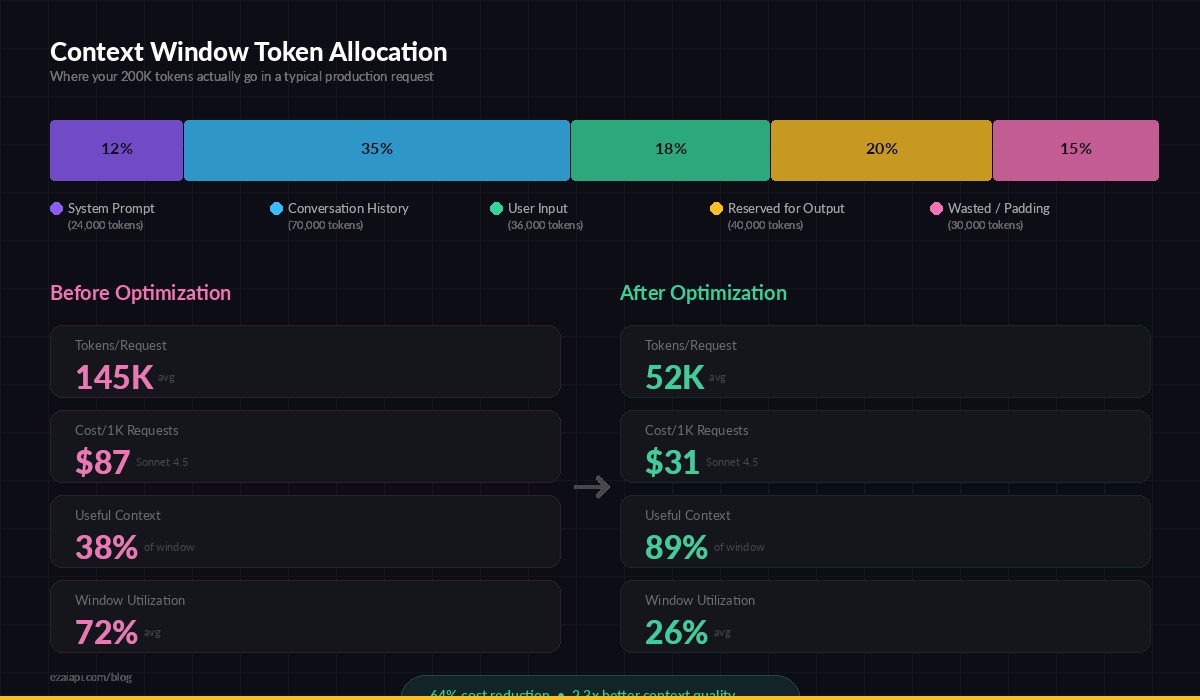
Token allocation inside a typical 200K context window — most devs waste 40-60% on redundant history
Strategy 1: Count Tokens Before You Send
Flying blind on token counts is the fastest way to hit limits mid-conversation and get truncated responses. The Anthropic SDK includes a token counting method, but you can also estimate locally with tiktoken for fast pre-flight checks.
import anthropic

client = anthropic.Anthropic(
    api_key="sk-your-key",
    base_url="https://ezaiapi.com"
)

def estimate_tokens(text: str) -> int:
    """Rough estimate: 1 token ≈ 4 chars for English text."""
    return len(text) // 4

def check_context_budget(messages, system_prompt, max_tokens=200000):
    total = estimate_tokens(system_prompt)
    for msg in messages:
        total += estimate_tokens(msg["content"])

    remaining = max_tokens - total
    print(f"Used: {total:,} tokens | Remaining: {remaining:,} | Budget: {remaining/max_tokens*100:.1f}%")
    return remaining

# Example: check before sending
messages = [
    {"role": "user", "content": "Analyze this 10,000-line log file..."},
]
budget = check_context_budget(messages, system_prompt="You are a log analyzer.")
# Used: 2,510 tokens | Remaining: 197,490 | Budget: 98.7%
For production systems, count tokens on every request and log the ratio of used vs. available. When you consistently hit 70%+ utilization, it's time to implement one of the strategies below.
Strategy 2: Sliding Window Conversations
Long-running chat applications are the worst context window offenders. A 50-turn conversation easily burns through 100K tokens of history — and half of those turns are irrelevant to the current question. The sliding window pattern keeps only the most recent N turns, plus a compressed summary of everything before.
import anthropic

client = anthropic.Anthropic(
    api_key="sk-your-key",
    base_url="https://ezaiapi.com"
)

class SlidingWindowChat:
    def __init__(self, window_size=10, model="claude-sonnet-4-5"):
        self.messages = []
        self.summary = ""
        self.window_size = window_size
        self.model = model

    def _compress_old_messages(self):
        """Summarize messages outside the window."""
        if len(self.messages) <= self.window_size:
            return

        old = self.messages[:-self.window_size]
        old_text = "\n".join(f"{m['role']}: {m['content']}" for m in old)

        resp = client.messages.create(
            model="claude-haiku-3-5",  # use cheap model for summaries
            max_tokens=500,
            messages=[{"role": "user", "content": f"Summarize this conversation in 3-4 bullet points, preserving key decisions and context:\n\n{old_text}"}]
        )
        self.summary = resp.content[0].text
        self.messages = self.messages[-self.window_size:]

    def send(self, user_message: str) -> str:
        self.messages.append({"role": "user", "content": user_message})
        self._compress_old_messages()

        system = "You are a helpful coding assistant."
        if self.summary:
            system += f"\n\nPrevious conversation summary:\n{self.summary}"

        resp = client.messages.create(
            model=self.model,
            max_tokens=4096,
            system=system,
            messages=self.messages
        )
        reply = resp.content[0].text
        self.messages.append({"role": "assistant", "content": reply})
        return reply

# Usage — conversations stay lean forever
chat = SlidingWindowChat(window_size=8)
reply = chat.send("How do I set up a FastAPI project?")
The trick is using a cheap, fast model like Claude Haiku for summarization while keeping your main conversation on a more capable model. Haiku summaries cost pennies and keep your window under 20K tokens regardless of conversation length.
Strategy 3: Smart Document Chunking
When you need to process documents larger than the context window — or documents that would waste most of it — chunk them intelligently. Naive chunking by character count splits sentences mid-thought. Semantic chunking preserves meaning.
import re
import anthropic

client = anthropic.Anthropic(
    api_key="sk-your-key",
    base_url="https://ezaiapi.com"
)

def chunk_by_sections(text: str, max_tokens: int = 8000) -> list[str]:
    """Split text on natural boundaries (headers, double newlines)."""
    sections = re.split(r'\n(?=#{1,3}\s)|\n\n+', text)

    chunks, current = [], ""
    for section in sections:
        est_tokens = (len(current) + len(section)) // 4
        if est_tokens > max_tokens and current:
            chunks.append(current.strip())
            current = section
        else:
            current += "\n\n" + section
    if current.strip():
        chunks.append(current.strip())
    return chunks

def map_reduce_analyze(document: str, question: str) -> str:
    """Analyze a large document using map-reduce pattern."""
    chunks = chunk_by_sections(document)

    # Map: extract relevant info from each chunk
    extracts = []
    for i, chunk in enumerate(chunks):
        resp = client.messages.create(
            model="claude-haiku-3-5",
            max_tokens=1000,
            messages=[{
                "role": "user",
                "content": f"Extract any information relevant to this question from the text below. If nothing is relevant, reply 'N/A'.\n\nQuestion: {question}\n\nText (chunk {i+1}/{len(chunks)}):\n{chunk}"
            }]
        )
        result = resp.content[0].text
        if result.strip() != "N/A":
            extracts.append(result)

    # Reduce: synthesize with a capable model
    combined = "\n---\n".join(extracts)
    resp = client.messages.create(
        model="claude-sonnet-4-5",
        max_tokens=4096,
        messages=[{
            "role": "user",
            "content": f"Based on the following extracted information, answer this question comprehensively:\n\nQuestion: {question}\n\nExtracted info:\n{combined}"
        }]
    )
    return resp.content[0].text

# Process a 500-page document that would blow any context window
answer = map_reduce_analyze(large_document, "What were the key architectural decisions?")
The map-reduce pattern is powerful because the "map" step uses cheap Haiku calls to filter out irrelevant chunks, and only the concentrated, relevant extracts get sent to Sonnet for the final synthesis. A 500-page document that would cost $8 in a single massive prompt might cost $0.40 with this approach.
Strategy 4: System Prompt Compression
Your system prompt rides along with every single request. A 2,000-token system prompt across 1,000 daily requests means 2M extra input tokens — roughly $6/day on Sonnet alone, just for instructions the model reads identically each time.
Three rules for lean system prompts:
- Cut examples from the system prompt. Move them into a few-shot format inside the user message only when that specific capability is needed.
- Use abbreviated instructions. Claude and GPT understand concise directives. "JSON only. No markdown." works as well as a paragraph explaining output format.
- Leverage prompt caching — if you must keep a large system prompt, enable caching so you only pay full price once per session.
# ❌ Bloated system prompt (850+ tokens)
bloated = """You are a helpful assistant that analyzes code and provides
detailed explanations. When analyzing code, please follow these rules:
1. First, identify the programming language being used
2. Then, explain what each function does in plain English
3. Point out any potential bugs or issues you notice
4. Suggest improvements following best practices
5. Format your response using markdown with code blocks
Please be thorough but concise in your analysis..."""

# ✅ Compressed system prompt (120 tokens)
lean = """Code analyst. For each snippet: identify language, explain functions,
flag bugs, suggest fixes. Markdown + code blocks."""

# Same output quality, 85% fewer system prompt tokens
resp = client.messages.create(
    model="claude-sonnet-4-5",
    max_tokens=4096,
    system=lean,
    messages=[{"role": "user", "content": "Analyze this Python function:\n\ndef calc(x, y):\n    return x/y"}]
)
Context Window Sizes in 2026
Not all context windows are equal. Here's where the major models stand — and the real-world sweet spot for each:
- Claude Opus 4.6: 200K tokens. Best for deep code analysis and complex reasoning. Sweet spot: 50-100K for quality output.
- Claude Sonnet 4.5: 200K tokens. The workhorse. Handles 150K+ without quality degradation.
- GPT-5.2: 128K tokens. Strong at structured tasks. Quality dips past 80K in our benchmarks.
- Gemini 3.1 Pro: 2M tokens. Massive window, but retrieval accuracy drops significantly past 500K tokens.
- Claude Haiku 3.5: 200K tokens. Fast and cheap — ideal for the chunking and summarization work in strategies above.
All of these are available through EzAI's unified API at reduced pricing. Switch between models with a single parameter change — no separate API keys or endpoints needed.
Putting It All Together
The best context window strategy combines multiple techniques. Here's a production-ready pattern we use internally:
- Pre-flight check: Count tokens before every request. If under 60% window utilization, send directly.
- Conversation management: Sliding window with Haiku summarization after 8-10 turns.
- Large documents: Map-reduce with semantic chunking. Haiku extracts, Sonnet synthesizes.
- System prompts: Compressed instructions + prompt caching for repeat sessions.
- Model routing: Use model routing to pick the right context window for each task. Don't burn Opus tokens on a simple classification that Haiku handles in 500 tokens.
Following these patterns, teams we've worked with consistently cut their token usage by 40-70% while actually improving output quality — because the model gets focused, relevant context instead of a firehose of everything.
Start by adding the token counting function to your codebase. Measure before you optimize. Once you see where your tokens go, the right strategy becomes obvious.
Ready to start optimizing? Sign up for EzAI and try these patterns against any model. Your dashboard shows real-time token counts for every request — the fastest way to see exactly where your context budget goes.