You're running claude-sonnet-4-5 in production. Anthropic drops claude-sonnet-4-5-20260415. The benchmarks look great. So you swap the model string, deploy, and — your summarization pipeline starts returning garbage for 12% of requests. Users are filing tickets before you even notice.
AI model upgrades aren't like library bumps. A new model version can shift tone, change JSON formatting habits, or handle edge cases differently. Canary deployments solve this by routing a small percentage of traffic to the new model first, comparing real metrics against your stable version, and auto-rolling back if anything regresses.
Here's how to build one with Python and EzAI's API, which makes this straightforward because you can swap between models by changing a single string — same endpoint, same SDK.
How Canary Deployments Work for AI APIs
The concept is borrowed from infrastructure engineering. Instead of switching 100% of traffic to a new model at once, you ramp up gradually:
- Phase 1 (5%) — Deploy the canary model. Route 5% of requests to it.
- Phase 2 (25%) — If metrics hold, increase to 25%.
- Phase 3 (50%) — Half and half. Side-by-side comparison at scale.
- Phase 4 (100%) — Full rollout. The canary becomes the new stable.
At any phase, if the canary's error rate, latency, or quality score crosses a threshold, you snap back to 0% canary traffic. No manual intervention. No 3 AM pages.
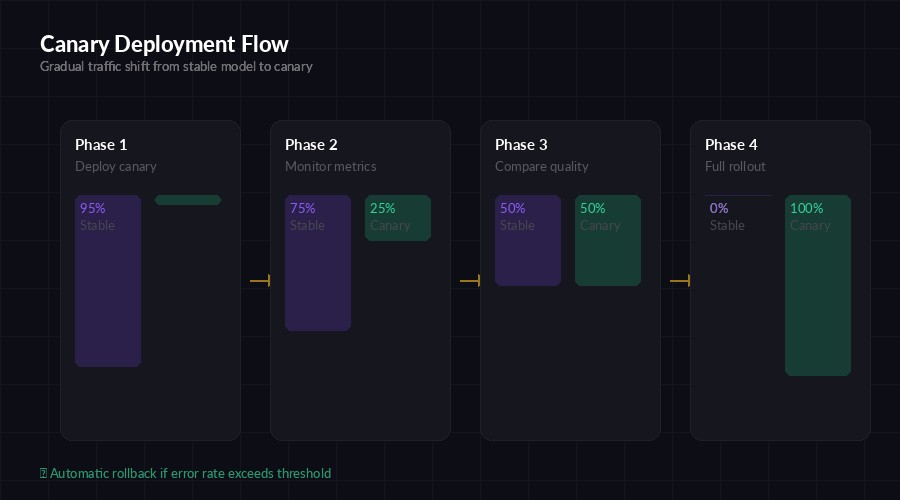
Four-phase canary rollout — traffic shifts gradually with automatic rollback gates
Building the Canary Router
The router sits between your application and the AI API. It decides which model handles each request based on a weighted random split. Here's a production-ready implementation:
import random, time, anthropic
from dataclasses import dataclass, field

@dataclass
class CanaryConfig:
    stable_model: str = "claude-sonnet-4-5-20260301"
    canary_model: str = "claude-sonnet-4-5-20260415"
    canary_weight: float = 0.05  # Start at 5%
    error_threshold: float = 0.02  # Roll back if >2% errors
    latency_threshold_ms: float = 5000

@dataclass
class ModelMetrics:
    requests: int = 0
    errors: int = 0
    total_latency_ms: float = 0.0

    @property
    def error_rate(self):
        return self.errors / max(self.requests, 1)

    @property
    def avg_latency_ms(self):
        return self.total_latency_ms / max(self.requests, 1)

client = anthropic.Anthropic(
    api_key="sk-your-key",
    base_url="https://ezaiapi.com",
)
config = CanaryConfig()
metrics = {"stable": ModelMetrics(), "canary": ModelMetrics()}
The CanaryConfig holds your two model versions and the traffic split. ModelMetrics tracks error rates and latency for each. Now let's add the routing logic:
def route_request(messages, max_tokens=1024):
    # Weighted random: pick canary or stable
    use_canary = random.random() < config.canary_weight
    model = config.canary_model if use_canary else config.stable_model
    variant = "canary" if use_canary else "stable"

    start = time.monotonic()
    try:
        response = client.messages.create(
            model=model,
            max_tokens=max_tokens,
            messages=messages,
        )
        latency = (time.monotonic() - start) * 1000

        metrics[variant].requests += 1
        metrics[variant].total_latency_ms += latency
        return response, variant

    except Exception as e:
        metrics[variant].requests += 1
        metrics[variant].errors += 1
        raise
Every request flows through route_request. The caller doesn't know or care which model handled it — the response format is identical because EzAI normalizes everything behind the same Anthropic-compatible interface.
Automatic Rollback
The safety net. After every N requests, check if the canary is regressing. If it is, slam the weight to zero:
def check_canary_health():
    canary = metrics["canary"]
    stable = metrics["stable"]

    if canary.requests < 20:
        return "collecting"  # Not enough data yet

    # Check error rate regression
    if canary.error_rate > config.error_threshold:
        config.canary_weight = 0.0
        print(f"⚠️ ROLLBACK: canary error rate {canary.error_rate:.1%}")
        return "rolled_back"

    # Check latency regression (canary >50% slower than stable)
    if stable.requests > 20 and canary.avg_latency_ms > stable.avg_latency_ms * 1.5:
        config.canary_weight = 0.0
        print(f"⚠️ ROLLBACK: canary latency {canary.avg_latency_ms:.0f}ms vs stable {stable.avg_latency_ms:.0f}ms")
        return "rolled_back"

    return "healthy"

def promote_canary(new_weight):
    """Gradually increase canary traffic if metrics are good."""
    status = check_canary_health()
    if status == "healthy":
        config.canary_weight = min(new_weight, 1.0)
        print(f"✅ Canary promoted to {config.canary_weight:.0%} traffic")
    elif status == "rolled_back":
        print("🛑 Canary rolled back. Investigate before retrying.")
The rollback is instant. No deploy needed. You just set canary_weight = 0.0 and all traffic goes back to the stable model. The 20-request minimum prevents false alarms from small sample sizes.
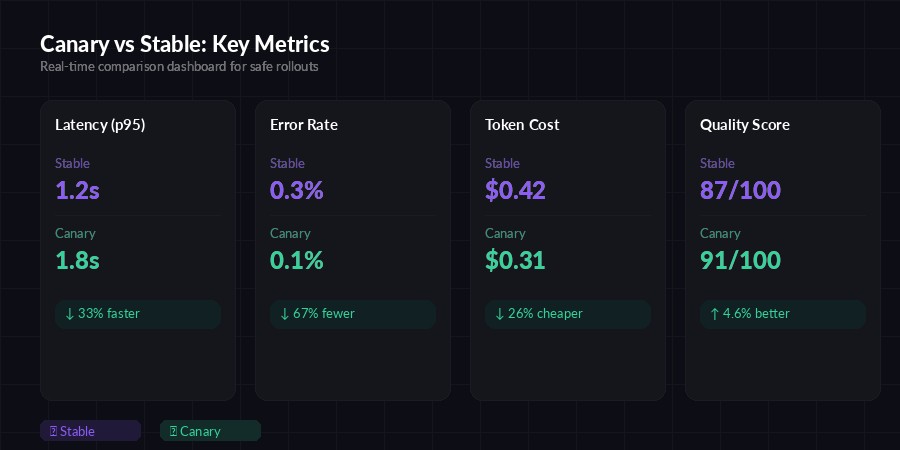
Real-time metric comparison — latency, error rate, cost, and quality scored side by side
Adding Quality Scoring
Error rates and latency catch hard failures. But what about soft regressions — the model still responds, but the output quality drops? You need a quality scoring layer. Here's a lightweight approach using a judge model:
import json

def score_response(prompt, response_text):
    """Use a cheap model to score output quality 1-100."""
    judge = client.messages.create(
        model="claude-haiku-3-5",  # Cheap, fast judge
        max_tokens=100,
        messages=[{
            "role": "user",
            "content": f"""Score this AI response 1-100 on relevance,
accuracy, and completeness. Return JSON only.

Prompt: {prompt[:500]}
Response: {response_text[:1000]}

Return: {{"score": <int>, "reason": "<one line>"}}"""
        }],
    )
    try:
        result = json.loads(judge.content[0].text)
        return result["score"]
    except:
        return 50  # Default if parsing fails
Run this on a random 10% sample of canary responses to avoid burning tokens on every request. If the average quality score for the canary drops below the stable model's average by more than 5 points, trigger a rollback. Using claude-haiku-3-5 through EzAI keeps the cost negligible — about $0.001 per quality check.
The Promotion Schedule
Don't just jump from 5% to 100%. Here's a tested promotion cadence that gives you enough signal at each stage:
- Hour 0-4: 5% canary — catch obvious regressions (bad JSON, errors, timeouts)
- Hour 4-12: 25% canary — validate across diverse request patterns
- Hour 12-24: 50% canary — statistical significance on quality scores
- Hour 24+: 100% canary — full rollout, canary becomes new stable
For high-traffic services (1000+ requests/hour), you can compress this to 2-4 hours total. Low-traffic? Extend to 48-72 hours. You need at least 200 requests per phase to make rollback decisions with confidence.
Monitoring with EzAI Dashboard
EzAI's dashboard already tracks per-model latency and error rates in real time. Pair that with your canary metrics to get a complete picture without building a separate monitoring stack. You can filter by model version in the request log to compare canary vs stable performance visually.
For automated alerting, poll the metrics in your canary loop and send a Slack/Discord notification on rollback:
import httpx

def alert_rollback(reason, canary_metrics, stable_metrics):
    httpx.post("https://hooks.slack.com/services/YOUR/WEBHOOK", json={
        "text": f"""🛑 *Canary Rollback*
Model: `{config.canary_model}`
Reason: {reason}
Canary error rate: {canary_metrics.error_rate:.2%}
Stable error rate: {stable_metrics.error_rate:.2%}
Canary p95 latency: {canary_metrics.avg_latency_ms:.0f}ms"""
    })
When to Use This
Canary deployments make sense when:
- Model version bumps — Anthropic releases
-20260415and you want to validate before committing - Cross-provider migration — Moving from GPT-4o to Claude Opus? Canary test it first. EzAI lets you swap models by changing one string.
- Prompt changes — Updated your system prompt? Route 5% to the new version and compare
- Cost optimization — Testing if a cheaper model (Haiku vs Sonnet) can handle a specific workload without quality loss
Skip canary testing for non-critical paths like internal tools or prototypes. The overhead isn't worth it when the blast radius is small.
Key Takeaways
AI model upgrades are high-risk deploys disguised as one-line changes. A canary deployment gives you a safety net that costs almost nothing to run — just a few lines of routing logic and a metrics comparison loop. The pattern works because EzAI provides a single endpoint for all models, so swapping between stable and canary is a string change, not an infrastructure change.
Start with 5% traffic, watch for 4 hours, promote if clean, rollback if not. Your users will never know the difference — and that's the point.