Your AI-powered feature works flawlessly in development. Then it hits production: a Claude Opus request takes 45 seconds, the user's browser gives up at 30, and your load balancer kills the connection at 60. Three different timeout boundaries, zero coordination between them. The user sees a spinner, then nothing. Your logs show a successful completion — for a response nobody received.
AI API calls are fundamentally different from typical REST endpoints. A database query takes 5-50ms. An AI model generating 4,000 tokens can take 10-90 seconds depending on the model, prompt complexity, and current load. Standard timeout defaults designed for traditional APIs will silently eat your AI requests. Here's how to fix that with a systematic approach using EzAI API.
Why AI APIs Are Timeout Minefields
Traditional APIs have predictable latency profiles. You call a REST endpoint, it hits a database, and responds in under 100ms. AI APIs break every assumption baked into standard HTTP infrastructure:
- Variable latency by model — Claude Haiku responds in 1-3 seconds while Claude Opus might take 30-60 seconds for the same prompt
- Token count determines duration — generating 100 tokens takes 2 seconds, generating 8,000 tokens takes 40+ seconds
- Load-dependent spikes — during peak hours, p99 latency can 3-5x versus p50
- Streaming changes the game — first byte arrives in 500ms but the full response takes 30 seconds, and your timeout needs to account for both
The default timeout: 30000 in most HTTP clients was designed for a world where 30 seconds meant something was broken. In AI, 30 seconds means the model is halfway through writing your code review.
The 4-Layer Timeout Strategy
Production AI applications need four distinct timeout boundaries. Each layer catches failures that the previous one misses.
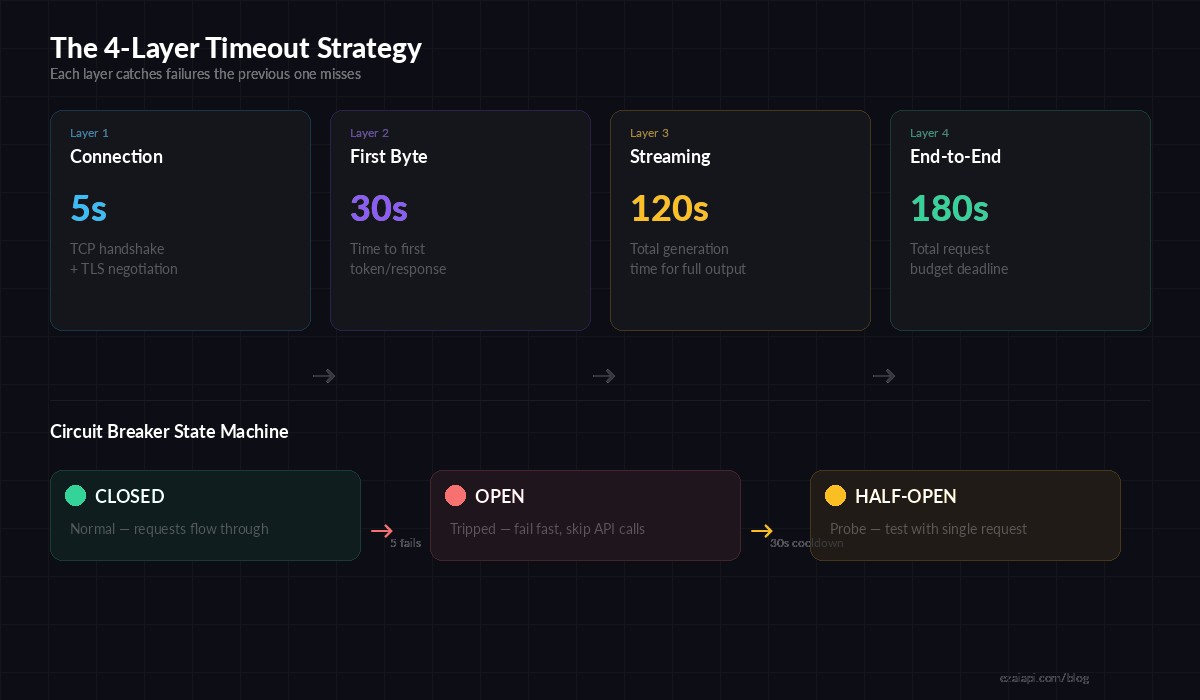
Four timeout layers: connection → first byte → streaming → end-to-end deadline
Layer 1: Connection Timeout (5 seconds)
This catches DNS failures, network partitions, and unreachable hosts. If you can't establish a TCP connection in 5 seconds, retrying the same endpoint won't help — switch to a fallback.
import httpx

# Layer 1: Connection-level timeout
client = httpx.AsyncClient(
    base_url="https://ezaiapi.com",
    timeout=httpx.Timeout(
        connect=5.0,      # TCP + TLS handshake
        read=120.0,       # Between chunks (streaming)
        write=10.0,       # Sending request body
        pool=5.0,         # Waiting for connection from pool
    )
)
Layer 2: First-Byte Timeout (30 seconds)
After connecting, how long should you wait for the model to start responding? This catches cases where the API accepted your request but the model is overloaded and queued. For streaming requests, first byte means the first SSE event:
import Anthropic from '@anthropic-ai/sdk';

const client = new Anthropic({
  apiKey: 'sk-your-key',
  baseURL: 'https://ezaiapi.com',
  timeout: 30_000,  // 30s first-byte timeout
});

// Streaming with first-byte awareness
const stream = await client.messages.stream({
  model: 'claude-sonnet-4-5',
  max_tokens: 4096,
  messages: [{ role: 'user', content: prompt }],
});

let firstChunkReceived = false;
const firstByteTimer = setTimeout(() => {
  if (!firstChunkReceived) {
    stream.abort();
    throw new Error('First byte timeout exceeded');
  }
}, 30_000);

for await (const event of stream) {
  if (!firstChunkReceived) {
    firstChunkReceived = true;
    clearTimeout(firstByteTimer);
  }
  processChunk(event);
}
Layer 3: Streaming Timeout (120 seconds)
Once tokens start flowing, you need a per-chunk idle timeout. If no new data arrives for 15 seconds mid-stream, the connection is likely dead — even though the TCP socket is still open. This is the timeout most developers miss.
Layer 4: End-to-End Deadline (180 seconds)
The total budget for the entire operation. This is your backstop — no matter what happens at the other three layers, the request dies at 180 seconds. Use AbortController in JavaScript or asyncio.timeout in Python:
import asyncio
import anthropic

client = anthropic.AsyncAnthropic(
    api_key="sk-your-key",
    base_url="https://ezaiapi.com",
)

async def call_with_deadline(prompt: str, deadline_seconds: int = 180):
    """End-to-end deadline wrapping the entire AI call."""
    try:
        async with asyncio.timeout(deadline_seconds):
            response = await client.messages.create(
                model="claude-sonnet-4-5",
                max_tokens=4096,
                messages=[{"role": "user", "content": prompt}],
            )
            return response.content[0].text
    except asyncio.TimeoutError:
        # Log, increment metric, return fallback
        print(f"Deadline exceeded after {deadline_seconds}s")
        return None
Circuit Breakers for AI Endpoints
When an AI provider goes down, you don't want every request in your queue to wait the full timeout before failing. A circuit breaker tracks failures and short-circuits requests when the error rate crosses a threshold. Here's a minimal implementation that works with EzAI's API:
import time
from dataclasses import dataclass, field

@dataclass
class CircuitBreaker:
    failure_threshold: int = 5
    cooldown_seconds: float = 30.0
    failures: int = field(default=0, init=False)
    last_failure: float = field(default=0.0, init=False)
    state: str = field(default="closed", init=False)

    def can_proceed(self) -> bool:
        if self.state == "closed":
            return True
        if self.state == "open":
            # Check if cooldown has passed → half-open
            if time.time() - self.last_failure > self.cooldown_seconds:
                self.state = "half-open"
                return True
            return False
        return True  # half-open: allow one probe

    def record_success(self):
        self.failures = 0
        self.state = "closed"

    def record_failure(self):
        self.failures += 1
        self.last_failure = time.time()
        if self.failures >= self.failure_threshold:
            self.state = "open"

# Usage with EzAI API
breaker = CircuitBreaker(failure_threshold=5, cooldown_seconds=30)

async def safe_ai_call(prompt):
    if not breaker.can_proceed():
        raise Exception("Circuit open — AI endpoint unavailable")
    try:
        result = await call_with_deadline(prompt)
        breaker.record_success()
        return result
    except Exception:
        breaker.record_failure()
        raise
This pairs naturally with multi-model fallback — when the circuit opens on one model, route to a fallback model through EzAI's unified endpoint.
Deadline Propagation Across Services
In microservice architectures, the user's request passes through an API gateway, a backend service, and then the AI API call. Each layer adds latency overhead. If your user-facing timeout is 60 seconds and your gateway adds 2 seconds of overhead, the AI call's deadline should be 58 seconds — not 60.
Pass deadlines explicitly through your service chain instead of relying on independent timeouts at each layer:
// Express middleware — propagate deadline to AI calls
function deadlineMiddleware(userTimeoutMs = 60_000) {
  return (req, res, next) => {
    const deadline = Date.now() + userTimeoutMs;
    req.deadline = deadline;

    // Auto-abort if deadline passes
    req.deadlineTimer = setTimeout(() => {
      if (!res.headersSent) {
        res.status(504).json({ error: 'Request deadline exceeded' });
      }
    }, userTimeoutMs);

    res.on('finish', () => clearTimeout(req.deadlineTimer));
    next();
  };
}

// In your route handler
app.post('/api/chat', deadlineMiddleware(60_000), async (req, res) => {
  const remainingMs = req.deadline - Date.now() - 2000; // 2s buffer
  const controller = new AbortController();
  const timer = setTimeout(() => controller.abort(), remainingMs);

  const response = await client.messages.create({
    model: 'claude-sonnet-4-5',
    max_tokens: 2048,
    messages: req.body.messages,
  }, { signal: controller.signal });

  clearTimeout(timer);
  res.json(response);
});
Model-Specific Timeout Profiles
Different models have wildly different latency profiles. Applying the same timeout to Haiku and Opus is like using the same speed limit for a highway and a school zone. Here are practical timeout values based on real-world p99 latency data:
- Claude Haiku / GPT-4o Mini — Connection: 5s, First byte: 10s, Total: 30s
- Claude Sonnet / GPT-4o — Connection: 5s, First byte: 20s, Total: 90s
- Claude Opus / GPT-4.5 — Connection: 5s, First byte: 45s, Total: 180s
- Extended Thinking (any model) — Connection: 5s, First byte: 90s, Total: 300s
With EzAI's unified API, you can switch models without changing your infrastructure — just adjust the timeout profile when you change the model parameter.
Graceful Degradation: When Timeouts Fire
A timeout isn't an error — it's a signal to degrade gracefully. Instead of showing users a blank error page, build a fallback chain:
- Try the target model (Opus/Sonnet) with full timeout
- On timeout, fall back to a faster model (Haiku) with shorter max_tokens
- On second timeout, return cached/static response if available
- Last resort: acknowledge the delay and offer to notify the user when ready
The goal isn't perfection — it's never leaving the user staring at a spinner with no feedback. Even a "this is taking longer than usual, trying a faster model..." message is better than silence. Check out our guide on retry strategies for the full picture on building resilient AI request pipelines.
Key Takeaways
- Set 4 separate timeout layers: connection, first byte, streaming idle, and end-to-end deadline
- Use model-specific timeout profiles — Haiku and Opus need different numbers
- Add a circuit breaker to fail fast when a provider is down
- Propagate deadlines through your service chain with explicit budget subtraction
- Always degrade gracefully — fall back to faster models before showing errors
Timeouts are the difference between "AI feature is flaky" and "AI feature is rock-solid." Get them right once, and your users will never know how much chaos is happening behind the scenes. Get started with EzAI and build timeout-resilient AI apps from day one.