A bug in a retry loop. A prompt that suddenly balloons context. A new feature shipped on Friday at 5pm. Any of these can quietly burn through your AI API budget while you're at dinner. By Monday morning, you're staring at a $4,800 bill that should have been $80. Spend anomaly detection is the difference between catching that in 15 minutes versus 60 hours.
This post walks through three production-grade detection methods — fixed thresholds, rolling z-score, and EWMA — with working Python code that you can wire to EzAI usage data and Slack alerts. We'll skip the academic stats and stick to what actually catches real incidents without paging you about lunch.
Why Threshold Alerts Aren't Enough
The first instinct is always: "Alert me if hourly spend goes above $X." Done in 5 minutes, ships to prod, ignored by 6pm because it false-positives every time you run a batch job. Static thresholds break for three reasons:
- Traffic isn't flat. Most apps have daily and weekly seasonality. A $10/hr threshold fires every Tuesday at 2pm and stays silent during a real Saturday spike.
- Spend grows. Set a threshold, the product takes off, you forget to update it, suddenly nothing alerts.
- "Anomaly" is relative. $50/hr is fine for a search team and catastrophic for a side project. The same dollar value can't power both.
What you actually want: alerts when current spend deviates significantly from recent normal behavior for this specific account. That's statistical anomaly detection.
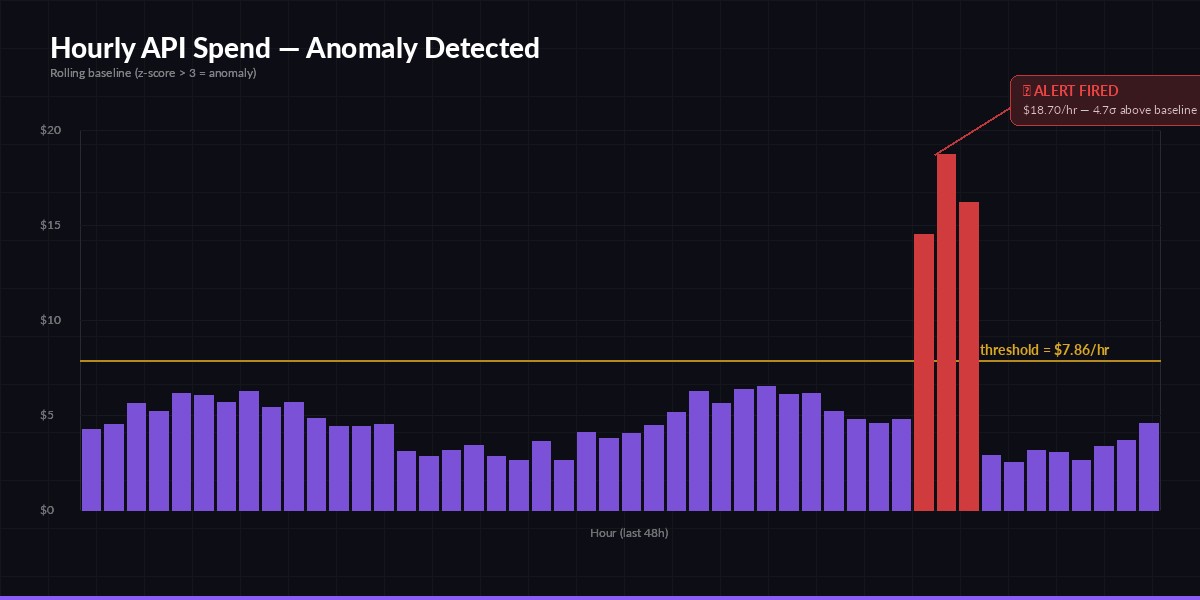
A real spike at hour 38 — 4.7σ above baseline. Static threshold would have missed the slow ramp.
Method 1: Rolling Z-Score (Start Here)
For most teams, rolling z-score is the right default. You compute the mean and standard deviation of spend over the last N hours, and alert when the current hour exceeds mean + 3·σ. Three sigma corresponds to roughly 0.27% false positive rate under normal traffic — about one false alert every 15 days at hourly granularity. Tunable.
Pull your hourly spend from the EzAI usage endpoint and run detection in a cron loop:
import httpx, statistics, os
from datetime import datetime, timedelta, timezone

EZAI_KEY = os.environ["EZAI_API_KEY"]
WINDOW_HOURS = 48          # baseline window
SIGMA = 3.0                # sensitivity
MIN_SPEND_USD = 0.50        # floor: don't page on $0.02 spikes

def fetch_hourly_spend(hours):
    end = datetime.now(timezone.utc).replace(minute=0, second=0, microsecond=0)
    start = end - timedelta(hours=hours)
    r = httpx.get(
        "https://ezaiapi.com/v1/usage/hourly",
        headers={"x-api-key": EZAI_KEY},
        params={"start": start.isoformat(), "end": end.isoformat()},
        timeout=10,
    )
    r.raise_for_status()
    return [bucket["cost_usd"] for bucket in r.json()["buckets"]]

def detect_anomaly(series):
    *baseline, current = series
    if len(baseline) < 12 or current < MIN_SPEND_USD:
        return None
    mean = statistics.mean(baseline)
    std = statistics.pstdev(baseline) or 0.01
    z = (current - mean) / std
    if z > SIGMA:
        return {"current": current, "baseline_mean": mean,
                "sigma": std, "z": round(z, 2)}
    return None

if __name__ == "__main__":
    series = fetch_hourly_spend(WINDOW_HOURS + 1)
    alert = detect_anomaly(series)
    if alert:
        print(f"🚨 ${alert['current']:.2f}/hr (baseline ${alert['baseline_mean']:.2f}, z={alert['z']})")
Run it every 5 minutes. The MIN_SPEND_USD floor is critical — without it, a quiet account triggers when spend goes from $0.01 to $0.10 because that's technically a 10× jump.
Method 2: EWMA for Faster Reaction
Z-score weighs all 48 baseline hours equally. That's a problem when traffic shifted last week — old data drags the mean down and an alert fires constantly even though the new normal is just higher. Exponentially weighted moving average (EWMA) fixes this by giving recent observations more weight:
def ewma_anomaly(series, alpha=0.15, k=3.0):
    """Returns alert dict if current point exceeds EWMA + k * EWM-stdev."""
    *history, current = series
    mean = history[0]
    var = 0.0
    for x in history[1:]:
        diff = x - mean
        mean += alpha * diff
        var = (1 - alpha) * (var + alpha * diff * diff)
    std = var ** 0.5 or 0.01
    deviation = (current - mean) / std
    if deviation > k and current > MIN_SPEND_USD:
        return {"current": current, "ewma": mean, "deviation": deviation}
    return None
The alpha parameter controls memory. 0.15 means roughly the last 7 hours dominate the average. Lower it (0.05) for more stable baselines, raise it (0.3) for fast-reacting detection that's more sensitive to noise. EWMA also doesn't require buffering 48 raw points — you can keep state between runs in Redis with two floats per account.
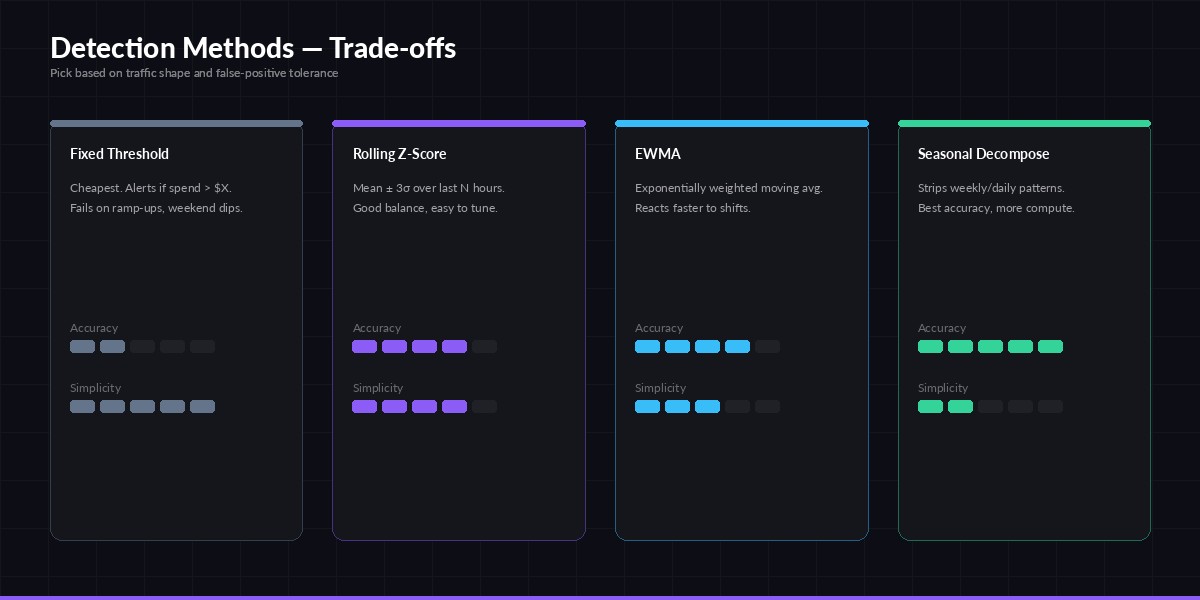
Pick the simplest method that meets your false-positive budget. Most teams stop at z-score.
Method 3: Per-Dimension Detection
One number per hour hides where the spike came from. Was it a single rogue API key? A specific model? A new endpoint? Run detection per dimension and aggregate alerts:
def scan_all_dimensions():
    """Run anomaly detection per (api_key, model) tuple."""
    r = httpx.get(
        "https://ezaiapi.com/v1/usage/hourly",
        headers={"x-api-key": EZAI_KEY},
        params={"group_by": "api_key,model", "hours": 49},
        timeout=15,
    )
    alerts = []
    for dim, series in r.json()["groups"].items():
        result = detect_anomaly(series)
        if result:
            result["dimension"] = dim
            alerts.append(result)
    return sorted(alerts, key=lambda a: -a["current"])
Now an alert tells you "key=sk-prod-xxx, model=claude-opus-4 is at $42/hr, baseline $1.20". That's instantly actionable — rotate the key, check what code path uses opus, and you've contained the bleed in minutes instead of hours.
Wiring to Slack and PagerDuty
Detection without delivery is just a log line nobody reads. Use Slack for soft alerts (z > 3) and PagerDuty for hard ones (z > 6 or absolute spend > $100/hr):
def deliver(alert):
    severity = "critical" if alert["z"] > 6 or alert["current"] > 100 else "warning"
    msg = (
        f":rotating_light: *AI spend anomaly* — {alert['dimension']}\n"
        f"Current: ${alert['current']:.2f}/hr  ·  Baseline: ${alert['baseline_mean']:.2f}/hr  ·  z={alert['z']}\n"
        f"<https://ezaiapi.com/dashboard|Open dashboard>"
    )
    httpx.post(os.environ["SLACK_WEBHOOK"], json={"text": msg})
    if severity == "critical":
        httpx.post("https://events.pagerduty.com/v2/enqueue", json={
            "routing_key": os.environ["PD_KEY"],
            "event_action": "trigger",
            "payload": {"summary": msg, "severity": "critical", "source": "ezai-spend"},
        })
Add a 30-minute deduplication window so a single sustained spike doesn't fire 6 alerts. Hash the dimension key, store last fire time in Redis, suppress if <30 min ago.
Tuning Without Alert Fatigue
The real failure mode isn't missing anomalies — it's getting paged so often you mute the channel. Use these guardrails:
- Run shadow first. Log alerts for two weeks without paging anyone. Count true positives and false positives. Tune sigma until precision is >70%.
- Combine signals. Require both z-score AND absolute deviation (e.g.
z > 3ANDcurrent - baseline > $5). Filters out percentage spikes on tiny baselines. - Whitelist scheduled batches. If you run nightly bulk jobs, suppress alerts during that window or score them separately.
- Auto-resolve. When the next bucket returns to baseline, send a "resolved" message. Open-ended alerts become noise.
Stopping the Bleed
Detection is half the battle. The other half is automatic action — pause the offending key, downgrade to a cheaper model, or cap throughput. Combine this monitor with a cost dashboard for visibility, rate-limit handling for graceful capping, and EzAI's per-key budgets to stop catastrophic overruns automatically. For background on the math, the Wikipedia anomaly detection overview and Forecasting: Principles and Practice are worth the time when you're ready to graduate to seasonal decomposition.
Wire this up before your next Friday deploy. The 30 minutes you spend now save the weekend you'd otherwise spend explaining a bill.