Your company's AI bill just crossed $5,000/month. Finance wants to know which team is burning through tokens. The backend team swears it's the frontend team's chatbot. The data science crew blames the code review bot. Nobody has numbers because every request hits the same API key.
This is the AI cost allocation problem, and it bites every engineering org that scales past a handful of developers. The fix isn't complicated — you need per-team tagging on every API request and a system to aggregate costs at token-level granularity. Here's how to build it.
Why Per-Team Cost Tracking Matters
Without cost attribution, AI spend is a shared pool that nobody owns. Teams over-provision because there's no feedback loop between usage and budget. A single prompt engineering experiment can blow through $200 in an afternoon, and you won't know until the monthly invoice lands.
Proper cost allocation gives you three things:
- Accountability — each team sees their own spend and optimizes accordingly
- Budgeting — finance can set per-team limits instead of guessing
- Optimization signals — you spot which models and patterns cost the most, per team
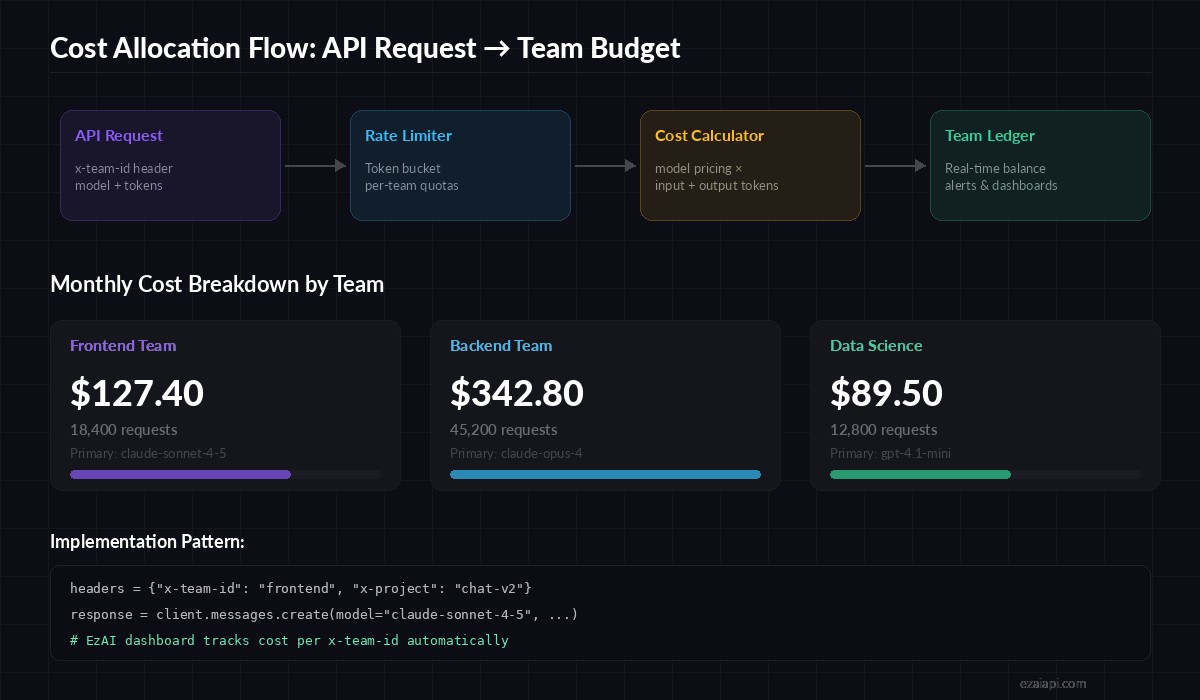
Request flow: team header → rate limiter → cost calculation → team ledger
Tag Every Request with Team Metadata
The foundation is simple: attach a team identifier to every API call. With EzAI, you pass custom headers that get tracked in your dashboard automatically. Here's a Python wrapper that enforces team tagging:
import anthropic
from dataclasses import dataclass
from typing import Optional

@dataclass
class TeamContext:
    team_id: str
    project: str
    environment: str = "production"

class TrackedClient:
    def __init__(self, api_key: str, team: TeamContext):
        self.team = team
        self.client = anthropic.Anthropic(
            api_key=api_key,
            base_url="https://ezaiapi.com",
            default_headers={
                "x-team-id": team.team_id,
                "x-project": team.project,
                "x-env": team.environment,
            }
        )

    def chat(self, messages, model="claude-sonnet-4-5", **kwargs):
        response = self.client.messages.create(
            model=model,
            messages=messages,
            **kwargs
        )
        return response

# Each team gets its own client instance
frontend = TrackedClient(
    api_key="sk-your-key",
    team=TeamContext("frontend", "customer-chat")
)
backend = TrackedClient(
    api_key="sk-your-key",
    team=TeamContext("backend", "code-review-bot")
)
Every request from the frontend client now carries x-team-id: frontend and x-project: customer-chat. EzAI logs these alongside token counts, model used, and calculated cost.
Calculate Costs at Token Granularity
Raw request counts are useless for cost allocation. A single Claude Opus call with 100K context tokens costs more than 500 Haiku calls. You need token-level cost math. Here's a cost calculator that maps model pricing to actual usage:
# Per-million-token pricing (EzAI rates)
MODEL_PRICING = {
    "claude-opus-4":      {"input": 12.0,  "output": 60.0},
    "claude-sonnet-4-5":  {"input": 2.4,   "output": 12.0},
    "claude-haiku-3-5":   {"input": 0.64,  "output": 3.2},
    "gpt-4.1":            {"input": 1.6,   "output": 4.8},
    "gpt-4.1-mini":       {"input": 0.32,  "output": 1.28},
}

def calculate_cost(model: str, input_tokens: int, output_tokens: int) -> float:
    pricing = MODEL_PRICING.get(model)
    if not pricing:
        raise ValueError(f"Unknown model: {model}")
    cost = (input_tokens * pricing["input"] + output_tokens * pricing["output"]) / 1_000_000
    return round(cost, 6)

# Example: a typical code review request
cost = calculate_cost("claude-sonnet-4-5", input_tokens=8500, output_tokens=1200)
print(f"Request cost: ${cost}")  # $0.034800
Build a Team Ledger with SQLite
For production tracking, you want a persistent ledger. SQLite is perfect here — no server to manage, and it handles thousands of writes per second. This ledger stores every request with its team attribution and calculated cost:
import sqlite3
from datetime import datetime

class CostLedger:
    def __init__(self, db_path="ai_costs.db"):
        self.conn = sqlite3.connect(db_path)
        self.conn.execute("""
            CREATE TABLE IF NOT EXISTS usage (
                id INTEGER PRIMARY KEY AUTOINCREMENT,
                timestamp TEXT NOT NULL,
                team_id TEXT NOT NULL,
                project TEXT NOT NULL,
                model TEXT NOT NULL,
                input_tokens INTEGER,
                output_tokens INTEGER,
                cost_usd REAL,
                request_id TEXT
            )
        """)

    def record(self, team_id, project, model, input_t, output_t, cost):
        self.conn.execute(
            "INSERT INTO usage VALUES (NULL,?,?,?,?,?,?,?,?)",
            (datetime.utcnow().isoformat(), team_id, project,
             model, input_t, output_t, cost, None)
        )
        self.conn.commit()

    def team_spend(self, team_id, since=None):
        query = "SELECT SUM(cost_usd) FROM usage WHERE team_id = ?"
        params = [team_id]
        if since:
            query += " AND timestamp >= ?"
            params.append(since)
        row = self.conn.execute(query, params).fetchone()
        return row[0] or 0.0

# Usage
ledger = CostLedger()
ledger.record("frontend", "customer-chat", "claude-sonnet-4-5", 8500, 1200, 0.0348)
print(f"Frontend this month: ${ledger.team_spend('frontend', '2026-04-01'):.2f}")
Set Budget Alerts and Hard Limits
Tracking is half the battle. The other half is preventing runaway spend. Wrap your client with a budget gate that checks the ledger before every request:
import logging

TEAM_BUDGETS = {
    "frontend":     {"monthly_limit": 200.0,  "alert_at": 0.8},
    "backend":      {"monthly_limit": 500.0,  "alert_at": 0.8},
    "data-science": {"monthly_limit": 150.0,  "alert_at": 0.7},
}

class BudgetGate:
    def __init__(self, ledger: CostLedger):
        self.ledger = ledger

    def check(self, team_id: str) -> bool:
        budget = TEAM_BUDGETS.get(team_id)
        if not budget:
            return True

        current = self.ledger.team_spend(team_id, "2026-04-01")
        ratio = current / budget["monthly_limit"]

        if ratio >= 1.0:
            logging.error(f"🚫 {team_id} hit budget limit: ${current:.2f}/{budget['monthly_limit']}")
            return False
        elif ratio >= budget["alert_at"]:
            logging.warning(f"⚠️ {team_id} at {ratio:.0%} of budget: ${current:.2f}")
        return True

# Integrate with TrackedClient
gate = BudgetGate(ledger)
if gate.check("frontend"):
    response = frontend.chat([{"role": "user", "content": "Review this PR"}])
else:
    print("Budget exceeded — falling back to cached response or cheaper model")
When a team hits 80% of their monthly budget, the system logs a warning. At 100%, requests get blocked. The fallback strategy is up to you — downgrade to a cheaper model like gpt-4.1-mini, serve cached responses, or queue the request for the next billing cycle.
Use EzAI Dashboard for Real-Time Visibility
If you're using EzAI API, you get per-request cost tracking out of the box. The dashboard shows every API call with model, token count, and cost — filterable by the custom headers you send.
For teams that want a self-service view without sharing the main dashboard, you can query the EzAI API for usage data and pipe it into your internal tools:
# Weekly cost report per team — pipe to Slack or email
sqlite3 ai_costs.db "
  SELECT team_id,
         COUNT(*) as requests,
         SUM(input_tokens) as total_input,
         SUM(output_tokens) as total_output,
         ROUND(SUM(cost_usd), 2) as total_cost
  FROM usage
  WHERE timestamp >= date('now', '-7 days')
  GROUP BY team_id
  ORDER BY total_cost DESC;
"
Model Selection as a Cost Lever
The biggest cost optimization isn't rate limiting — it's model selection. A team using Claude Opus for routine summarization is burning 5x what Sonnet would cost for the same quality. Build model routing into your allocation system:
- High-stakes code review →
claude-opus-4(worth the cost) - Customer chat →
claude-sonnet-4-5(fast, accurate, affordable) - Log parsing and classification →
gpt-4.1-miniorclaude-haiku-3-5(bulk workloads) - Embeddings and search → dedicated embedding models (pennies per million tokens)
Pair this with model routing and you'll cut costs 40-60% without touching prompt quality. See our cost reduction guide for more strategies.
Putting It Together
The full pattern is straightforward: tag requests with team metadata, calculate costs per response, store in a ledger, and enforce budgets. With EzAI handling the API routing and per-request tracking, you're mostly wiring up the budget enforcement and reporting layers.
Start simple — even just adding x-team-id headers to your existing calls gives you visibility in the EzAI dashboard. Build the budget gates once you have a month of data to baseline against.
The teams that do this well share one trait: they treat AI API spend the same way they treat cloud compute — metered, attributed, and optimized. The alternative is a shared credit card with no receipts.