The Vercel AI SDK is the fastest way to add streaming AI responses to a Next.js app. It handles SSE parsing, abort signals, loading states, and token-by-token rendering out of the box. Pair it with EzAI and you get access to Claude, GPT, Gemini, and 20+ other models through one endpoint — no provider-specific SDKs needed.
This guide walks through building a production-ready AI chat interface in Next.js 14+ (App Router) using EzAI as the backend. We'll cover route handlers, streaming, model switching, and edge deployment — with code you can copy straight into your project.
Project Setup
Start with a fresh Next.js project and install the AI SDK. You need two packages: ai for React hooks and streaming utilities, and @ai-sdk/openai for the provider adapter (EzAI is OpenAI-compatible, so this works directly).
npx create-next-app@latest my-ai-app --typescript --tailwind --app
cd my-ai-app
npm install ai @ai-sdk/openai
Add your EzAI API key to .env.local. The AI SDK reads OPENAI_API_KEY and OPENAI_BASE_URL by default, so you don't need any custom configuration:
# Get your key at https://ezaiapi.com/dashboard
OPENAI_API_KEY=sk-ezai-your-key-here
OPENAI_BASE_URL=https://api.ezaiapi.com/v1
That's the entire setup. The AI SDK picks up those env vars automatically — no createOpenAI() call, no custom headers, nothing. EzAI's OpenAI-compatible endpoint means you get Claude, GPT, and Gemini through the same interface the SDK already expects.
Streaming Chat Route Handler
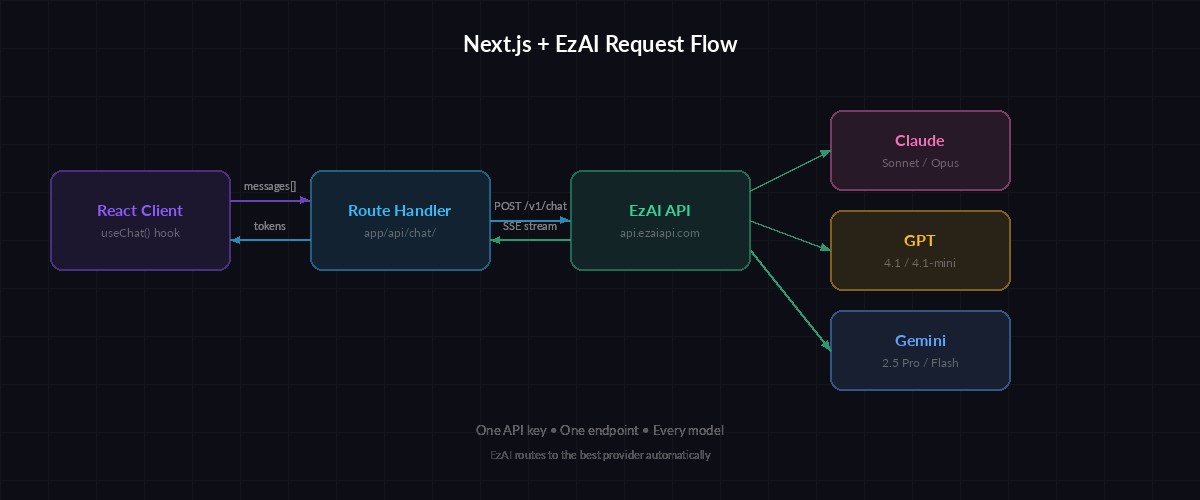
Request flow: React client → Next.js route handler → EzAI proxy → AI model → streamed tokens
The route handler is where the AI call happens. Create app/api/chat/route.ts — this receives messages from the client, forwards them to EzAI, and streams the response back as Server-Sent Events:
import { openai } from '@ai-sdk/openai';
import { streamText } from 'ai';

export async function POST(req: Request) {
  const { messages } = await req.json();

  const result = streamText({
    // EzAI routes this to Claude 4 Sonnet via OPENAI_BASE_URL
    model: openai('claude-sonnet-4-20250514'),
    system: 'You are a helpful coding assistant. Be concise.',
    messages,
    maxTokens: 2048,
    temperature: 0.7,
  });

  return result.toDataStreamResponse();
}
Notice we pass 'claude-sonnet-4-20250514' directly as the model name. EzAI accepts model IDs from any provider — Claude, GPT, Gemini, Grok — through the same OpenAI-compatible endpoint. Swap the string to 'gpt-4.1' or 'gemini-2.5-pro' to switch models without touching any other code.
React Chat Component
The useChat hook from the AI SDK handles message state, streaming, loading indicators, and abort control. Wire it up in your page component:
'use client';

import { useChat } from '@ai-sdk/react';

export default function Home() {
  const { messages, input, handleInputChange, handleSubmit, isLoading, stop } =
    useChat();

  return (
    <main className="max-w-2xl mx-auto p-6">
      <div className="space-y-4 mb-24">
        {messages.map((m) => (
          <div key={m.id} className={m.role === 'user' ? 'text-right' : ''}>
            <span className="font-semibold">
              {m.role === 'user' ? 'You' : 'AI'}:
            </span>
            <p className="whitespace-pre-wrap">{m.content}</p>
          </div>
        ))}
      </div>

      <form onSubmit={handleSubmit} className="fixed bottom-0 w-full max-w-2xl p-4">
        <div className="flex gap-2">
          <input
            value={input}
            onChange={handleInputChange}
            placeholder="Ask anything..."
            className="flex-1 rounded-lg border px-4 py-2"
          />
          {isLoading ? (
            <button type="button" onClick={stop}
              className="px-4 py-2 bg-red-600 rounded-lg text-white">
              Stop
            </button>
          ) : (
            <button type="submit"
              className="px-4 py-2 bg-violet-600 rounded-lg text-white">
              Send
            </button>
          )}
        </div>
      </form>
    </main>
  );
}
Run npm run dev and open localhost:3000. Type a message and you'll see Claude's response stream in token by token. The stop button aborts mid-stream — the AI SDK sends an abort signal that cleanly terminates the SSE connection.
Model Switching at Runtime
One of EzAI's strengths is accessing every model through one API key. You can let users pick their model — or route automatically based on task complexity. Modify the route handler to accept a model parameter:
import { openai } from '@ai-sdk/openai';
import { streamText } from 'ai';

// Allowlist of models available through EzAI
const MODELS: Record<string, string> = {
  'claude-sonnet': 'claude-sonnet-4-20250514',
  'gpt-4.1':       'gpt-4.1',
  'gemini-pro':   'gemini-2.5-pro',
  'claude-haiku': 'claude-3-5-haiku-latest',
};

export async function POST(req: Request) {
  const { messages, model: requestedModel } = await req.json();

  // Validate model or fall back to Claude Sonnet
  const modelId = MODELS[requestedModel] ?? MODELS['claude-sonnet'];

  const result = streamText({
    model: openai(modelId),
    messages,
    maxTokens: 2048,
  });

  return result.toDataStreamResponse();
}
On the client side, pass the selected model via the body option in useChat:
const [model, setModel] = useState('claude-sonnet');

const { messages, input, handleInputChange, handleSubmit } = useChat({
  body: { model },  // Sent with every request
});

// Add a <select> dropdown in your UI to switch models
Users pick Claude for complex reasoning, Haiku for quick answers, GPT for creative writing — all through the same interface, same API key, same billing. No provider credentials to juggle.
Edge Runtime for Faster TTFB
Deploying on Vercel? Switch the route handler to the Edge Runtime for lower latency. Edge functions run closer to your users and have sub-millisecond cold starts. The AI SDK works identically on Edge — no code changes needed beyond the export:
// Add this line to enable Edge Runtime
export const runtime = 'edge';

export async function POST(req: Request) {
  // Same code as before — no changes needed
  const { messages, model: requestedModel } = await req.json();
  const modelId = MODELS[requestedModel] ?? MODELS['claude-sonnet'];

  const result = streamText({
    model: openai(modelId),
    messages,
    maxTokens: 2048,
  });

  return result.toDataStreamResponse();
}
Edge Runtime drops time-to-first-byte by 50-200ms compared to serverless Node.js functions, depending on the user's location. Since EzAI handles the heavy lifting (model routing, caching, load balancing), your Edge function stays lightweight — it's just a proxy that forwards the request and pipes the stream back.
Error Handling and Rate Limits
Production apps need to handle failures gracefully. EzAI returns standard HTTP status codes — 429 for rate limits, 503 for model overload. Wrap your route handler with proper error boundaries:
export async function POST(req: Request) {
  try {
    const { messages } = await req.json();

    const result = streamText({
      model: openai('claude-sonnet-4-20250514'),
      messages,
      maxTokens: 2048,
      abortSignal: req.signal,  // Respect client disconnects
    });

    return result.toDataStreamResponse();

  } catch (error: any) {
    if (error?.statusCode === 429) {
      return Response.json(
        { error: 'Rate limited — try again in a few seconds' },
        { status: 429, headers: { 'Retry-After': '5' } }
      );
    }
    return Response.json(
      { error: 'AI service temporarily unavailable' },
      { status: 503 }
    );
  }
}
On the client, the AI SDK exposes an error state through useChat. Display it inline rather than crashing the whole page — users can retry without losing their conversation history.
Deploy to Production
Push to your Git repo and Vercel deploys automatically. Set your environment variables in the Vercel dashboard (Settings → Environment Variables):
OPENAI_API_KEY→ your EzAI key from the dashboardOPENAI_BASE_URL→https://api.ezaiapi.com/v1
That's it. Your app now has streaming AI chat powered by any model you want, deployed at the edge, with zero cold-start penalty. Scale from prototype to production without changing providers — EzAI handles the infrastructure, you handle the product.
The full source code for this tutorial is about 50 lines of actual application code. The Vercel AI SDK eliminates most boilerplate, and EzAI eliminates the multi-provider headache. If you're building AI features in Next.js, this stack gets you from npm init to production in under an hour.
Check the EzAI pricing page to see per-model costs, or grab your API key from the dashboard and start building. Need help? Join the EzAI Discord — we answer questions daily.