The Claude Code vs Cursor debate has taken over every dev forum in 2026, and honestly, the answer isn't straightforward. I've spent the last six months bouncing between Claude Code, Cursor, Cline, Aider, and Windsurf on real projects — not toy demos. Here's what I actually think about each one, who should use what, and where the hype doesn't match reality.

The AI Coding Tools Landscape in 2026
A year ago, Cursor was the undisputed king. Then Claude Code dropped as a terminal-first agent, Cline matured into a genuinely powerful VS Code extension, Aider kept quietly being excellent, and Windsurf (Codeium's editor) entered the ring. The best AI code editor now depends entirely on how you work.
Let's break them down across the categories that actually matter.
Quick Comparison: AI Coding Tools 2026
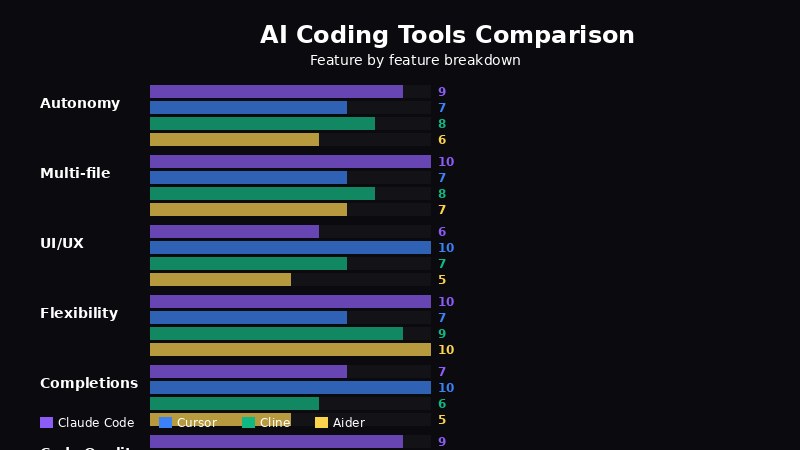
Feature comparison across five AI coding tools
| Tool | Interface | Models | Pricing | Best For |
|---|---|---|---|---|
| Claude Code | Terminal (CLI) | Claude only | Pay-per-use | Agentic workflows, large refactors |
| Cursor | VS Code fork | Claude, GPT, Gemini | $20/mo Pro | All-in-one daily driver |
| Cline | VS Code extension | Any (BYO key) | Free (BYO API) | Flexibility, budget control |
| Aider | Terminal (CLI) | Any (BYO key) | Free / open source | Git-native workflows |
| Windsurf | VS Code fork | Claude, GPT, Gemini | Free tier / $10+/mo | Beginners, cost-conscious |
Claude Code: The Terminal Powerhouse
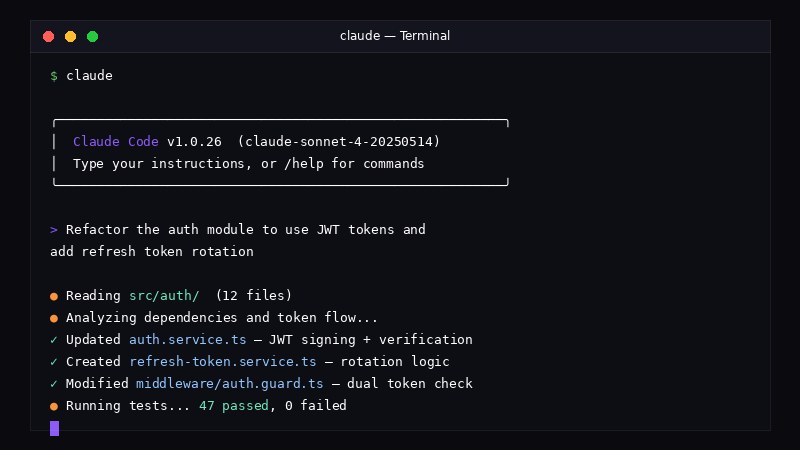
Claude Code running in terminal — agentic coding with extended thinking
Claude Code is Anthropic's official CLI agent. No GUI, no electron app — just your terminal. It reads your codebase, proposes edits, runs commands, and handles multi-file refactors autonomously. If you're comfortable in a terminal, Claude Code feels like pair-programming with a senior engineer who never gets tired.
What it does well:
- Full agentic mode — it can create files, run tests, fix errors, and iterate without hand-holding
- Understands entire repo context better than any chat-based tool
- No context-window gymnastics — it manages what to read and when
- Ridiculously good at large refactors across dozens of files
Where it falls short:
- Terminal-only means no inline diffs, no hover previews, no visual git integration
- Locked to Claude models (unless you route through a proxy like EzAI)
- Can burn through tokens fast on large repos if you're not careful
Cursor: The Best AI Code Editor for Most Devs
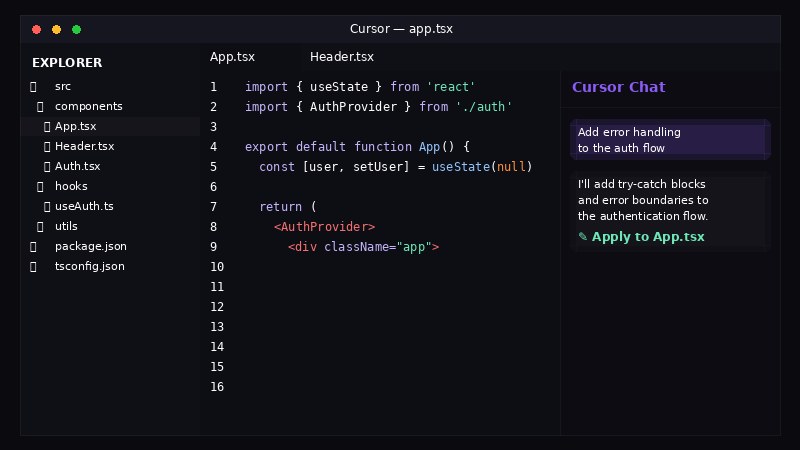
Cursor IDE — VS Code fork with built-in AI autocomplete and Composer
Cursor is still the most polished experience. It's a VS Code fork, so you get the entire extension ecosystem plus AI baked into every interaction — tab completion, inline chat, composer mode for multi-file edits, and a terminal with AI awareness. The subscription model means predictable costs.
What it does well:
- Tab completion that actually reads your mind (their fine-tuned model is scary good)
- Composer mode handles multi-file edits with a nice diff view
- Supports Claude, GPT-4, and Gemini — switch models per conversation
- Feels like VS Code with superpowers, not a separate tool to learn
Where it falls short:
- $20/month gets you limited "fast" requests — heavy users hit the slow queue constantly
- The agentic mode is improving but still not as autonomous as Claude Code
- You're locked into their ecosystem. If Cursor the company pivots, your workflow breaks
Cline: The Best Cursor Alternative for Power Users
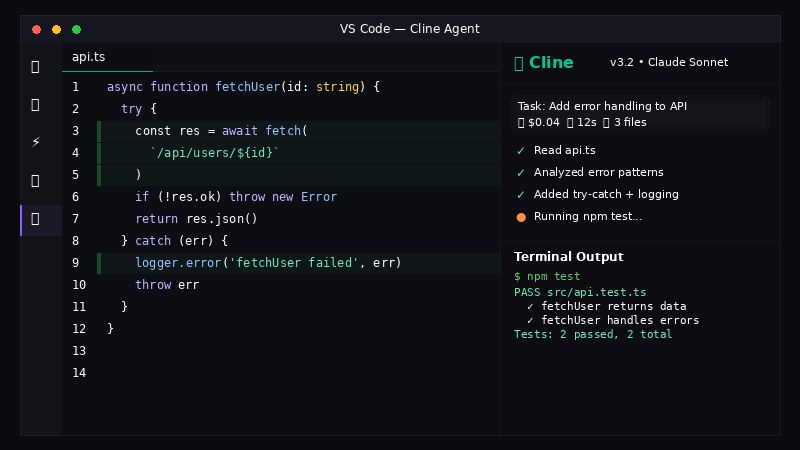
Cline — open source AI agent running inside VS Code
Cline is an open-source VS Code extension that turned into a legitimate Cursor alternative in 2026. Bring your own API key, pick any model, and get agentic coding right inside VS Code — no fork needed. It's the tool I recommend to anyone who says "I want Cursor but I hate subscriptions."
What it does well:
- Works with any model from any provider — total freedom
- Stays inside regular VS Code — no migration, keep all your extensions
- Agentic mode with file creation, terminal commands, browser control
- You control your spend — pay only for what you use via API
Where it falls short:
- No tab completion (it's an agent, not an autocomplete engine)
- UI can feel clunky compared to Cursor's polish
- Requires some API key management — not as plug-and-play
This is where services like EzAI API shine — one API key gives Cline access to Claude, GPT, Gemini, and 20+ other models without juggling multiple provider accounts.
Aider: The Git-Native Dark Horse
Aider has been around longer than most of these tools and doesn't get enough credit. It's a terminal-based pair programmer that commits every change to git automatically. Each edit is a clean commit with a descriptive message. If you value a clean git history, nothing else comes close.
What it does well:
- Every change = a git commit. Undo is just
git revert - Works with any model via API keys
- Lightweight — it's a Python script, not an Electron app eating 2GB of RAM
- Rock-solid for focused, incremental changes
Where it falls short:
- Not great for large autonomous tasks — it prefers human-in-the-loop
- No GUI, no inline diffs (similar limitation to Claude Code)
- Smaller community means fewer tutorials and less support
Windsurf: The Budget-Friendly Newcomer
Windsurf (formerly Codeium) offers a polished editor with a generous free tier. It's the easiest entry point if you've never used AI coding tools before. The "Cascade" flow feature handles multi-step tasks reasonably well, though it doesn't match Claude Code's autonomy or Cursor's completions.
What it does well:
- Generous free tier — actually usable without paying
- Clean, beginner-friendly interface
- Cascade mode handles multi-file edits with context awareness
Where it falls short:
- Feels like Cursor from a year ago — playing catch-up on features
- Free tier has model limitations
- Smaller extension ecosystem compared to VS Code/Cursor
Setup Ease: Who Gets You Coding Fastest?
Cursor wins here. Download, log in, start coding. Tab completions work immediately. For Claude Code, you need to configure API keys and environment variables (our getting started guide covers this in 5 minutes). Cline needs a VS Code install plus an API key. Aider requires Python and pip. Windsurf is similar to Cursor — download and go.
Model Support and Flexibility
If you care about model choice, Cline and Aider win — they work with any API-compatible model. Cursor supports Claude, GPT, and Gemini natively. Claude Code is Claude-only by default, though you can route it through EzAI's proxy to use other models too.
This is honestly the strongest argument for BYO-key tools. When a new model drops (and they drop monthly now), Cline and Aider support it immediately. Cursor and Windsurf have to push an update.
So Which One Should You Use?
Here's my honest take after daily-driving all five:
- Use Claude Code if you live in the terminal and need an agent that can handle complex, multi-file tasks autonomously. It's the most powerful option for experienced developers.
- Use Cursor if you want one tool that does everything — completions, chat, multi-file edits — and you're fine with a subscription.
- Use Cline if you want Cursor-level agentic coding without leaving VS Code and want full control over model choice and costs.
- Use Aider if git history matters to you and you prefer focused, commit-by-commit changes over autonomous agents.
- Use Windsurf if you're just getting started with AI coding tools and want to try it without spending money.
One API Key for All of Them
Here's the thing that most comparison articles won't tell you: the model behind the tool matters more than the tool itself. Claude Code with Sonnet is a very different experience from Claude Code with Opus. Cursor with GPT-4o feels nothing like Cursor with Claude.
With EzAI API, you get one API key that works with all the BYO-key tools (Claude Code, Cline, Aider) and gives you access to 20+ models at reduced pricing. No juggling Anthropic, OpenAI, and Google accounts separately. Just one key, one balance, one dashboard to track everything.
# Works with Claude Code, Cline, and Aider — same key
export ANTHROPIC_BASE_URL="https://ezaiapi.com"
export ANTHROPIC_API_KEY="sk-your-ezai-key"
Try all five tools. Use whichever fits your brain. The model layer is a solved problem — grab your EzAI key and stop worrying about which provider to sign up for next.