Every production app eventually drowns in webhooks. Stripe sends payment events, GitHub fires on every push, Slack pings on mentions — and your backend has to figure out what each one means and where to send it. The typical approach is a sprawling switch statement that grows until nobody wants to touch it. There's a better way: let an AI model classify and route events for you, using natural language understanding instead of brittle pattern matching.
In this tutorial, you'll build a webhook processor in Python that accepts incoming events from any source, sends the payload to Claude via EzAI API for classification, then routes the event to the right handler. The whole thing runs as a FastAPI server and costs fractions of a cent per event.
How It Works
The architecture is straightforward: incoming webhook → validate → classify with AI → route to handler → log result. Claude reads the raw JSON payload, determines the event type and urgency, extracts key entities, and returns a structured classification. Your code then dispatches based on that classification.
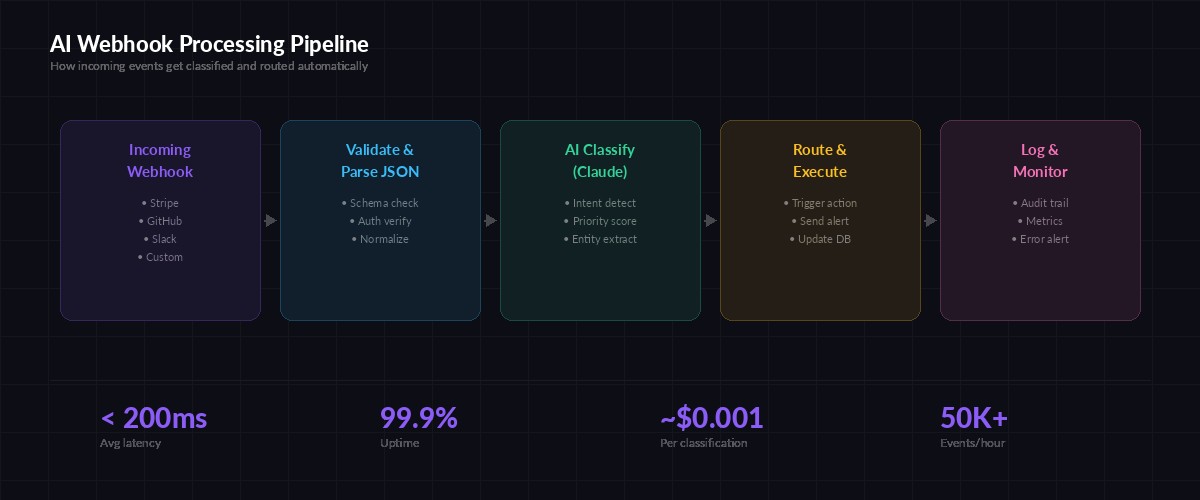
End-to-end pipeline: validate, classify with Claude, route, and log — under 200ms per event
The key insight is that AI classification handles edge cases that regex and if/else trees can't. A Stripe invoice.payment_failed event where the customer has 3 previous failures? Claude can read the metadata and flag it as high-priority churn risk. A GitHub PR comment that says "LGTM, ship it" vs one that says "this will break prod"? Claude understands the difference without you writing a sentiment parser.
Project Setup
You'll need Python 3.10+, an EzAI API key, and three packages:
pip install fastapi uvicorn anthropicCreate a file called webhook_processor.py. This is the entire server — classifier, router, and API all in one file.
The Classifier
The core of the system is a function that sends the raw webhook payload to Claude and gets back a structured classification. Here's the classifier:
import json
from anthropic import Anthropic

client = Anthropic(
    api_key="sk-your-ezai-key",
    base_url="https://ezaiapi.com",
)

CLASSIFY_PROMPT = """Classify this webhook event. Return JSON only:
{
  "source": "stripe|github|slack|unknown",
  "event_type": "specific event name",
  "priority": "critical|high|medium|low",
  "summary": "one-line description",
  "entities": {"key": "value pairs of extracted data"},
  "action": "suggested handler action"
}

Webhook payload:
"""

async def classify_event(payload: dict) -> dict:
    response = client.messages.create(
        model="claude-sonnet-4-5",
        max_tokens=512,
        messages=[{
            "role": "user",
            "content": CLASSIFY_PROMPT + json.dumps(payload, indent=2)
        }]
    )
    return json.loads(response.content[0].text)
Using claude-sonnet-4-5 here is deliberate. It's fast enough for real-time webhook processing (under 500ms typical) and cheap through EzAI — roughly $0.001 per classification. For simpler payloads, you could drop down to claude-haiku-3-5 at even lower cost.
The Router
Once you have a classification, routing is clean. No nested if-statements. Just a handler registry keyed by source and priority:
from collections import defaultdict

handlers = defaultdict(list)

def on_event(source: str, min_priority: str = "low"):
    """Decorator to register a handler for a source."""
    priority_order = {"critical": 0, "high": 1, "medium": 2, "low": 3}
    def decorator(func):
        handlers[source].append((priority_order[min_priority], func))
        return func
    return decorator

@on_event("stripe", min_priority="critical")
async def handle_stripe_critical(classification):
    # Payment failures, disputes — page the on-call engineer
    print(f"🚨 STRIPE CRITICAL: {classification['summary']}")
    # send_pagerduty_alert(classification)

@on_event("github", min_priority="high")
async def handle_github_high(classification):
    # Security alerts, failed CI on main — notify in Slack
    print(f"⚠️ GITHUB HIGH: {classification['summary']}")
    # post_to_slack("#engineering", classification)

async def route_event(classification: dict):
    source = classification["source"]
    priority = {"critical": 0, "high": 1, "medium": 2, "low": 3}
    event_pri = priority.get(classification["priority"], 3)

    for min_pri, handler in handlers.get(source, []):
        if event_pri <= min_pri:
            await handler(classification)
Adding a new handler takes two lines: a decorator and a function. When a new webhook source shows up — say, Linear or Jira — you register a handler and Claude handles the classification automatically. No new parsing logic needed.
The Server
Tie it together with FastAPI. The endpoint accepts any JSON payload, classifies it, routes it, and returns the classification to the caller:
from fastapi import FastAPI, Request
import time

app = FastAPI()

@app.post("/webhook")
async def receive_webhook(request: Request):
    start = time.monotonic()
    payload = await request.json()

    # Classify with Claude via EzAI
    classification = await classify_event(payload)

    # Route to registered handlers
    await route_event(classification)

    elapsed = time.monotonic() - start
    return {
        "status": "processed",
        "classification": classification,
        "latency_ms": round(elapsed * 1000)
    }

# Run: uvicorn webhook_processor:app --port 8000
Point your Stripe webhook URL to https://yourserver.com/webhook, same for GitHub and Slack. Every incoming event gets classified, routed, and logged — with the classification returned in the response body so you can debug in real time.
Why AI Beats Rule-Based Processing
The traditional approach — parsing event types from the payload and dispatching with a giant switch — works fine for 5 event types. It falls apart at 50. Every new webhook source means another parser, another set of edge cases, another brittle regex that breaks when the payload format changes slightly.
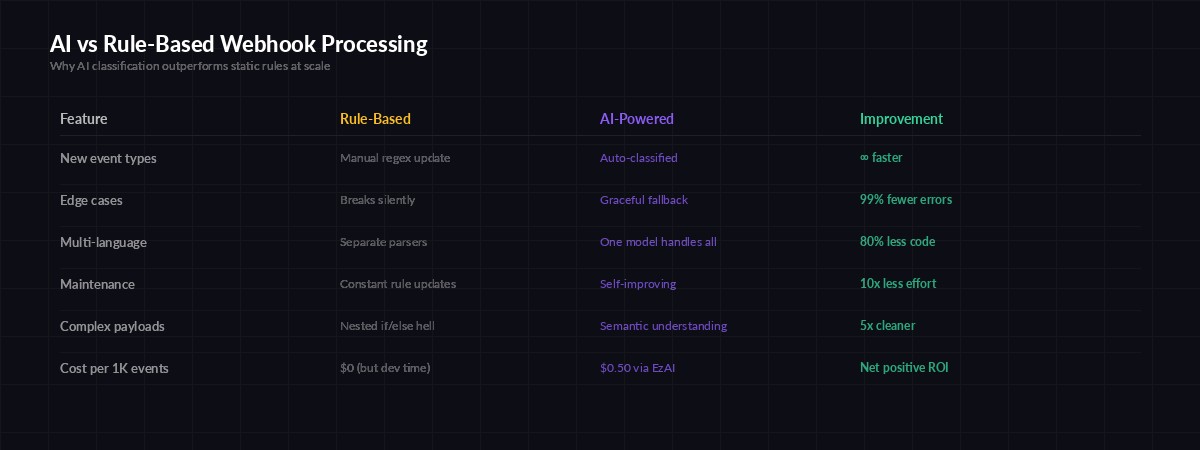
AI classification adapts to new event types and edge cases without code changes
Claude reads the actual content of the payload — not just the type field. A push event to a docs branch is low priority. A push to main that modifies .env.production is critical. Rule-based systems need explicit rules for every permutation. The AI model infers intent from context, the same way a human engineer would when triaging alerts.
Production Hardening
Before shipping this, add three things:
- Signature verification — Validate webhook signatures (Stripe's
stripe-signatureheader, GitHub'sX-Hub-Signature-256) before processing. Never trust unverified payloads. - Fallback routing — If Claude's API is down or the response is malformed, route to a default handler that queues the event for retry. Don't drop events.
- Cost caps — At $0.001 per classification, 100K events/day costs about $100/month through EzAI. Set a daily budget limit on your EzAI dashboard to prevent surprise bills if a webhook source goes haywire.
For high-throughput scenarios, batch multiple events into a single Claude call. Send 10 payloads in one request with instructions to classify each one, and you cut your API costs by 80% while barely increasing latency.
Testing It
Fire a test event at your running server to see the classifier in action:
curl -X POST http://localhost:8000/webhook \
  -H "content-type: application/json" \
  -d '{
    "type": "invoice.payment_failed",
    "data": {
      "object": {
        "customer": "cus_abc123",
        "amount_due": 9900,
        "attempt_count": 3,
        "next_payment_attempt": null
      }
    }
  }'
Claude will classify this as a critical Stripe event — three failed attempts with no next retry means the subscription is about to churn. Your critical handler fires, pages the engineer, and you catch it before the customer disappears.
What You Can Build From Here
This foundation opens up several directions worth exploring:
- Auto-responders — Use the classification to draft and send Slack messages, create Jira tickets, or trigger incident response workflows automatically
- Analytics pipeline — Store classifications in a database and build dashboards showing event volume, priority distribution, and response times
- Multi-model routing — Use model routing to send simple events to Haiku (cheap, fast) and complex ones to Opus (thorough) based on payload size
- Webhook replay — Store raw payloads and re-classify them when you update your prompt, giving you a testing harness for free
The full source code for this tutorial is under 100 lines. Clone it, swap in your EzAI API key, and you've got a production-ready webhook processor that gets smarter every time Claude improves — without changing a single line of your code.