Every developer knows the pain: you inherit a repo with zero documentation, or you finish a project and stare at an empty README.md for twenty minutes before writing three bullet points. An AI README generator solves both problems. Point it at any directory, and it produces a structured, accurate README in seconds — complete with install instructions, usage examples, and API reference.
In this tutorial, you'll build a Python CLI tool that walks your project tree, feeds the relevant source files to Claude, and writes a production-grade README. The whole thing is under 120 lines of code and works with any language or framework.
How the Generator Works
The architecture is straightforward. The CLI does three things in sequence:
- Scan — Walk the project directory, collect file names and contents, skip binaries and vendor folders
- Prompt — Send the file tree and selected source files to Claude with a structured system prompt
- Write — Dump the markdown response directly to
README.md
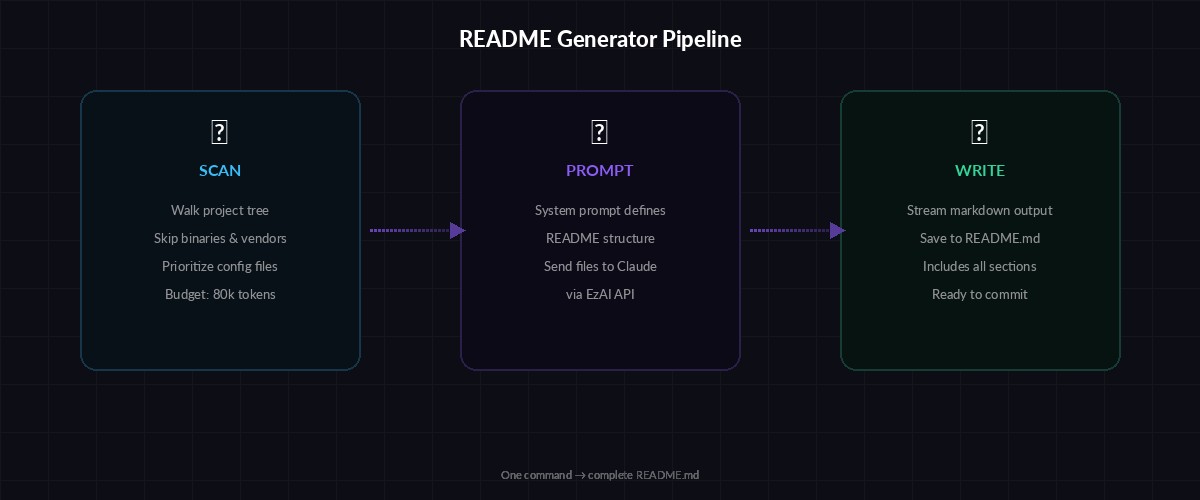
Three-stage pipeline: scan your codebase, prompt Claude, write the README
The trick is in the scanning step. You don't want to send every file — that wastes tokens and blows past context limits. Instead, you prioritize: config files first (package.json, pyproject.toml, Cargo.toml), then entry points, then the rest of the source. Binary files, node_modules, .git, and build artifacts get skipped entirely.
Project Setup
You need Python 3.10+ and the Anthropic SDK. Install the dependency:
pip install anthropic
export ANTHROPIC_API_KEY="sk-your-ezai-key"
export ANTHROPIC_BASE_URL="https://ezaiapi.com"
Setting ANTHROPIC_BASE_URL routes all requests through EzAI, so you get access to every Claude model at reduced pricing. The SDK picks up both environment variables automatically — no code changes needed.
The File Scanner
This function walks your project and returns a filtered list of files with their contents. It respects .gitignore patterns and skips anything that looks like generated output.
import os
from pathlib import Path

SKIP_DIRS = {".git", "node_modules", "__pycache__", "dist",
             "build", ".venv", "venv", "target", ".next"}

SKIP_EXT = {".pyc", ".jpg", ".png", ".gif", ".woff",
            ".woff2", ".ico", ".lock", ".map"}

PRIORITY_FILES = ["package.json", "pyproject.toml", "Cargo.toml",
                  "go.mod", "Makefile", "Dockerfile"]

def scan_project(root: str, max_tokens: int = 80000) -> dict:
    root = Path(root).resolve()
    files = {}
    char_budget = max_tokens * 3  # rough chars-to-tokens ratio
    used = 0

    # Grab priority files first
    for name in PRIORITY_FILES:
        path = root / name
        if path.exists():
            content = path.read_text(errors="replace")
            files[name] = content
            used += len(content)

    # Walk the rest
    for dirpath, dirnames, filenames in os.walk(root):
        dirnames[:] = [d for d in dirnames if d not in SKIP_DIRS]
        for fname in sorted(filenames):
            rel = os.path.relpath(os.path.join(dirpath, fname), root)
            if rel in files or Path(fname).suffix in SKIP_EXT:
                continue
            if used >= char_budget:
                break
            try:
                content = Path(dirpath, fname).read_text(errors="replace")
                files[rel] = content
                used += len(content)
            except (OSError, UnicodeDecodeError):
                pass

    return files
The max_tokens parameter controls how much source code gets included. At 80k tokens, you can feed most medium-sized projects in a single request. For monorepos, you might want to point the tool at a specific subdirectory instead.
Generating the README with Claude
The core generation function packs the scanned files into a prompt and asks Claude to produce structured markdown. The system prompt is the secret weapon — it tells Claude exactly what sections to include and how to format them.
import anthropic

client = anthropic.Anthropic(
    base_url="https://ezaiapi.com"
)

SYSTEM = """You are a technical writer generating a README.md.
Analyze the provided source files and produce markdown with these sections:
1. Project title and one-line description
2. Features (bullet list, 4-8 items)
3. Prerequisites
4. Installation
5. Usage with code examples
6. Configuration (if config files exist)
7. API Reference (if the project exposes an API)
8. Project Structure (tree view of key directories)
9. Contributing
10. License (infer from LICENSE file or package.json)

Rules:
- Write for developers, not managers
- Include real command examples, not placeholders
- If you see test files, mention how to run tests
- Keep it under 600 lines of markdown
- Use GitHub-flavored markdown"""

def generate_readme(files: dict, model: str = "claude-sonnet-4-5") -> str:
    file_dump = ""
    for path, content in files.items():
        file_dump += f"\n--- {path} ---\n{content}\n"

    response = client.messages.create(
        model=model,
        max_tokens=4096,
        system=SYSTEM,
        messages=[{
            "role": "user",
            "content": f"Generate a README.md for this project:\n{file_dump}"
        }]
    )
    return response.content[0].text
Note how the client initializes with base_url="https://ezaiapi.com". That single line is all it takes to route through EzAI. You can swap claude-sonnet-4-5 for claude-opus-4 if you want deeper analysis of complex codebases, or drop down to claude-haiku-3-5 for quick, cheap generation on smaller projects.
Building the CLI
Wrap everything in an argparse CLI so you can run it from any terminal. This adds flags for the target directory, output path, and model selection.
import argparse, sys

def main():
    parser = argparse.ArgumentParser(
        description="Generate README.md from source code using AI"
    )
    parser.add_argument("path", nargs="?", default=".",
                        help="Project directory (default: current)")
    parser.add_argument("-o", "--output", default="README.md",
                        help="Output file (default: README.md)")
    parser.add_argument("-m", "--model", default="claude-sonnet-4-5",
                        help="Model to use")
    parser.add_argument("--dry-run", action="store_true",
                        help="Print file list without generating")
    args = parser.parse_args()

    print(f"📂 Scanning {args.path}...")
    files = scan_project(args.path)
    print(f"   Found {len(files)} files")

    if args.dry_run:
        for f in files:
            print(f"   • {f}")
        sys.exit(0)

    print(f"🤖 Generating with {args.model}...")
    readme = generate_readme(files, model=args.model)

    out = Path(args.path) / args.output
    out.write_text(readme)
    print(f"✅ Written to {out}")

if __name__ == "__main__":
    main()
Run it against any project:
# Generate README for current directory
python readme_gen.py

# Target a specific project with a different model
python readme_gen.py ~/projects/my-api -m claude-opus-4

# Preview which files will be included
python readme_gen.py ~/projects/my-api --dry-run
Streaming for Large Projects
For bigger codebases, the generation can take 15-30 seconds. Streaming the response gives your users immediate feedback instead of a blank terminal.
def generate_readme_stream(files: dict, model: str = "claude-sonnet-4-5") -> str:
    file_dump = ""
    for path, content in files.items():
        file_dump += f"\n--- {path} ---\n{content}\n"

    chunks = []
    with client.messages.stream(
        model=model,
        max_tokens=4096,
        system=SYSTEM,
        messages=[{
            "role": "user",
            "content": f"Generate a README.md for this project:\n{file_dump}"
        }]
    ) as stream:
        for text in stream.text_stream:
            print(text, end="", flush=True)
            chunks.append(text)

    return "".join(chunks)
The streaming version uses client.messages.stream() — same parameters, but you get tokens as they arrive. The output prints to the terminal in real time while simultaneously collecting chunks for the final file write. Check our streaming guide for more patterns.
Handling Monorepos and Large Projects
When a project exceeds your token budget, the scanner truncates. But you can be smarter about it. Add a --focus flag that targets specific subdirectories:
# Generate README for just the API package
python readme_gen.py ~/monorepo/packages/api

# Use a larger model for complex projects
python readme_gen.py ~/monorepo -m claude-opus-4
For truly massive projects, consider a two-pass approach: first generate a tree overview with Haiku (cheap and fast), then feed that summary plus key files to Sonnet for the full README. This keeps costs under $0.05 per generation even for 500+ file repositories.
Cost Breakdown
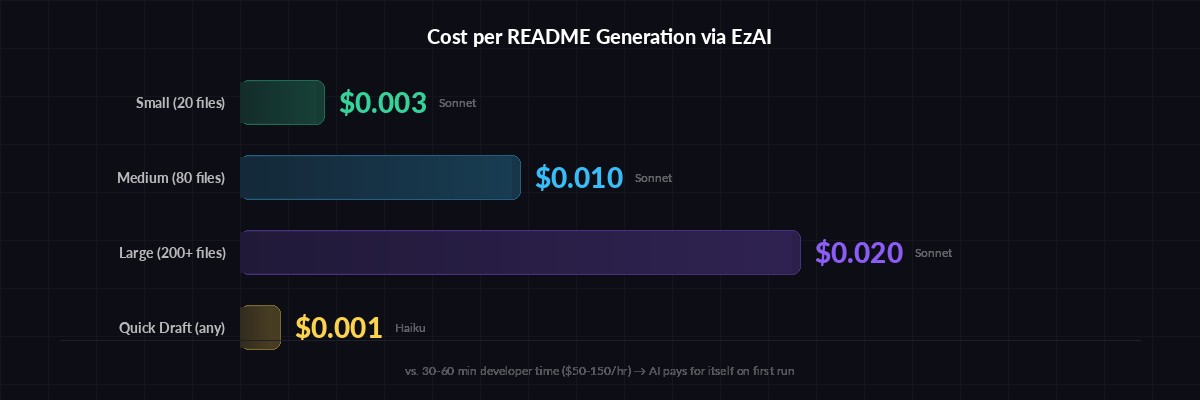
README generation costs pennies — even for large codebases
Running through EzAI, here's what typical generations cost:
- Small project (20 files, ~15k tokens input) — $0.003 with Sonnet
- Medium project (80 files, ~50k tokens input) — $0.01 with Sonnet
- Large project (200+ files, ~80k tokens input) — $0.02 with Sonnet
- Quick draft (any size, Haiku) — under $0.001
Compare that to the 30-60 minutes a developer would spend writing a README from scratch. Even at senior rates, the AI version pays for itself on the first run.
What's Next
You've got a working README generator in under 120 lines. Some ideas to extend it:
- Git hook integration — Auto-update the README on every release tag
- Diff mode — Compare the existing README against generated output and suggest updates
- Multi-language — Generate READMEs in multiple languages for international projects
- Badge injection — Auto-detect CI, coverage, and npm/PyPI badges from config files
The full source code from this tutorial is ready to copy-paste. Swap in your EzAI API key, and you'll have documentation that actually matches your code — updated in seconds, not hours.