The Model Context Protocol (MCP) is an open standard that lets AI models interact directly with your databases, APIs, file systems, and custom tools — all through a single, standardized interface. Instead of building one-off integrations for every service, MCP gives your AI a universal plug that works with any compatible server. If you're running Claude Code, Cursor, or any AI coding tool through EzAI API, you can wire up MCP servers to give your AI superpowers it didn't have five minutes ago.
What Is MCP and Why Should You Care?
Think of MCP like USB for AI. Before USB, every peripheral needed its own proprietary connector. MCP does the same thing for AI-tool integrations: one protocol, infinite connections. Anthropic released it as an open spec, and the ecosystem has exploded — there are now MCP servers for GitHub, PostgreSQL, Slack, file systems, web browsers, and hundreds more.
Without MCP, connecting Claude to your Postgres database means writing a custom tool-calling wrapper, handling serialization, managing auth, and maintaining that code forever. With MCP, you point your AI host at a Postgres MCP server and it discovers the available operations automatically.
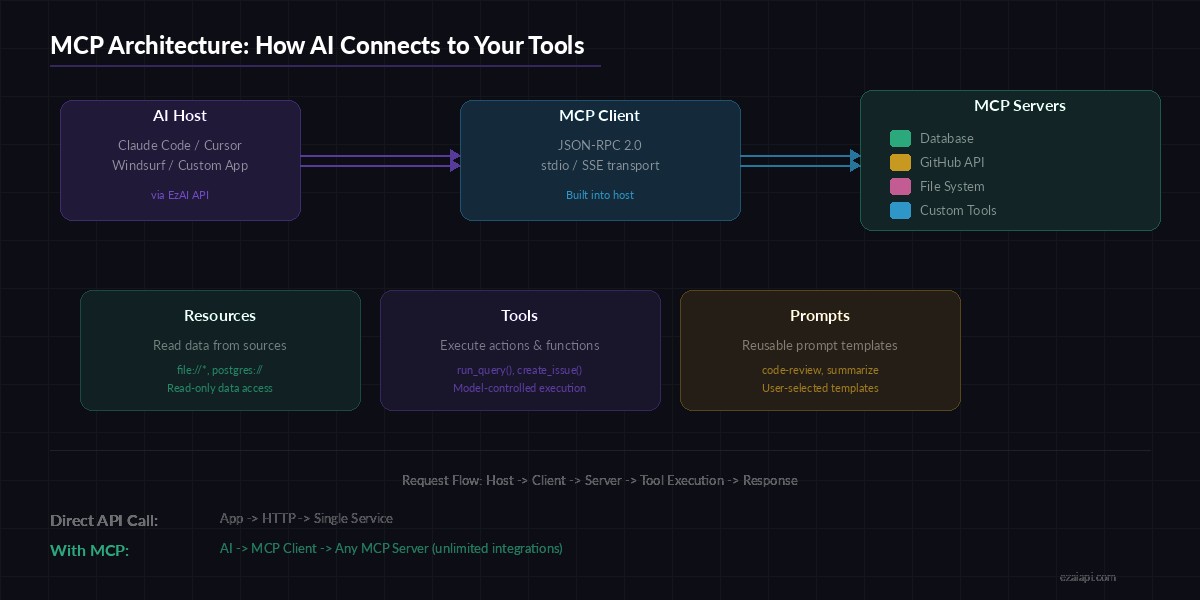
MCP architecture — one protocol connecting AI hosts to unlimited tool servers
MCP Architecture: The Three Primitives
MCP defines three core primitives that servers can expose:
- Resources — Read-only data the AI can access. Think file contents, database rows, or API responses. The AI can read them but can't modify them through the resource interface.
- Tools — Executable functions the AI can call. Run a SQL query, create a GitHub issue, send a Slack message. These are model-controlled: the AI decides when and how to invoke them.
- Prompts — Reusable prompt templates exposed by the server. A code-review prompt, a summarization template, or a migration checker. These are user-controlled — you pick which one to use.
The transport layer uses JSON-RPC 2.0 over either stdio (local processes) or Server-Sent Events (remote servers). When your AI host connects, it calls initialize, the server responds with its capabilities, and from there the AI can list and invoke tools, read resources, or use prompts.
Building Your First MCP Server with EzAI
Let's build a simple MCP server that exposes a weather lookup tool. Any AI host (Claude Code, Cursor, etc.) connected through EzAI can then call this tool during conversations.
1. Install the MCP SDK
npm init -y
npm install @modelcontextprotocol/sdk zod
2. Create the MCP Server
import { McpServer } from "@modelcontextprotocol/sdk/server/mcp.js";
import { StdioServerTransport } from "@modelcontextprotocol/sdk/server/stdio.js";
import { z } from "zod";

const server = new McpServer({
  name: "weather-server",
  version: "1.0.0",
});

// Define a tool the AI can call
server.tool(
  "get_weather",
  "Get current weather for a city",
  {
    city: z.string().describe("City name, e.g. 'Tokyo'"),
    units: z.enum(["celsius", "fahrenheit"]).default("celsius"),
  },
  async ({ city, units }) => {
    const res = await fetch(
      `https://wttr.in/${encodeURIComponent(city)}?format=j1`
    );
    const data = await res.json();
    const current = data.current_condition[0];
    const temp = units === "fahrenheit"
      ? `${current.temp_F}°F`
      : `${current.temp_C}°C`;

    return {
      content: [{
        type: "text",
        text: `${city}: ${temp}, ${current.weatherDesc[0].value}`
      }]
    };
  }
);

// Start listening on stdio
const transport = new StdioServerTransport();
await server.connect(transport);
3. Wire It Into Claude Code via EzAI
Add the server to your Claude Code MCP config. Since you're using EzAI as your API provider, the AI requests route through EzAI while MCP tools run locally:
{
  "mcpServers": {
    "weather": {
      "command": "npx",
      "args": ["tsx", "./weather-server.ts"],
      "env": {}
    }
  }
}
Restart Claude Code. It discovers the get_weather tool automatically. Ask it "What's the weather in Hanoi?" and it calls your MCP server, fetches real data, and responds with the result — no custom tool-calling code on your side.
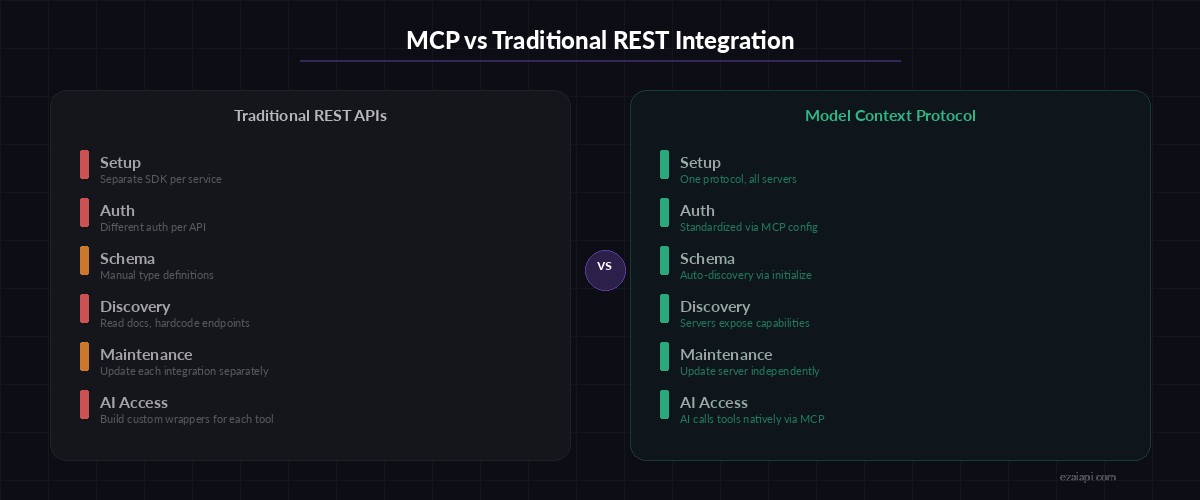
MCP eliminates per-service integration code — one protocol replaces dozens of custom wrappers
Real-World MCP Server: Database Query Tool
Weather is a toy example. Here's a more practical MCP server that lets your AI query a PostgreSQL database safely, with read-only access and query validation:
import { McpServer } from "@modelcontextprotocol/sdk/server/mcp.js";
import { StdioServerTransport } from "@modelcontextprotocol/sdk/server/stdio.js";
import { z } from "zod";
import pg from "pg";

const pool = new pg.Pool({
  connectionString: process.env.DATABASE_URL,
});

const server = new McpServer({
  name: "postgres-readonly",
  version: "1.0.0",
});

// Expose database schema as a resource
server.resource(
  "schema",
  "db://schema",
  async () => {
    const { rows } = await pool.query(`
      SELECT table_name, column_name, data_type
      FROM information_schema.columns
      WHERE table_schema = 'public'
      ORDER BY table_name, ordinal_position
    `);
    return {
      contents: [{
        uri: "db://schema",
        text: JSON.stringify(rows, null, 2),
        mimeType: "application/json",
      }]
    };
  }
);

// Read-only query tool with safety checks
server.tool(
  "query",
  "Run a read-only SQL query against the database",
  { sql: z.string().describe("SELECT query to execute") },
  async ({ sql }) => {
    const forbidden = new RegExp(
      /\b(INSERT|UPDATE|DELETE|DROP|ALTER|CREATE|TRUNCATE)\b/i
    );
    if (forbidden.test(sql)) {
      return {
        content: [{ type: "text", text: "Error: Only SELECT queries are allowed." }],
        isError: true,
      };
    }
    const { rows } = await pool.query(sql);
    return {
      content: [{
        type: "text",
        text: JSON.stringify(rows.slice(0, 100), null, 2),
      }]
    };
  }
);

const transport = new StdioServerTransport();
await server.connect(transport);
Now when you ask your AI "How many users signed up this week?", it reads the schema resource to understand your tables, generates a proper SELECT query, executes it through the query tool, and gives you the answer — all without you writing a single line of glue code between the AI and your database.
MCP + EzAI: The Cost Advantage
MCP tool calls count as regular tokens in the AI conversation. Every tool definition, invocation, and result gets billed as input/output tokens. Running this through EzAI means those tokens cost a fraction of what you'd pay going direct to Anthropic or OpenAI. A typical MCP session with 3-4 tool calls might add 2,000-4,000 tokens — through EzAI, that's pennies instead of dimes.
Combine MCP with prompt caching and you can slash costs further. Cache your tool definitions and schema resources so they don't get re-sent every turn. EzAI supports prompt caching natively, meaning your MCP server definitions get cached on the first message and stay cached for the entire session.
Production Tips for MCP Servers
- Keep tool descriptions tight. Every character in your tool's description is tokens you pay for. Be precise: "Run a read-only SQL SELECT query" beats "This tool allows you to execute database queries against the PostgreSQL database for the purpose of retrieving data."
- Limit result sizes. Cap query results at 50-100 rows. If the AI needs more, it can paginate. Dumping 10,000 rows into context burns tokens and degrades response quality.
- Use resources for static data. Database schemas, config files, documentation — anything that doesn't change per-request belongs in resources, not tools. Resources can be cached.
- Add error context. When a tool fails, return a descriptive error message with
isError: true. The AI can often self-correct if it knows what went wrong: "Column 'signup_date' doesn't exist — did you mean 'created_at'?" - Run MCP servers locally. stdio transport is faster and more secure than SSE for same-machine setups. Reserve SSE for servers running on remote hosts.
What's Next for MCP?
The MCP ecosystem is moving fast. Anthropic, OpenAI, and Google have all committed to supporting the protocol. We're seeing MCP servers for everything from Kubernetes cluster management to Figma design systems. The spec itself is evolving — Streamable HTTP transport is replacing SSE for remote servers, OAuth 2.1 is becoming the standard auth flow, and server-initiated tool calls (elicitation) are on the roadmap.
If you're building AI-powered workflows, MCP is the layer you should be betting on. It's open, it's standardized, and it means you write your integration once and every AI host can use it. Pair it with EzAI for cost-efficient model access, and you've got a production-ready AI stack that can talk to anything.
Ready to connect AI to your tools? Sign up for EzAI, set up your API key, and start building MCP servers that give your AI real capabilities. Check the docs for full setup instructions, or explore the official MCP server registry for pre-built integrations.