You tweak a system prompt on Friday afternoon. Monday morning, customer support tickets spike: the AI is hallucinating product names, ignoring instructions, and generating outputs twice as long as before. Sound familiar? Prompt regression testing catches these breaks before they ship — and building a test suite takes less effort than you think.
This guide walks through building a complete prompt regression framework in Python using the EzAI API. You'll have a reusable test harness that runs against any model, scores outputs automatically, and slots into CI pipelines.
Why Prompts Need Tests
Prompts are code. They control logic, shape output, and define behavior — yet most teams treat them as freeform text. When a backend endpoint changes, you run tests. When a prompt changes, you cross your fingers.
The failure modes are subtle. A minor wording change can shift tone, break structured output, or trigger refusals that worked fine yesterday. Model updates amplify this: the same prompt on Claude Sonnet 4.5 might behave differently than on Claude Opus 4. Without automated checks, you're flying blind.
A prompt regression suite gives you three things:
- Snapshot baselines — golden outputs you compare against after each change
- Automated scoring — AI-judged quality metrics that catch drift before humans notice
- CI integration — fail the build if a prompt change degrades output quality
Project Structure
The test suite lives alongside your prompts. Here's the layout:
prompt-tests/
├── cases/
│   ├── summarizer.yaml       # test cases per prompt
│   └── classifier.yaml
├── snapshots/
│   └── summarizer/
│       └── case_001.txt      # golden outputs
├── runner.py                 # test harness
├── scorer.py                 # AI-based evaluation
└── config.yaml               # models, thresholds
Define Test Cases in YAML
Each test case pairs an input with evaluation criteria. No hardcoded expected outputs — instead, you define what good looks like using rubrics the scorer can check.
# cases/summarizer.yaml
prompt: "Summarize this article in 2-3 sentences."
model: "claude-sonnet-4-5"

cases:
  - id: "news_article"
    input: "SpaceX launched its 200th Starship today..."
    checks:
      - type: "max_length"
        value: 300
      - type: "must_contain"
        value: ["SpaceX", "Starship"]
      - type: "rubric"
        value: "Captures the key fact and is under 3 sentences"

  - id: "technical_doc"
    input: "The RFC proposes a new HTTP header..."
    checks:
      - type: "no_hallucination"
      - type: "rubric"
        value: "Technical accuracy preserved, jargon retained"
The rubric check type is the most powerful — it sends the output to a judge model that scores it against your criteria. More on that in the scorer section.
Build the Test Runner
The runner loads cases, calls the EzAI API, and pipes results through the scorer. It handles retries, caches responses for deterministic re-runs, and outputs a structured report.
# runner.py
import yaml, json, sys, hashlib, os
from pathlib import Path
import anthropic

client = anthropic.Anthropic(
    api_key=os.environ["EZAI_API_KEY"],
    base_url="https://ezaiapi.com",
)

CACHE_DIR = Path("prompt-tests/.cache")
CACHE_DIR.mkdir(parents=True, exist_ok=True)


def cache_key(model, prompt, user_input):
    raw = f"{model}:{prompt}:{user_input}"
    return hashlib.sha256(raw.encode()).hexdigest()[:16]


def call_model(model, system_prompt, user_input):
    key = cache_key(model, system_prompt, user_input)
    cache_path = CACHE_DIR / f"{key}.json"

    if cache_path.exists():
        return json.loads(cache_path.read_text())

    response = client.messages.create(
        model=model,
        max_tokens=1024,
        system=system_prompt,
        messages=[{"role": "user", "content": user_input}],
    )
    result = {
        "text": response.content[0].text,
        "tokens": response.usage.input_tokens + response.usage.output_tokens,
        "model": model,
    }
    cache_path.write_text(json.dumps(result))
    return result


def run_suite(suite_path):
    suite = yaml.safe_load(Path(suite_path).read_text())
    results = []

    for case in suite["cases"]:
        output = call_model(
            suite["model"], suite["prompt"], case["input"]
        )
        results.append({
            "case_id": case["id"],
            "output": output["text"],
            "tokens": output["tokens"],
            "checks": case["checks"],
        })

    return results
The cache layer is deliberate. AI outputs are non-deterministic, so caching lets you re-run scoring without burning tokens. Clear the cache when you want fresh outputs after a prompt change.
Score Outputs with an AI Judge
Deterministic checks (length, keyword presence) are easy. The hard part is judging quality. The trick: use a stronger model as a judge. Send it the original input, the output, and your rubric — it returns a score from 1 to 5.
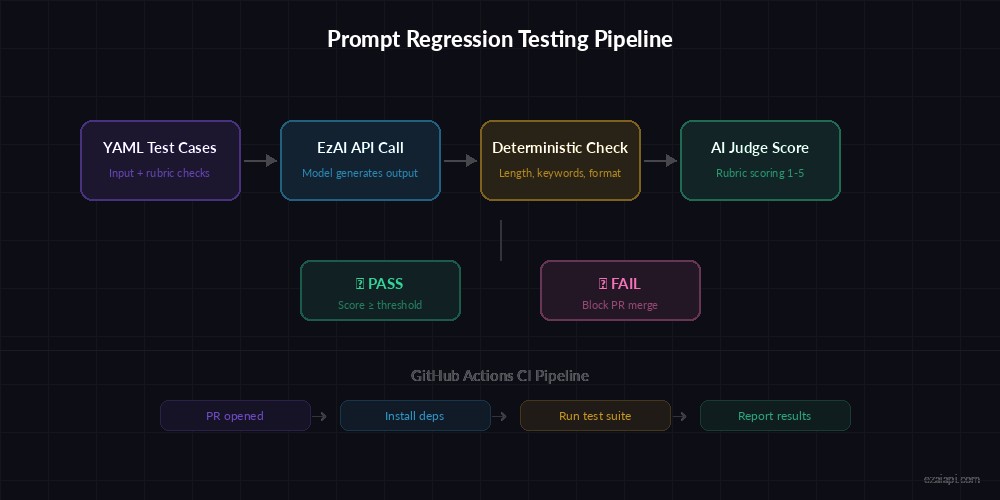
The scoring pipeline: deterministic checks run first, then the AI judge evaluates rubric criteria
# scorer.py
import json, re

JUDGE_MODEL = "claude-sonnet-4-5"

JUDGE_PROMPT = """Score the AI output against this rubric.
Return JSON: {"score": 1-5, "reason": "brief explanation"}

Rubric: {rubric}
Input: {input}
Output: {output}"""


def check_max_length(output, max_chars):
    return len(output) <= max_chars


def check_must_contain(output, keywords):
    lower = output.lower()
    return all(kw.lower() in lower for kw in keywords)


def check_rubric(client, user_input, output, rubric):
    """Ask a judge model to score the output 1-5."""
    prompt = JUDGE_PROMPT.format(
        rubric=rubric, input=user_input, output=output
    )
    resp = client.messages.create(
        model=JUDGE_MODEL,
        max_tokens=200,
        messages=[{"role": "user", "content": prompt}],
    )
    text = resp.content[0].text
    match = re.search(r'"score"\s*:\s*(\d)', text)
    return int(match.group(1)) if match else 0


def evaluate(client, result, user_input, threshold=3):
    """Run all checks for a single test case."""
    failures = []

    for check in result["checks"]:
        if check["type"] == "max_length":
            if not check_max_length(result["output"], check["value"]):
                failures.append(f"Exceeded {check['value']} chars")

        elif check["type"] == "must_contain":
            if not check_must_contain(result["output"], check["value"]):
                failures.append(f"Missing keywords: {check['value']}")

        elif check["type"] == "rubric":
            score = check_rubric(
                client, user_input, result["output"], check["value"]
            )
            if score < threshold:
                failures.append(
                    f"Rubric '{check['value']}' scored {score}/5"
                )

    return {
        "case_id": result["case_id"],
        "passed": len(failures) == 0,
        "failures": failures,
    }
Using claude-sonnet-4-5 as the judge is a practical choice — fast enough for CI, smart enough to catch real quality issues. For higher-stakes systems, you could upgrade to Opus via EzAI's model routing.
Snapshot Testing for Drift Detection
Snapshot testing complements scoring. Save a "golden" output, then compare future runs against it using cosine similarity on embeddings. If the output drifts past a threshold, the test flags it for review.
# snapshot.py — Drift detection with embeddings
from pathlib import Path
import numpy as np
import httpx

SNAP_DIR = Path("prompt-tests/snapshots")
SIMILARITY_THRESHOLD = 0.85


def get_embedding(text, api_key):
    """Get text embedding via EzAI's OpenAI-compatible endpoint."""
    resp = httpx.post(
        "https://ezaiapi.com/v1/embeddings",
        headers={"Authorization": f"Bearer {api_key}"},
        json={"model": "text-embedding-3-small", "input": text},
    )
    return np.array(resp.json()["data"][0]["embedding"])


def cosine_sim(a, b):
    return np.dot(a, b) / (np.linalg.norm(a) * np.linalg.norm(b))


def check_drift(suite_name, case_id, current_output, api_key):
    snap_path = SNAP_DIR / suite_name / f"{case_id}.txt"

    if not snap_path.exists():
        snap_path.parent.mkdir(parents=True, exist_ok=True)
        snap_path.write_text(current_output)
        return {"status": "baseline_created", "similarity": 1.0}

    baseline = snap_path.read_text()
    emb_base = get_embedding(baseline, api_key)
    emb_curr = get_embedding(current_output, api_key)
    sim = cosine_sim(emb_base, emb_curr)

    return {
        "status": "pass" if sim >= SIMILARITY_THRESHOLD else "drift_detected",
        "similarity": round(float(sim), 4),
    }
A similarity of 0.85 means the output preserved the core meaning. Tune this per use case — summaries can drift more than structured extractors. When a snapshot test fails, you review the diff and either update the baseline or fix the prompt.
Wire It Into CI with GitHub Actions
The final piece: run tests on every PR that touches prompt files. This GitHub Actions workflow installs deps, clears the cache (so you get fresh outputs), and fails the build if any test case drops below threshold.
# .github/workflows/prompt-tests.yml
name: Prompt Regression Tests
on:
  pull_request:
    paths: ["prompts/**", "prompt-tests/**"]

jobs:
  test-prompts:
    runs-on: ubuntu-latest
    steps:
      - uses: actions/checkout@v4
      - uses: actions/setup-python@v5
        with:
          python-version: "3.12"
      - run: pip install anthropic pyyaml numpy httpx
      - run: python prompt-tests/runner.py --all --ci
        env:
          EZAI_API_KEY: ${{ secrets.EZAI_API_KEY }}
The --ci flag tells the runner to exit with code 1 on any failure, which blocks the PR merge. Developers get a clear report of which cases regressed and why.
Practical Tips From Production
After running prompt tests on a 40-prompt production system for six months, here's what actually works:
- Start with 3-5 cases per prompt. Cover the happy path, one edge case, and one adversarial input. Expand later.
- Use a weaker model for testing, stronger for judging. Run cases on Haiku for speed, judge with Sonnet. EzAI makes this trivial since all models share one endpoint.
- Version your snapshots. Commit them to git. When you intentionally change prompt behavior, update the snapshot in the same PR — the diff tells reviewers exactly what changed.
- Set cost budgets. A full test run on 50 cases costs roughly $0.15 through EzAI pricing. Track it in your dashboard.
- Test across models. If you're considering switching from Sonnet to Haiku for cost savings, run the suite on both and compare scores. The data beats guesswork.
Prompt regression testing turns "I think this prompt change is fine" into "the data says this prompt change scores 4.2/5 across 47 cases." It catches the subtle breaks that manual review misses — and at $0.003 per case through EzAI, there's no excuse to skip it.
Grab your API key from the EzAI dashboard, clone the example repo, and start catching breaks before your users do.